This thread has been locked.

If you have a related question, please click the "Ask a related question" button in the top right corner. The newly created question will be automatically linked to this question.

CCS/TDA2PXEVM: Hwi already defined

Part Number: TDA2PXEVM
Other Parts Discussed in Thread: AWR1243, SYSBIOS

Tool/software: Code Composer Studio

I am using Processor SDK 3.3.0.0 and a TDA2Px EVM, connected to custom hardware that includes AWR1243 chips. In trying to run the built-in use-case to erase the AWR1243 firmware, I encountered an error. Here is the CCS console output:

[Cortex_M4_IPU1_C0]  SYSTEM: UART: INTERRUPT Mode is Selected
ti.sysbios.family.arm.m3.Hwi: line 143: ti.sysbios.family.arm.m3.Hwi: line 143: E_alreadyDefined: Hwi already defined: intr# 44
xdc.runtime.Error.raise: terminating execution

I do not believe I have configured interrupt 44 anywhere in my code changes. Here is the approximate call stack of where the error occurs:

chains_radar_main.c: ChainsCommon_ar12xxFirmwareFlash()
    bspdrv_ar12xx.c: Bsp_ar12xxEraseFirmware()
        bspdrv_ar12xxPriv.c: Bsp_ar12xxRadarDeviceOn()
            rl_device.c: rlDevicePowerOn()
                rl_device.c: rlDriverInit()
                    rl_driver.c: rl_driverData.clientCtx.comIfCb.rlComIfOpen(index, 0U);
                        The function pointer is assigned in: Bsp_ar12xxRegisterCallbacks() - confirmed below assignment by comparing struct value with function address (all are off by 1 in watch window for some reason).
                            RlApp_ClientCtx->comIfCb.rlComIfOpen = &Bsp_ar12xxSpiOpenCb;
                            bspdrv_ar12xxMcspiCfgPriv.c: Bsp_ar12xxSpiOpenCb()
                                GIO_create()
                                    MAIN_APP_ipu1_0_pem4.c: ti_sysbios_io_GIO_create(). Beyond this point, it is hard to debug due to sysbios calls without source.

Any ideas how I may be able to resolve the issue?

While attempting to use the debugger, I occasionally encounter problems in which I am unable to set breakpoints - CCS reports that it does not have symbols loaded, despite the fact that I use the same script to load code/symbols every time. In another case, I attempted to step through code but the code execution point appeared to jump around forward and backward in time. What could cause either of these behaviors?

Thanks.

  • Hi Todd,

    This is coming from : PROCESSOR_SDK_RADAR_03_XX_00_00\ti_components\drivers\pdk_XX_XX_XX_XX\packages\ti\csl\soc\tda2px\cslr_soc_defines.h

    /* MCSPI interrupt */
    #define CSL_INTC_EVENTID_MCSPIINT0 (57)
    #define CSL_INTC_EVENTID_MCSPIINT1 (58)
    /*Dummy and crossbar Mapped - please cross check before use */
    #define CSL_INTC_EVENTID_MCSPIINT2 (44)
    #define CSL_INTC_EVENTID_MCSPIINT3 (45)

    You can modify the 44 to a number which you are not using. To know all the HWIs you are using, you can use ROV.

    Kindly note when you modify this number from 44, you would need to set the cross bar correctly to make sure the MCSPI interrupt is directed to the right interrupt line on the Cortex M4.

    Thanks and Regards,
    Piyali
  • Thanks for the very useful pointer to the file where the MCSPI interrupts are defined.
    The same file also contains what may explain the conflict (though odd that it contains a conflict as provided):
        #define    CSL_INTC_EVENTID_UARTINT0        (44U)

    I have not used the ROV tool before. When I tried to run the Tools:Runtime Object View menu command and connect, I received an error:
        Can't connect: Program symbols must be loaded to core 'Texas Instruments XDS2xx USB Debug Probe_0/CortexA15_0'

    However, no code is defined for the A15 core in the project I am debugging. Is ROV usable in this case? If so, what do I need to do?

    I also tried to run ROV classic. However, it prompted:
        XDC path or XDC Tools location not set.
        Set project/global RTSC preferences and relaunch ROV.

    I tried to set up RTSC settings under Window:Preferences:Code Composer Studio:Products:RTSC.
    I selected device family ARM, Compiler version TI v18.1.2.LTS, XDCtools version: 3.50.5.12_core.
    However, Products and Repositories is blank. I clicked the Add... button. Under Select product:, no products are listed in the popup menu. Under "Select repository from file-system:" I don't know what to add.

  • I need more help understanding how these interrupt assignments work - especially given that I haven't gotten ROV to work yet. I tried a few different values, but an error reported that they conflicted too.


    1. There appears to be a distinction between hardware interrupt hwiNumber and cpuEventNumber as shown by the following call-stack. Is the cpuEventNumber just used for dispatching events within the RTOS?

    ChainsCommon_ar12xxInit()
        Utils_mcspiInit(CHAINS_SINGLE_RAD_SENSOR_MCSPI_INST2);
            GIO_addDevice(): accepts a pointer to Utils_mcspi2UserInit()
                Utils_mcspi2UserInit()
                    Utils_mcspiUserCommonInit(2U);
                        Mcspi_init();
                            Mcspi_deviceInstInfo[2].cpuEventNumber = (UInt32) CSL_INTC_EVENTID_MCSPIINT2;
                        mcspiCfgPrms[mcSPINum].hwiNumber = 7;
                        
    Here is the section of code again that defines CSL_INTC_EVENTID_MCSPIINT2:
        /* To get the ducati int mux number, the 'CSL_INTMUX_OFFSET' has to be
         * subttracted from the interrupt number (directly mapped)
         */
        #define    CSL_INTMUX_OFFSET                (23U)

        /* MCSPI interrupt                                                            */
        #define    CSL_INTC_EVENTID_MCSPIINT0       (57)
        #define    CSL_INTC_EVENTID_MCSPIINT1       (58)
        /*Dummy and crossbar Mapped - please cross check before use */
        #define    CSL_INTC_EVENTID_MCSPIINT2       (44)

    2. I don’t understand the purpose of the CSL_INTMUX_OFFSET, or the ducati reference. Does that apply to the TDA2Px?
    3. Before CSL_INTC_EVENTID_MCSPIINT2 is defined, what does dummy refer to?

    4. What is the relationship between CSL_INTC_EVENTID_MCSPIINT2 and the crossbar settings if any?
    Crossbar settings for this interrupt appear to be handled by the following:
        utils_mcspi.c: Utils_mcspiInit()
            calls IRQXBARConnect() to set up non-default crossbar for MCSPI2-3 (processor 3-4)
            IRQXBARConnect(SOC_IRQ_DMARQ_CROSSBAR_REGISTERS_BASE, // = 0x4a0027a0U
                CPU_IPU1,
                XBAR_INST_IPU1_IRQ_59, // = CSL_XBAR_INST_IPU1_IRQ_59 = 37 (crossbar instance)
                MCSPI3_IRQ); // = 86 (interrupt source, TRM Table 19-11)

    Thanks.

  • Hi Todd,

    You would need to run the ROV from the Cortex M4. Some details on how to run the ROV is given in processors.wiki.ti.com/.../Runtime_Object_View_(ROV)

    CSL_INTMUX_OFFSET is the M4 interrupt number from which the Interrupt Cross bar is connected to handle interrupts from the SoC to the M4.
    yes. it is applicable to TDA2px.

    The comment Dummy above CSL_INTC_EVENTID_MCSPIINT2 basically refers to the fact that the value assigned is not application specific and the customer needs to take care to update.

    Based on the Interrupt number used, you can use the corresponding Crossbar. For the TDA2xx for instance:
    pdk\packages\ti\csl\soc\tda2xx\cslr_soc_defines.h has
    /* MCSPI interrupt */
    #define CSL_INTC_EVENTID_MCSPIINT0 (57)
    #define CSL_INTC_EVENTID_MCSPIINT1 (58)
    /*Dummy and crossbar Mapped - please cross check before use */
    #define CSL_INTC_EVENTID_MCSPIINT2 (59)
    #define CSL_INTC_EVENTID_MCSPIINT3 (60)

    This matches with utils_mcspi.c: Utils_mcspiInit()

    You can apply the same changes on TDA2px to see if this works for you.

    hwinumber is not used when the McSPI driver is running on the Cortex M4. You can look at mcspiRegisterIntrHandler in pdk_\packages\ti\drv\bsp_lld\mcspi\src\bsp_mcspi.c

    Thanks and Regards,
    Piyali
  • 1) ROV: I would like to get ROV working. I looked at the Wiki but that did not help me install it correctly. I am using a makefile-based project based on Processor SDK Vision. I created a CCS project too for ease in viewing the code, but that is not used for the build. Is the existence of this project confusing ROV (see connection error below)?

    What should I have listed under Windows:Preferences:Code Composer Studio:Products? Currently, I have:
    Product discovery path: C:/ti, C:/Program Files (x86)/Texas Instruments.
    Installed products:
        XDCtools
            3.50.5.12_core
            3.50.4.43_core
            3.32.2.25_core

    Under Window:Preferences:Code Composer Studio:Products:RTSC, I have:
    Device family: ARM
    Compiler version: TI v18.1.2.LTS (other choices: TI v18.1.1LTS or GNU v7.2.1 Linaro)
    XDCtools version: 3.50.5.12_core
    When I click Add... to add Products and Repositories, the list of products under Select product is blank.
    I can Select repository from file-system, but I don't know what directory to pick. I selected the C:\ti\PROCESSOR_SDK_VISION_XX directory but that probably didn't help. I left Target and Platform blank.

    When I attempt to connect ROV I get the following error:
    An error occurred while getting project info: IDE server failed: <html> <head> <meta http-equiv="Content-Type" content="text/html;charset=utf-8"/> <title>Error 400 Project &apos;Processor_SDK_Vision_CCS&apos; is not of a recognized type!</title> </head> <body><h2>HTTP ERROR 400</h2> <p>Problem accessing /ide/getProjectProperties. Reason: <pre> Project &apos;Processor_SDK_Vision_CCS&apos; is not of a recognized type!</pre></p><hr><a href="eclipse.org/jetty">Powered by Jetty:// 9.4.5.v20170502</a><hr/> </body> </html>

    2) ROV Classic is another approach. I tried Tools:ROV Classic using the above configuration, and it partly ran. However, if I select any module while the code is running, the tab says Failed to load module: and the content of the window says Target Running.
    If I try to view a module when the code is paused, it gives the following error:

    3) Events vs interrupts:
    mcspiRegisterIntrHandler() makes a distinction between events and HWI, based on the last two statements in that function:
        /* Enabling the event                                                     */
        EventCombiner_enableEvent((UInt32) intNum);

        /* Enabling the HWI_ID                                                    */
        Hwi_enableInterrupt(instHandle->hwiNumber);

    It appears that the intNum specified by CSL_INTC_EVENTID_MCSPIINT2 is actually used as an event number, yet the conflict is reported as an hwi conflict. Maybe events and interrupt numbers are one and the same for the M4/IPU?

    I looked at Hwi.c: Hwi_Instance_init() and found unused values in the Hwi_module array of ISR pointers. I set it to 78, and it no longer reports that there is a conflict. If I understand correctly, I should set up the crossbar accordingly, so I modified Utils_McspiInit() case 2U:
                        IRQXBARConnect(SOC_IRQ_DMARQ_CROSSBAR_REGISTERS_BASE,
                                    CPU_IPU1, XBAR_INST_IPU1_IRQ_78, MCSPI3_IRQ);   // was XBAR_INST_IPU1_IRQ_59

    4) I still don't understand how CSL_INTMUX_OFFSET may apply to the TDA2Px. Can you point me to the basis for this in the TDA2Px TRM?

    5) The debugger sometimes steps through code that is highlighted gray as if it is excluded due to #if/#endif commands. I was told that it should go by the sources that are loaded rather than the project file I have open but there is a discrepancy.

    Thanks!

  • Hi Todd,

    You can also have a look at the vision_sdk\docs\TrainingSlides\CCS_Debug_Trace.pdf Slides 24/25 for steps to use ROV with Processor SDK Vision.

    In the M4 context events and Interrupt numbers is the same. (Event combiner is a C6x concept).

    For the CSL_INTMUX_OFFSET refer Table 19-5. IPU1_Cx_INTC Default Interrupt Mapping in the TDA2Px TRM. You would notice in the table the cross bar configurations start from :
    IPU1_IRQ_23 1 CTRL_CORE_IPU1_IRQ_23_24[8:0] 20 DISPC_IRQ Display controller interrupt

    Based on my experience, the debugger understands the #defines based on the project macro definitions.

    Thanks and Regards,
    Piyali
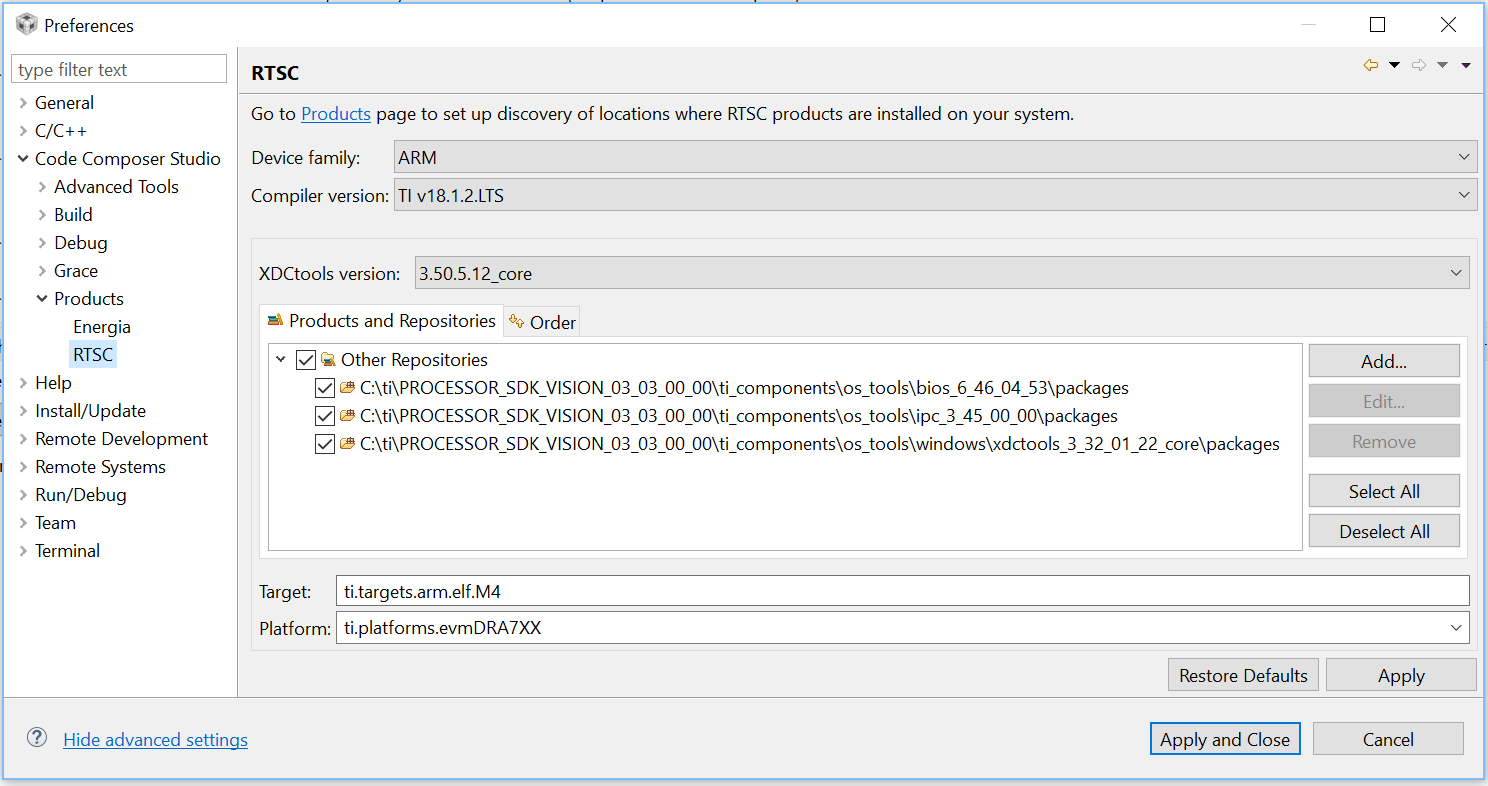
  • I reviewed the ROV wiki and training slides you referenced. However, I still can't get it to work with Processor SDK Vision/Radar. Can I please have more specific instructions?

    Here are my Preferences settings:

    I get an error when trying to connect:

    ROV Classic doesn't work either: it appears to run but won't display any results.

    Thanks!

  • Hi Todd,

    1. You would need to halt the target when you are looking at the ROV.
    2. Your target and platform fields are empty in the configuration: Can you please set:
    Target: ti.targets.arm.elf.M4
    Platform: ti.platforms.evmDRA7XX

    Thanks and Regards,
    Piyali
  • After adding the Target and Platform information you provided above, ROV Classic appears to be working!

    For standard ROV, I still get an error:

    An error occurred while getting project info: IDE server failed: <html> <head> <meta http-equiv="Content-Type" content="text/html;charset=utf-8"/> <title>Error 400 Project &apos;Processor_SDK_Vision_CCS&apos; is not of a recognized type!</title> </head> <body><h2>HTTP ERROR 400</h2> <p>Problem accessing /ide/getProjectProperties. Reason: <pre> Project &apos;Processor_SDK_Vision_CCS&apos; is not of a recognized type!</pre></p><hr><a href="eclipse.org/jetty">Powered by Jetty:// 9.4.5.v20170502</a><hr/> </body> </html>

    Note that it is referring to the name of the project I have open in Project Explorer, which I created for ease in finding files but it is not capable of reproducing the build, which uses the Processor SDK Vision makefile framework. How do I tell it to ignore that project and not try to determine any parameters from it, or add any needed parameters to the project?

    I had copied C:\ti\PROCESSOR_SDK_VISION_03_03_00_00\vision_sdk\binaries\<my_app>\<my_config>\obj\vision_sdk\tda2px-evm\ipu1_0\debug\vision_sdk_configuro\package\cfg\MAIN_APP_ipu1_0_pem4.rov.xs to the folder with executables: C:\ti\PROCESSOR_SDK_VISION_03_03_00_00\vision_sdk\binaries\<my_app>\<my_config>\vision_sdk\bin\tda2px-evm. I also tried setting Executable path to a link to the *.xem4 file in place of <Use the program currently being debugged>, however, that gave a different error.

    Anything else I should do to get standard ROV to work?

    Thanks.

  • Todd,

    What are the steps you are using to invoke standard ROV?

    Thanks and Regards,
    Piyali
  • Here are the steps I used to attempt to run ROV (standard, NOT classic):

    I set Preferences:Code Composer Studio:Products:RTSC as follows:

    I copied MAIN_APP_ipu1_0_pem4.rov.xs and MAIN_APP_ipu1_1_pem4.rov.xs into the C:\ti\PROCESSOR_SDK_VISION_03_03_00_00\vision_sdk\binaries\<my_app>\<my_config>\vision_sdk\bin\tda2px-evm directory.

    I loaded code & symbols via the XDS200 JTAG.

    With the IPU processor stopped, I clicked on the ROV icon on the toolbar.

    In the ROV Connect Target dialog, I left the defaults (Executable path: Use the program currently being debugged, Target communication link: Debugger) and clicked connect.

    I get the following error message:

    An error occurred while getting project info: IDE server failed: <html> <head> <meta http-equiv="Content-Type" content="text/html;charset=utf-8"/> <title>Error 400 Project &apos;Processor_SDK_Vision_CCS&apos; is not of a recognized type!</title> </head> <body><h2>HTTP ERROR 400</h2> <p>Problem accessing /ide/getProjectProperties. Reason: <pre> Project &apos;Processor_SDK_Vision_CCS&apos; is not of a recognized type!</pre></p><hr><a href="eclipse.org/jetty">Powered by Jetty:// 9.4.5.v20170502</a><hr/> </body> </html>

    Note that Processor_SDK_Vision_CCS is the name of a CCS project I created by importing from the makefile project. It is intended to make it easier to browse through the code, but is not set up to build. The fact that the error message refers to it is probably relevant.

    No doubt I'm doing something wrong, but what?

    Thanks.

  • Todd,

    As an experiment, can you try removing the project from the CCS Project Explorer and then try again? I do not see anything wrong in the flow you are following. We can get some CCS experts to look at this issue if this experiment gives the same result.

    Thanks and Regards,
    Piyali
  • I created a new empty workspace with settings copied from my usual workspace. I loaded code into the TDA2Px, and halted the IPU. I clicked on ROV (standard), and attempted to connect target with default settings (Executable path: Use the program currently being debugged; Target communication link: debugger). I received the following error:

    "xdc/runtime/Types.xdc", line 60: unrecognized attribute (@RomConsts)
    js: "C:/ti/PROCESSOR_SDK_VISION_03_03_00_00/ti_components/os_tools/windows/xdctools_3_32_01_22_core/packages/xdc/om2.xs", line 172: parser failed (pass 2)
    "C:/ti/PROCESSOR_SDK_VISION_03_03_00_00/ti_components/os_tools/windows/xdctools_3_32_01_22_core/packages/xdc/tools/Cmdr.xs", line 32 "C:/ti/PROCESSOR_SDK_VISION_03_03_00_00/ti_components/os_tools/windows/xdctools_3_32_01_22_core/packages/xdc/tools/ICmd.xs", line 37

    Please let me know if you have other ideas to try. Also, I don't know how different ROV is from ROV Classic (which seems to work), so I don't know how hard to fight to get ROV working.

    Thanks.
  • I notice the XDC tools version is different between the selected version in the XDC drop down selection and the SDK package. Can you please try to match this and then try again.

    Thanks and Regards,
    Piyali
  • I installed an older version of XDC to match the one included by Processor SDK Vision/Radar, and discovered/installed the new set of tools from the Preferences dialog after copying the folder to C:\ti\xdctools_3_32_01_22_core. Now the settings appear as follows. Is it appropriate to manually add XDC tools to the list of packages, or is it enough to select it from the popup dialog?

    This did appear to change the behavior upon trying to start ROV standard, but I still got the following error:

    Can't connect: Program symbols must be loaded to core 'Texas Instruments XDS2xx USB Debug Probe_0/CortexA15_0'

    I don't know how to comply with that, since my code is similar to many of the examples and does not have any code uploaded to the A15 core. Any other ideas what may be wrong?

    Thanks.

  • For:
    Is it appropriate to manually add XDC tools to the list of packages, or is it enough to select it from the popup dialog?

    If this is visible in the pop up dialog you do not need to manually add the list of packages.

    For the Cortex A15_0, the ROV is core specific. Can you please make sure you are connected to the M4 core and have that core highlighted in the debug window when you are trying to launch the ROV?

    Thanks and Regards,
    Piyali
  • When attempting to enable ROV above, I have already ensured that I selected one of the IPU/M4 cores before launching ROV, but that results in the errors described in the previous posts.

    Are you saying I should delete the XDC packages directory from the Products and Repositories tab?
  • Todd,

    Since you already have the same XDC package showing up in your drop down menu, you do not need to additionally add the XDC in the products and repositories tab.

    This may not solve the issue you are facing however. I would have to check with the CCS team.

    Thanks and Regards,
    Piyali
  • Hi,

    Let's focus on ROV Classic. The multi-core support in Runtime Object View has some issues. The newer Runtime Object View offers graphs, multiple views at once and a couple other usability features. The basic data shown is the same as for both Runtime Object View and ROV Classic.

    Have you gotten ROV Classic to work? (Sorry, I'm new to this thread and it was a little hard to follow, so forgive me if I'm asking redundant questions).

    Todd
  • I tried removing the XDC tools from the list of added packages and using the popup menu only for specifying the XDC version. That did not seem to change anything significantly.

    ROV Classic is working fine, as far as I can tell.

    ROV standard gives an error upon attempting to connect: An error occurred while getting project info: IDE server failed: <html> <head> <meta http-equiv="Content-Type" content="text/html;charset=utf-8"/> <title>Error 400 Project &apos;Processor_SDK_Vision_CCS&apos; is not of a recognized type!</title> </head> <body><h2>HTTP ERROR 400</h2> <p>Problem accessing /ide/getProjectProperties. Reason: <pre> Project &apos;Processor_SDK_Vision_CCS&apos; is not of a recognized type!</pre></p><hr><a href="eclipse.org/jetty">Powered by Jetty:// 9.4.5.v20170502</a><hr/> </body> </html>

    Perhaps it is unhappy with my project settings - again, this project is used for viewing code only and is not configured to be able to build the Processor SDK makefile project.

    Thanks.

  • Use ROV Classic then. Are you able to debug that initial problem you were trying to resolve by looking at ROV?

    Todd
  • Yes, I can and have been using ROV Classic and that may be sufficient. I don't know what I'm missing, but figured it would be good to correct any misconfiguration of my system. It seems odd that this feature does not work out of the box despite indications that there should be some way to automatically discover installed tools. It does not seem to be well documented either. If there are no further ideas or instructions how to set up ROV for operation with Processor SDK, then we can close this ticket for now.