This thread has been locked.

If you have a related question, please click the "Ask a related question" button in the top right corner. The newly created question will be automatically linked to this question.

AM5728: Waking up DSP at boot time

Part Number: AM5728

Hello,

I am using AM5728 for my application, and i would like to use just the DSP core in AM5728. I see there are options to wake up the dsp by using SBL with the help of the sd card.But how do i wake up the dsp by flashing the processor itself?  I would like to avoid any dependencies on A15 and have dsp run as a standalone. Can someone help me with the right instructions.

I really appreciate your help. 

Thanks,

Deepthi

  • Hi,

    At boot time the ROM code always passes execution to A15 Core 0. This cannot be overridden.
  • Biser,

    I am fine if the execution is passed to A15. But at the same time, can we also wake up DSP without any manual steps? When the board powers up, i would like the A15 and DSP to wake up at the same time. Any chance we can do this?
  • No, there must be at least some software running from the ARM side to configure the DSP and load firmware.
  • Biser Gatchev-XID said:
    No, there must be at least some software running from the ARM side to configure the DSP and load firmware.

    What exactly do you mean by “software from the ARM side”? Are you referring to the built-in Linux OS? If booting via bare metal, wouldn't it be only our script(s) running? Can we bypass the ARM15 Linux entirely via bare metal? And then wouldn’t we be able to script the booting of the DSP early in the start-up process, via tweaking of the register values? 
    If not, what is the most efficient method for access to and for booting the DSP? Our goal is to simply use the ARM15 to initiate the DSP, then use the DSP for all our processing. In addition, we want to ensure on any resets that the DSP gets activated. 
  • Alec, Deepthi,

    The overview of the application boot process for AM57xx devices is provided here:
    processors.wiki.ti.com/.../Processor_SDK_RTOS_BOOT_AM57x

    The AM57x devices was designed such that A15 is the boot master and the system master. So, as Biser indicated on power on reset the ROM bootloader (programmed in the device during manufacturing), the A15 is the core that wakes up first and installs secondary level boot loader into on chip memory (OCMC memory). The secondary bootloader will then execute on A15 to wake up DSP and other slave cores, setup clocks, pinmux and external DDR memory and then load the application for ARM, DSP and M4 cores on the SOC. If you don`t have an ARM application and M4 application, it will simply load the DSP application and keep the ARM in WFI state.

    Many of our audio customers use these devices where primary system functions /application is running on the DSP for the most part independent of the ARM and their usecase is similar to your usecase. However, there is no way to bypass the A15 booting to load an application on the DSP.

    Coming to to the part about flashing. The devices don`t have an inbuilt flash but the ROM bootloader is designed to copy the image from external flash memory and install it into OCMC memory in the same way that it does from an SD card. Currently as part of the processor SDK RTOS (bare metal users use this version of the SDK) SBL , we support booting from QSPI flash (and plan to also support eMMC flash).
    processors.wiki.ti.com/.../Processor_SDK_RTOS_BOOT_AM57x

    In this case we provide flash writer utitlities that will allow you to program the SBL and your application image to the QSPI flash.

    Now finally coming to the point on how to convert your boot image from .out into bootable image. For this device we support a multicore boot image format that allows us to address usecases of booting different cores. In the process you first convert the .out (which is tested over emulator) into an intermediate RPRC format and then combine the images for different cores into a combined image as shown below

    Application binary (.out) for each core is first converted to out2rprc format
    Example:
    out2rprc.exe test_arm.out test_arm.rprc
    out2rprc.exe test_dsp.out test_dsp.rprc
    out2rprc.exe test_m4.out test_m4.rprc

    RPRC files corresponding to each core are then merged together into single MulticoreImage application format
    Example:
    MulticoreImageCreate.exe LE 55 app 0 test_arm.rprc 8 test_dsp.rprc 4 test_m4.rprc
    Device ID for AM57x : 55
    Core ID ARM Core 0 : 0
    Core ID DSP Core 0 : 8
    Core ID IPU1 SMP: 4

    In your case since you have only DSP binary, your process would look something like this
    out2rprc.exe test_dsp.out test_dsp.rprc
    MulticoreImageCreate.exe LE 55 app 8 test_dsp.rprc

    Refer : AM57xImageCreate script in the Processor SDK bootloader package

    To boot the application from power on reset, you will use the flashing tool and write the SBL binary to base address of flash and the application image at offset 0x80000 in the QSPI flash. Now when you power on, you should be able to see the application executing on the DSP.

    With this when ever there is a reset on the chip, the full boot flow will be enforced and the DSP will activate Or you can use the application on the A15 to reset the DSP.

    Hope this answers your questions. Let us know if you have any further questions.

    Regards,
    Rahul
  • Rahul,

    This is a very helpful explanation, and seems like it might be simple enough for us to implement in our embedded application. Can you walk me through how I would be able to test this on a IDK AM572x board? I want to do a preliminary test run for this setup to ensure the process is not overly involved, but I am still very new to using the IDK board. Any assistance you can provide would be appreciated.

    Thanks for the above reply and I look forward to your reply.

    Regards,

    Alec Phillips

  • To follow up on my previous post, I am able to execute "Hello World" on the C66x_DSP1 core via Bare Metal operation:

    1. GPEVM_AM572X_SiRevA selected as target configuration
    2. CortexA15_0 -> Connect target
    3. Scripts (While A15_0 selected) -> AM572x MULTICORE Initialization -> DSP1SSClkEnable_API
    4. C66xx_DSP1 -> Connect target
    5. Build hello_world_dsp program
    6. Run -> Load Program -> browse to .out file in Debug folder
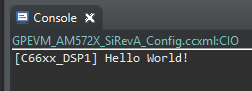
    7. Resume (F8) -> Output to console:

  • Alec,

    I will be glad to help you here. You have started of from the right stage by getting Hello world working on the DSP but this is not best suited for testing boot.  CCS based debugging and COnsole IO is a good start to the debugging effort. However for production code that boots from flash, since you do not have a connection over an emulator or a way to see console IO messages. You need to integrate UART based printfs or a GPIO based led blink type code that can help you confirm that the application booted.

    I would either use PDK UART or GPIO LLD DSP example or a demo like audio starterkit which is DSP application benchmarking signal processing functions as a starting point to test booting.

    Follow the video here in setting up the PDK examples:

    https://www.youtube.com/watch?v=rwXThPZmxvE 

  • Alec,

    I will be glad to help you here. You have started of from the right stage by getting Hello world working on the DSP but this is not best suited for testing boot.  CCS based debugging and COnsole IO is a good start to the debugging effort. However for production code that boots from flash, since you do not have a connection over an emulator or a way to see console IO messages. You need to integrate UART based printfs or a GPIO based led blink type code that can help you confirm that the application booted.

    I would either use PDK UART or GPIO LLD DSP example or a demo like audio starterkit which is DSP application benchmarking signal processing functions as a starting point to test booting.

    Follow the video here in setting up the PDK examples:

    https://www.youtube.com/watch?v=rwXThPZmxvE 

    Ensure that you setup the environment and CCS setup as described in the video.

    For DSP examples, CCS project can be created using :

    cd pdk_am57xx_x_x_x_x\packages

    pdkProjectCreate AM572x idkAM572x little gpio all dsp

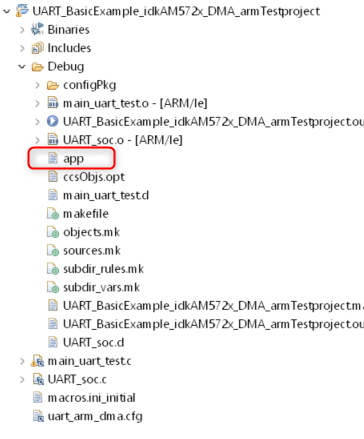
    Import the project and build it in CCS. At the end of the build along with .out there is a file called app in the Debug folder in your workspace. That is the bootable file generated at he end of the build step due to a post build step intergated in project.

    This automates the process of converting .out to boot able image.

    You can then create a SD card using the steps described and copy the app into the SD card with the MLO:

    http://processors.wiki.ti.com/index.php/Processor_SDK_RTOS_BOOT_AM57x#Boot_Modes 

    Plugging this into the idk and powering up will have the demo then run from the SD card. Once this is confirmed you can try the same from QSPI flash.

    Regards,

    Rahul

  • Hi Rahul,

    Thanks so much for the very helpful reply. I have successfully gotten up to the QSPI flashing portion of your post (for anyone else reading this, there was troubleshooting done to correctly read the GPIO path for booting the LED blink project on the SD card... right click on project in Project Explorer, properties->resource->linked resource; the PDK_INSTALL_PATH name had to be added and then value was mapped to correct location).

    Now I am attempting the instructions from the Boot Modes link you have provided. I am able to find the "qspi_flash_writer.out" file in this path: xxxxxx\pdk_am57xx_1_0_11\packages\ti\boot\sbl\tools\flashWriter\qspi\bin\idkAM572x but when I try to Run-> Load the .out file, I am getting not getting an "App" file created.

    When I load the file in CCSv8, there is an error in locating the "sbl_qspi_writer.c" file, which is located : xxxxxx\pdk_am57xx_1_0_11\packages\ti\boot\sbl\tools\flashWriter\qspi\src . When I point the error to the file location, it is accepted and the .c file opens in CCS. When I resume the script, nothing seems to happen, and no file is generated as mentioned previously.  I am using Code Composer Studio Version: 8.1.0.00011 and my OS: Windows 10, v.10.0, x86 / win32. 

    The rest of the process seems simple enough to follow, so if you could assist me in this part, I think I will be able to continue. 

    Thanks again,

    Alec

  • Alec,

    When you ran the QSPI flash writer, did you insert the FAT formatted SD card with the three files : boot, app and config. I noticed that the steps don`t indicate that the SD card needs to be FAT formatted so I suspect that you may not have formatted the SD card. I am referring to step 1 to 3 in the "Booting Via QSPI" section of the wiki article:
    processors.wiki.ti.com/.../Processor_SDK_RTOS_BOOT_AM57x

    The steps to FAT format the SD card are provided in the section above by the name "Preparing the SD card". In Windows, you need to use a tool called WinDiskImager and in Linux we provide a script to format the SD card with FAT filesystem format.

    If this doesn`t work then can you please copy the logs from the UART serial terminal when you run the QSPI flash writer and post the log here. This may indicate any issue with the flashing process. The version of CCS and Windows shouldn`t matter in this case as the flash writer is being built using makefiles using tools provided in processor SDK.

    Regards,
    Rahul
  • Rahul,

    I misunderstood the process, I thought I needed to have the app file generated from the "qspi_flash_writer.out" and place onto the SD card to flash from (how I performed with the Blinking LED project). After your response, I see in the instructions that I don't actually run the .out file until step 5 of the process. My confusion is with the instructions asking for the "app" file.

    My SD card was previously formatted through Windows, and is already in FAT format.  I am able to place MLO & app files on it and run from a SD card boot as I did with the LED project.

    I am still confused about what I am loading onto the SD card initially. I understand there are 3 files, boot, app, and config. I've got the MLO file from here: xxxxxx\pdk_am57xx_1_0_11\packages\ti\boot\sbl\binary\idkAM572x\qspi\bin - I rename this to "boot" with no extension. The config file I am able to find from the location provided on the link (TI_PDK_INSTALL_DIR\packages\ti\boot\sbl\tools\flashWriter\qspi\config). I  think I have 2 of 3 of the files figured out. 

    What is "application image(app) generated using the Script into the SD card" & How do I generate it?

    Thank you again,

    Alec

  • the app file is the final application that you need to run from flash. In this case since you are using GPIO LED example to test the booting the app file in the GPIO LLD example is the flash image you need:

    boot : Rename the MLO file from pdk_am57xx_1_0_11\packages\ti\boot\sbl\binary\idkAM572x\qspi\bin  to "boot"

    app:  This is the final application that you want to run from flash. In your case, this is app generated in the GPIO LLD example in the Debug folder.

    config: This is the file from pdk_am57xx_1_0_11\packages\ti\boot\sbl\tools\flashWriter\qspi.  No need to modify default.

    I am showing the screenshot of the app from PDK UART Examples for reference so you know where to locate it with your setup:

    Hope this resolves your issue. 

    Regards,

    Rahul

  • Rahul,

    Thanks so much for all your support. I was able to get the LED program flashed to QSPI and now it boots into the LED program without the SD card; and after power has been removed from the board, the LED program is retained in ROM. As I get further along in my process of creating our bootloader, I will create a new thread for more assistance.

    Thanks again and best regards.
    Take care,
    Alec
  • Alec,

    Glad to know that your issue has been resolved and you have the application booting from QSPI flash.

    Can you please mark the issue as "This resolved my issue" using my previous response. This will automatically closed the thread and mark the issue resolved.

    Regards,
    Rahul