This thread has been locked.

If you have a related question, please click the "Ask a related question" button in the top right corner. The newly created question will be automatically linked to this question.

Linux/AM5728: Dual EMAC mode issue

Part Number: AM5728


Tool/software: Linux

We are using AM572X IDK board and our SDK is :ti-processor-sdk-linux-am57xx-evm-04.01.00.06

I want to use both eth0 and eth1.But it seems that I can only use one of them at the same time.

When the board had boot up,I use "ping www.baidu.com -I eth0",and it is ok.If I use "ping www.baidu.com -I eth1",it will ping failed!

root@am57xx-evm:~# ifconfig
eth0      Link encap:Ethernet  HWaddr A0:F6:FD:B1:DB:10  
          inet addr:192.168.1.104  Bcast:192.168.1.255  Mask:255.255.255.0
          inet6 addr: fe80::a2f6:fdff:feb1:db10%763860/64 Scope:Link
          UP BROADCAST RUNNING MULTICAST  MTU:1500  Metric:1
          RX packets:405 errors:0 dropped:0 overruns:0 frame:0
          TX packets:449 errors:0 dropped:0 overruns:0 carrier:0
          collisions:0 txqueuelen:1000 
          RX bytes:51711 (50.4 KiB)  TX bytes:50978 (49.7 KiB)
          Interrupt:93 

eth1      Link encap:Ethernet  HWaddr A0:F6:FD:B1:DB:11  
          inet addr:192.168.22.26  Bcast:192.168.22.255  Mask:255.255.255.0
          inet6 addr: fe80::a2f6:fdff:feb1:db11%763860/64 Scope:Link
          UP BROADCAST RUNNING MULTICAST  MTU:1500  Metric:1
          RX packets:1199 errors:0 dropped:0 overruns:0 frame:0
          TX packets:134 errors:0 dropped:0 overruns:0 carrier:0
          collisions:0 txqueuelen:1000 
          RX bytes:112210 (109.5 KiB)  TX bytes:20226 (19.7 KiB)

root@am57xx-evm:~# ping www.baidu.com -I eth0
PING www.baidu.com (180.97.33.107): 56 data bytes
64 bytes from 180.97.33.107: seq=0 ttl=54 time=46.181 ms
64 bytes from 180.97.33.107: seq=1 ttl=54 time=12.285 ms
64 bytes from 180.97.33.107: seq=2 ttl=54 time=16.306 ms
^C
--- www.baidu.com ping statistics ---
3 packets transmitted, 3 packets received, 0% packet loss
round-trip min/avg/max = 12.285/24.924/46.181 ms

root@am57xx-evm:~# ping www.baidu.com -I eth1
PING www.baidu.com (180.97.33.108): 56 data bytes

  • Please follow this checklist and post the results here: processors.wiki.ti.com/.../5x_CPSW
  • Hi,

    For the moment I will assume that you have acquired the ip addresses through a dhcp transaction. This would indicate that the cpsw is functioning correctly from a local connectivity aspect as you are able to get ip addresses for both ports. To double check try to ping a local device such as the gateway that is supporting the .22 subnet in this example. Another thing to verify is that the eth1 subnet actually has a path to get to the internet.

    Why the board is not able to communicate on eth1 with an internet address is beyond the scope of TI support. As a suggestion though this probably has to do the gateways and DNS addresses that are specified on the platform. You can look at the gateways listed with the "route" command. You will have to research how to add DNS addresses to the search path. You will also have to research how to add gateways so the network will know which port has a path to the internet.

    Best Regards,
    Schuyler
  • Thanks for your reply

    First of all,we don't change anything in the iamge.

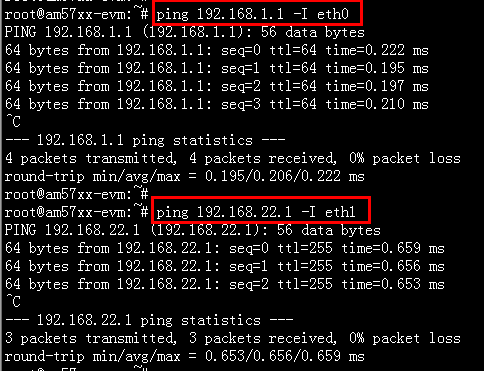
    Secondly we are able to get the ip address for both ports and they can also ping the corresponding gateway successfully.

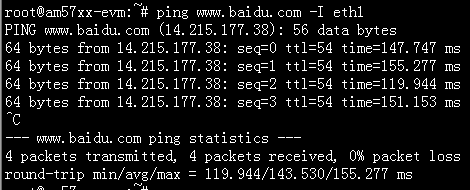
    At this time I can only use eth0 to ping the website(www.baidu.com)

    Last but not lest,If I let the eth0 down,then the eth1 can ping the website successfully.

    Best Regards

    Jerry

  • Hi,

    Thanks for verifying that both ports can ping the gateway, this demonstrates what I meant by local network connectivity is working correctly. Since you are able to shut down eth0 and then successfully ping the website indicates that the cpsw driver is functioning correctly.

    The reason when pinging out of eth1 may not work could be a number reasons. Since the ports are connecting and passing packets this is somewhat beyond the scope of TI support.

    The one recommendation I have is looking at the route table which I mentioned in the earlier post, "route". In this table is the default gateway and the gateways used by each port that the kernel is going to use. When you shut down eth0, now eth1 should have the path to the default gateway. The solution could be setting up a gateway for eth1 which is that 192.168.22.1 address that was pinged if I am correct.

    Best Regards,
    Schuyler
  • Hi Schuyler
    Your quick response is always appreciated!
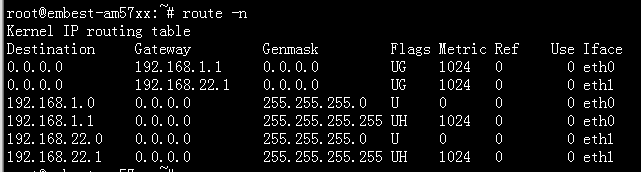
    According to your advices! I checked out the routing table.The follwing picture shows the default routing table of our board:
    As you can see,Both eth0 and eth1's gateway are already in the table.So I'm wondering whether there have other configurations for dual ethernet?
    Best Regards,
    Jerry
  • Hi,

    I apologize for the delay, I was out of the office for a week. The feature is you are looking for is a higher level kernel function dealing with the route table and possibly IP tables. This is something you will have to research to find the answer you need as this level of support is beyond the scope of TI support. One possibility is that the -I may not impact the kernel's decision which port to use to send the ICMP packet. I would suggest using Wireshark or some utility similar on both ports simultaneously to verify which port the packet left from, or the response was returned to.

    One other suggestion is to use the ping command with the interface defined before the destination address, ping -I eth1 <destiniation address>, this should print out the port the ping tried to use. As I mentioned earlier this should be verified with an external analyzer like Wireshark.

    Best Regards,
    Schuyler