This thread has been locked.

If you have a related question, please click the "Ask a related question" button in the top right corner. The newly created question will be automatically linked to this question.

RTOS/DRA71: pvr error

Part Number: DRA71


Tool/software: TI-RTOS
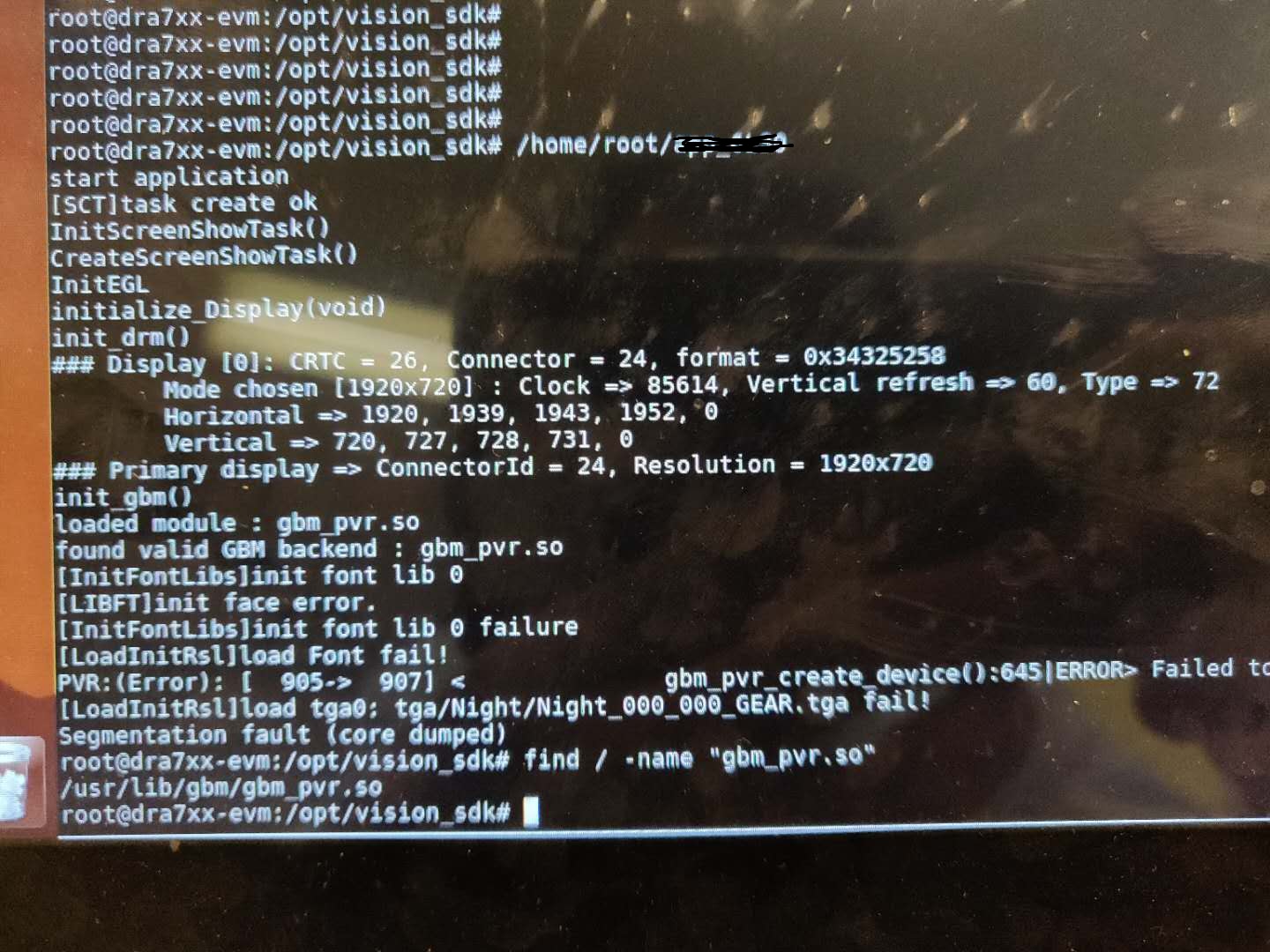
When I use vDRM to drawing cluster UI, origion PSDK is,ok ,now run vsdk has the error. 

Please give me some suggestion?

Need your support,thanks

  • Is the application a DRM/KMS application or a wayland client?

    If it is a DRM/KMS application, you need to ensure that weston IS NOT running when you launch this application

    If it is a wayland-client, you need to ensure that weston IS running when you launch this application.

    Regards,
    Subhajit

  • the application a DRM/KMS.

    I am sure that I have already stop the weston.

    Please guide me to solve the question. thanks

  • Ok, understood.

    Please share the output of "ls /dev/dri"

    also, looks like you have reused the init_drm and init_gbm code from kmscube. Is that correct? If you done any modifications to these two functions, can you share that with me?

    Regards,

    Subhajit

  • root@dra7xx-evm:/opt/vision_sdk# ls /dev/dri/
    card0 card1 card2 controlD64 controlD65 renderD128

    Yes, I reused the code from kmscube.
    Modify as below: I use vDRM,
    +++ b/src/display.c
    @@ -163,7 +163,7 @@ static bool set_drm_format(void)
    return false;
    }

    -Flag init_drm(void)
    +Flag init_drm(char *device_name)^M
    {
    static const char *modules[] = {
    "omapdrm", "tilcdc", "i915", "radeon", "nouveau", "vmwgfx", "exynos"
    @@ -177,6 +177,13 @@ Flag init_drm(void)
    uint32_t maxRes, curRes;
    printf("init_drm()\n");

    + if(device_name) {^M
    + drm.fd = open(device_name, O_RDWR);^M
    + }^M
    + if(drm.fd > 0)^M
    + goto done;^M
    +^M
    + ^M
    for (i = 0; i < ARRAY_SIZE(modules); i++) {
    printf("trying to load module %s...", modules[i]);
    drm.fd = drmOpen(modules[i], NULL);
    @@ -187,7 +194,7 @@ Flag init_drm(void)
    break;
    }
    }
    -
    +done:^M
    if (drm.fd < 0) {
    printf("could not open drm device\n");
    return INST_FAIL;
    @@ -433,7 +440,7 @@ Flag initialize_Display(void)
    i32 i;
    printf("initialize_Display(void)\n");

    - ret = init_drm();
    + ret = init_drm("/dev/dri/card0");^M
    if (ret != INST_TRUE) {
    printf("failed to initialize DRM\n");
    return ret;
    diff --git a/src/display.h b/src/display.h
    index 46325e4..0dd5fed 100755
    --- a/src/display.h
    +++ b/src/display.h
    @@ -103,7 +103,7 @@ struct drm_fb *fb;
    //int waiting_for_flip;

    void page_flip_handler(int fd, unsigned int frame,unsigned int sec, unsigned int usec, void *data);
    -Flag init_drm(void);
    +Flag init_drm(char *device_name);
  • This looks good. however, when using VDRM fd for creating the gbm device and eglGetDisplay() you need to modify /etc/powervr.ini, or it will default to omapdrm. The following lines need to be added in /etc/powervr.ini

    [your-application-name]
    DbmDriverName=vdrm
    GbmNumBuffers=5

    Regards,

    Subhajit

  • thanks, I'll try it. but can you replay the reason, I use kmscube -d /dev/dri/card1 sun right.
    don't need modify any thing.

    thanks
  • not sun right, it's run right .
  • still there are errors need your suppot.

    -- card 0 no display
    root@dra7xx-evm:/opt/vision_sdk# /home/root/app_instrument/app_card0 &
    [7] 1015
    [6] Done(255) kmscube -b /dev/dri/card0
    start application
    [SCT]task create ok
    InitScreenShowTask()
    CreateScreenShowTask()
    ioctl i2c read error, fd:3, id:6, ret:-1
    [COM]i2cPowerOn: request 0x06 frame error
    ioctl i2c read error, fd:3, id:6, ret:-1
    [COM]i2cPowerOn: request 0x06 frame error
    ioctl i2c read error, fd:3, id:6, ret:-1
    [COM]i2cPowerOn: request 0x06 frame error
    [COM]i2cPowerOn: error
    InitEGL
    initialize_Display(void)
    init_drm()
    ### Display [0]: CRTC = 26, Connector = 24, format = 0x34325258
    Mode chosen [1920x1080] : Clock => 128480, Vertical refresh => 60, Type => 72
    Horizontal => 1920, 1939, 1943, 1952, 0
    Vertical => 1080, 1090, 1092, 1097, 0
    ### Primary display => ConnectorId = 24, Resolution = 1920x1080
    init_gbm()
    loaded module : gbm_pvr.so
    found valid GBM backend : gbm_pvr.so
    [InitFontLibs]init font lib 0
    [LIBFT]init face error.
    [InitFontLibs]init font lib 0 failure
    [LoadInitRsl]load Font fail!
    [LoadInitRsl]load tga0: tga/Night/Night_000_000_GEAR.tga fail!
    [menu]load tga/Menu/menu_line.tga fail!
    init_egl()
    Using display 0x1 with EGL version 1.4
    EGL Version "1.4 build 1.14@3699939 (MAIN)"
    EGL Vendor "Imagination Technologies"
    EGL Extensions "EGL_IMG_client_api_ogl EGL_KHR_image EGL_KHR_image_base EGL_KHR_gl_texture_2D_image EGL_KHR_gl_texture_cubemap_image EGL_KHR_gl_renderbuffer_image EGL_KHR_vg_parent_image EGL_IMG_cl_image EGL_KHR_fence_sync EGL_IMG_context_priority EGL_IMG_hibernate_process EGL_IMG_image_plane_attribs EGL_KHR_surfaceless_context EGL_KHR_wait_sync EGL_KHR_create_context EGL_WL_bind_wayland_display EGL_EXT_image_dma_buf_import"
    root@dra7xx-evm:/opt/vision_sdk# menu init, fail
    all_display = 0
    initialize_Display() ok
    exit gl and clean egl~
    exit gl and clean egl~
    Cleanup of GL, GBM and DRM completed

    --card1 error
    root@dra7xx-evm:/opt/vision_sdk# /home/root/app_instrument/app_card0 &
    [3] 1005
    [2] Segmentation fault (core dumped) /home/root/app_instrument/app_card1
    start application
    [SCT]task create ok
    InitScreenShowTask()
    CreateScreenShowTask()
    ioctl i2c read error, fd:3, id:6, ret:-1
    [COM]i2cPowerOn: request 0x06 frame error
    ioctl i2c read error, fd:3, id:6, ret:-1
    [COM]i2cPowerOn: request 0x06 frame error
    ioctl i2c read error, fd:3, id:6, ret:-1
    [COM]i2cPowerOn: request 0x06 frame error
    [COM]i2cPowerOn: error
    InitEGL
    initialize_Display(void)
    init_drm()
    ### Display [0]: CRTC = 26, Connector = 24, format = 0x34325258
    Mode chosen [1920x1080] : Clock => 128480, Vertical refresh => 60, Type => 72
    Horizontal => 1920, 1939, 1943, 1952, 0
    Vertical => 1080, 1090, 1092, 1097, 0
    ### Primary display => ConnectorId = 24, Resolution = 1920x1080
    init_gbm()
    loaded module : gbm_pvr.so
    found valid GBM backend : gbm_pvr.so
    [InitFontLibs]init font lib 0
    [LIBFT]init face error.
    [InitFontLibs]init font lib 0 failure
    [LoadInitRsl]load Font fail!
    [LoadInitRsl]load tga0: tga/Night/Night_000_000_GEAR.tga fail!
    [menu]load tga/Menu/menu_line.tga fail!
    init_egl()
    Using display 0x1 with EGL version 1.4
    EGL Version "1.4 build 1.14@3699939 (MAIN)"
    EGL Vendor "Imagination Technologies"
    EGL Extensions "EGL_IMG_client_api_ogl EGL_KHR_image EGL_KHR_image_base EGL_KHR_gl_texture_2D_image EGL_KHR_gl_texture_cubemap_image EGL_KHR_gl_renderbuffer_image EGL_KHR_vg_parent_image EGL_IMG_cl_image EGL_KHR_fence_sync EGL_IMG_context_priority EGL_IMG_hibernate_process EGL_IMG_image_plane_attribs EGL_KHR_surfaceless_context EGL_KHR_wait_sync EGL_KHR_create_context EGL_WL_bind_wayland_display EGL_EXT_image_dma_buf_import"
    root@dra7xx-evm:/opt/vision_sdk# menu init, fail
    all_display = 0
    initialize_Display() ok
    exit gl and clean egl~
    exit gl and clean egl~
    Cleanup of GL, GBM and DRM completed

    --kmscube right
    root@dra7xx-evm:/opt/vision_sdk# kmscube -d /dev/dri/card1 &
    [5] 1013
    [4] Done(255) kmscube -b /dev/dri/card1
    ### Display [0]: CRTC = 26, Connector = 24, format = 0x34325258
    Mode chosen [1920x1080] : Clock => 128480, Vertical refresh => 60, Type => 72
    Horizontal => 1920, 1939, 1943, 1952, 0
    Vertical => 1080, 1090, 1092, 1097, 0
    ### Primary display => ConnectorId = 24, Resolution = 1920x1080
    loaded module : gbm_pvr.so
    found valid GBM backend : gbm_pvr.so
    root@dra7xx-evm:/opt/vision_sdk# Using display 0x1 with EGL version 1.4
    EGL Version "1.4 build 1.14@3699939 (MAIN)"
    EGL Vendor "Imagination Technologies"
    EGL Extensions "EGL_IMG_client_api_ogl EGL_KHR_image EGL_KHR_image_base EGL_KHR_gl_texture_2D_image EGL_KHR_gl_texture_cubemap_image EGL_KHR_gl_renderbuffer_image EGL_KHR_vg_parent_image EGL_IMG_cl_image EGL_KHR_fence_sync EGL_IMG_context_priority EGL_IMG_hibernate_process EGL_IMG_image_plane_attribs EGL_KHR_surfaceless_context EGL_KHR_wait_sync EGL_KHR_create_context EGL_WL_bind_wayland_display EGL_EXT_image_dma_buf_import"


    can you provide the kmscube.c source code.
  • you have provided a lot of information which is difficult to understand. So lets break it down to simple steps.

    1. Which SDK are you using? Which version?
    2. What is your hardware setup?
    3. Does the basic VDRM based vision sdk example work?

    Regards,
    Subhajit
  • 1. VSDK0304

    2. J6Entry EVM

    3. Yes/

    Now the app already run.thanks.