This thread has been locked.

If you have a related question, please click the "Ask a related question" button in the top right corner. The newly created question will be automatically linked to this question.

Linux/AM5718: TCP throughput benchmarks

Part Number: AM5718
Other Parts Discussed in Thread: TMDXIDK5718

Tool/software: Linux

Hello,
My customer informed that TMDXIDK5718 CPSW TCP receive bandwidth, receive side is lower. (RCV : XMT) = (1 : 3).
We are requested to investigate the reason.
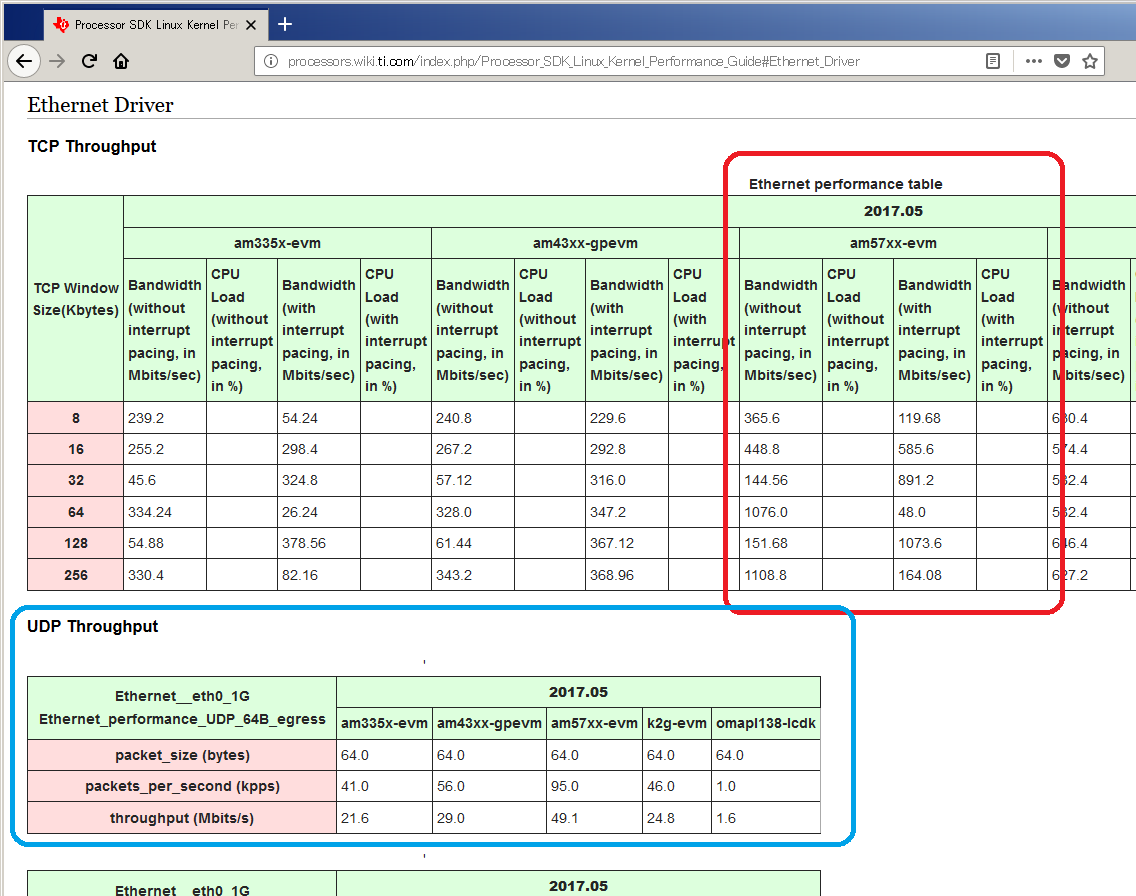
First of all I am studying TI's benchmark data as a reference, but it was not easy for me to understand the meaning of the values.

Can I ask what is the meaning of the values in the table?
Or let me make a specific questions:
- These values are transmit or receive ?
- The UDP tables looked easy to use. Why TCP table took the different format?
- Could I ask the operations to test TCP? Are they the lines on the bottom of  UDP results?

iperf -s -u
iperf -c <server ip> -b <bandwidth limit> -f M -t 60
 

http://processors.wiki.ti.com/index.php/Processor_SDK_Linux_Kernel_Performance_Guide#Ethernet_Driver
  • Hi,

    The two tests that you are highlighting are showing different capabilities of UDP and TCP and potential use case examples. Looking at the TCP table, there are two features demonstrated, throughput related to TCP window size and throughput improvement with RX interrupt pacing. Increasing window size increases throughput. The RX interrupt is showing how throughput is increased by coalescing the RX interrupts which in a TCP test is essentially collecting TCP ACK packets for group processing rather than individual processing. I think there may be an error in this table as the numbers for TCP should be increasing with window size.

    iperf is a standard open source utility that TI provided in the file system. The two iperf lines you mentioned are the commands used for UDP, a little more explanation:

    iperf -s -u ----- This runs on a Linux development machine, the -s means it receives and the -u indicates UDP protcol

    iperf -c <server ip> -b <bandwidth limit> -f M -t 60 ------ This would run on a TI EVM, -c client means it sends, -f M means format M = megabits , -t 60 means the test runs for 60 seconds.

    The TCP test does not appear to be documented but it would something like this:
    iperf -s ---- On Linux development machine

    iperf -c <server ip> -t 60 ---- there are several options that can used and I recommend looking at a man page for iperf, but this command will send TCP data to a server and use a default TCP window size which is printed out when the command starts up. The -t 60 means the test runs for 60 seconds.

    These numbers are provided as a starting point, during product evaluation TI encourages the potential customer to re-create the numbers provided in the benchmarks. TI is switching from wikis to restructured text files like most of the community. The benchmarks for cpsw do not appear to be in the current documentation.

    Best Regards,
    Schuyler
  • Schuyler,

    Thank you for your clarification. Very kind.