This thread has been locked.

If you have a related question, please click the "Ask a related question" button in the top right corner. The newly created question will be automatically linked to this question.

Linux/AM5748: COM8 in U-Boot does not work

Part Number: AM5748


Tool/software: Linux

Hi 

I'm using custom AM5748 board and got U-boot working on COM3. 

Now I tried COM8. Pinmux is set accordingly.

In defconfig I see that COM ports are restricted to 1..6.
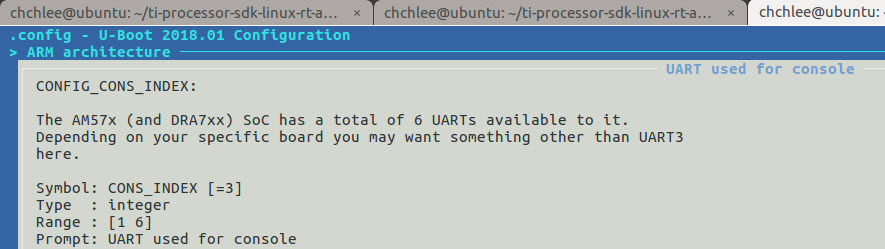
So I changed Kconfig to allow 1..8 and set the CONFIG_CONS_INDEX to 8

I also tried to change UART in DT:

chosen {
stdout-path = &uart8;

};

and I did

&uart3 {
status = "disabled";

};

&uart8 {
status = "okay";
u-boot,dm-spl;
};

I did not work. Then I started the USB JAG debugger and found out that it hangs in ns_16550.c, line 173:

while (!(serial_in(&com_port->lsr) & UART_LSR_TEMT));

Also also saw that for UART3 there is an extra attribute "interrupts-extended", which is not present for COM8

&uart3 {

interrupts-extended = <&crossbar_mpu GIC_SPI 69 IRQ_TYPE_LEVEL_HIGH
&dra7_pmx_core 0x248>;

Questions:

1) Should COM8 work at all with AM5748?

2) what is the correct way to change UART, using CONFIG_CONS_INDEX, or by modifying the device tree? I'm using .cfg based on tisdk_am57xx-evm-rt_defconfig, so "U-Boot config based on DT" is enabled.

3) why could it hang in the line stated?

Thanks, Chris

  • Hello Chris,

    It is no longer needed CONFIG_CONS_INDEX to be changed in "kernel menuconfig" to change the console in AM57xx platform devices. You are probably missing the UART8 clock control sources. Please, refer to the attached patch in this post where I've changed the UART from 3 to 9 in AM572x GP EVM, and do the similar changes for your UART8.

    Best regards,
    Kemal

  • Thanks a lot this works great in SPL and U-boot!!

    In Linux I added

    &uart8 {
     status = "okay";
    };

     chosen {
      stdout-path = &uart8;
     };

    but don't get any console output on UART8.

    Is there any patch needed as well?

    Also saw that for UART3 there is an extra attribute "interrupts-extended", which is not present for COM8

    &uart3 {

    interrupts-extended = <&crossbar_mpu GIC_SPI 69 IRQ_TYPE_LEVEL_HIGH
    &dra7_pmx_core 0x248>;

    }

    Regards, Chris

  • For Linux, you need to enable uart8 in Linux device tree,

    &uart8 {
     status = "okay";
    };

    and change the console U-Boot environment variable.

    => setenv console ttyO7,115200n8
    => saveenv

    If you want a getty login prompt on that tty, you can enter these two commands before switching to the new console.

    root@am57xx-evm:~# systemctl enable serial-getty@ttyS7.service
    root@am57xx-evm:~# systemctl daemon-reload

    If you want to specify "interrupts-extended" property for uart8 node, please refer to this thread.