This thread has been locked.

If you have a related question, please click the "Ask a related question" button in the top right corner. The newly created question will be automatically linked to this question.

RTOS: TIDL object detection issue


Tool/software: TI-RTOS

Hi,

I have trained caffe-jacinto ssd for 768x320 resolution with VOC dataset.

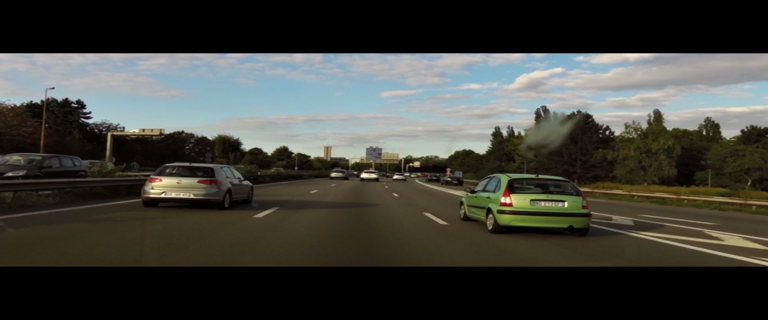
Imported the model files using TIDL import tool and running the tidl_OD usecase on TDA2xx. It is detecting the objects but, the detection boxes are flickering(Not stable).

Processor_vision_SDK version: 03.05.00.00

Find the attached resultant dump.

Please help me to resolve this issue.

  • Hi,

    Could you please share the import config file used for import the models for verification.

    Thanks,
    Praveen
  • Hi Praveen,

    Please find attached import config file for the same.

    # Default - 0
    randParams         = 0 
    
    # 0: Caffe, 1: TensorFlow, Default - 0
    modelType          = 0 
    
    # 0: Fixed quantization By tarininng Framework, 1: Dyanamic quantization by TIDL, Default - 1
    quantizationStyle  = 1 
    
    # quantRoundAdd/100 will be added while rounding to integer, Default - 50
    quantRoundAdd      = 25
    
    numParamBits       = 8 #10
    # 0 : 8bit Unsigned, 1 : 8bit Signed Default - 1
    inElementType      = 0 
    
    inputNetFile       = "..\..\test\testvecs\config\caffe_jacinto_models\trained\image_detection\768x320\deploy.prototxt"  
    inputParamsFile       = "..\..\test\testvecs\config\caffe_jacinto_models\trained\image_detection\768x320\voc0712_ssdJacintoNetV2_iter_120000.caffemodel"
    outputNetFile      = "..\..\test\testvecs\config\tidl_models\jdetnet\Trained768x320\NET_OD.bin"
    outputParamsFile   = "..\..\test\testvecs\config\tidl_models\jdetnet\Trained768x320\PRM_OD.bin"
    
    rawSampleInData = 1
    preProcType   = 4
    sampleInData = "..\..\test\testvecs\input\trace_dump_0_768x320.y"
    tidlStatsTool = "..\quantStatsTool\eve_test_dl_algo.out.exe"
    layersGroupId =   0 1 1 1 1 1 1 1 1 1 1 1 1 1 1 1 1 1 1 1 1 1 2 1 2 1 2 1 2 1 2 1 2 1 2 1 2 1 2 1 2 2 2 2 0
    conv2dKernelType = 0	0	0	0	0	0	0	0	0	0	0	0	0	0	0	0	0	1	1	1	1	1	1	1	1	1	1	1	1	1	1	1	1	1	1	1	1	1	1	1	1	1	1	1	1	
    

    We have taken same import config file from below thread.

    Regards,

    Sayali Vhanne

  • Hi Praveen,
    Any update on this?

    Regards,
    Sayali V.
  • Is the detections stable when you run using caffe PC software?
  • Hi Kumar,
    Yes, the detection is stable on caffe PC.

    Regards,
    Sayali V.
  • Hi Kumar,

    Is there any update on this?

    Regards,
    Sayali V.
  • Caould you try with
    numParamBits = 10
    or
    numParamBits = 12

    If you stil see the issue try increasing
    createParams.quantMargin = 0; to 30


    Also cay try with small objects and share your observations.
    We would like to understand whether it is specific to objects which are big?
  • Hi Kumar,

    I have changed numParamBits = 10 then to numParamBits = 12. Also changed createParams.quantMargin =  30.

    But the resultant video shows lots of false positive with both numParamBits change.

    Also cay try with small objects and share your observations.

    We would like to understand whether it is specific to objects which are big?

    => With createParams.quantMargin = 30 and numParamBits = 8 changes, I am getting result for big objects only for small objects it's not showing any predication.

    Please find attached video sequence for both the changes:

    videos.tar.gz

  • Can you try with 12 bit in import steps for these images and confirm the behaviour
  • Hi Kumar,

    I tried with car image in import step and numParamBit =12.

    Please find input and import step resultant image after visualization of detection boxes :

    Meaning of color code:

    Red : Aeroplane

    Green: Car

    Blue : Person

    Regards,

    Sayali v.

  • Is this result from import step or from VSDK?

    If it is not from import step. Can you share the results of import step

  • Hi Kumar,

    Yes this is the result from import step. I have visualized the stats_tool_out.bin generated by import step using below script.

    #include <stdio.h>
    #include <stdint.h>
    
    int main()
    {
    	FILE *fi, *fb, *fout;
    	float data[4];
    	float label;
    	float dummy;
    	uint8_t orig[768*320];
    	uint8_t result[768*320*3];
    	int x1, x2;
    	uint16_t xmin, ymin, xmax, ymax;
    	uint8_t value;
    	uint8_t Red, Green, Blue;
    	
    	fi = fopen("768x320_TICarImgTest.y", "r");
    	fb = fopen("stats_tool_out.bin", "rb");
    	fout = fopen("TI_car_768x320.ppm", "w");
    	
    	fread(&orig[0], 768 * 320, sizeof(uint8_t), fi);
    	
     	for(x1 = 0; x1 < 320; x1 ++)
    	{
    		for(x2 = 0; x2 < 768; x2 ++)
    		{
    			value = orig[(x1 * 768) +  x2];
    			result[(x1 * 768 * 3) + (x2 * 3)]= value;
    			result[(x1 * 768 * 3) + (x2 * 3) + 1] = value;
    			result[(x1 * 768 * 3) + (x2 * 3) + 2] = value;			
    		}
    	} 
    	
    	for(x2 = 0; x2 < 20; x2 ++)
    	{
    		fread(&dummy, 1, sizeof(float), fb);
    		
    		fread(&label, 1, sizeof(float), fb);
    		
    		fread(&dummy, 1, sizeof(float), fb);
    		
    		fread(&data[0], 4, sizeof(float), fb);
    		
    		xmin = (uint16_t)(data[0] * 768);
    		ymin = (uint16_t)(data[1] * 320);
    		xmax = (uint16_t)(data[2] * 768);
    		ymax = (uint16_t)(data[3] * 320);
    		
    		// printf("data[3] = %f, ymax = %d\n", data[3], ymax);
    		
    		// printf("%f - (%f, %f)  (%f, %f) - %f\n", label, data[0], data[1], data[2], data[3], dummy);
    		printf("%d - (%d, %d)  (%d, %d) - %f\n\n", (uint8_t)label, xmin, ymin, xmax, ymax, dummy);
    		
    		if(label == 1)
    		{
    			Red = 255;
    			Green = 0;
    			Blue = 0;
    		}
    		
    		if(label == 7)
    		{
    			Red = 0;
    			Green = 255;
    			Blue = 0;
    		}
    		
    		if(label == 15)
    		{
    			Red = 0;
    			Green = 0;
    			Blue = 255;
    		}
    		
    		for(x1 = xmin; x1 <= xmax; x1 ++)
    		{
    			result[(ymin * 768 * 3) + (x1 * 3)] = Red;
    			result[(ymin * 768 * 3) + (x1 * 3) + 1] = Green;
    			result[(ymin * 768 * 3) + (x1 * 3) + 2] = Blue;
    		}
    		
    		for(x1 = xmin; x1 <= xmax; x1 ++)
    		{
    			result[(ymax * 768 * 3) + (x1 * 3)] = Red;
    			result[(ymax * 768 * 3) + (x1 * 3) + 1] = Green;
    			result[(ymax * 768 * 3) + (x1 * 3) + 2] = Blue;
    		}
    		
    		for(x1 = ymin; x1 <= ymax ; x1 ++)
    		{
    			result[(x1 * 768 * 3) + (xmin * 3)] = Red;
    			result[(x1 * 768 * 3) + (xmin * 3) + 1] = Green;
    			result[(x1 * 768 * 3) + (xmin * 3) + 2] = Blue;
    		}
    		
    		for(x1 = ymin; x1 <= ymax ; x1 ++)
    		{
    			result[(x1 * 768 * 3) + (xmax * 3)] = Red;
    			result[(x1 * 768 * 3) + (xmax * 3) + 1] = Green;
    			result[(x1 * 768 * 3) + (xmax * 3) + 2] = Blue;
    		}
    	}
    	
    	fprintf(fout, "P3 768 320 255 ");
    	for(x1 = 0; x1 < 768 * 320 * 3; x1 ++)
    		fprintf(fout, "%d ", result[x1]);
    	
    	fclose(fi);
    	fclose(fb);
    	fclose(fout);
    	
    	return 1;
    }
    

    Regards,

    Sayali V.

  • Hi Kumar,

    Any updates?

    Regards,

    Sayali V.