This thread has been locked.

If you have a related question, please click the "Ask a related question" button in the top right corner. The newly created question will be automatically linked to this question.

Linux/AM5728: H.264 Encode problem

Part Number: AM5728


Tool/software: Linux

Hi TI team


I'm testing H.264 Encode on AM572x Evaluation Module.
I use the following command to Encode a video.

gst-launch-1.0 -v -m --gst-debug=*rtmp*:5 \
videotestsrc is-live=1 \
! "video/x-raw, width=1920, height=1080, framerate=30/1" \
! queue \
! ducatih264enc \
! h264parse \
! flvmux streamable=true name=mux \
! rtmpsink location="rtmp://live-api-s.facebook.com:80/rtmp/xxxxxx"

When I decode the h.264 file, the resolution is 1920x1088.
Why the resolution is 1920x1088 ??

How to fix the problem ?

From Will Hsu

  • Hello,

    What is the PSDK version that you are using here?
    What is the decoding pipeline that you are using?
    Is the decoding pipeline executed on EVM?

    BR
    Margarita
  • Hello,

    I ran some tests on my side.

    Here is my observations:

    1. Encode->parse->qtmux->save in file:

    gst-launch-1.0 -v  \

    videotestsrc num-buffers=500 \

    ! "video/x-raw, format=(string)NV12, width=1920, height=1080, framerate=30/1" \

    ! queue \

    ! vpe \

    ! ducatih264enc level=level-51 profile=high \

    ! queue \

    ! h264parse \

    ! qtmux \

    ! filesink location=test_resolution.mov

    In the log file I see the resolution on the ducatih264enc's input/output is 1920x1080.

    /GstPipeline:pipeline0/GstDucatiH264Enc:ducatih264enc0.GstPad:sink: caps = video/x-raw, format=(string)NV12, width=(int)1920, height=(int)1080, pixel-aspect-ratio=(fraction)1/1, framerate=(fraction)30/1

    /GstPipeline:pipeline0/GstDucatiH264Enc:ducatih264enc0.GstPad:src: caps = video/x-h264, width=(int)1920, height=(int)1080, framerate=(fraction)30/1, pixel-aspect-ratio=(fraction)1/1, stream-format=(string)byte-stream, align=(string)au, num-reorder-frames=(int)3, profile=(string)high, level=(string)4

    /GstPipeline:pipeline0/GstH264Parse:h264parse0.GstPad:sink: caps = video/x-h264, width=(int)1920, height=(int)1080, framerate=(fraction)30/1, pixel-aspect-ratio=(fraction)1/1, stream-format=(string)byte-stream, align=(string)au, num-reorder-frames=(int)3, profile=(string)high, level=(string)4

    On the h264parse input I see the same resolution 1920x1080:

    /GstPipeline:pipeline0/GstH264Parse:h264parse0.GstPad:src: caps = video/x-h264, width=(int)1920, height=(int)1088, framerate=(fraction)30/1, pixel-aspect-ratio=(fraction)1/1, stream-format=(string)avc, align=(string)au, num-reorder-frames=(int)3, profile=(string)high, level=(string)4, interlace-mode=(string)progressive, parsed=(boolean)true, alignment=(string)au, codec_data=(buffer)01640028ffe1003e27640028ad84054562b8ac5471080a8ac57158a8e210248521393c9f27e4fe4fc9f279b9b34d081242909c9e4f93f27f27e4f93cdcd9a6cac0780227e54001000528de01ae2c

    But on the parser output I see height is reported as 1088. It seems it is aligned to 16.

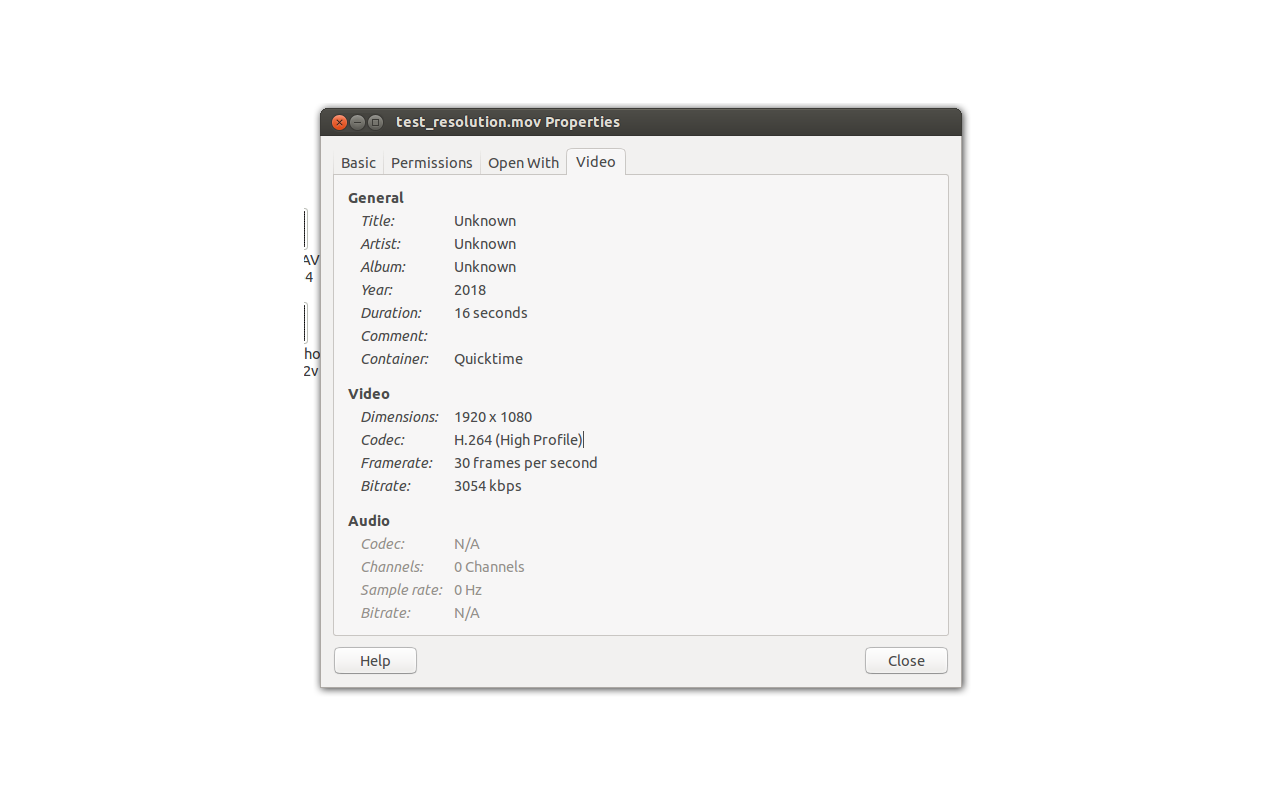
    If you  check the file on PC I see the resolution is 1920x1080.

    2. No parser involved:

    gst-launch-1.0 -v  \
    videotestsrc num-buffers=500 \
    ! "video/x-raw, format=(string)NV12, width=1920, height=1080, framerate=30/1" \
    ! queue \
    ! vpe \
    ! ducatih264enc level=level-51 profile=high \
    ! queue \
    ! filesink location=test_resolution1.h264

    The resolution on the input of the filesink is 1920x1080:

    /GstPipeline:pipeline0/GstFileSink:filesink0.GstPad:sink: caps = video/x-h264, width=(int)1920, height=(int)1080, framerate=(fraction)30/1, pixel-aspect-ratio=(fraction)1/1, stream-format=(string)byte-stream, align=(string)au, num-reorder-frames=(int)3, profile=(string)high, level=(string)5.1

    Hope this helps.

    BR
    Margarita

  • Hello,

    Please if this answers your question click the "This resolved my issue" button.
    If you have new question you could open a new e2e thread.

    BR
    Margarita
  • Hi Margarita
    Thanks for your reply.
    I'll test your suggestion.
  • Hello,

    Sure. If you have new questions/issues open a new thread. I will close this one.

    In my previous answer, I forgot to add the result of the first pipeline on PC :

    BR
    Margarita