This thread has been locked.

If you have a related question, please click the "Ask a related question" button in the top right corner. The newly created question will be automatically linked to this question.

RTOS/AMIC110: Demonstrating DDR-less EtherCAT Slave on AMIC110

Part Number: AMIC110


Tool/software: TI-RTOS

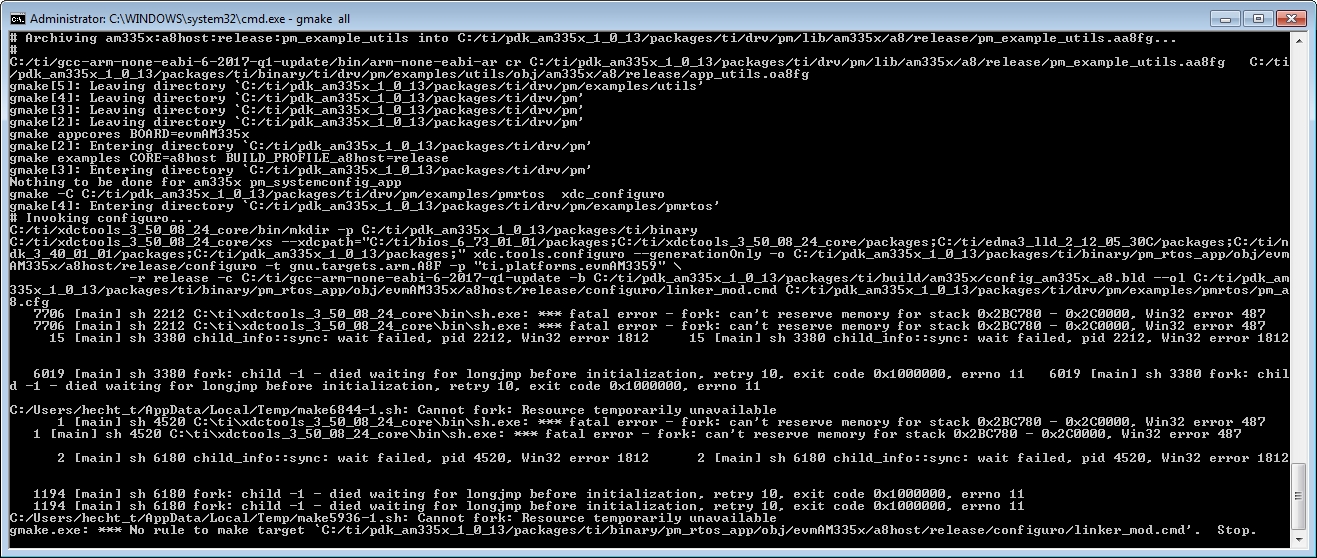
Hello , I am just about to complete the video "Demonstration DDR-less EtherCAT Slave on AMIC110". At the point gmake all I get after a while the following error message:

have you got an idea to get rid of it?
best regards
Thomas
  • Thomas,

    Can you check if this helps? e2e.ti.com/.../624493

    Regards,
    Garrett
  • Thank you, 
    unfortunately I have not got any further. All answers aim to replace the tools (cygwin, etc.). But, as I see it, all the tools you need are already supplied by TI, so they should be correct.
    Why it is necessary to build the libraries themselves, there are no libraries that you just need to include?
    I once tried gmake with individual components called (gmake pm) and get the error message described above. Do you have an idea?
    Are there any other tutorials to get a EtherCat SlaveStack up and running?
    Yours sincerely Thomas
  • Thomas,

    The issue should be caused by incompatible cygwin (msys) or MinGW instead of missing libraries from TI. If you have these tools installed, can you try to uninstall it or reinstall as the thread suggested - e2e.ti.com/.../475176

    Regards,
    Garrett
  • Hi Garrett,
    I just found a spot on my machine where CygWin is, it comes with a Vivado installation from Xilinx, but I need it for my projects. 
    If I follow the suggestion to delete for CygWin, I find on my computer no running Cygwin applications and also no entries in the regedit.
    I once tried to rename the directory, restart the computer and run gmake again - unfortunately again with the error message.

    Can it be due to MinGw? These are very common on my computer (Matlab2017, Vivado, ...) Can I find out which of the MinGw is used (for example, where)?
    best regards
    Thomas
  • pdksetupenv.zipI had previously discovered that you have to open a cmd shell. Then call there the batch "pdksetupenv.bat" so that gmake is known. So I deleted all environment variables, then I set the relevant ones again.

    This can now call the gmake error-free. With this procedure, I do not have to change / reinstall my computer.