


Part Number: AM3358
Tool/software: Linux
Hi, all.
I have intended use 1MHz PCM clock with 24.567MHz external clock.
So, I have changed device tree like below:
&mcasp0 {
        #sound-dai-cells = <0>;
        pinctrl-names = "default";
        pinctrl-0 = <&mcasp0_pins>;
        pinctrl-1 = <&mcasp0_pins_sleep>;

        status = "okay";

        op-mode = <0>; /* MCASP_IIS_MODE */
        tdm-slots = <8>;
        /* 4 serializers */
        serial-dir = < /* 1 TX 2 RX 0 unused */
                2 1 0 0
        >;
        rx-num-evt = <32>;
        tx-num-evt = <32>;
};

/ {
        pcm5102a: pcm5102a {
                #sound-dai-cells = <0>;
                compatible = "ti,pcm5102a";
                status = "okay";
        };

        clk_mcasp0_fixed: clk_mcasp0_fixed {
                #clock-cells = <0>;
                compatible = "fixed-clock";
                clock-frequency = <24576000>;
        };

        clk_mcasp0: clk_mcasp0 {
                #clock-cells = <0>;
                compatible = "gpio-gate-clock";
                clocks = <&clk_mcasp0_fixed>;
                enable-gpios = <&gpio2 16 0>;
        };

        sound {
                compatible = "simple-audio-card";
                simple-audio-card,name = "pcm5102a";
                simple-audio-card,format = "i2s";
                simple-audio-card,bitclock-master = <&sound_master>;
                simple-audio-card,frame-master = <&sound_master>;
                /* simple-audio-card,bitclock-inversion; */

                sound_master: simple-audio-card,cpu {
                        sound-dai = <&mcasp0>;
                        clocks = <&clk_mcasp0>;
                };

                simple-audio-card,codec {
                        sound-dai = <&pcm5102a>;
                };
        };
};

When I play 8kHz/16SE wave file with aplay, the PCM clock is unstable ~60ms.  Below is capture of PCM clock.
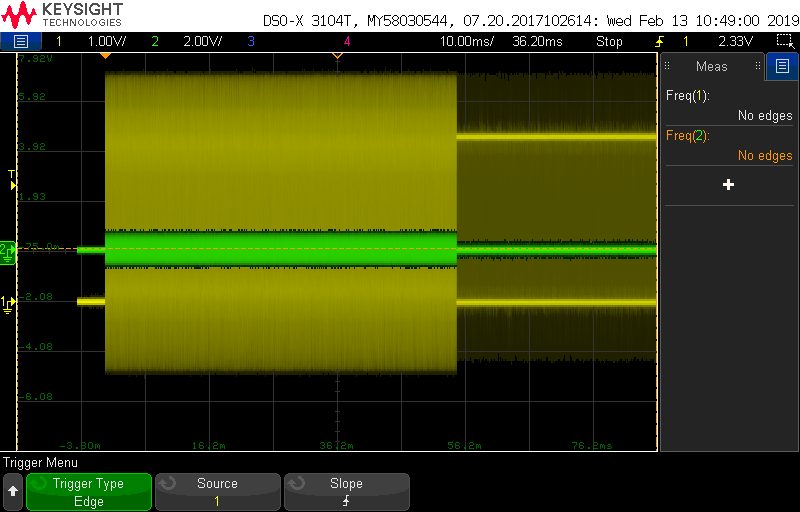
Yellow signal is PCM clock, at the first, it has 25MHz frequency and changed to intened frequency (1MHz) after almost 60ms.
I have checked related register,
[   70.728173] @@@ CLKXCTL : 0x000000B7
[   70.731760]  CLKXP : 0x00000001, ASYNC : 0x00000000, CLKXM : 0x00000001, CLKXDIV : 0x00000017
I think it is no problem (24,576 / 24 = 1,024), can I get information how to remove the unstable PCM clock?
Thanks,
Roy.

