This thread has been locked.

If you have a related question, please click the "Ask a related question" button in the top right corner. The newly created question will be automatically linked to this question.

RTOS/CCSTUDIO-SITARA: AM65xx

Part Number: CCSTUDIO-SITARA
Other Parts Discussed in Thread: CCSTUDIO, SYSBIOS

Tool/software: TI-RTOS

CCS hangs in following build step:

Building file: "../cfg/am65xx_app_r5f_release_pnunit.cfg"

Invoking: XDCtools

"C:/ti/xdctools_3_50_04_43_core/xs" --xdcpath="C:/ti/bios_6_73_00_03_eng/packages;C:/ti/pdk_am65xx_1_0_1/packages;" xdc.tools.configuro -o configPkg -t ti.targets.arm.elf.R5F -p ti.platforms.cortexR:AM65X -r release -c "C:/ti/ti-cgt-arm_16.9.4.LTS" "../cfg/am65xx_app_r5f_release_pnunit.cfg"

It tells "Blocked: The user operation is waiting for background work to complete" with no obvious task being run besides the build process.

After manually canceling the build process the following error appears:

!CommandLauncher.error.commandCanceled!

Error: Program "C:/ti/ccsv8/utils/bin/gmake" is not found in PATH


PATH=[C:\ti\ccsv8\ccs_base\common\bin;C:\ti\ccsv8\ccs_base\common\uscif;C:\Program Files (x86)\Common Files\Intel\Shared Libraries\redist\ia32\mpirt;C:\Program Files (x86)\Common Files\Intel\Shared Libraries\redist\ia32\compiler;C:\Program Files (x86)\Common Files\Intel\Shared Files\fortran\bin\ia32;C:\WINDOWS\system32;C:\WINDOWS;C:\WINDOWS\System32\Wbem;C:\WINDOWS\System32\WindowsPowerShell\v1.0\;C:\WINDOWS\System32\OpenSSH\;C:\Program Files (x86)\Java\jre1.8.0_181\bin;C:\Program Files (x86)\Intel\Intel(R) Management Engine Components\DAL;C:\Program Files\Intel\Intel(R) Management Engine Components\DAL;C:\Users\xxx\.dnx\bin;C:\Program Files\Microsoft DNX\Dnvm\;C:\Program Files (x86)\Windows Kits\10\Windows Performance Toolkit\;C:\Program Files\Microsoft SQL Server\120\Tools\Binn\;C:\Program Files\Microsoft SQL Server\130\Tools\Binn\;C:\Program Files (x86)\Microsoft Emulator Manager\1.0\;C:\Program Files (x86)\nodejs\;C:\Program Files\Git\cmd;C:\ti\ccsv8\utils\bin;C:\Users\xxx\AppData\Local\Microsoft\WindowsApps]

The currently used Windows version is:

  • Windows 10 Enterprise
  • Version 1803

The error does occur on different installations and does not occur with the previous installation (Version 1703).

It does also occur for CCS versions 8.1, 8.2 and 8.3.


Has anyone already experienced some issue like this?

  • Continuing the offline discussion. We have tried to disable indexer, increased the heap/RAM allocated to CCS and tried to disable antivirus to see if this issue improves but the issue still persists.

    Bilal,

    Can you also indicate if you have tried to compiler some R5F code from command line ? The reason I ask this is TI ARM compiler doesn`t come with pre-built libraries so it will build some of the libraries from source during the first build and it typically takes few minutes for that to build. When you build from command line you can some times see the message built TI ARM compiler libraries...this may take few minutes to indicate to the user about this first time build.

    Also, confirm that you are installing with admin privileges and you have read, write and execute permissions in C:\ti folder where you installed the package.

    Regards,
    Rahul
  • Bilal okcu said:
    The error does occur on different installations and does not occur with the previous installation (Version 1703).

    This comment leads me to believe that the issue happens only on machines with Windows 10 version 1803 and not on ones with version 1703. Is that correct?

    Also could you let us know if the issue happens when building any project on the problem machines or only few specific projects.

  • Hi AartiG,

    That is correct, the same software was used in same manner in multiple Win 10 version 1703 and Win 10 version 1803.

    On every machine with Win 10 version 1803 it fails,
    On every machine with Win 10 version 1703 it works fine.


    I have tried to build all projects and it hangs in the same way.


    @Rahul, I have tried that, at least I have tried to run the last command that hangs("C:/ti/xdctools_3_50_04_43_core/xs" --xdcpath="C:/ti/bios_6_73_00_03_eng/packages;C:/ti/pdk_am65xx_1_0_1/packages;" xdc.tools.configuro -o configPkg -t ti.targets.arm.elf.R5F -p ti.platforms.cortexR:AM65X -r release -c "C:/ti/ti-cgt-arm_16.9.4.LTS" "../cfg/am65xx_app_r5f_release_pnunit.cfg") and the error is as following:

    3 [main] sh 18576 C:\ti\xdctools_3_50_04_43_core\bin\sh.exe: *** fatal error - fork: can't reserve memory for stack 0x2A3C290 - 0x2A40000, Win32 error 487


    This is same error when the CCS8 IDE build is cancelled(e.g. kill).

    I have tried with admin privileges(also tried to particularly set every file's ownership and read/write rights for all users). To be sure that the C:\ drive does not introduce additional issues, I have also tried to build where the complete ti folder was extracted(installed) on D:\ti.

    Best regards,

    Bilal


  • Bilal okcu said:
    3 [main] sh 18576 C:\ti\xdctools_3_50_04_43_core\bin\sh.exe: *** fatal error - fork: can't reserve memory for stack 0x2A3C290 - 0x2A40000, Win32 error 487

    This error leads me to believe that there might be a conflict with another sh.exe in the systems where the build is failing.

    As per this article that shows a similar build error, could you check your system PATH and see if there are other shells (from other toolchains like Cygwin, WinAVR etc) that may be getting picked up instead? 

    This type of error has been reported a few times on the forum (couple of links listed below), although in those cases the build did not hang. Could you please take a look at these and see if they help?

    https://e2e.ti.com/support/processors/f/791/t/751869

    https://e2e.ti.com/support/tools/ccs/f/81/t/486268


  • Hi AartiG,

    I have actually tried those proposed solutions and it did not work out for me. but i tried now again.
    There are no Cygwin WinARV etc in my system as

    Regarding Cygwin(C:\ti\ccsv8\utils\cygwin\sh.exe) i tried to execute those executables several times.
    For instance when i run above sh.exe and type in any command it fails, including help: 

    $ help
    6 [main] sh 15500 C:\ti\ccsv8\utils\cygwin\sh.exe: *** fatal error - fork: can't reserve memory for stack 0x347C610 - 0x3480000, Win32 error 487

    regarding the above error message, how is it possible to do a rebase?(similar as done here http://cygwin.wikia.com/wiki/Rebaseall )?


    On my PC i have removed the cygwin. it is not a part of the PATH variable either.

    Q1: Why would it work on Win 10 version 1703 but fail in 10?(other PCs where it works i have checked the environment variables, i have used identical PATH variables)

    Q2: Has this been tested on an Windows 10 version 1803 ever? Do you have any working case on your side?

    Best regards,
    Bilal

  • Hi Bilal,

    Bilal okcu said:
    On my PC i have removed the cygwin. it is not a part of the PATH variable either.

    Could you type the "set" command on one of the problem machines, save the output and send it to us so we can have a look at the environment variables to see if anything else stands out?

    Bilal okcu said:
    Q2: Has this been tested on an Windows 10 version 1803 ever? Do you have any working case on your side?

    We have not seen this issue at our end (our machines are running Windows 10 1709). I could try to see if I can install and test with 1803, but it may take some time. 

    In the meantime, could you please generate and provide us with thread stack dumps when the hang happens? Whenever things are slow or deadlocked, it helps to obtain the Java stack-trace for all the running Java threads. This would show what the Java threads are doing during the slowness period, and might provide hints into what is causing it.

    The steps to generate a thread stack dump file is mentioned in this forum thread: https://e2e.ti.com/support/tools/ccs/f/81/t/659011

     Thank you for your patience and cooperation while we work through this.

  • Hi AartiG,

    attached are the files(set output and the dump files(the break "CTRL + PAUSE" is performed several times, the consecutive files are named accordingly, dump1, dump2 etc.).

    It would be only interesting to see whether you reproduce the issue on Windows 10, 1803, since i have reproduced same issue on 3 different PCs.

    Best regards,

    Bilal

    4682.logs.zip

  • Bilal,

    Thank you for taking the time to provide the stack dump files. A developer has taken a look at them and they look OK, (ie) no deadlocks in Java code. The Java code is just sitting and waiting for output from the compiler.

    If you let the build go without canceling it, does it eventually finish? How long does it take?

    One test you could do to isolate whether the stall is happening in the GUI or in the compiler/build tools itself is to try building the project using command line. Information on this is available at this page: Create and Build Projects using Command Line

    I also noticed the following in your System Path:
    Path=C:\ti\ccsv6\utils\cygwin;C:\ti\ccsv6\utils\bin;C:\ti\ccsv6\utils\tiobj2bin;

    The path points to CCSv6 utils, but you are building with CCSv8 correct? Not sure if that could cause a conflict, but if you type "where sh" in the shell prompt, it should tell you all the shells it found. Could you try removing those ccsv6 paths from the System Path (or change it to the CCS version you are building with) and see if that helps?


  • Hi AartiG,

    If the build is let to run it runs forever(in some occasions i have let it run over the night, "building project" bar remains hanged at 31%, there is also a second progress bar appearing below  "Refreshing workspace(blocked: the user operation is waiting for background work to complete)" which never ends. Once you kill the second bar the "building project" bar keeps running but still never proceed further.
    Q: What would be a reasonable build time in your opinion? because when the same project is built on other PC it takes up to 2-3 minutes.

    I have now tried to build from command which is also hanging at the same step:

    C:\ti\ccsv8\eclipse>eclipsec -noSplash -data "C:\workspace_v8" -application com.ti.ccstudio.apps.projectBuild -ccs.workspace

    %%%%%%%%%%%%%%%%%%%%%%%%%%%%%%%%%%%%%%%%%%%%%%%%%%%%%%%%%%%%%%%%%%%%%%%%%%%%%%%%

    CCS headless build starting... [Mon Feb 25 10:54:51 CET 2019]

    %%%%%%%%%%%%%%%%%%%%%%%%%%%%%%%%%%%%%%%%%%%%%%%%%%%%%%%%%%%%%%%%%%%%%%%%%%%%%%%%

    ================================================================================

    Pre processing...

    ================================================================================

    Building...

    **** Build of configuration MyProject for project profinet_switch_AM65xx_r5f ****

    "C:\\ti\\ccsv8\\utils\\bin\\gmake" all

    Building file: "../cfg/am65xx_app_r5f.cfg"

    Invoking: XDCtools

    "C:/ti/xdctools_3_50_04_43_core/xs" --xdcpath="C:/ti/bios_6_73_00_03_eng/packages;C:/ti/pdk_am65xx_1_0_1/packages;" xdc.tools.configuro -o configPkg -t ti.targets.arm.elf.R5F -p ti.platforms.cortexR:AM65X -r release -c "C:/ti/ti-cgt-arm_16.9.4.LTS" "../am65xx_app_r5f.cfg"

    - Regarding the path variables: i use ccs8 and variables are set correctly as(l have been already trying other ccs versions meanwhile posting the forum post and didnt pay attention when adding path afterwards, sorry for confusion) : 

    Path=C:\ti\ccsv8\utils\cygwin;C:\ti\ccsv8\utils\bin;C:\ti\ccsv8\utils\tiobj2bin;C:\Program Files (x86)\Intel\Intel(R) Management Engine Components\iCLS\;C:\Program Files\Intel\Intel(R) Management Engine Components\iCLS\;C:\Program Files (x86)\Common Files\Intel\Shared Libraries\redist\ia32\mpirt;C:\Program Files (x86)\Common Files\Intel\Shared Libraries\redist\ia32\compiler;C:\Program Files (x86)\Common Files\Intel\Shared Files\fortran\bin\ia32;C:\WINDOWS\system32;C:\WINDOWS;C:\WINDOWS\System32\Wbem;C:\WINDOWS\System32\WindowsPowerShell\v1.0\;C:\WINDOWS\System32\OpenSSH\;C:\Program Files (x86)\Java\jre1.8.0_181\bin;C:\Program Files (x86)\Intel\Intel(R) Management Engine Components\DAL;C:\Program Files\Intel\Intel(R) Management Engine Components\DAL;C:\Program Files (x86)\Intel\Intel(R) Management Engine Components\IPT;C:\Program Files\Intel\Intel(R) Management Engine Components\IPT;C:\Program Files\Intel\WiFi\bin\;C:\Program Files\Common Files\Intel\WirelessCommon\;C:\Users\user\.dnx\bin;C:\Program Files\Microsoft DNX\Dnvm\;C:\Program Files\Microsoft SQL Server\120\Tools\Binn\;C:\Program Files\Microsoft SQL Server\130\Tools\Binn\;C:\Program Files (x86)\Microsoft Emulator Manager\1.0\;C:\Program Files (x86)\nodejs\;C:\Program Files (x86)\Windows Kits\10\Windows Performance Toolkit\;C:\Users\user\AppData\Local\Microsoft\WindowsApps

    Q: What is the status of trying on same windows version(Win 10 version 1803) on your side? Any progress and/or any clues?

    Best regards,

    Bilal

  • Bilal okcu said:
    Q: What is the status of trying on same windows version(Win 10 version 1803) on your side? Any progress and/or any clues?

    We hope to have a machine set up with Win 10 version 1803 tomorrow.
    Would you mind zipping up your project and attaching it here, so we can check if the issue is reproducible at our end with the same project?

    Also I noticed that the SYS/BIOS version in your build is bios_6_73_00_03_eng which appears to be an engineering version.
    The tool versions (BIOS, XDCtools) in your build are older than the versions released with the Processor SDK version 05.02.00.10.
    That may not be an issue in itself, but I wanted to confirm if the same tool versions are also used in the other PCs that build fine.


  • Hi AartiG,

    The bios version given above is what my other colleagues also use, it is working fine, it should not be a problem. For sake of identical setups we use the same project and settings. However i have also tried other versions and combinations(e.g bios_6_73_00_12, xdctools_3_51_01_18_core, xdctools_3_32_02_25_core etc). It did not bring anything.

    I would need to check whether i could attach the project here(i will update as soon as i could).

    Please meanwhile let me know whether you face same issue on Win. 10 ver. 1803(FYI: I have also installed each component of the project from TI website and still could reproduce the issue).

    Best regards,

    Bilal

  • Hi Bilal,

    My colleague was able to set up a machine with Win 10 1803 and has not been able to reproduce the issue on this version of OS either.
    Below are details of the setup and build output.

    The screenshot shows the version of Windows and the build completion. We tested with the example PDK projects that were generated after running the pdkProjectCreate scripts in the C:\ti\pdk_am65xx_1_0_3\packages directory within the AM65xx Processor SDK v5.02.00.10.

    We also tried with different version of XDCtools and ARM CGT and still had no issues. I am attaching the build logs for the three example projects for your reference. They are built using xdctools 3.50.4.43, CGT 16.9.9.LTS and BIOS 6.73.1.1. 

    Do you face the issue even when building the PDK example projects?

    Based on these results, the problem does not appear to be a systemic issue with Win 10 1803 but rather something specific to your build environment. Any possibility of anti-virus conflicts on these machines? I believe this has been checked already but just wanted to re-confirm.

    Also, if you are able to provide us your custom project, we could confirm whether that builds fine as well. If you do not wish to post the project here in the public forum, you may share it with me privately. To do so, hover over my username in this thread and it should give you the option to Send a private message. 

    /cfs-file/__key/communityserver-discussions-components-files/791/USB_5F00_DevBulk_5F00_am65xx_5F00_evm_5F00_mcuExampleProject.build.log

    /cfs-file/__key/communityserver-discussions-components-files/791/USB_5F00_DevMsc_5F00_am65xx_5F00_evm_5F00_mcuExampleProject.build.log

    /cfs-file/__key/communityserver-discussions-components-files/791/USB_5F00_HostMsc_5F00_am65xx_5F00_evm_5F00_mcuExampleProject.build.log

  • Hi AartiG,


    I have further invetigated the issue on my side, it could be a problem due to "DEP" feature.

    I still try to work around the issue, once i have a result i will update here.


    DEP(Data Execution Prevention):(https://docs.microsoft.com/en-us/windows/desktop/memory/data-execution-prevention

    Best regards,

  • Hi Bilal,

    That is interesting. Thank you for the update and I'm glad you were able to narrow down the root cause.
    I'd be very interested to hear how you work around the issue. Do keep us posted.

    Thank you!
  • Hi AartiG,

    The updates are as following on my side:

    1) The "C:\ti\ccsv8\eclipse\ccstudio.exe" CANNOT* be added to exceptions list for the applications that would be excepted by the DEP feature of Windows.
    *Windows error: "this program must run with data execution prevention (DEP) enabled you can not turn off DEP for this program"[See below: After adding exlipse.exe, i tried to add the ccstudio.exe the same way but the error pops up]

    So this brings up the following questions:
    - Why can "ccstudio.exe" not be added to exceptions list? Which rules are jeopardized so that it is prevented?
    - The other exe files under the same folder are successfully added to exception list(e.g. C:\ti\ccsv8\eclipse\eclipsec.exe and C:\ti\ccsv8\eclipse\eclipse.exe)
    - How is ccstudio.exe different than any other standard application?
    - etc

    2) Could you please try to add the ccstudio.exe application to exception list on your windows version(Windows 10 version 1803)?

    3) Is DEP feature active on your system at all? 


    Best regards,

    Bilal


  • Hi Bilal,

    Thank you for trying out these tests and providing additional details.

    Bilal okcu said:
    3) Is DEP feature active on your system at all? 

    The default setting on our machines is “Turn on DEP for essential Windows programs and services only”.

    We changed it to “Turn on DEP for all programs and services except those I select”, did not add anything to exception list, and tested on two machines - one with Win10 1709 and another with 1803. In both cases, there were no issues or significant slow-downs during project build.

    Bilal okcu said:
    2) Could you please try to add the ccstudio.exe application to exception list on your windows version(Windows 10 version 1803)?

    We were also unable to add ccstudio.exe to the exception list. I don't know the reason for this but am trying to find out. 

    The DEP feature is certainly one avenue we can continue to pursue, but I think we should continue to look at other possible areas of conflict as well.


    Could you please try out the following tests at your end, as they will help provide additional data points:

    1) Does the behavior change at your end if the DEP is set to “Turn on DEP for essential Windows programs and services only”?

    2) I am attaching the simple PDK projects that are included in the SDK. Could you import these into a new workspace, try the build and let us know if the same problem happens?

    3) Could you try temporarily editing your system PATH environment variable to remove everything except the basic c:\windows\system32 paths? Make a copy of all the system paths before deleting them so you can revert back after the test. Then try the build via command line - (ie) open a command prompt and enter just the command that invokes the xdctools.

    7142.MyExampleProjects.zip

  • Hi Aartig,

    1) I have seen same issue when i changed the DEP to either  “Turn on DEP for essential Windows programs and services only” or “Turn on DEP for all programs and services except those I select”. However I could not, for instance change the feature off for all(e.g: bcdedit /set {current} nx AlwaysOff ) on my PC, please refer to here: https://answers.microsoft.com/en-us/windows/forum/windows_7-gaming/cannot-disable-dep-for-certain-programs/d5352d1e-11ac-4254-ad3f-c0ecb85311f0 .


    2) The attchement might miss the files, i see only errors:

    **** Build of configuration Debug for project USB_DevBulk_am65xx_evm_mcuExampleProject ****

    "C:\\ti\\ccsv8\\utils\\bin\\gmake" -k -j 24 all -O

    subdir_rules.mk:37: recipe for target 'build-1267295407' failed
    gmake: *** No rule to make target 'C:/Users/z003reeb/Downloads/MyExampleProjects/ti/drv/usb/example/bios/biosMmu.c', needed by 'biosMmu.oer5f'.
    gmake: *** No rule to make target 'C:/Users/z003reeb/Downloads/MyExampleProjects/ti/build/am65xx/config_am65xx_r5f.bld', needed by 'configPkg/compiler.opt'.
    gmake: *** No rule to make target 'C:/Users/z003reeb/Downloads/MyExampleProjects/ti/drv/usb/example/bios/am65xx/usb_am65xx_bios.cfg', needed by 'configPkg/linker.cmd'.
    gmake: *** No rule to make target 'C:/Users/z003reeb/Downloads/MyExampleProjects/ti/drv/usb/example/bios/dev_bulk_main.c', needed by 'dev_bulk_main.oer5f'.
    gmake: *** No rule to make target 'C:/Users/z003reeb/Downloads/MyExampleProjects/ti/drv/usb/example/common/intRouter.c', needed by 'intRouter.oer5f'.
    gmake: *** No rule to make target 'C:/Users/z003reeb/Downloads/MyExampleProjects/ti/drv/usb/example/common/timer.c', needed by 'timer.oer5f'.
    gmake: *** No rule to make target 'C:/Users/z003reeb/Downloads/MyExampleProjects/ti/drv/usb/example/usb_dev/bulk/usb_bulk_structs.c', needed by 'usb_bulk_structs.oer5f'.
    gmake: *** No rule to make target 'C:/Users/z003reeb/Downloads/MyExampleProjects/ti/drv/usb/example/common/usb_osal.c', needed by 'usb_osal.oer5f'.
    gmake: *** No rule to make target 'C:/Users/z003reeb/Downloads/MyExampleProjects/ti/build/am65xx/linker_r5_sysbios.lds', needed by 'all'.
    gmake[1]: *** No rule to make target 'C:/Users/z003reeb/Downloads/MyExampleProjects/ti/drv/usb/example/bios/am65xx/usb_am65xx_bios.cfg', needed by 'build-1267295407-inproc'.
    gmake[1]: Target 'build-1267295407-inproc' not remade because of errors.
    gmake: *** [build-1267295407] Error 2
    gmake: Target 'all' not remade because of errors.

    **** Build Finished ****

    3) I have deleted all the PATH variables:

    C:\>echo %PATH%
    c:\windows\system32

    open cmd(as admin):
    C:\ti\ccsv8\eclipse>"C:/ti/xdctools_3_50_04_43_core/xs" --xdcpath="C:/ti/bios_6_73_00_03_eng/packages;C:/ti/pdk_am65xx_1_0_1/packages;" xdc.tools.configuro -o configPkg -t ti.targets.arm.elf.R5F -p ti.platforms.cortexR:AM65X -r release -c "C:/ti/ti-cgt-arm_16.9.4.LTS" "D:\profinet_switch_AM65xx_r5f\cfg\am65xx_app_r5f.cfg"

    2 [main] sh 24828 C:\ti\xdctools_3_50_04_43_core\bin\sh.exe: *** fatal error - fork: can't reserve memory for stack 0x2DFC300 - 0x2E00000, Win32 error 487
    2 [main] sh 24828 C:\ti\xdctools_3_50_04_43_core\bin\sh.exe: *** fatal error - fork: can't reserve memory for stack 0x2DFC300 - 0x2E00000, Win32 error 487
    10 [main] sh 568 child_info::sync: wait failed, pid 8592, Win32 error 1812
    430 [main] sh 568 fork: child -1 - died waiting for longjmp before initialization, retry 10, exit code 0x1000000, errno 11
    3 [main] sh 22532 child_info::sync: wait failed, pid 6944, Win32 error 1812
    214 [main] sh 22532 fork: child -1 - died waiting for longjmp before initialization, retry 10, exit code 0x1000000, errno 11
    3 [main] sh 20056 child_info::sync: wait failed, pid 24144, Win32 error 1812
    220 [main] sh 20056 fork: child -1 - died waiting for longjmp before initialization, retry 10, exit code 0x1000000, errno 11

    DISCUSSION: Here the question is why there is the error "2 [main] sh 24828 C:\ti\xdctools_3_50_04_43_core\bin\sh.exe: *** fatal error - fork: can't reserve memory for stack 0x2DFC300 - 0x2E00000, Win32 error 487" . On several threads referring this issue and cygwin were always suggesting to do a rebase all(cygwin.fandom.com/.../Rebaseall). I do not know what this has to do with our issue but could be worth to try.

    UPDATE: Meanwhile, I have found a solution that solves the issue. Maybe you could also explain why this is causing the problem and how it relates to the issue. 
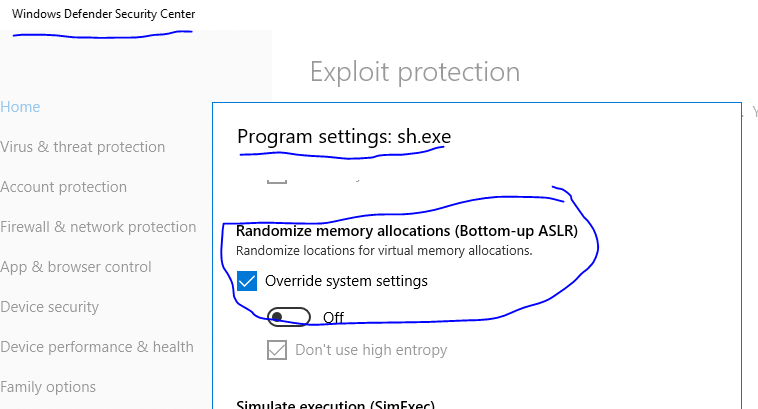
    FIX: "

    1. Go to you Windows Defender Security Center settings
    2. Click on App & Browser Control
    3. At the bottom click on the "Exploit Protection Settings" link
    4. Go to "Program Settings" and click on the "Add program to customize" -> "Choose exact file path"
    5. Navigate to "C:\Program Files\Git\usr\bin\sh.exe" and add it
    6. Override and turn off the following: Mandatory ASLR, Randomize memory allocations (Bottom-up ASLR)
    7. Click "Apply" and now everything should work fine.

    Also add these other binaries from the same folder: expr.exe, uname.exe, grep.exe, rm.exe "


    (sourcehttps://stackoverflow.com/questions/36399041/cygwin-update-cause-error-could-not-fork-child-process-resource-temporarily-u 

    Best regards,

    Bilal

  • Hi Bilal,

    Thank you for the update, I am happy to hear that you have found a solution. But I have to say I am surprised about the workaround as this is one setting or solution I haven't heard of before with relation to our tools. I'm curious which version of Git is installed on this machine?

    We will need to discuss and investigate this some more internally to better understand how and why this is impacting the build.

    So it seems the issue had nothing to do with the DEP setting after all, but I still wanted to forward the answer from a CCS developer on why ccstudio.exe could not be added to exception list in DEP.

    We compile ccstudio.exe with /NXCOMPAT:YES (the default settings)
    docs.microsoft.com/.../nxcompat-compatible-with-data-execution-prevention
    which seem to tell Microsoft not to allow you to run it without DEP.
    That is the reason why the file cannot be added to the exception list.

    All compilation happens outside of the CCStudio.exe process. We don't see why DEP enabled CCStudio.exe will have any impact on the build.
  • Hi Aartig,

    I used to have git installed on my PC however i have removed it. In one of the threads it was pointed out, by TI colleagues, that it could be the reason for this issue. So no cygwin, no git.

    Regarding this:

    "So it seems the issue had nothing to do with the DEP setting after all, but I still wanted to forward the answer from a CCS developer on why ccstudio.exe could not be added to exception list in DEP."

    i think it could have a direct relation between the DEP and "Windows defender security" in terms of limiting specific executables allocate memory and execute data.
    Because one of the features i have overridden is "Randomized memory allocations(Buttom-up ASLR" which seems to be closely related to error "3 [main] sh 18576 C:\ti\xdctools_3_50_04_43_core\bin\sh.exe: *** fatal error - fork: can't reserve memory for stack 0x2A3C290 - 0x2A40000, Win32 error 487".
    Don't you think so?


    For more i would refer to 2nd paragraph of DEP(docs.microsoft.com/.../data-execution-prevention) which says:
    "DEP prevents code from being run from data pages such as the default heap, stacks, and memory pools. If an application attempts to run code from a data page that is protected, a memory access violation exception occurs, and if the exception is not handled, the calling process is terminated."

    I guess here the sh.exe tries to allocate a memory but it returns nothing(null/viod string) and then the exception is not correctly handled so the application is waiting there for the return forever. In some cases i have also seen that the child process have a retry to reserve a memory(see my previous post in this thread for more):

    "2 [main] sh 24828 C:\ti\xdctools_3_50_04_43_core\bin\sh.exe: *** fatal error - fork: can't reserve memory for stack 0x2DFC300 - 0x2E00000, Win32 error 487
    10 [main] sh 568 child_info::sync: wait failed, pid 8592, Win32 error 1812
    430 [main] sh 568 fork: child -1 - died waiting for longjmp before initialization, retry 10, exit code 0x1000000, errno 11"

    Maybe you could explain this further since you should have a correct and better understand on what happens here.


    Nevertheless, these are all assuptions and guesses from my side when i try to relate the issue and the "fix" mentioned above. I do not have extensive know-how regarding this topic thou.

    Here another point to beware of why this is now an issue on this Windows-version, although the same features are present on other versions as well.

    Best regards,

    Bilal

  • Follow up:
    "We compile ccstudio.exe with /NXCOMPAT:YES (the default settings) "

    /DYNAMICBASE might be the right thing in this case.
    The technical details are elaborated here: blogs.technet.microsoft.com/.../

    For other related open discussions see:
    - www.zdnet.com/.../
    - twitter.com/.../930498911676108801
  • Bilal okcu said:
    UPDATE: Meanwhile, I have found a solution that solves the issue.

    Bilal,

    So you added sh.exe from the C:\ti\xdctools_3_50_04_43_core\bin\sh.exe directory to the Windows Defender Security Center settings and that resolved the issue? Did you have to add any other executables?

  • Hi Aartig,

    I have not done any additonal steps other than the ":\ti\xdctools_3_50_04_43_core\bin\sh.exe"
    (NOTE: this was the exe that was hanging(or being blocked)
     NOTE2: On contrary, when i reverse the fix below, the software behaviour is same as before(e.g. hanging).).

    The fix i have applied is given previoulsly:"

    1. Go to you Windows Defender Security Center settings
    2. Click on App & Browser Control
    3. At the bottom click on the "Exploit Protection Settings" link
    4. Go to "Program Settings" and click on the "Add program to customize" -> "Choose exact file path"
    5. Navigate to "C:\ti\xdctools_3_50_04_43_core\bin\sh.exe" and add it
    6. Override and turn off the following: A) Mandatory ASLR, B)Randomize memory allocations (Bottom-up ASLR)
    7. Click "Apply" and now everything should work fine."

      Of course in case any other executable is being blocked then the procedure should be applied respectively.

    Here is also the official microsoft answer to the topic where another(a 2nd) solution is also proposed(please note that i have not tested whether other solution works):

    https://docs.microsoft.com/en-us/cpp/build/reference/nxcompat-compatible-with-data-execution-prevention?view=vs-2017


    Best regards,

    Bilal 

  • Hi Aartig,

    I have not done any additonal steps other than the ":\ti\xdctools_3_50_04_43_core\bin\sh.exe"
    (NOTE: this was the exe that was hanging(or being blocked)
    NOTE2: On contrary, when i reverse the fix below, the software behaviour is same as before(e.g. hanging).).


    The fix i have applied is given previoulsly:"

    Go to you Windows Defender Security Center settings
    Click on App & Browser Control
    At the bottom click on the "Exploit Protection Settings" link
    Go to "Program Settings" and click on the "Add program to customize" -> "Choose exact file path"
    Navigate to "C:\ti\xdctools_3_50_04_43_core\bin\sh.exe" and add it
    Override and turn off the following: A) Mandatory ASLR, B)Randomize memory allocations (Bottom-up ASLR)
    Click "Apply" and now everything should work fine."

    Of course in case any other executable is being blocked then the procedure should be applied respectively.
    Here is also the official microsoft answer to the topic where another(a 2nd) solution is also proposed(please note that i have not tested whether other solution works):

    docs.microsoft.com/.../nxcompat-compatible-with-data-execution-prevention


    Best regards,

    Bilal
  • Hi,

    I have also problems with Windows 10, my configuration is:

    Windows 10 Enterprise

    Version 1803

    Build 17134.590

    I have already switched off "C:\ti\xdctools_3_50_08_24_core\bin\sh.exe" under Defender Security Center as adivised above.

    I am using

    ti-processor-sdk-rtos-am65xx-evm-05.02.00.10-Windows-x86

    strawberry-perl-5.28.0.1-64bit

    CCS Version: 8.2.0.00007 

    Basically I want to build SBL, which is not a CCS project, it is build on cmd line. Here the cmd line log:

    Win10_cmd_line_log.txt

    Thomas

  • Thomas,

    The error you are seeing is similar to what the other user was experiencing, but is coming from the mklib step in the build. We've had users report this type of error with mklib when they had some conflicting tools (like MKS ToolKit, Cygwin, etc) with incompatible versions of sh.exe or gmake.exe in their PATH.

    http://processors.wiki.ti.com/index.php/Mklib#MKS_or_Cygwin_or_gmake_tools_in_your_path

    http://processors.wiki.ti.com/index.php/Mklib#Required_non-Texas_Instruments_Software

    I see that you already tried the Windows Defender settings as described in the previous post. Did you also ensure that there are no other conflicting tools/utilities in your Windows system PATH? If not, could you please double-check that by temporarily removing all other software packages/utilities from your system PATH, then reboot and retry the build?

  • Hi Thomas,

    I have the same system(Win 10, Enteerprise, version 1803, OS Build 17123.590).

    My assumption is that there are 2 issues(from the logs file you attached):

    10996 [main] sh 11020 c:\ti\xdctoo~1\bin\sh.exe: *** fatal error - fork: can't reserve memory for stack 0x2DFC540 - 0x2E00000, Win32 error 487
    5 [main] sh 7516 c:\ti\xdctoo~1\bin\sh.exe: *** fatal error - fork: can't reserve memory for stack 0x2DFC540 - 0x2E00000, Win32 error 487
    17141 [sig] sh 7516 _cygtls::handle_exceptions: Exception: STATUS_ACCESS_VIOLATION


    1- The "*** fatal error - fork: can't reserve memory for stack 0x2DFC540 - 0x2E00000, Win32 error 487"
    (I think you have an issue because the system interprets the "c:\ti\xdctoo~1\bin\sh.exe" incorrectly. I do not know why the path is shown with a tilde sign in the path. This could be manipulated through explicit use of the full path to sh.exe. You should have a possibility to change this in build scripts. Then this issue should be solved).

    2- The STATUS_ACCESS_VIOLATION issue.
    (For this I did not face it, but i guess you should uninstall and delete the Cygwin. Please make sure that all cygwin assosiated files are deleted) and as suggested in this forum make sure that you don't have conflicting PATH variables in your system/user environment variables. Make sure to delete all cygwin/git/etc related variables assigned to PATH)

    Best regards, 

    Bilal

  • Hi,

    I found a solution!!!!!


    Here the way I get it running!

    As mentioned in a previous post I should try following CCS project:

    e2e.ti.com/.../2889420

    As I build these ones I get errors:

    Invoking: ARM Linker

    "C:/ti/ti-cgt-arm_16.9.9.LTS/bin/armcl" -mv7R5 --code_state=32 --float_support=VFPv3D16 -me --define=USE_BIOS --define=BUILD_MCU --define=TIRTOS --define=am65xx_evm --define=SOC_AM65XX --define=gcc -g --diag_warning=225 --diag_wrap=off --display_error_number --emit_warnings_as_errors --super_quiet --gen_func_subsections=on --abi=eabi --asm_extension=.ser5f --obj_extension=.oer5f -z -m"USB_DevBulk_am65xx_evm_mcuExampleProject.map" -i"C:/ti/ti-cgt-arm_16.9.9.LTS/lib" -i"C:/ti/ti-cgt-arm_16.9.9.LTS/include" --reread_libs --diag_wrap=off --display_error_number --warn_sections --xml_link_info="USB_DevBulk_am65xx_evm_mcuExampleProject_linkInfo.xml" --rom_model -o "USB_DevBulk_am65xx_evm_mcuExampleProject.out" "./biosMmu.oer5f" "./dev_bulk_main.oer5f" "./intRouter.oer5f" "./timer.oer5f" "./usb_bulk_structs.oer5f" "./usb_osal.oer5f" "C:/ti/pdk_am65xx_1_0_3/packages/ti/build/am65xx/linker_r5_sysbios.lds" -l"configPkg/linker.cmd" -llibc.a

    Makefile:1807: recipe for target 'c:/users/addeth2/appdata/local/temp/ti_mkl~2/obj/e_acoshf.obj' failed

    error #10366-D: automatic library build: using library "C:\ti\ti-cgt-arm_16.9.9.LTS\lib\rtsv7R4_A_le_v3D16_eabi.lib" for the first time, so it must be built. This may take a few minutes.

       264 [main] sh 13208 c:\ti\ccsv8\utils\cygwin\sh.exe: *** fatal error - fork: can't reserve memory for stack 0x31FBF40 - 0x3200000, Win32 error 487


    This pinpoint me to “c:\ti\ccsv8\utils\cygwin\sh.exe”, so I add this to the  Windows Defender excluding list.


    • After that I could build the CCS project!!!!!!


    Afer that I tried again to build SBL on cmd line and succeed!!!!!


    Thanks and BRG


    Thomas

  • Hi Thomas,

    Thank you for the update and I'm very glad to hear that the Windows Defender solution worked for you as well, after adding the sh.exe from the CCS utils path.

    Just as additional reference, I found this information on the Cygwin FAQ page that mentions Windows Defender as one of the applications known to interfere with Cygwin: https://cygwin.com/faq/faq.html#faq.using.bloda

    We will definitely have some internal discussions here at TI to see if there is anything we can do to improve the user experience in such situations. At a minimum, we will make sure to add this to our FAQs and Troubleshooting tips as a potential setting that could impact successful execution of a build.

    Thank you both again for your patience in working through this.