This thread has been locked.

If you have a related question, please click the "Ask a related question" button in the top right corner. The newly created question will be automatically linked to this question.

RTOS/TMDSIDK437X: Timestamp_get32() accuracy

Genius 5840 points

Part Number: TMDSIDK437X
Other Parts Discussed in Thread: SYSBIOS

Tool/software: TI-RTOS

Hello,

Could you tell me accuracy of Timestamp_get32() ?

What frequency and kind of clock source of Timestamp_get32()?

Are there any ways and procedures to measure more accurately?

Regards,

U-SK

  • The BIOS using DMtimer as the default timer to generate BIOS clock. The TimeStampProvider code for AM437x can be located here:

    bios_6_73_01_01\packages\ti\sysbios\timers\dmtimer\TimeStampProvider.c

    You can change the default DMtimer used by time stamp provider using the following syntax:

    /* Assign GPTimer4 to be used for Timestamp */

    /* Timer ID = 4 for GPTimer4 and input clock runs at 24 MHz */

    var DMTimer = xdc.useModule('ti.sysbios.timers.dmtimer.Timer');

    var timerParams2 = new DMTimer.Params();

    timerParams2.tsicr.posted = 0;

    DMTimer.intFreqs[4].hi = 0;

    DMTimer.intFreqs[4].lo = 24000000;   //Use input clock OSCIN which is default input to DMtimer.

    var DMTimestampProvider = xdc.useModule("ti.sysbios.timers.dmtimer.TimestampProvider");

    DMTimestampProvider.timerId = 4;

    DMTimestampProvider.useClockTimer = false;

    var Timestamp = xdc.useModule("xdc.runtime.Timestamp");

    Timestamp.SupportProxy = DMTimestampProvider;

    /* Indicate GPT3 & GPT4 are used */

    var TimerSupport = xdc.useModule('ti.sysbios.family.arm.a9.am437x.TimerSupport');

    TimerSupport.availMask = 0x0018;


    Hope this clarifies the usage.

    Regards,

    Rahul

  • Hi Rahul,

    Thank you for your reply.

    Could you tell me accuracy value of Timestamp_get32() ?

    Does the accuracy of Timestamp_get32() only depend on OSC0 clock accuracy?

    Regards,
    U-SK
  • TimestampProvider module in RTOS depends on OSC0 clock accuracy and on configuration of the Timestamp module in the BIOS configuration script. The above setting will give you timer resolution of 1 usec so if you need finer resolution to measure performance on the ARM this is not suitable.

    Timestamp_get32 uses different source for providing time stamps on different SOCs, on AM437x, RTOS uses DMtimer but on our A15 devices, we implement TimeStampProvider module using PMU module. To get most accurate bench marking number, ARM provides PMUCCNTR counter inside all Cortex A devices. this is a cycle accurate counter that can be used to measure cycle accurate ARM cycles to execute certain code. Please refer to PMCCNTR register in the ARM spec here:
    infocenter.arm.com/.../index.jsp

    We don`t have an assembly implementation of this for Cortex A9 parts but you can refer to the code here:
    pdk_am43xx_1_0_13\packages\ti\csl\arch\a15\V1\perfromacne_unit.asm

    Regards,
    Rahul
  • Hi Rahul,

    Thank you for your reply.

    If I run CPU and BIOS clock at 300MHz, Does Timestamp_get32 () have the potential to vary up to 300 from the correct number because it provides 1us resolution ?

    I executed following code.

    StartTime = Timestamp_get32();
    EndTime = Timestamp_get32();
    Duration = EndTime - StartTime;
    Timestamp_getFreq(&SystemFrequency);
    System_printf("Processing Duration %u, System Frequency %u \n", Duration, SystemFrequency.lo);
    System_flush();

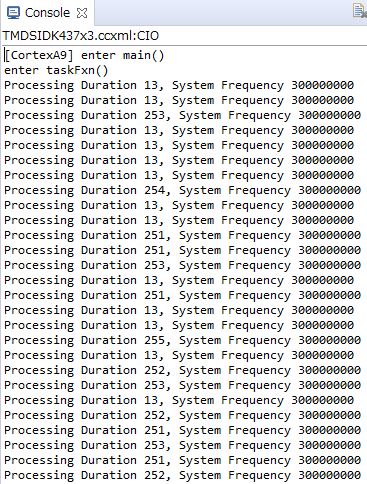
    Result is as follows.

    Does "ti.sysbios.family.arm.a15.TimestampProvider" also use DMtimer in cortex-A9 not using PMUCCNTR?

    Could you tell me procedure how to implement perfromacne_unit.asm in A9 timestamp module?

    Regards,

    U-SK

  • U-SK,

    On AM437x, by the default the kernel will use the PMCCNTR for timestamps.  This implementation is in the package: ti.sysbios.family.arm.a15.TimestampProvider.  The cycle counter is configured to run at the CPU rate.  There is some assembly code in this package that will configure the PMCR and PMCNTENSET registers.

    It could be possible to use a DMTimer for timestamps (as described above) but this is not the default, and would give less resolution.

    I think your console output confirms this, as it shows 300MHz for the CPU rate of 300MHz.  You can also confirm that the default has not changed, by opening the ROV tool in your debug session,  click on “All Modules”, then “xdc”, then “runtime”, then “Timestamp”.  Then expand “Configuration”, then “SupportProxy” and look at the “$name” field of the provider.

    Regards,
    Scott

  • The System_printf() calls are not real-time calls. Under the hood it's using a silent breakpoint such that when you call that function the processor momentarily halts. When CCS recognizes that it has halted at the special CIO breakpoint it reads out the contents of the CIO buffer (over slow JTAG) and prints it in the console window. Finally CCS silently restarts the CPU running again. This is a very slow and non-deterministic process. If you wish to use prints and have them be more deterministic there are a couple options:

    1. You could switch to using the UART for your printf's. This is the traditional solution.
    2. You can also use the LOG_printf capability from sysbios. It maintains a circular buffer of messages that have been logged, and whenever you halt the processor CCS will update the output window.
  • Hi Scott,

    Thank you for your reply.

    I understand ti.sysbios.family.arm.a15.TimestampProvider using PMCCNTR(default setting)is the most accurate solution in timestamp.

    I added #include <ti/sysbios/family/arm/a15/TimestampProvider.h> to sorce file and var TimestampProvider = xdc.useModule('ti.sysbios.family.arm.a15.TimestampProvider'); to cfg file.

    And I executed below code.

    StartTime = TimestampProvider_get32();
    EndTime = TimestampProvider_get32();
    GPIO_write(FOC_GPIO_PIN0, 0);
    if(LoopCount++ == 10000){
       Duration = EndTime - StartTime;
       TimestampProvider_getFreq(&SystemFrequency);
       System_printf("Processing Duration %u, System Frequency %u \n", Duration, SystemFrequency.lo);
       System_flush();
       LoopCount =0;
    }


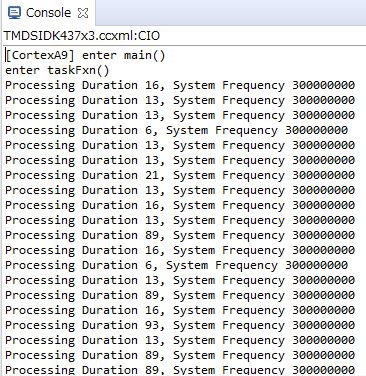
    Then, the result is as below.

    release build:

    debug build:

    Could you tell me the reason why duration varies as above by execution timing in debug build?

    Is it pure cpu cycles value because using PMCCNTR?

    Or, should I not use timestamp provider in debug build?

    Regards,

    U-SK

  • Hi Brad,

    Thank you for your reply.
    I will use UART_Printf().

    Regards,
    U-SK
  • US-K,

    Debug builds typically use lower optimizations than release builds, so the compiler-generated code is usually different.  I would expect more cycles for debug, but not the big variation you are seeing between StartTime and EndTime.   I’m wondering if maybe there are interrupts going off at the wrong times, or more likely if there are different cache timings for the debug build.

    To rule out interrupts, can you bracket the calls to TimestampProvider_get32() to be within a Hwi_disable/Hwi_restore block?

        key = Hwi_disable();
        StartTime = TimestampProvider_get32();
        EndTime = TimestampProvider_get32();
        Hwi_restore(key);

    For cache timing, maybe you can try a first get of the timestamp, before reading StartTime and EndTime, something like:

        temp = TimestampProvider_get32();
        StartTime = TimestampProvider_get32();
        EndTime = TimestampProvider_get32();

    Do either of these give you more consistent numbers for debug?

    And yes, using PMCCNTR should be reporting pure CPU cycles.

    Thanks,
    Scott

  • Hi Scott,

    Thank you for your reply.

    I disabled Hwi and executed program as below.

    unsigned int key;
    key = Hwi_disable();
    StartTime = TimestampProvider_get32();
    EndTime = TimestampProvider_get32();
    Hwi_restore(key);
    
    Duration = EndTime - StartTime;
    TimestampProvider_getFreq(&SystemFrequency);
    System_printf("Processing Duration %u, System Frequency %u \n", Duration, SystemFrequency.lo);
    System_flush();
    

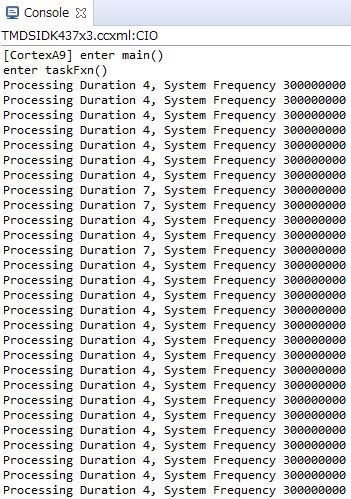
    Then, the result is following capture.

    Duration become small.

    But I executed above code in Hwi which is highest priority, so I don't think any thread interrupt in the duration.

    What is the factor details that increases the duration?

    I added  temp = TimestampProvider_get32(); , the Duration became completely stable.

    I understand the Duration vary from 4 cycles to 7 cycles due to cache state. 

    Regards,

    U-SK

  • US-K,

    Ok, thanks for trying this.
     
    For “What is the factor details that increases the duration?”, I’m not clear on which differences you are asking about.  

    If you are calling this code from within a Hwi I think you should remove the call to System_flush(), the underlying transport (maybe JTAG, or UART) will likely do some blocking which should not be done from an ISR.  The duration between the StartTime and EndTime sampling is protected by the Hwi_disable(), but a long execution time (or blocking) later within the ISR will likely cause other app issues.

    Regards,
    Scott

  • Did this get resolved?

    Todd

    [4/4 Update: Marking this as TI Thinks Resolved dues to no activity from original poster.]