This thread has been locked.

If you have a related question, please click the "Ask a related question" button in the top right corner. The newly created question will be automatically linked to this question.

RTOS/BEAGLEBK: Sending Data Packets with NIMU in case of multiple network interfaces

Part Number: BEAGLEBK

Tool/software: TI-RTOS

Hi,

I have multiple network interfaces in my application and I map their initialization functions at the starting in main function as follows:

NIMUDeviceTable[nimu_device_index++].init =  &CpswEmacInit ;
NIMUDeviceTable[nimu_device_index++].init =  &WifiInit ;
NIMUDeviceTable[nimu_device_index].init = NULL;

I start the BIOS and both network interfaces are successfully registered and initialized. I configure the IP to one of the network interface. Now when I will call the send socket API like NDK_sendto(), how does the NDK know which interface to use to transfer data? I do not see passing any network interface parameter to ndk socket functions. Does it send the data to both the interfaces? If yes, I want to send the data using a particular interface. How do I do that?

Here are the details of tools that I am using:

EDMA3 Low Level Driver 2.12.5

NDK 3.40.1.01

SYS/BIOS 6.73.1.01

am335x PDK 1.0.13

xdctools_3_51_01_18

Base Eample: NIMU_BasicExmample_bbbAM335x_armExampleProject

Regards

Vishav

  • Hi,

    The port to send packet is controlled by driver code:

    /* for dual emac mode, need to update the flags to direct packet out specified port */
    if(numEmacInterfaces == 2U)
    {
    portFlag = (pi->PhysIdx + 1U) << EMAC_PKT_FLAG_TO_PORT_SHIFT;

    csl_send_pkt.Flags |= portFlag;
    }

    For the two ports, you need to use different subnet for each.

    Regards, Eric
  • Hi,

    Let me clarify my question more. I have no problems how data is sent with Ethernet Interface. Of all the examples that I have seen so far, I see that there is only one interface used which is CpswEmac. Now I created a new interface which is initialized in WifiInit function (my own source code). I map this interface init function in NIMUDeviceTable as shown in my question. Now I have following questions:

    1. Does TI-RTOS support multiple network interfaces (NIMU Devices)? In my case it is Ethernet and Wifi.

    2. if yes, then how should I configure these interfaces?

    3. If I have multiple interfaces registered and when I call the function NDK_sendto, which interface would it call for(as I dont have any Network Interface object parameter in this function)?

    Here is how my source code looks like:

    #include <ti/ndk/inc/netmain.h>
    #include <stdio.h>
    #include <ti/ndk/inc/stkmain.h>
    /*
     *  ======== main.c ========
     */
    
    #include <xdc/std.h>
    
    #include <xdc/runtime/Error.h>
    #include <xdc/runtime/System.h>
    
    #include <ti/sysbios/BIOS.h>
    
    #include <ti/sysbios/knl/Task.h>
    
    #include <ti/board/board.h>
    #include <ti/drv/uart/UART.h>
    #include <ti/drv/uart/UART_stdio.h>
    
    #include <ti/drv/emac/emac_drv.h>
    #include <ti/drv/emac/src/v4/emac_drv_v4.h>
    
    #include <ti/starterware/include/ethernet.h>
    #include <ti/starterware/include/soc_control.h>
    /*
     *  ======== taskFxn ========
     */
    
    #define MAX_TABLE_ENTRIES   4
    #define UDPHANDLERSTACK 1024
    
    /**Phy address of the CPSW port 1*/
    #define EMAC_CPSW_PORT0_PHY_ADDR_EVM    0
    /**Phy address of the CPSW port 1*/
    #define EMAC_CPSW_PORT1_PHY_ADDR_EVM    1
    // Our NETCTRL callback functions
    static void   NetworkOpen();
    static void   NetworkClose();
    static void   NetworkIPAddr( uint32_t IPAddr, uint32_t IfIdx, uint32_t fAdd );
    
    Void udpHandler(UArg arg0, UArg arg1);
    // Fun reporting function
    static void   ServiceReport( uint32_t Item, uint32_t Status, uint32_t Report, void* hCfgEntry );
    
    extern int CpswEmacInit (STKEVENT_Handle hEvent);
    extern int WifiInit (STKEVENT_Handle hEvent);
    
    //---------------------------------------------------------------------------
    // Configuration
    //
    char *HostName    = "EchoHost";
    char *LocalIPAddr = "192.168.1.4";
    char *LocalIPMask = "255.255.255.0";    // Not used when using DHCP
    char *GatewayIP   = "192.168.1.1";    // Not used when using DHCP
    char *DomainName  = "demo.net";         // Not used when using DHCP
    char *DNSServer   = "0.0.0.0";          // Used when set to anything but zero
    
    /*
     *  ======== main ========
     */
    static int nimu_device_index = 0U;
    NIMU_DEVICE_TABLE_ENTRY NIMUDeviceTable[MAX_TABLE_ENTRIES];
    
    Int main()
    { 
        EMAC_HwAttrs_V4 cfg;
        /* Chip configuration MII/RMII selection */
            SOCCtrlCpswPortMacModeSelect(1, ETHERNET_MAC_TYPE_MII);
            SOCCtrlCpswPortMacModeSelect(2, ETHERNET_MAC_TYPE_MII);
    
            EMAC_socGetInitCfg(0, &cfg);
            cfg.port[0].phy_addr = EMAC_CPSW_PORT0_PHY_ADDR_EVM;
            cfg.port[1].phy_addr = EMAC_CPSW_PORT0_PHY_ADDR_EVM;
            cfg.macModeFlags = EMAC_CPSW_CONFIG_MODEFLG_FULLDUPLEX;
            EMAC_socSetInitCfg(0, &cfg);
    
        NIMUDeviceTable[nimu_device_index++].init =  &CpswEmacInit ;
        NIMUDeviceTable[nimu_device_index++].init =  &WifiInit ;
        NIMUDeviceTable[nimu_device_index].init = NULL;
    
        BIOS_start();    /* does not return */
        return(0);
    }
    int StackTest()
    {
        Board_STATUS boardInitStatus =0;
        Board_initCfg boardCfg;
        int rc;
        void*          hCfg;
    
        boardCfg = BOARD_INIT_PINMUX_CONFIG |
                BOARD_INIT_MODULE_CLOCK | BOARD_INIT_UART_STDIO;
    
        Board_init(boardCfg);
        if (boardInitStatus !=0)
            {
                UART_printf("Board_init failure\n");
                return(0);
            }
            UART_printf("Board_init success\n");
    
       //
       // THIS MUST BE THE ABSOLUTE FIRST THING DONE IN AN APPLICATION before
       //  using the stack!!
       //
    
       rc = NC_SystemOpen( NC_PRIORITY_LOW, NC_OPMODE_INTERRUPT );
       if( rc )
           {
               UART_printf("NC_SystemOpen Failed (%d)\n",rc);
               for(;;);
           }
    
       /*Create and build the system configuration from scratch without using XGCONF*/
    
       hCfg = CfgNew();
           if( !hCfg )
           {
               UART_printf("Unable to create configuration\n");
               return 0;
           }
    
    
       // We better validate the length of the supplied names
       if( strlen( DomainName ) >= CFG_DOMAIN_MAX ||
           strlen( HostName ) >= CFG_HOSTNAME_MAX )
       {
           UART_printf("Names too long\n");
           return 0;
       }
    
       // Add our global hostname to hCfg (to be claimed in all connected domains)
       int err = CfgAddEntry( hCfg, CFGTAG_SYSINFO, CFGITEM_DHCP_HOSTNAME, 0,
                    strlen(HostName), (uint8_t *)HostName, 0 );
       if(err<0 )
              {
                  UART_printf("Error: %d\n", err);
              }
       // If the IP address is specified, manually configure IP and Gateway
           //if (!platform_get_switch_state(1))
       if (1)
       {
           CI_IPNET NA;
           CI_ROUTE RT;
           uint32_t      IPTmp;
    
           // Setup manual IP address
           memset( &NA, 0, sizeof(NA) );
           NA.IPAddr  = inet_addr(LocalIPAddr);
           NA.IPMask  = inet_addr(LocalIPMask);
           strcpy( NA.Domain, DomainName );
           NA.NetType = 0;
    
           // Add the address to interface 1
           err = CfgAddEntry( hCfg, CFGTAG_IPNET, 26, 0,
                        sizeof(CI_IPNET), (uint8_t *)&NA, 0 );
    
    
           if(err<0)
           {
               UART_printf("Error: %d\n", err);
           }
           // Add the default gateway. Since it is the default, the
           // destination address and mask are both zero (we go ahead
           // and show the assignment for clarity).
           memset( &RT, 0, sizeof(RT) );
           RT.IPDestAddr = 0;
           RT.IPDestMask = 0;
           RT.IPGateAddr = inet_addr(GatewayIP);
    
           // Add the route
           CfgAddEntry( hCfg, CFGTAG_ROUTE, 0, 0,
                        sizeof(CI_ROUTE), (uint8_t *)&RT, 0 );
    
           // Manually add the DNS server when specified
           IPTmp = inet_addr(DNSServer);
           if( IPTmp )
           CfgAddEntry( hCfg, CFGTAG_SYSINFO, CFGITEM_DHCP_DOMAINNAMESERVER,
                        0, sizeof(IPTmp), (uint8_t *)&IPTmp, 0 );
        }
       // Else we specify DHCP
       else
       {
           CI_SERVICE_DHCPC dhcpc;
    
           // Specify DHCP Service on IF-1
           memset( &dhcpc, 0,sizeof(dhcpc) );
           dhcpc.cisargs.Mode   = CIS_FLG_IFIDXVALID;
           dhcpc.cisargs.IfIdx  = 1;
           dhcpc.cisargs.pCbSrv = &ServiceReport;
           CfgAddEntry( hCfg, CFGTAG_SERVICE, CFGITEM_SERVICE_DHCPCLIENT, 0,
                            sizeof(dhcpc), (uint8_t *)&dhcpc, 0 );
           }
       //
       // Configure IPStack/OS Options
       //
    
       // We don't want to see debug messages less than WARNINGS
       rc = DBG_WARN;
       CfgAddEntry( hCfg, CFGTAG_OS, CFGITEM_OS_DBGPRINTLEVEL,
                    CFG_ADDMODE_UNIQUE, sizeof(uint32_t), (uint8_t *)&rc, 0 );
    
       //
       // This code sets up the TCP and UDP buffer sizes
       // (Note 8192 is actually the default. This code is here to
       // illustrate how the buffer and limit sizes are configured.)
       //
    
       // UDP Receive limit
       rc = 8192;
       CfgAddEntry( hCfg, CFGTAG_IP, CFGITEM_IP_SOCKUDPRXLIMIT,
                    CFG_ADDMODE_UNIQUE, sizeof(uint32_t), (uint8_t *)&rc, 0 );
    
       //
       // Boot the system using this configuration
       //
       // We keep booting until the function returns 0. This allows
       // us to have a "reboot" command.
       //
    
    
       if(err<0)
              {
                  UART_printf("Error: %d\n", err);
              }
       do
       {
          rc = NC_NetStart( hCfg, NetworkOpen, NetworkClose, NetworkIPAddr );
       } while( rc > 0 );
    
       // Delete Configuration
       CfgFree( hCfg );
       NC_SystemClose();
       return(0);
    
    }
    
    //
    // Service Status Reports
    //
    // Here's a quick example of using service status updates
    //
    static char *TaskName[]  = { "Telnet","HTTP","NAT","DHCPS","DHCPC","DNS" };
    static char *ReportStr[] = { "","Running","Updated","Complete","Fault" };
    static char *StatusStr[] = { "Disabled","Waiting","IPTerm","Failed","Enabled" };
    static void ServiceReport( uint32_t Item, uint32_t Status, uint32_t Report, void* h )
    {
        UART_printf( "Service Status: %-9s: %-9s: %-9s: %03d\n",
                TaskName[Item-1], StatusStr[Status],
                ReportStr[Report/256], Report&0xFF );
    
        //
        // Example of adding to the DHCP configuration space
        //
        // When using the DHCP client, the client has full control over access
        // to the first 256 entries in the CFGTAG_SYSINFO space.
        //
        // Note that the DHCP client will erase all CFGTAG_SYSINFO tags except
        // CFGITEM_DHCP_HOSTNAME. If the application needs to keep manual
        // entries in the DHCP tag range, then the code to maintain them should
        // be placed here.
        //
        // Here, we want to manually add a DNS server to the configuration, but
        // we can only do it once DHCP has finished its programming.
        //
        if( Item == CFGITEM_SERVICE_DHCPCLIENT &&
            Status == CIS_SRV_STATUS_ENABLED &&
            (Report == (NETTOOLS_STAT_RUNNING|DHCPCODE_IPADD) ||
             Report == (NETTOOLS_STAT_RUNNING|DHCPCODE_IPRENEW)) )
        {
            uint32_t IPTmp;
    
            // Manually add the DNS server when specified
            IPTmp = inet_addr(DNSServer);
            if( IPTmp )
                CfgAddEntry( 0, CFGTAG_SYSINFO, CFGITEM_DHCP_DOMAINNAMESERVER,
                             0, sizeof(IPTmp), (uint8_t *)&IPTmp, 0 );
        }
    }
    
    //
    // NetworkOpen
    //
    // This function is called after the configuration has booted
    //
    
    static void NetworkOpen()
    {
        DbgPrintf(DBG_INFO,"Network Open called\n");
    
        TaskCreate(udpHandler,"NetworkTask",1, UDPHANDLERSTACK,0,0,0);
    }
    
    //
    // NetworkClose
    //
    // This function is called when the network is shutting down,
    // or when it no longer has any IP addresses assigned to it.
    //
    static void NetworkClose()
    {
    
    }
    //
    // NetworkIPAddr
    //
    // This function is called whenever an IP address binding is
    // added or removed from the system.
    //
    static void NetworkIPAddr( uint32_t IPAddr, uint32_t IfIdx, uint32_t fAdd )
    {
        uint32_t IPTmp;
    
        if( fAdd )
            UART_printf("Network Added: ");
        else
            UART_printf("Network Removed: ");
    
        // Print a message
        IPTmp = NDK_ntohl( IPAddr );
        UART_printf("If-%d:%d.%d.%d.%d\n", IfIdx,
                (uint8_t)(IPTmp>>24)&0xFF, (uint8_t)(IPTmp>>16)&0xFF,
                (uint8_t)(IPTmp>>8)&0xFF, (uint8_t)IPTmp&0xFF );
    }
    
    /*
     *  ======== udpHandler ========
     *  Creates new Task to handle new udp connections.
     */
    Void udpHandler(UArg arg0, UArg arg1)
    {
        char data[]= "HelloVishavBansal";
        struct sockaddr_in cli_addr;
        int size =sizeof(cli_addr);
    
    
        SOCKET s = NDK_socket(AF_INET, SOCK_DGRAM, IPPROTO_UDP);
        if (s <0)
        {
           UART_printf("Socket not created: %d\n", fdError());
        }
    
    
        memset(&cli_addr, 0, sizeof(cli_addr));
        cli_addr.sin_family = AF_INET;
        cli_addr.sin_addr.s_addr = inet_addr("192.168.1.10");
        cli_addr.sin_port = 17225;


        int err = NDK_sendto(s,data,sizeof(data),0,(struct sockaddr *)&cli_addr, sizeof(cli_addr));
        if(err<0)
        {
    
            UART_printf("Error: %x\n",fdError());
        }


        err = NDK_shutdown(s,0);
        //NC_NetStop(1);
    }
    

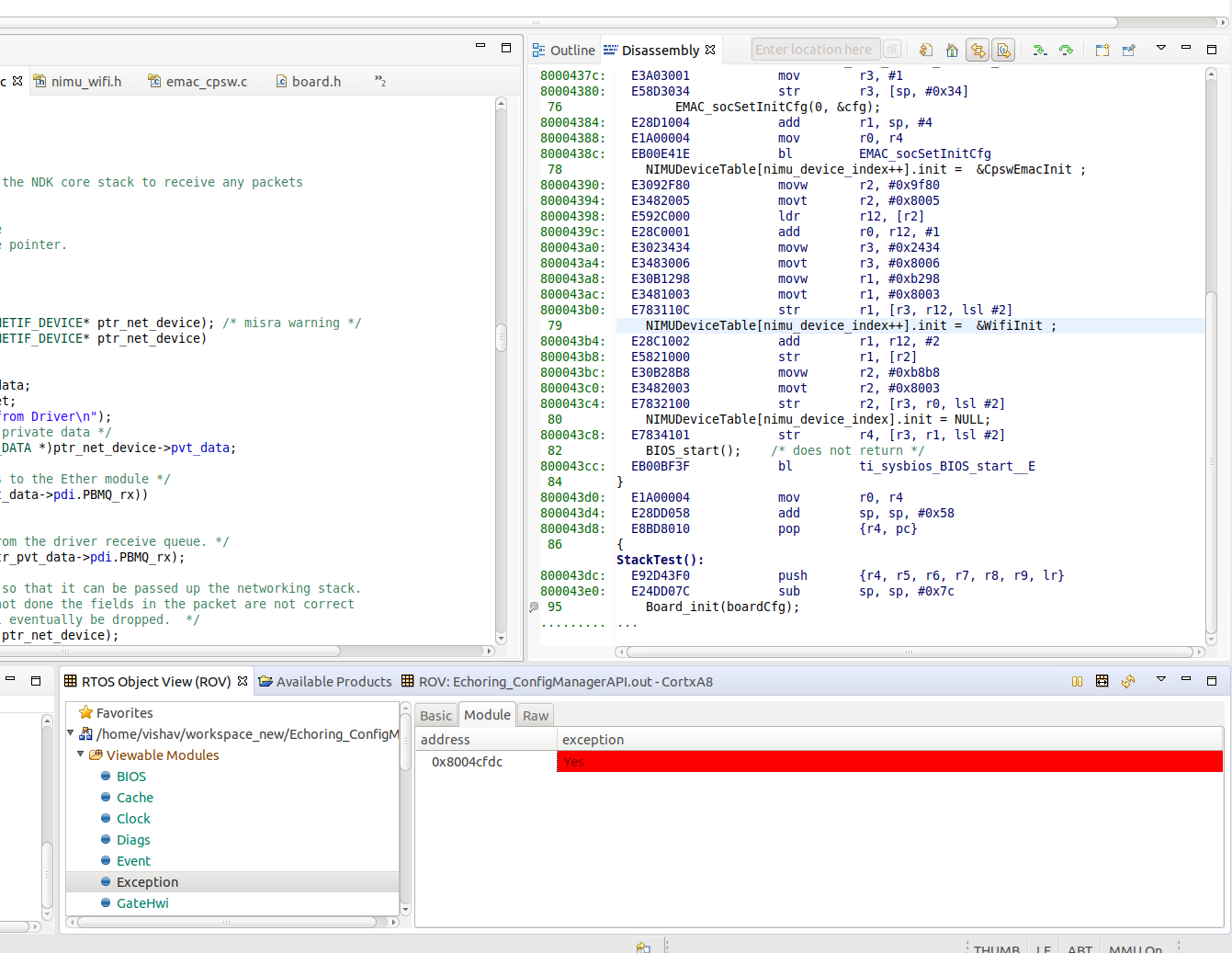
    I am able to successfully create the socket but when I call NDK_sendto, I get an exception at address 0x8004cfdc as shown here which further says that Can't use 'in' on a non-object. What does that mean?

  • Hi,

    1. Does TI-RTOS support multiple network interfaces (NIMU Devices)? In my case it is Ethernet and Wifi.>>>
    Yes, we have examples to configure two Ethernet interfaces with NIMU, called NIMU_DualMacExample_idkAM572/4x_armExampleproject. Those example expect to work on AM335x as well for dual EMAC, or your case: one EMAC, one WIFI port.

    2. if yes, then how should I configure these interfaces?
    I thought you already did this:
    NIMUDeviceTable[nimu_device_index++].init = &CpswEmacInit ;
    NIMUDeviceTable[nimu_device_index++].init = &WifiInit ;
    NIMUDeviceTable[nimu_device_index].init = NULL;

    3. If I have multiple interfaces registered and when I call the function NDK_sendto, which interface would it call for(as I dont have any Network Interface object parameter in this function)?
    The interfaces are determined by the IP address.
    cli_addr.sin_addr.s_addr = inet_addr("192.168.1.10");
    int err = NDK_sendto(s,data,sizeof(data),0,(struct sockaddr *)&cli_addr, sizeof(cli_addr));

    You need to use two separate IP subnets for two interfaces.

    Regards, Eric