This thread has been locked.

If you have a related question, please click the "Ask a related question" button in the top right corner. The newly created question will be automatically linked to this question.

RTOS/AM6548: SBL application loading issue

Part Number: AM6548
Other Parts Discussed in Thread: TMDX654IDKEVM

Tool/software: TI-RTOS

Hello All,

I have  problem with running application from the SD card via SBL.
I am using AM65x industrial development kit (IDK) - TMDX654IDKEVM without any modifications.

My configuration is:

CCS ver 8.3.0
Windows version - Windows 10 Pro version 1803
PDK - pdk_am65xx_1_0_3
SanDisk industrial SD card supplied with TMDX654IDKEVM

I prepared SD card by copying tiboot3.bin and sysfw.bin from pdk as instucted in Processor SDK RTOS 05_02_00_10 wiki - 4.6.3.3.7. Testing the SBL.
Boot switches are set for primary SD card boot.

First, I tried running my app and it worked fine on one TMDX654IDKEVM board but when I tried the same SD card on two other TMDX654IDKEVM boards only SBL executed up to the point when app image should be loaded. I then tried using test app that was on SanDisk industrial SD card that was supplied with TMDX654IDKEVM board but it still did not run the app on two TMDX654IDKEVM boards it run on the first TMDX654IDKEVM board.

With little debugging of SBL I found out that SBL hangs when it should open app image file on the SD card.
sbl_mmcsd.c -> int32_t SBL_MMCBootImage(sblEntryPoint_t *pEntry)  line     fresult = f_open(&fp, fileName, ((BYTE)FA_READ));

SYSFW is loaded and executed correctly from the same SD card so I guess that SD card interface is not initialized properly after SYSFW is executed.

Output on R5F UART (log level 3) is :

SYSFW ver 18.10.0-v2018.10 (Curious Crow) running
SBL Revision: 01.00.09.02 (Mar 28 2019 - 15:19:27)
Initlialzing PLLs ...done.
InitlialzingClocks ...done.
Initlialzing DDR ...done.
Begin parsing user application

Has anyone experienced similar problem?

Best regards,
Milan

  • Milan,

    Yes, there is a known issue with the SBL for Processor SDK RTOS which was reported after the release.  The bug ID for this issue is PRSDK-5311 and PRSDK-5448. The issue has been narrowed down to two issue and PRSDK-5311 provides a work around.

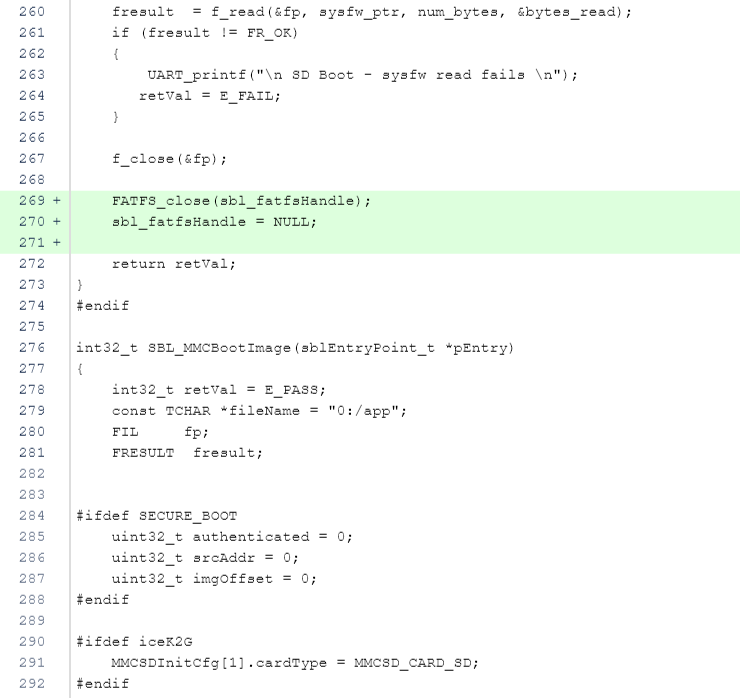
    In Processor SDK RTOS 5.02, the DMSC/M3 SYSFW was separated out from the SBL and so users need tiboot3.bin and sysfw.bin file on the SD card. The problem appears to be that fopen & fcclose of sysfw.bin followwed by f_open of app creates a issue somewhere.  As a work around for this issue, you can close the FATFS handle in the function that reads the SYSFW and re-open it when app is copied using the following lines of code: (marked in green) in the file 

    pdk_am65xx_1_0_3\packages\ti\boot\sbl\src\mmcsd\sbl_mmcsd.c


    After applying the fix, you will need to rebuild the sbl and copy the tiboot3.bin to the SD card. Please try the fix and let us know if the issue is resolved.

    PRSDK-5448 bug is tracking how the root cause in FATFS driver needs to be resolved for this issue as we expect no issues passing the FATFS handle in between functions defined in an application.

    Regards,

    Rahul

  • Hello Rahul,

    Thanks on the explanation and workaround advice.
    I tried this workaround and it works on one board. I will confirm you as soon as the other team tests it on the second board that had a problem.

    I could not find PRSDK-5311 and PRSDK-5448 issues under 2.1. Release Notes on 

    Where can I find the most recent list of issues?

    Best regards,
    Milan

  • Milan,

    Thanks for the update about the workaround working for you.

    We spike out known issues and issues resolved in new release in the Release notes. However, this issue was reported post the release so you will notice this in PrSDK 5.03 Release notes which is estimated to be released at the end of this week.

    software-dl.ti.com/.../index_release_specific.html

    Regards,
    Rahul
  • Hello Rahul,

    Thanks on the information. I will look at the Release notes and test new PDK 05_03.
    I can confirm that workaround works on all boards that we have.

    Best regards,
    Milan