This thread has been locked.

If you have a related question, please click the "Ask a related question" button in the top right corner. The newly created question will be automatically linked to this question.

CCS/AM5726: Changes required to run EMAC basic example with MII interface

Part Number: AM5726
Other Parts Discussed in Thread: AM5728

Tool/software: Code Composer Studio

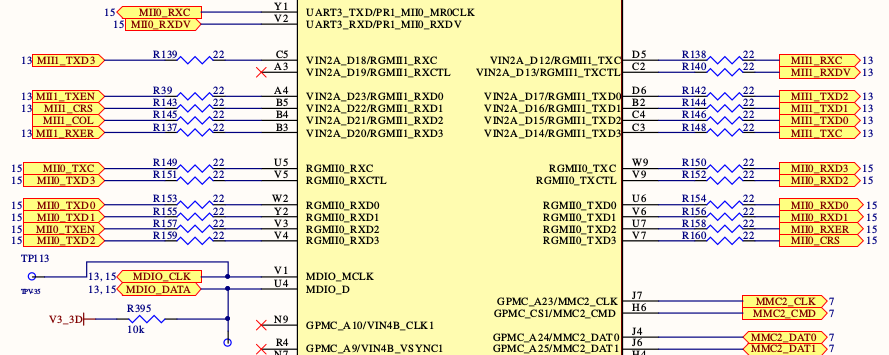
We are in the process of bringing up our custom board which is largely based off of the AM5728 IDK reference design. In particular I am trying to prove out the networking interface. On the IDK, SW0 and SW1 are configured as RGMII to support the Gigabit Ethernet PHYs. We changed this part of the design slightly by connecting these MACs to two 10/100 PHYs via MII (instead of RGMII). We are using the same PHYs as the PRU ICSS (basically just copied the design). I can confirm that the PRU ICSS interfaces work fine. I can run the EMAC and NIMU basic examples just fine on these interfaces, which validates the design. I cannot however successfully run the EMAC or NIMU apps on the SW0 or SW1 interfaces (previously Gigabit ethernet). Before running these apps, I changed the pinmux so that SW0 and SW1 are MII instead of RGMII. I have also updated the EMAC app by changing the GMIIx_SEL registers to GMII/MII mode as follows:

CSL_FINS (((CSL_control_coreRegs *) CSL_MPU_CTRL_MODULE_CORE_CORE_REGISTERS_REGS)->CONTROL_IO_1,
CONTROL_CORE_CONTROL_IO_1_GMII1_SEL, 0U);
CSL_FINS (((CSL_control_coreRegs *) CSL_MPU_CTRL_MODULE_CORE_CORE_REGISTERS_REGS)->CONTROL_IO_1,
CONTROL_CORE_CONTROL_IO_1_GMII2_SEL, 0U);

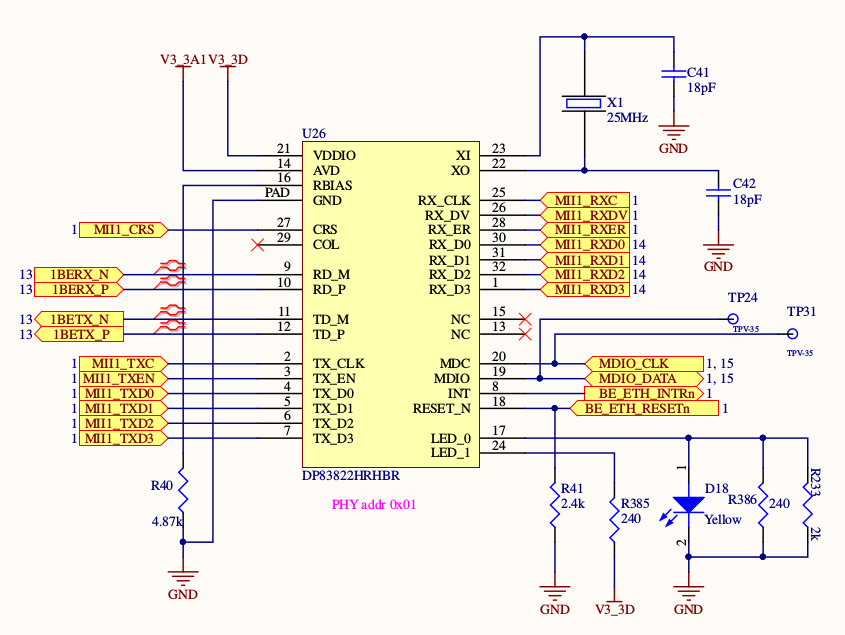
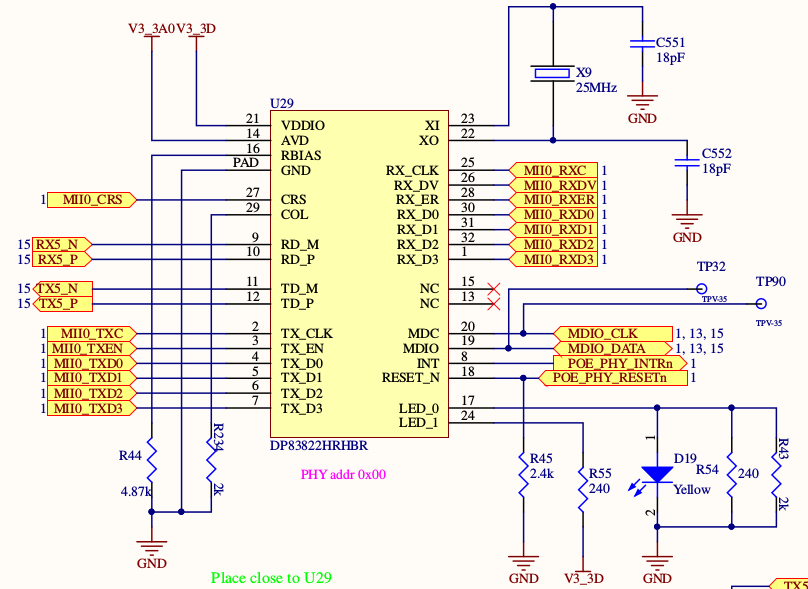
I rebuilt the board library and the EMAC/NIMU apps after making these changes. I have been focusing on getting the EMAC app to work first because that is the first step in bringing up the network. When running the EMAC app, I can see that the PHY gets link, but it times out trying to receive packets. This tells me that the MDIO interface is working correctly and that there may be an issue with the MII interface. Are there any other changes that I need to make to convert the interfaces from RGMII to MII? See the network interface design below:
  • Hi,

    You may check AM572x TRM, 24.11.4.3.1 Subsystem Clocking
    24.11.4.3.2.1 G/MII Interface Clocking
    GMII1_MR_CLK, GMII1_MT_CLK, GMII2_MR_CLK, GMII2_MT_CLK frequencies are fixed by the 802.3
    specification.
    • 2.5 MHz at 10 Mbps
    • 25 MHz at 100 Mbps
    Are they correct?

    When you ping the AM572x with the modified NIMU basic example, if you set a break point at nimu_rx_pkt_cb() (this is implemented in ti\transport\ndk\nimu\src\v4\cpsw_nimu_eth.c), did you get this hit? What is the version of your Processor SDK RTOS?

    Regards, Eric
  • Update: I was able to get the NIMU Dual MAC Basic Example app working for SW1/PHY 0x01. This PHY sits in between the MAC on the processor and the connector, and the general design is exactly the same as PHY 0x00, including the MII interface. I believe this validates that MII is connected correctly and clocks are at the correct speed. What is interesting about this is that the EMAC Basic Example app does not work, but the NIMU app does. PHY 0x00 still does not work, this PHY is a little more complicated because it sits in between the SW0 MAC on the processor and the 5th port of a 5 port switch. This PHY is not getting Link right now (it was last week) but I believe the reason for this is that it is missing terminations on the differential Rx/Tx lines between the PHY and the switch. We will be experimenting more with this today.

  • I am now able to get NIMU Dual MAC Basic example app working for both SW0 and SW1 PHYs. The issue with the SW0 PHY was that there was an unsupported strapping resistor on the 5 port switch, which is only available on the RMII version of the chip. This put the switch in an unknown state where is was out of reset and responding to MDIO/SPI commands, but was unable to fully function. After fixing this issue, the SW0 IP could be pinged.

    I am now working on getting the network interfaces up and running in Linux, but I am having issues with this. Since the hardware seems to be working, I have made a new forum post to address my Linux/driver related issues. This new post can be viewed here: https://e2e.ti.com/support/processors/f/791/t/800274