This thread has been locked.

If you have a related question, please click the "Ask a related question" button in the top right corner. The newly created question will be automatically linked to this question.

TDA2EVM5777: Issues building Processor Sdk Visual

Part Number: TDA2EVM5777

Hi

I'm having an issue, while trying to build Processor Sdk Vision 3.6.0.0. I'm following VisionSDK_UserGuide_TDA2xx.pdf for the steps to build in Windows 10. The build process is stuck on the last stage with the error you can find attached below.

Arm gcc is installed, and the first make, done with: 

  • gmake -s -j depend

completed successfully. After this step I tried to do :

  • gmake -s -j

and after some time this error occurred:.
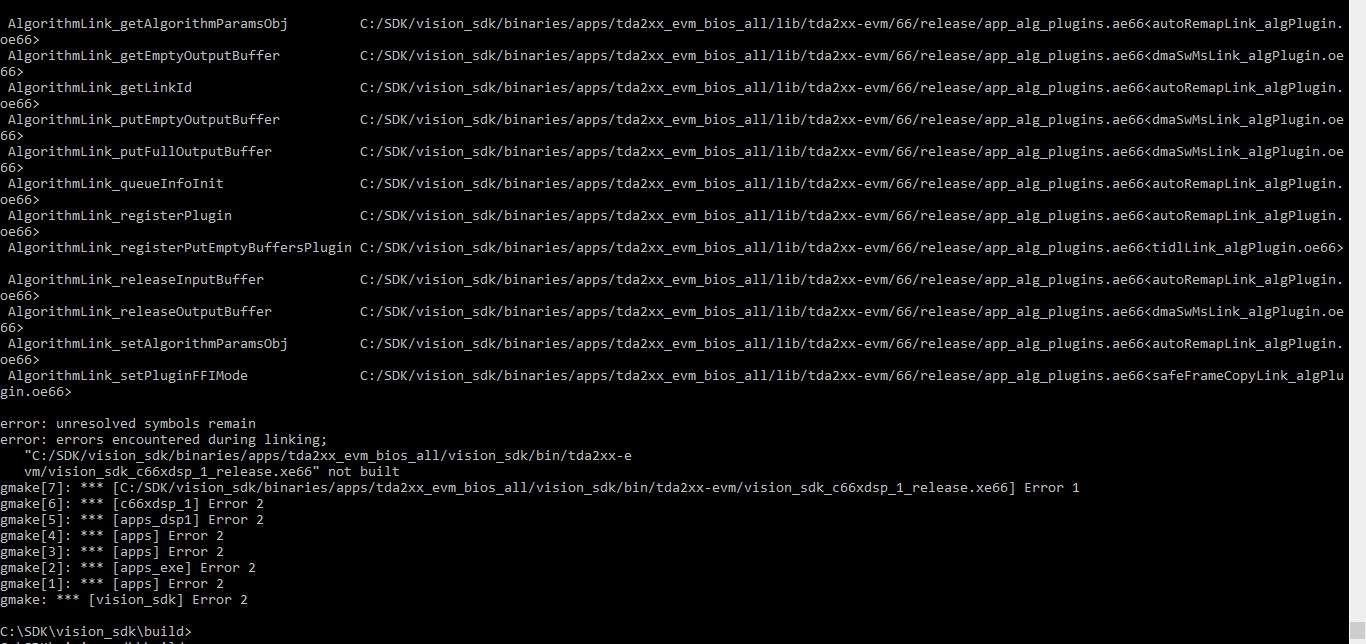
  • Hi Alexander,

    Can you try building without "-j" option i.e. "make -s depend" and "make -s".

    Regards,

    Rishabh

  • Hi Rishabh,

    Even with "gmake -s depend" and "gmake -s" the same error happened.

    Regards,

    Aleksander

  • Hi Aleksander,

    Can you run "gmake showconfig" and share the result.

    The issue is with building DSP binary.

    Can you check if C66x compiler is installed and the PATH is correct.

    Can you try re-installation or installation on a different machine.

    Also are you building using Git Bash or command prompt?

    Regards,

    Rishabh

  • Hi Rishabh,

    I uploaded the outputs of the "gmake showconfig" command.

    How do I check if C66x compiler is installed and the PATH is correct?

    Unfortunately, this is the only machine available at the moment.

    I'm building using command prompt.

    Regards,

    Aleksander

    gmake -C C:/SDK/vision_sdk/apps/configs -f build_makeconfig.mk showconfig
    gmake[1]: Entering directory `C:/SDK/vision_sdk/apps/configs'
    #
    # Build Config is [ tda2xx_evm_bios_all ]
    # Build Config file is @ C:/SDK/vision_sdk/configs/tda2xx_evm_bios_all/cfg.mk
    # Build Config .h file is @ C:/SDK/vision_sdk/links_fw/include/config/apps/tda2xx_evm_bios_all/system_cfg.h
    # Build CPUs is @ ipu1_0 ipu1_1 ipu2 a15_0 dsp1 dsp2 eve1 eve2 eve3 eve4
    #
    # CPUs included in application,
    # PROC_IPU1_0_INCLUDE=yes
    # PROC_IPU1_1_INCLUDE=yes
    # PROC_IPU2_INCLUDE=yes
    # PROC_DSP1_INCLUDE=yes
    # PROC_DSP2_INCLUDE=yes
    # PROC_EVE1_INCLUDE=yes
    # PROC_EVE2_INCLUDE=yes
    # PROC_EVE3_INCLUDE=yes
    # PROC_EVE4_INCLUDE=yes
    # PROC_A15_0_INCLUDE=yes
    #
    # Platform config,
    # VSDK_BOARD_TYPE=TDA2XX_EVM [options: TDA2XX_EVM TDA2EX_EVM TDA3XX_EVM TDA3XX_RVP TDA2XX_RVP]
    # PLATFORM=tda2xx-evm
    # DUAL_A15_SMP_BIOS=no
    # IPU1_SMP_BIOS=no
    # DDR_MEM=DDR_MEM_512M [options: DDR_MEM_128M DDR_MEM_512M DDR_MEM_1024M]
    # EMIFMODE=SINGLE_EMIF_512MB [options: SINGLE_EMIF_512MB SINGLE_EMIF_1GB ref build_pdk.mk]
    # NDK_PROC_TO_USE=ipu1_1 [options: a15_0 ipu1_0 ipu1_1 ipu2 none]
    # NSP_TFDTP_INCLUDE=no [options: yes no]
    # TDA2EX_ETHSRV_BOARD=no [options: yes no]
    # FATFS_PROC_TO_USE=ipu1_0 [options: ipu1_0 none]
    # RADAR_BOARD=none [options: TDA3XX_AR12_ALPS TDA3XX_AR12_VIB_DAB_BOOSTER TDA3XX_RADAR_RVP none]
    #
    # Build config,
    # BUILD_OS=Windows_NT [options: Windows_NT Linux]
    # BUILD_DEPENDENCY_ALWAYS=no
    # BUILD_ALGORITHMS=no
    # BUILD_INFOADAS=no
    # PROFILE=release [options: debug release]
    # KW_BUILD=no
    # CPLUSPLUS_BUILD=no
    # IPU_PRIMARY_CORE=ipu1_0 [options: ipu1_0 ipu2]
    # IPU_SECONDARY_CORE=ipu2 [options: ipu1_0 ipu2]
    # A15_TARGET_OS=Bios [options: Bios Linux Qnx]
    # BSP_STW_PACKAGE_SELECT=all [options: all vps-iss-dss-only vps-vip-vpe]
    #
    # Safety Module config,
    # RTI_INCLUDE=no
    # ECC_FFI_INCLUDE=no
    # DCC_ESM_INCLUDE=no
    #
    # Video Module config,
    # IVAHD_INCLUDE=yes
    # VPE_INCLUDE=yes
    # CAL_INCLUDE=no
    # ISS_INCLUDE=no
    # ISS_ENABLE_DEBUG_TAPS=no
    # WDR_LDC_INCLUDE=no
    # DSS_INCLUDE=yes
    #
    # Open Compute config,
    # OPENCL_INCLUDE=no
    # TARGET_ROOTDIR=C:/SDK/vision_sdk/apps/src/rtos/opencl
    # ENABLE_OPENCV=no
    # ENABLE_OPENCV_TESTS=no
    # OPENVX_INCLUDE=yes
    #
    # Log config,
    # ENABLE_UART_LOG=yes
    # ENABLE_NETWORK_LOG=no
    # ENABLE_CCS_LOG=no
    # CIO_REDIRECT=yes
    #
    # IPC config,
    # WORKQ_INCLUDE=no
    # IPC_LIB_INCLUDE=no
    #
    # AUTOSAR_APP=no
    #
    # Surround View config,
    # SRV_FAST_BOOT_INCLUDE=no
    #
    # Other Module config,
    # AVB_INCLUDE=no
    # DCAN_INCLUDE=no
    # RADAR_ONLY=no
    # CPU_IDLE_ENABLED=yes
    # FAST_BOOT_INCLUDE=no
    # DATA_VIS_INCLUDE=no
    # HS_DEVICE=no
    # ULTRASONIC_INCLUDE=no
    # PGA450=
    # PGA460=
    # ENABLE_ALL_DEPTH=
    #
    # Linux config,
    # DEFAULT_UBOOT_CONFIG=dra7xx_evm_vision_config
    # DEFAULT_KERNEL_CONFIG=ti_sdk_dra7x_release_defconfig
    # DEFAULT_DTB=dra7-evm-infoadas.dtb
    # CMEM_INCLUDE=no
    # IPUMM_INCLUDE=no
    # IPU1_EVELOADER_INCLUDE=no
    # ROBUST_RVC_INCLUDE=no
    # BUILD_ADAM_CAR=no
    #
    # Alg plugins included in build,
    # ALG_autocalibration ALG_autoremap ALG_census ALG_clr ALG_denseopticalflow ALG_disparityhamdist ALG_dmaSwMs ALG_vpeSwMs ALG_edgedetection ALG_framecopy ALG_lanedetection ALG_objectdetection ALG_remapmerge ALG_safe_framecopy ALG_sfm ALG_sparseopticalflow ALG_stereo_postprocessing ALG_subframecopy ALG_surroundview ALG_openvx ALG_tidl ALG_tiop
    #
    # Use-cases included in build,
    # UC_srv_calibration UC_lvds_vip_dual_cam_dual_display UC_lvds_vip_multi_cam_view UC_lvds_vip_sv_analytics_us UC_lvds_vip_sv_standalone UC_lvds_vip_single_stereo UC_lvds_vip_single_stereo_auto_calib UC_lvds_vip_single_stereo_calibration UC_network_rx_tx UC_network_stereo_display UC_null_src_dec_display UC_null_src_display UC_ov490_vip_sv_standalone UC_saveDisFrame UC_vip_single_cam_analytics2 UC_vip_single_cam_dense_optical_flow UC_vip_single_cam_dual_display UC_vip_single_cam_edge_detection UC_vip_single_cam_frame_copy UC_vip_single_cam_frame_copy_safety UC_vip_single_cam_lane_detection UC_vip_single_cam_object_detection2 UC_vip_single_cam_sfm UC_vip_single_cam_sparse_optical_flow UC_vip_single_cam_subframe_copy UC_vip_single_cam_tlr UC_vip_single_cam_view UC_vip_single_cam_view_encdec UC_vip_single_cam_openvx UC_tidl UC_semSeg UC_tidl_OD
    #
    gmake -s -fbuild_makeconfig.mk check_cpu_include
    gmake[2]: Entering directory `C:/SDK/vision_sdk/apps/configs'
    #
    # CPUs that are NOT required but included in config [ tda2xx_evm_bios_all ],
    #
    # WARNING: IPU2 can be excluded from application
    #
    # CPUs that are required but not included in config [ tda2xx_evm_bios_all ],
    #
    #
    # Edit C:/SDK/vision_sdk/apps/configs/tda2xx_evm_bios_all/cfg.mk to include or exclude CPUs in an application
    #
    gmake[2]: Leaving directory `C:/SDK/vision_sdk/apps/configs'
    gmake[1]: Leaving directory `C:/SDK/vision_sdk/apps/configs'
    

  • Hi Aleksander,

    Can you try using git bash? Most likely this will solve the problem if the installation went fine.

    Few customers have faced issues during installation which led to build issue and the issue was resolved on re-installation.

    I would suggest you to try this if the build fails with Git Bash as well.

    Git Bash can be downloaded from the web.

    You need to see tools_path.mk for C6000 compiler path.

    Regards,

    Rishabh

  • Hi Rishabh,

    I tried with git bash and the same problem persists. It gave me the same error.

    My paths are like this:

    CODEGEN_PATH_DSP ?= $(TI_SW_ROOT)/cg_tools/windows/ti-cgt-c6000_8.2.4
    CODEGEN_PATH_EVE ?= $(TI_SW_ROOT)/cg_tools/windows/arp32_1.0.7
    CODEGEN_PATH_A15 ?= $(TI_SW_ROOT)/cg_tools/windows/gcc-arm-none-eabi-4_9-2015q3
    CODEGEN_PATH_M4 ?= $(TI_SW_ROOT)/cg_tools/windows/ti-cgt-arm_16.9.2.LTS

    All of these folders exist in their correct paths.

    Thanks,

    Aleksander

  • Hi Aleksander,

    Can you try the re-installation?

    We don't see any issues with build.

    Regards,

    Rishabh

  • Hi Rishabh,

    By re-installation you mean starting from the downloaded file?

  • Hi Alexander,

    Yes. You can start by downloading the file again from ti.com.

    Regards,

    Rishabh

  • Hi Alexander,

    Are you able to build after re-installation?

    Regards,

    Rishabh

  • Hi Rishabh,

    Yes, re-installation solved the problem. Now the build finished without problems.

    Thank you.

    Aleksander

  • Hi Aleksander,

    Glad that your issue is resolved.

    Very few customers have faced build issue due to installation.

    However a large number of customers including TI itself have never faced this issue.

    In case you can provide any insights to what went wrong first time it will be very useful.

    Regards,

    Rishabh

  • Hi Rishabh,

    I think it was the problem of the folder name. During the first installation, to keep the folder's names short I renamed from PROCESSOR_SDK_VISION_03_06_00_00 to SDK. The second time I kept the name as it was suggested and didn't face the error.

    Thank you for your help.

    Regards,

    Aleksander