This thread has been locked.

If you have a related question, please click the "Ask a related question" button in the top right corner. The newly created question will be automatically linked to this question.

CCS/PROCESSOR-SDK-AMIC110: tmdxice110

Part Number: PROCESSOR-SDK-AMIC110
Other Parts Discussed in Thread: AMIC110, TMDXICE110, SYSBIOS

Tool/software: Code Composer Studio

Hello,

I have created project AMIC110 for ethernet adapter. it is build successfully.

I have xds100 v2 and TMDXICE110 eval board.

I am using CCS7 version 7.3.0.0009.

but i am not able to debugg.

it shows error.
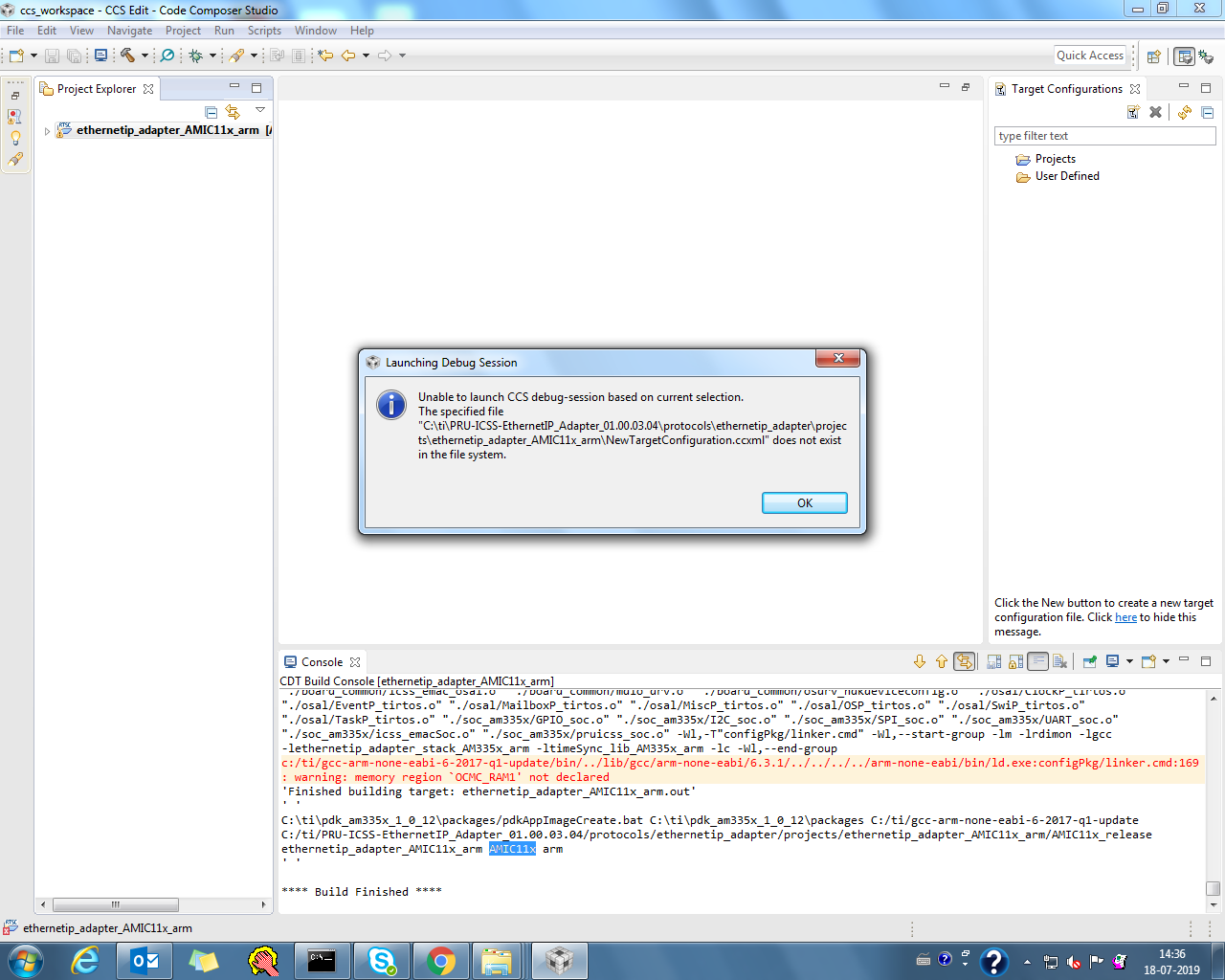
even if i tried to create debugg config my own it wont help either.

Kindly help me to start debugging and loading of the programm.

also share steps to create build configuration.

Regards,

Vrund

  • Hi,

    Is this the latest Processor SDK RTOS version?

    Best Regards,
    Yordan

  • Hi,

    I am using "PRU-ICSS-EthernetIP_Adapter_01.00.03.04".

    SDK version used is "processor_sdk_rtos_am335x_5_01_00_11".

    below is the .bat file for creating project under EIP adapter version mentioned above.

    Set CCS installation directory path(Mandatory) - The path where folder 'eclipse' is located
    set "CCS_INSTALL_DIR=C:\ti\ccsv7"

    ::Set the CCS workspace location(Mandatory). Workspace will be created if it doesn't exist!
    set "CCS_WORKSPACE_LOC=%USERPROFILE%\ccs_workspace"

    ::Set the IA_SDK_HOME Directory(Mandatory)
    set "IA_SDK_HOME=%cd%\..\..\.."

    ::Set PDK Installation directory path(Mandatory)
    set "AM57xx_PDK_INSTALL_PATH=C:\ti\pdk_am57xx_1_0_12\packages"

    ::Set PDK Installation directory path(Mandatory for K2G projects)
    set "K2G_PDK_INSTALL_PATH=C:\ti\pdk_k2g_1_0_11\packages"

    ::Set PDK Installation directory path(Mandatory for AM335x projects)
    set "AM335x_PDK_INSTALL_PATH=C:\ti\pdk_am335x_1_0_12\packages"

    ::Set PDK Installation directory path(Mandatory for AM437x projects)
    set "AM437x_PDK_INSTALL_PATH=C:\ti\pdk_am437x_1_0_12\packages"

    :: Set the folder path where the projects will be created using command line project create method(Mandatory)
    set "PROJECT_CREATE_DIR=%IA_SDK_HOME%\protocols\ethernetip_adapter\projects"

    :: Set the folder path where command line project create Options files for are kept(Mandatory)
    set "PROJECT_CREATE_OPTIONS_FILE_DIR=%IA_SDK_HOME%\protocols\ethernetip_adapter\projects\ccsproject_args"

    ::Set AM57xx PDK Eclipse ID
    set "AM57xx_PDK_ECLIPSE_ID=com.ti.pdk.am57xx"

    ::Set K2G PDK Eclipse ID
    set "K2G_PDK_ECLIPSE_ID=com.ti.pdk.k2g"

    ::Set AM335x PDK Eclipse ID
    set "AM335x_PDK_ECLIPSE_ID=com.ti.pdk.am335x"

    ::Set AM437x PDK Eclipse ID
    set "AM437x_PDK_ECLIPSE_ID=com.ti.pdk.am437x"

    ::Set AM57xx PDK Version
    set "AM57xx_PDK_VERSION=1.0.12"

    ::Set K2G PDK Version
    set "K2G_PDK_VERSION=1.0.11"

    ::Set AM335x PDK Version
    set "AM335x_PDK_VERSION=1.0.12"

    ::Set AM437x PDK Version
    set "AM437x_PDK_VERSION=1.0.12"

    :: Set XDC Tools Version which is to be used while creating the project
    set "XDC_TOOLS_VERSION=3.50.07.20_core"

    :: Set SYSBIOS Version which is to be used while creating the project
    set "SYS_BIOS_VERSION=6.73.00.12"

    :: Set NDK Version which is to be used while creating the project
    set "NDK_VERSION=3.40.01.01"

    :: Set EDMA3 Version which is to be used while creating the project
    set "EDMA_VERSION=2.12.05.30"

    Regards,

    Vrund

  • Vrund,

    As the error message shows, you don't have a target configuration created. You need browse to CCS menu 'File' -> 'New'->'target configuration file' then follow the instructions to create one.

    Regards,

    Garrett

  • Hi,

    By updateing the emu pack i am able to connect to the target.

    able to load the gel file.

    but while loading the .out file problem occurs.

    "

    CortxA8: SemiHosting : File IO Error : fopen() : C:\ti\PRU-ICSS-EthernetIP_Adapter_01.00.03.04\protocols\ethernetip_adapter\projects\ethernetip_adapter_AMIC11x_arm\AMIC11x_release\:semihosting-features : Invalid argument
    CortxA8: Unhandled ADP_Stopped exception 0x80187918

    "

    kindly help.

    Regards,

    Vrund Rana

  • Hello,

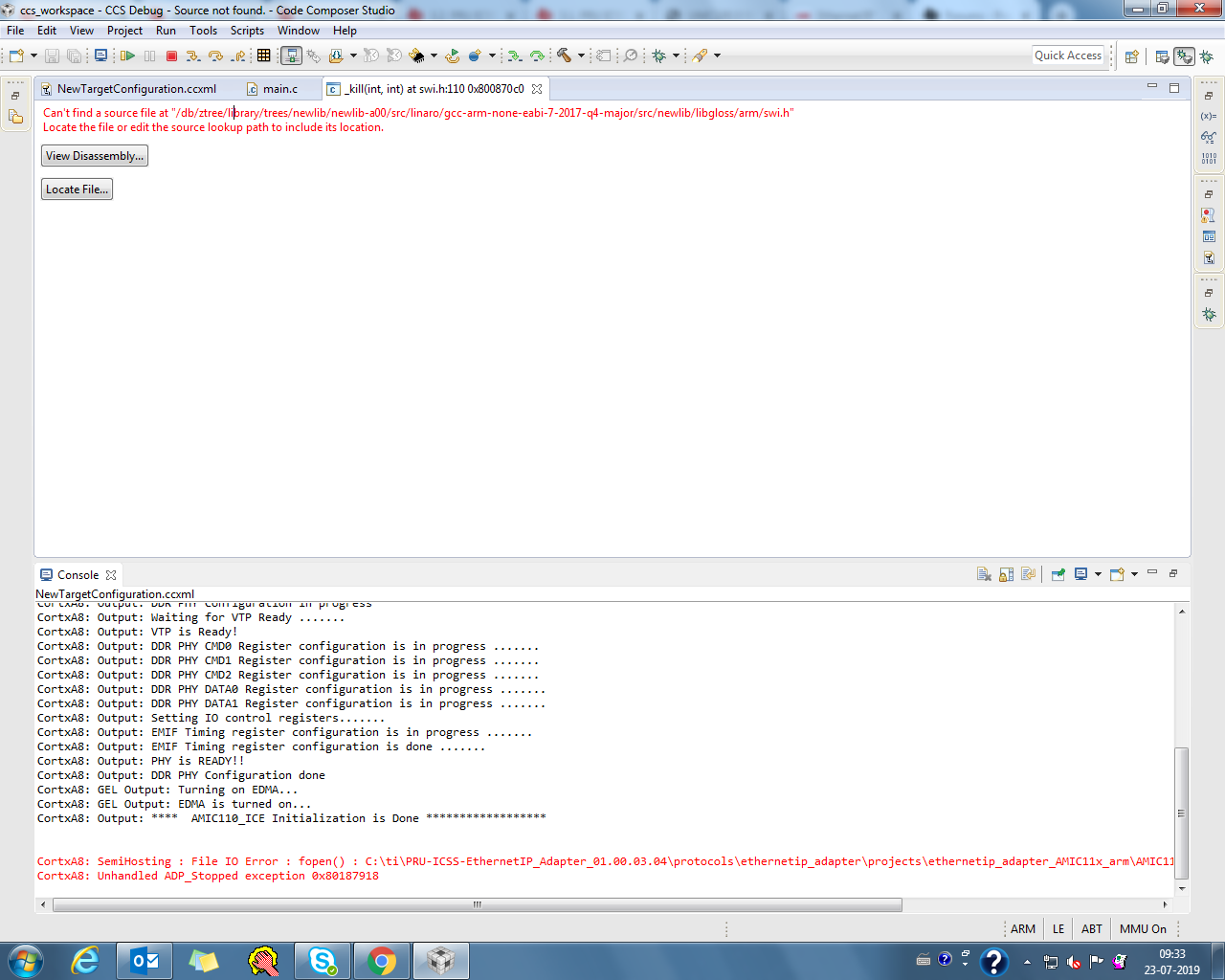
    This happens while loading the program.

    till this it is working after that problem occurs.

    This error is coming in seperate window.

    "

    Can't find a source file at "/db/ztree/library/trees/newlib/newlib-a00/src/linaro/gcc-arm-none-eabi-7-2017-q4-major/src/newlib/libgloss/arm/swi.h"
    Locate the file or edit the source lookup path to include its location.

    "

    Below error is coming in console window.

    "

    CortxA8: SemiHosting : File IO Error : fopen() : C:\ti\PRU-ICSS-EthernetIP_Adapter_01.00.03.04\protocols\ethernetip_adapter\projects\ethernetip_adapter_AMIC11x_arm\AMIC11x_release\:semihosting-features : Invalid argument
    CortxA8: Unhandled ADP_Stopped exception 0x80187918

    "

    Regards,

    Vrund

  • Hi,

    I have found some link on the net and able to overcome above mention problem.

    here is the link. kindly confirm.

    https://e2e.ti.com/support/processors/f/791/p/753188/2782834#2782834

    program is getting successfully loaded.But still i get statment on console in red.

    CortxA8: SemiHosting : File IO Error : fopen() : C:\ti\PRU-ICSS-EthernetIP_Adapter_01.00.03.04\protocols\ethernetip_adapter\projects\ethernetip_adapter_AMIC11x_arm\AMIC11x_release\:semihosting-features : Invalid argument

    Dont know why. kindly explain.

    After pressing run  led d16,d19 and d20 gets on and then off and that Green LED(D17 on tmdxice110) on the board is getting ON.

    KIndly confirm the behaviour.

    http://processors.wiki.ti.com/index.php/ICSS_EIP_Adapter_Developer_Guide#Molex_EIP_Tool

    I am able to do the process till step 10.(10. Now the communication driver is configured properly. Driver status should show ‘Running’. Click ‘Close’.)

    in step 11 i am facing problem.

    (11. Power up the DUT and run the RSWho utility in RSLinx. Open the RSWho window within RSLinx (Connections →RSWho) and browse the network with the DUT using the EtherNet/IP driver. Verify that the DUT is discovered by RSWho and is displayed correctly.)

    i have power up the tmdx110 and eip app is running. i have open the RSWho window. but in that under AB_ETHIP1,Ethernet it is not 

    showing anything. (as it shown in step 12).

    3) Can you tell me how data is mapped for given app.

    Kindly help.

    Regards,

    Vrund

  • Hi,

    By changing the IP address i am able to communicate.

    If i purchase the EIP stack from Molex would ti help me to do interfacing.?

    if yes, What are the efforts required for integrating the stack? n how much days it takes?

    Regards,

    Vrund

  • Hi Vrund,

    Yes, we will help you integrate the EIP stack to PRU-ICSS sw. Please contact Molex with regard to the effort of integrating their stack.

    Regards,

    Garrett

  • Hi,

    Yes, we will help you integrate the EIP stack to PRU-ICSS sw.

    -- But after purchasing of the stack do i need to integrate with TI's AMIC110?

    as EIP stack binary is already there provided by TI's AMIC110 EIP adapter application?

    Regards,

    Vrund

  • Vrund,

    The EIP stack binary in TI's application is an evaluation version with 1 hour time limit. Yes, after purchasing the stack you need to integrate with AMIC110.

    Regards,

    Garrett

  • Hello,

    AS per http://processors.wiki.ti.com/index.php/ICSS_EIP_Adapter_Developer_Guide#Molex_EIP_Tool

    Molex EIP Tool

    Test Setup 1. The Molex EIP tool can be downloaded from Molex Website and shall be extracted to Windows PC (Installation not required).
    2. Launch EIP_Tools.exe
    3. The DUT connected to the Test machine over LAN.

    It seems that only Unconnected Explicit meassaging testing example is provided.

    How to to check connected Explicit messaging and Implicit messaging?

    How to check ?

    • Exclusive Owner Connection
    • Input Only Connection
    • Listen Only Connection

    In case of Implicit messaging what datas are mapped? 

    How can i map my own data in code for Implicit messaging as well as For explicit messaging?

    Regards,

    Vrund

  • Vrund,

    >>It seems that only Unconnected Explicit meassaging testing example is provided.

    Yes. "The EtherNet/IP tool (EIPTool) is a small and simple helper tool which assists to explore CIP objects of EtherNet/IP nodes, without having any EDS files. It uses the explicit messaging to read and write CIP attributes" see https://www.molex.com/molex/common/staticLoader.jsp?fileName=/mx_upload/superfamily/iccc/EtherNet_IPTool.html

    For more feature test, you may use PLC as described in the section Communication between EtherNet/IP Adapter and Scanner devices (http://processors.wiki.ti.com/index.php/ICSS_EIP_Adapter_Developer_Guide#Communication_between_EtherNet.2FIP_Adapter_and_Scanner_devices)

    Regards,

    Garrett

  • Hello,

    I need to increase the number of connection?

    also need to add more data for I/O messaging?

    How to do it?

    Regards,

    Vrund

  • Hi,

    I want to map more data to explicit and implicit messaging?

    Can you tell me how do i map them?

    Regards,

    Vrund

  • Vrund,

    There are some APIs listed in the header files - PRU-ICSS-EthernetIP_Adapter_01.00.03.04\third_party\protocols\ethernetip_adapter\include for IO and objects creation. You may contact Molex for the complete documentation and API usage.

    EIP_BOOL CM_CreateIoConnection( ST_IOCNXN_PARAMS * pstIoCnxnParams,ST_CIP_STATUS *pstCipStatus);

    EIP_BOOL CM_ProduceIoData(EIP_LPVOID lpvProd, EIP_LPBYTE lpBuffer, EIP_WORD wSizeToCopy, EIP_LPSHORT lpnStatus);

    Regards,

    Garrett