This thread has been locked.

If you have a related question, please click the "Ask a related question" button in the top right corner. The newly created question will be automatically linked to this question.

AM3358: Ethernet boot fails

Part Number: AM3358

Hello Everyone,

We have a custom board based on the AM3358 and we want to boot through Ethernet using BOOTP and TFTP servers.  Both the BOOTP and TFTP servers are configured using the guides found in http://processors.wiki.ti.com/index.php/Ubuntu_12.04_Set_Up_to_Network_Boot_an_AM335x_Based_Platform and http://software-dl.ti.com/processor-sdk-linux/esd/docs/latest/linux/How_to_Guides_Host.html#ubuntu-14-04-set-up-to-network-boot-an-am335x-am437x-based-platform  Both TFTP servers, tftpd-hpa and atftpd, were tested and work fine to send the  u-boot-spl.bin.  This wiki has also been read http://software-dl.ti.com/processor-sdk-linux/esd/docs/latest/linux/index.html#Using_the_network_.28Wired_or_USB_Client.29   The modifications seen here http://e2e.ti.com/support/processors/f/791/t/652970?PROCESSOR-SDK-AM335X-Ethernet-boot-fails were also tested.

The SYSBOOT is configured as 11001b.  When trying to boot from a SD CARD there are no problems.

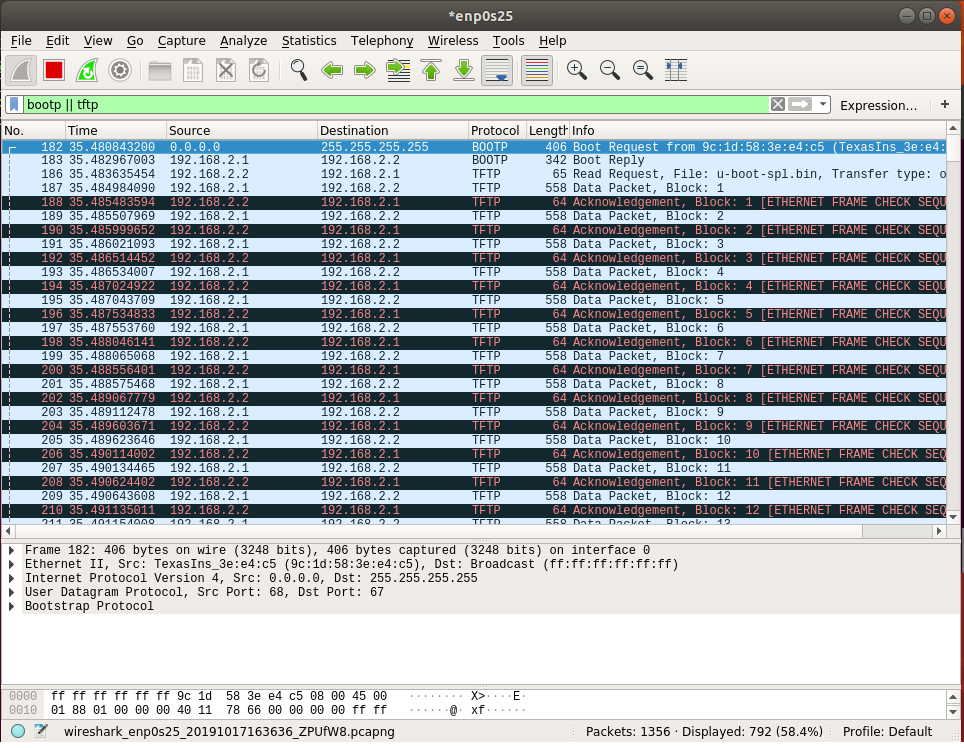
Attached can be seen that Wireshark is used to observe the process and it is observed that there are some frame check sequence errors with the TFTP transfer; however, it was read on http://e2e.ti.com/support/processors/f/791/t/515767#pi320966=2 that those issues from Wireshark are in regards with a bootp process, as mentioned in the final post.  The post suggested adding CONFIG_SPL_ETH_SUPPORT and that was done.  A similar solution was found in http://e2e.ti.com/support/processors/f/791/p/558760/2048067 

Our boot process stops and reports "SPL:  failed to boot from all boot devices" as seen on the attached image.

Attached:
 

Questions:

What could be the cause of the process stopping at this point and what can be done to fix it?

Is the Frame Check Sequence Error part of the problem?

Are there some configurations that could be missing?

Thank you for your time and help.

  • Jesus,

    I looked into this closer and it seems like Ethernet-based boot on AM335x has been broken for a while. My understanding is that when the Ethernet driver in U-Boot got converted to "driver model" (CONFIG_DM_ETH) the impact this conversion has on the SPL was not considered appropriately. Specifically, the Ethernet driver is reliant on the board-specific device tree file for configuration including the configuration of the PHY. However since AM335x platforms currently do not use device tree in SPL (CONFIG_SPL_OF_CONTROL) important configuration steps are not performed.

    This being said I did find a way to get a pure Ethernet-based boot to work on AM335x, by using the U-Boot that is part of Processor SDK Linux v06.00.00.07 as a starting point and adding a single patch (attached) to it to force-initialize the PHY to RGMII mode. Note that using this U-Boot as a starting point does not require adding in CONFIG_SPL_ETH_SUPPORT as it is already part of the config. With this, the board boots to U-Boot prompt without any issues as shown below.

    CCCCCCCCCCCCCCCC
    U-Boot SPL 2019.01-00353-g8cea8a1fa2 (Oct 18 2019 - 15:51:31 -0500)
    Trying to boot from eth device
    cpsw_gmii_sel_am3352: HACK forcing phy_mode=7 (rgmii)
    
    Warning: eth_cpsw using MAC address from ROM
    eth0: eth_cpsw
    eth_cpsw Waiting for PHY auto negotiation to complete..... done
    link up on port 0, speed 1000, full duplex
    BOOTP broadcast 1
    BOOTP broadcast 2
    BOOTP broadcast 3
    DHCP client bound to address 192.168.1.51 (1263 ms)
    Using eth_cpsw device
    TFTP from server 192.168.1.1; our IP address is 192.168.1.51
    Filename 'u-boot.img'.
    Load address: 0x82000000
    Loading: #################################################################
             #################################################################
             ##########################
             1.6 MiB/s
    done
    Bytes transferred = 794400 (c1f20 hex)
    
    
    U-Boot 2019.01-00353-g8cea8a1fa2 (Oct 18 2019 - 15:51:31 -0500)
    
    CPU  : AM335X-GP rev 2.0
    Model: TI AM335x EVM
    DRAM:  1 GiB
    NAND:  256 MiB
    MMC:   OMAP SD/MMC: 0
    Loading Environment from FAT... <ethaddr> not set. Validating first E-fuse MAC
    Net:   eth0: ethernet@4a100000
    Warning: usb_ether MAC addresses don't match:
    Address in ROM is          de:ad:be:ef:00:01
    Address in environment is  bc:6a:29:64:77:b7
    , eth1: usb_ether
    Hit any key to stop autoboot:  0 
    => 

    Note that this patch while it works should be considered as a HACK, as it might miss important configuration aspects that could cause issues that are not evident with the simple boot test. I'll get with some folks here to see how we can best solve this for one of the upcoming SDK releases, a full conversion of SPL to use device tree might not what we want to do for memory size reasons.

    Anyways, please do let me know if you can re-create this and if it helps you to get you unstuck.

    Jesus Pulido Garcia said:
    Is the Frame Check Sequence Error part of the problem?

    No this has nothing to do with it. I see the same FCS errors here, it seems like the AM335x ROM code just doesn't populate the FCS.

    Regards,
    Andreas

    https://e2e.ti.com/cfs-file/__key/communityserver-discussions-components-files/791/0001_2D00_HACK_2D00_net_2D00_ti_2D00_cpsw_2D00_Force_2D00_PHY_2D00_mode_2D00_to_2D00_RGMII_2D00_in_2D00_SPL.patch

  • Hello Andreas,

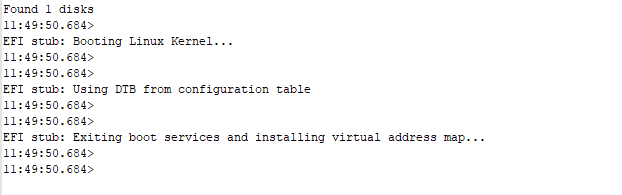
    Currently our team has gotten to where the process of booting through the Ethernet gets to where the it is able to download the zImage and attempts to boot the Linux Kernel as seen in attached.  This was accomplished by applying a custom patch to board_detect.c along with a custom .dtb and configuration for our custom board and using u-boot-2019.10.tar.bz2.  Not sure if the custom .dtb is being used being used through the Ethernet boot as our board doesn't start compared to how it starts when it is configured with the SD card.

    The issue we are having now is that it seems the custom device tree is not being selected and that the boot process gets stuck on "installing virtual address map".

    We will try your posted patch, Andreas.

    Attached:

    Thank you,

    Jesus

  • Jesus,

    without steps to re-create it's not really clear to me what is going on. Your Kernel startup hangs for some reasons not evident from the log extract you provided. Some ideas....

    • Could potentially be an issue with how your device tree file is loaded. See if you can control the load process by interrupting the boot @ U-Boot prompt and experimenting there, loading the different artifacts manually.
    • Ensure you have the 'early console' feature enabled (by configuring the Kernel command line in U-Boot appropriately, and ensuring the Kernel has the respective CONFIG options turned on). This might give you more clues. There is some related info here: 
    • Try using the latest TI Linux SDK for AM335x as a starting point for your experiments rather than your custom code base, while reducing device-tree content to an absolute minimum (only activate console, no other peripherals): 
    • Do you have a TI AM335x EVM? I could provide steps how to do network boot to Kernel prompt for you to re-create, this could serve as a known-good starting point.

    Regards, Andreas

  • Hello Andreas,

    I apologize for my negligence, please see attached for the full log of the terminal.  Unfortunately, the patch provided does not resolve our issue as I overlooked the fact that it forces PHY to only work with RGMII mode.  Our board currently only supports MII and that works well and fine.  Our team successfully loaded an Arago-Project kernel on our custom board by interrupting the u-boot image process and inserting tftpboot commands.  However, we want the entire process to be autonomous without any user intervention.  There are still some questions and doubts.  We are still interested in the steps you mentioned you would provide for network boot to Kernel.

    Attached:

    Terminal log file
    Date: 10/18/2019 - 11:48:19 AM
    -----------------------------------------------
    CCCC
    11:48:48.850> 
    U-Boot SPL 2019.10 (Oct 18 2019 - 11:08:49 -0400)
    11:48:48.850> 
    Trying to boot from eth device
    11:48:48.850> 
    
    11:48:48.910> 
    Warning: eth_cpsw using MAC address from ROM
    11:48:48.910> 
    eth0: eth_cpsw
    11:48:48.910> 
    eth_cpsw Waiting for PHY auto negotiation to complete... done
    11:48:50.600> 
    link up on port 0, speed 100, full duplex
    11:48:50.600> 
    BOOTP broadcast 1
    11:48:50.600> 
    DHCP client bound to address 192.168.1.98 (182 ms)
    11:48:50.787> 
    *** ERROR: `serverip' not set
    11:48:50.787> 
    Cannot autoload with TFTPGET
    11:48:50.787> 
    Problem booting with BOOTP
    11:48:50.787> 
    SPL: failed to boot from all boot devices
    11:48:50.787> 
    ### ERROR ### Please RESET the board ###
    11:48:50.787> 
    
    11:49:40.036> 
    U-Boot SPL 2019.10 (Oct 18 2019 - 11:08:49 -0400)
    11:49:40.036> 
    Trying to boot from eth device
    11:49:40.036> 
    
    11:49:40.036> 
    Warning: eth_cpsw using MAC address from ROM
    11:49:40.036> 
    eth0: eth_cpsw
    11:49:40.036> 
    eth_cpsw Waiting for PHY auto negotiation to complete... done
    11:49:41.725> 
    link up on port 0, speed 100, full duplex
    11:49:41.725> 
    BOOTP broadcast 1
    11:49:41.725> 
    BOOTP broadcast 2
    11:49:41.973> 
    DHCP client bound to address 192.168.2.5 (259 ms)
    11:49:42.035> 
    Using eth_cpsw device
    11:49:42.035> 
    TFTP from server 192.168.2.1; our IP address is 192.168.2.5
    11:49:42.035> 
    Filename 'u-boot.img'.
    11:49:42.035> 
    Load address: 0x82000000
    11:49:42.035> 
    Loading: *#################################################################
    11:49:42.150> 
    	 #################################################################
    11:49:42.285> 
    	 ###################
    11:49:42.348> 
    	 2.1 MiB/s
    11:49:42.348> 
    done
    11:49:42.348> 
    Bytes transferred = 757848 (b9058 hex)
    11:49:42.348> 
    
    11:49:42.661> 
    
    11:49:42.661> 
    U-Boot 2019.10 (Oct 17 2019 - 11:56:55 -0400)
    11:49:42.661> 
    
    11:49:42.661> 
    CPU  : AM335X-GP rev 2.1
    11:49:42.661> 
    Model: TI AM335x BeagleBone Black
    11:49:42.661> 
    DRAM:  512 MiB
    11:49:42.661> 
    WDT:   Started with servicing (60s timeout)
    11:49:42.847> 
    NAND:  0 MiB
    11:49:43.160> 
    MMC:   OMAP SD/MMC: 0, OMAP SD/MMC: 1
    11:49:43.160> 
    Loading Environment from FAT... <ethaddr> not set. Validating first E-fuse MAC
    11:49:43.224> 
    Net:   eth0: ethernet@4a100000
    11:49:43.224> 
    Warning: usb_ether MAC addresses don't match:
    11:49:43.224> 
    Address in ROM is          de:ad:be:ef:00:01
    11:49:43.224> 
    Address in environment is  9c:1d:58:3e:e4:c7
    11:49:43.224> 
    , eth1: usb_ether
    11:49:43.224> 
    Hit any key to stop autoboot:  2  1  0 
    11:49:45.162> 
    WARNING: Could not determine device tree to use
    11:49:45.162> 
    switch to partitions #0, OK
    11:49:45.285> 
    mmc1(part 0) is current device
    11:49:45.285> 
    ** No partition table - mmc 1 **
    11:49:45.285> 
    switch to partitions #0, OK
    11:49:45.285> 
    mmc1(part 0) is current device
    11:49:45.285> 
    SD/MMC found on device 1
    11:49:45.403> 
    ** No partition table - mmc 1 **
    11:49:45.403> 
    ## Error: "bootcmd_nand0" not defined
    11:49:45.403> 
    starting USB...
    11:49:45.403> 
    Bus usb@47401800: Port not available.
    11:49:46.346> 
    link up on port 0, speed 100, full duplex
    11:49:46.346> 
    BOOTP broadcast 1
    11:49:46.346> 
    DHCP client bound to address 192.168.2.5 (3 ms)
    11:49:46.346> 
    Using ethernet@4a100000 device
    11:49:46.346> 
    TFTP from server 192.168.2.1; our IP address is 192.168.2.5
    11:49:46.346> 
    Filename 'zImage'.
    11:49:46.346> 
    Load address: 0x82000000
    11:49:46.346> 
    Loading: *#################################################################
    11:49:46.540> 
    	 #################################################################
    11:49:46.540> 
    	 #################################################################
    11:49:46.660> 
    	 #################################################################
    11:49:46.787> 
    	 #################################################################
    11:49:46.847> 
    	 #################################################################
    11:49:46.973> 
    	 #################################################################
    11:49:47.036> 
    	 #################################################################
    11:49:47.163> 
    	 #################################################################
    11:49:47.224> 
    	 #################################################################
    11:49:47.350> 
    	 #################################################################
    11:49:47.473> 
    	 ######################################
    11:49:47.913> 
    	 3.2 MiB/s
    11:49:47.913> 
    done
    11:49:47.913> 
    Bytes transferred = 3854848 (3ad200 hex)
    11:49:47.913> 
    missing environment variable: pxeuuid
    11:49:47.913> 
    Retrieving file: pxelinux.cfg/01-9c-1d-58-3e-e4-c5
    11:49:47.913> 
    link up on port 0, speed 100, full duplex
    11:49:47.913> 
    Using ethernet@4a100000 device
    11:49:47.913> 
    TFTP from server 192.168.2.1; our IP address is 192.168.2.5
    11:49:47.913> 
    Filename 'pxelinux.cfg/01-9c-1d-58-3e-e4-c5'.
    11:49:47.913> 
    Load address: 0x80100000
    11:49:47.913> 
    Loading: *
    11:49:47.913> 
    TFTP error: 'File not found' (1)
    11:49:47.913> 
    Not retrying...
    11:49:47.913> 
    Retrieving file: pxelinux.cfg/C0A80205
    11:49:47.913> 
    link up on port 0, speed 100, full duplex
    11:49:47.913> 
    Using ethernet@4a100000 device
    11:49:47.913> 
    TFTP from server 192.168.2.1; our IP address is 192.168.2.5
    11:49:47.913> 
    Filename 'pxelinux.cfg/C0A80205'.
    11:49:47.913> 
    Load address: 0x80100000
    11:49:47.913> 
    Loading: *
    11:49:47.913> 
    TFTP error: 'File not found' (1)
    11:49:47.913> 
    Not retrying...
    11:49:47.913> 
    Retrieving file: pxelinux.cfg/C0A8020
    11:49:47.913> 
    link up on port 0, speed 100, full duplex
    11:49:47.913> 
    Using ethernet@4a100000 device
    11:49:47.913> 
    TFTP from server 192.168.2.1; our IP address is 192.168.2.5
    11:49:47.913> 
    Filename 'pxelinux.cfg/C0A8020'.
    11:49:47.913> 
    Load address: 0x80100000
    11:49:47.913> 
    Loading: *
    11:49:47.913> 
    TFTP error: 'File not found' (1)
    11:49:47.913> 
    Not retrying...
    11:49:47.913> 
    Retrieving file: pxelinux.cfg/C0A802
    11:49:47.913> 
    link up on port 0, speed 100, full duplex
    11:49:47.913> 
    Using ethernet@4a100000 device
    11:49:47.913> 
    TFTP from server 192.168.2.1; our IP address is 192.168.2.5
    11:49:47.913> 
    Filename 'pxelinux.cfg/C0A802'.
    11:49:47.913> 
    Load address: 0x80100000
    11:49:47.913> 
    Loading: *
    11:49:47.913> 
    TFTP error: 'File not found' (1)
    11:49:47.913> 
    Not retrying...
    11:49:47.913> 
    Retrieving file: pxelinux.cfg/C0A80
    11:49:47.913> 
    link up on port 0, speed 100, full duplex
    11:49:47.913> 
    Using ethernet@4a100000 device
    11:49:47.913> 
    TFTP from server 192.168.2.1; our IP address is 192.168.2.5
    11:49:47.913> 
    Filename 'pxelinux.cfg/C0A80'.
    11:49:47.913> 
    Load address: 0x80100000
    11:49:47.913> 
    Loading: *
    11:49:47.913> 
    TFTP error: 'File not found' (1)
    11:49:47.913> 
    Not retrying...
    11:49:47.913> 
    Retrieving file: pxelinux.cfg/C0A8
    11:49:47.913> 
    link up on port 0, speed 100, full duplex
    11:49:47.913> 
    Using ethernet@4a100000 device
    11:49:47.913> 
    TFTP from server 192.168.2.1; our IP address is 192.168.2.5
    11:49:47.913> 
    Filename 'pxelinux.cfg/C0A8'.
    11:49:47.913> 
    Load address: 0x80100000
    11:49:47.913> 
    Loading: *
    11:49:47.913> 
    TFTP error: 'File not found' (1)
    11:49:47.913> 
    Not retrying...
    11:49:47.913> 
    Retrieving file: pxelinux.cfg/C0A
    11:49:47.913> 
    link up on port 0, speed 100, full duplex
    11:49:47.913> 
    Using ethernet@4a100000 device
    11:49:47.913> 
    TFTP from server 192.168.2.1; our IP address is 192.168.2.5
    11:49:47.913> 
    Filename 'pxelinux.cfg/C0A'.
    11:49:47.913> 
    Load address: 0x80100000
    11:49:47.913> 
    Loading: *
    11:49:47.913> 
    TFTP error: 'File not found' (1)
    11:49:47.913> 
    Not retrying...
    11:49:47.913> 
    Retrieving file: pxelinux.cfg/C0
    11:49:47.913> 
    link up on port 0, speed 100, full duplex
    11:49:47.913> 
    Using ethernet@4a100000 device
    11:49:47.913> 
    TFTP from server 192.168.2.1; our IP address is 192.168.2.5
    11:49:47.913> 
    Filename 'pxelinux.cfg/C0'.
    11:49:47.913> 
    Load address: 0x80100000
    11:49:47.913> 
    Loading: *
    11:49:47.913> 
    TFTP error: 'File not found' (1)
    11:49:47.913> 
    Not retrying...
    11:49:47.913> 
    Retrieving file: pxelinux.cfg/C
    11:49:47.913> 
    link up on port 0, speed 100, full duplex
    11:49:47.913> 
    Using ethernet@4a100000 device
    11:49:47.913> 
    TFTP from server 192.168.2.1; our IP address is 192.168.2.5
    11:49:47.913> 
    Filename 'pxelinux.cfg/C'.
    11:49:47.913> 
    Load address: 0x80100000
    11:49:47.913> 
    Loading: *
    11:49:47.913> 
    TFTP error: 'File not found' (1)
    11:49:47.913> 
    Not retrying...
    11:49:47.913> 
    Retrieving file: pxelinux.cfg/default-arm-am33xx-am335x
    11:49:47.913> 
    link up on port 0, speed 100, full duplex
    11:49:47.913> 
    Using ethernet@4a100000 device
    11:49:47.913> 
    TFTP from server 192.168.2.1; our IP address is 192.168.2.5
    11:49:47.913> 
    Filename 'pxelinux.cfg/default-arm-am33xx-am335x'.
    11:49:47.913> 
    Load address: 0x80100000
    11:49:47.913> 
    Loading: *
    11:49:47.913> 
    TFTP error: 'File not found' (1)
    11:49:47.913> 
    Not retrying...
    11:49:47.913> 
    Retrieving file: pxelinux.cfg/default-arm-am33xx
    11:49:47.913> 
    link up on port 0, speed 100, full duplex
    11:49:47.913> 
    Using ethernet@4a100000 device
    11:49:47.913> 
    TFTP from server 192.168.2.1; our IP address is 192.168.2.5
    11:49:47.913> 
    Filename 'pxelinux.cfg/default-arm-am33xx'.
    11:49:47.913> 
    Load address: 0x80100000
    11:49:47.913> 
    Loading: *
    11:49:47.913> 
    TFTP error: 'File not found' (1)
    11:49:47.913> 
    Not retrying...
    11:49:47.913> 
    Retrieving file: pxelinux.cfg/default-arm
    11:49:47.913> 
    link up on port 0, speed 100, full duplex
    11:49:47.913> 
    Using ethernet@4a100000 device
    11:49:47.913> 
    TFTP from server 192.168.2.1; our IP address is 192.168.2.5
    11:49:47.913> 
    Filename 'pxelinux.cfg/default-arm'.
    11:49:47.913> 
    Load address: 0x80100000
    11:49:47.913> 
    Loading: *
    11:49:47.913> 
    TFTP error: 'File not found' (1)
    11:49:47.913> 
    Not retrying...
    11:49:47.913> 
    Retrieving file: pxelinux.cfg/default
    11:49:47.913> 
    link up on port 0, speed 100, full duplex
    11:49:47.913> 
    Using ethernet@4a100000 device
    11:49:47.913> 
    TFTP from server 192.168.2.1; our IP address is 192.168.2.5
    11:49:47.913> 
    Filename 'pxelinux.cfg/default'.
    11:49:47.913> 
    Load address: 0x80100000
    11:49:47.913> 
    Loading: *
    11:49:47.913> 
    TFTP error: 'File not found' (1)
    11:49:47.913> 
    Not retrying...
    11:49:47.913> 
    Config file not found
    11:49:47.913> 
    starting USB...
    11:49:47.913> 
    Bus usb@47401800: Port not available.
    11:49:50.684> 
    link up on port 0, speed 100, full duplex
    11:49:50.684> 
    BOOTP broadcast 1
    11:49:50.684> 
    DHCP client bound to address 192.168.2.5 (2 ms)
    11:49:50.684> 
    Using ethernet@4a100000 device
    11:49:50.684> 
    TFTP from server 192.168.2.1; our IP address is 192.168.2.5
    11:49:50.684> 
    Filename 'boot.scr.uimg'.
    11:49:50.684> 
    Load address: 0x80000000
    11:49:50.684> 
    Loading: *
    11:49:50.684> 
    TFTP error: 'File not found' (1)
    11:49:50.684> 
    Not retrying...
    11:49:50.684> 
    link up on port 0, speed 100, full duplex
    11:49:50.684> 
    BOOTP broadcast 1
    11:49:50.684> 
    DHCP client bound to address 192.168.2.5 (2 ms)
    11:49:50.684> 
    Using ethernet@4a100000 device
    11:49:50.684> 
    TFTP from server 192.168.2.1; our IP address is 192.168.2.5
    11:49:50.684> 
    Filename 'zImage'.
    11:49:50.684> 
    Load address: 0x82000000
    11:49:50.684> 
    Loading: *#################################################################
    11:49:50.684> 
    	 #################################################################
    11:49:50.684> 
    	 #################################################################
    11:49:50.684> 
    	 #################################################################
    11:49:50.684> 
    	 #################################################################
    11:49:50.684> 
    	 #################################################################
    11:49:50.684> 
    	 #################################################################
    11:49:50.684> 
    	 #################################################################
    11:49:50.684> 
    	 #################################################################
    11:49:50.684> 
    	 #################################################################
    11:49:50.684> 
    	 #################################################################
    11:49:50.684> 
    	 ######################################
    11:49:50.684> 
    	 3.2 MiB/s
    11:49:50.684> 
    done
    11:49:50.684> 
    Bytes transferred = 3854848 (3ad200 hex)
    11:49:50.684> 
    link up on port 0, speed 100, full duplex
    11:49:50.684> 
    Using ethernet@4a100000 device
    11:49:50.684> 
    TFTP from server 192.168.2.1; our IP address is 192.168.2.5
    11:49:50.684> 
    Filename 'dtb/undefined'.
    11:49:50.684> 
    Load address: 0x88000000
    11:49:50.684> 
    Loading: *
    11:49:50.684> 
    TFTP error: 'File not found' (1)
    11:49:50.684> 
    Not retrying...
    11:49:50.684> 
    libfdt fdt_check_header(): FDT_ERR_BADMAGIC
    11:49:50.684> 
    78Scanning disk mmc@48060000.blk...
    11:49:50.684> 
    Disk mmc@48060000.blk not ready
    11:49:50.684> 
    Scanning disk mmc@481d8000.blk...
    11:49:50.684> 
    Found 1 disks
    11:49:50.684> 
    EFI stub: Booting Linux Kernel...
    11:49:50.684> 
    11:49:50.684> 
    EFI stub: Using DTB from configuration table
    11:49:50.684> 
    11:49:50.684> 
    EFI stub: Exiting boot services and installing virtual address map...
    11:49:50.684> 
    11:49:50.684> 
    
    -----------------------------------------------
    Date: 10/18/2019 - 11:51:02 AM
    End log file
    

    Questions & Doubts:

    Following the guide in http://software-dl.ti.com/processor-sdk-linux/esd/docs/latest/linux/How_to_Guides_Host.html#ubuntu-14-04-set-up-to-network-boot-an-am335x-am437x-based-platform , does u-boot.img still search for uEnv.txt to setup different configurations when the booting process is done completely through BOOTP and TFTP?

    According to the above guide, should the kernel that is downloaded be the uImage or the zImage?  Based the guide, it only mentions zImage.

    Is there a specific way of flashing the kernel to the eMMC of the board so that it can start from that point upon reset?  Or is this process automatically done through BOOTP and TFTP?

    Thank you,

    Jesus

  • Hi Jesus,

    Jesus Pulido Garcia said:
    We are still interested in the steps you mentioned you would provide for network boot to Kernel.

    I was able to perform a network-based boot of the Beagle Bone Black from an Ubuntu 18.04-based box where the Kernel and the DTB file were hosted via TFTP, and the rootfs via NFS using the build artifacts provided as part of AM335X Linux Processor SDK v06.00.00.07.

    As usual there are several ways to accomplish that, and to maximize my chances of success I tend to start bottoms-up trying to find a *simple* way to do things, as most guides/instructions -while generally helpful- are often to be taken with a grain of salt (ideally they should match 100%, but it is hard to keep ever-evolving code and documentation in sync).

    This being said looking at the default environment of the TI U-Boot 19.01 in that SDK I see the following (just dumping it all here so we can digest it in its entirety)...

    => env print
    arch=arm
    args_mmc=run finduuid;setenv bootargs console=${console} ${optargs} root=PARTUUID=${uuid} rw rootfstype=${mmcrootfstype}
    baudrate=115200
    board=am335x
    board_name=A335BNLT
    board_rev=00C0
    board_serial=5014BBBK1DBD
    boot_a_script=load ${devtype} ${devnum}:${distro_bootpart} ${scriptaddr} ${prefix}${script}; source ${scriptaddr}
    boot_efi_binary=if fdt addr ${fdt_addr_r}; then bootefi bootmgr ${fdt_addr_r};else bootefi bootmgr ${fdtcontroladdr};fi;load ${devtype} ${devnum}:${distro_bootpart} ${kernel_addr_r} efi/boot/bootarm.efi; if fdt addr ${fdt_addr_r}; then bootefi ${kernel_addr_r} ${fdt_addr_r};else bootefi ${kernel_addr_r} ${fdtcontroladdr};fi
    boot_extlinux=sysboot ${devtype} ${devnum}:${distro_bootpart} any ${scriptaddr} ${prefix}${boot_syslinux_conf}
    boot_fdt=try
    boot_fit=0
    boot_net_usb_start=usb start
    boot_prefixes=/ /boot/
    boot_script_dhcp=boot.scr.uimg
    boot_scripts=boot.scr.uimg boot.scr
    boot_syslinux_conf=extlinux/extlinux.conf
    boot_targets=mmc0 legacy_mmc0 mmc1 legacy_mmc1 nand0 pxe dhcp 
    bootcmd=if test ${boot_fit} -eq 1; then run update_to_fit; fi; run findfdt; run init_console; run envboot; run distro_bootcmd
    bootcmd_dhcp=run boot_net_usb_start; if dhcp ${scriptaddr} ${boot_script_dhcp}; then source ${scriptaddr}; fi;setenv efi_fdtfile ${fdtfile}; if test -z "${fdtfile}" -a -n "${soc}"; then setenv efi_fdtfile ${soc}-${board}${boardver}.dtb; fi; setenv efi_old_vci ${bootp_vci};setenv efi_old_arch ${bootp_arch};setenv bootp_vci PXEClient:Arch:00010:UNDI:003000;setenv bootp_arch 0xa;if dhcp ${kernel_addr_r}; then tftpboot ${fdt_addr_r} dtb/${efi_fdtfile};if fdt addr ${fdt_addr_r}; then bootefi ${kernel_addr_r} ${fdt_addr_r}; else bootefi ${kernel_addr_r} ${fdtcontroladdr};fi;fi;setenv bootp_vci ${efi_old_vci};setenv bootp_arch ${efi_old_arch};setenv efi_fdtfile;setenv efi_old_arch;setenv efi_old_vci;
    bootcmd_legacy_mmc0=setenv mmcdev 0; setenv bootpart 0:2 ; run mmcboot
    bootcmd_legacy_mmc1=setenv mmcdev 1; setenv bootpart 1:2 ; run mmcboot
    bootcmd_mmc0=setenv devnum 0; run mmc_boot
    bootcmd_mmc1=setenv devnum 1; run mmc_boot
    bootcmd_nand=run nandboot
    bootcmd_pxe=run boot_net_usb_start; dhcp; if pxe get; then pxe boot; fi
    bootcount=4
    bootdelay=2
    bootdir=/boot
    bootenvfile=uEnv.txt
    bootfile=zImage
    bootm_size=0x10000000
    bootpart=0:2
    bootscript=echo Running bootscript from mmc${mmcdev} ...; source ${loadaddr}
    console=ttyO0,115200n8
    cpu=armv7
    dfu_alt_info_emmc=rawemmc raw 0 3751936;boot part 1 1;rootfs part 1 2;MLO fat 1 1;MLO.raw raw 0x100 0x200;u-boot.img.raw raw 0x300 0x1000;u-env.raw raw 0x1300 0x200;spl-os-args.raw raw 0x1500 0x200;spl-os-image.raw raw 0x1700 0x6900;spl-os-args fat 1 1;spl-os-image fat 1 1;u-boot.img fat 1 1;uEnv.txt fat 1 1
    dfu_alt_info_mmc=boot part 0 1;rootfs part 0 2;MLO fat 0 1;MLO.raw raw 0x100 0x200;u-boot.img.raw raw 0x300 0x1000;u-env.raw raw 0x1300 0x200;spl-os-args.raw raw 0x1500 0x200;spl-os-image.raw raw 0x1700 0x6900;spl-os-args fat 0 1;spl-os-image fat 0 1;u-boot.img fat 0 1;uEnv.txt fat 0 1
    dfu_alt_info_nand=SPL part 0 1;SPL.backup1 part 0 2;SPL.backup2 part 0 3;SPL.backup3 part 0 4;u-boot part 0 5;u-boot-spl-os part 0 6;kernel part 0 8;rootfs part 0 9
    dfu_alt_info_ram=kernel ram 0x80200000 0x4000000;fdt ram 0x80f80000 0x80000;ramdisk ram 0x81000000 0x4000000
    distro_bootcmd=for target in ${boot_targets}; do run bootcmd_${target}; done
    efi_dtb_prefixes=/ /dtb/ /dtb/current/
    envboot=mmc dev ${mmcdev}; if mmc rescan; then echo SD/MMC found on device ${mmcdev};if run loadbootscript; then run bootscript;else if run loadbootenv; then echo Loaded env from ${bootenvfile};run importbootenv;fi;if test -n $uenvcmd; then echo Running uenvcmd ...;run uenvcmd;fi;fi;fi;
    eth1addr=6c:ec:eb:ba:cb:c9
    ethaddr=6c:ec:eb:ba:cb:c7
    fdt_addr_r=0x88000000
    fdtaddr=0x88000000
    fdtcontroladdr=9df3b0d8
    fdtfile=undefined
    findfdt=if test $board_name = A335BONE; then setenv fdtfile am335x-bone.dtb; fi; if test $board_name = A335BNLT; then setenv fdtfile am335x-boneblack.dtb; fi; if test $board_name = A335PBGL; then setenv fdtfile am335x-pocketbeagle.dtb; fi; if test $board_name = BBBW; then setenv fdtfile am335x-boneblack-wireless.dtb; fi; if test $board_name = BBG1; then setenv fdtfile am335x-bonegreen.dtb; fi; if test $board_name = BBGW; then setenv fdtfile am335x-bonegreen-wireless.dtb; fi; if test $board_name = BBBL; then setenv fdtfile am335x-boneblue.dtb; fi; if test $board_name = BBEN; then setenv fdtfile am335x-sancloud-bbe.dtb; fi; if test $board_name = A33515BB; then setenv fdtfile am335x-evm.dtb; fi; if test $board_name = A335X_SK; then setenv fdtfile am335x-evmsk.dtb; fi; if test $board_name = A335_ICE && test $ice_mii = rmii; then setenv fdtfile am335x-icev2.dtb; fi; if test $board_name = A335_ICE && test $ice_mii = mii; then setenv fdtfile am335x-icev2-prueth.dtb; fi; if test $fdtfile = undefined; then echo WARNING: Could not determine device tree to use; fi; 
    finduuid=part uuid mmc ${bootpart} uuid
    fit_bootfile=fitImage
    fit_loadaddr=0x90000000
    get_overlaystring=for overlay in $overlay_files;do;setenv overlaystring ${overlaystring}'#'${overlay};done;
    ice_mii=mii
    importbootenv=echo Importing environment from mmc${mmcdev} ...; env import -t ${loadaddr} ${filesize}
    init_console=if test $board_name = A335_ICE; then setenv console ttyO3,115200n8;else setenv console ttyO0,115200n8;fi;
    kernel_addr_r=0x82000000
    load_efi_dtb=load ${devtype} ${devnum}:${distro_bootpart} ${fdt_addr_r} ${prefix}${efi_fdtfile}
    loadaddr=0x82000000
    loadbootenv=fatload mmc ${mmcdev} ${loadaddr} ${bootenvfile}
    loadbootscript=load mmc ${mmcdev} ${loadaddr} boot.scr
    loadfdt=load ${devtype} ${bootpart} ${fdtaddr} ${bootdir}/${fdtfile}
    loadfit=run args_mmc; run run_fit;
    loadimage=load ${devtype} ${bootpart} ${loadaddr} ${bootdir}/${bootfile}
    loadramdisk=load mmc ${mmcdev} ${rdaddr} ramdisk.gz
    mmc_boot=if mmc dev ${devnum}; then setenv devtype mmc; run scan_dev_for_boot_part; fi
    mmcboot=mmc dev ${mmcdev}; setenv devnum ${mmcdev}; setenv devtype mmc; if mmc rescan; then echo SD/MMC found on device ${mmcdev};if run loadimage; then if test ${boot_fit} -eq 1; then run loadfit; else run mmcloados;fi;fi;fi;
    mmcdev=0
    mmcloados=run args_mmc; if test ${boot_fdt} = yes || test ${boot_fdt} = try; then if run loadfdt; then bootz ${loadaddr} - ${fdtaddr}; else if test ${boot_fdt} = try; then bootz; else echo WARN: Cannot load the DT; fi; fi; else bootz; fi;
    mmcrootfstype=ext4 rootwait
    mtdids=nand0=nand.0
    mtdparts=mtdparts=nand.0:128k(NAND.SPL),128k(NAND.SPL.backup1),128k(NAND.SPL.backup2),128k(NAND.SPL.backup3),256k(NAND.u-boot-spl-os),1m(NAND.u-boot),128k(NAND.u-boot-env),128k(NAND.u-boot-env.backup1),8m(NAND.kernel),-(NAND.file-system)
    nandargs=setenv bootargs console=${console} ${optargs} root=${nandroot} rootfstype=${nandrootfstype}
    nandboot=echo Booting from nand ...; run nandargs; nand read ${fdtaddr} NAND.u-boot-spl-os; nand read ${loadaddr} NAND.kernel; bootz ${loadaddr} - ${fdtaddr}
    nandroot=ubi0:rootfs rw ubi.mtd=NAND.file-system,2048
    nandrootfstype=ubifs rootwait=1
    netargs=setenv bootargs console=${console} ${optargs} root=/dev/nfs nfsroot=${serverip}:${rootpath},${nfsopts} rw ip=dhcp
    netboot=echo Booting from network ...; setenv autoload no; dhcp; run netloadimage; run netloadfdt; run netargs; bootz ${loadaddr} - ${fdtaddr}
    netloadfdt=tftp ${fdtaddr} ${fdtfile}
    netloadimage=tftp ${loadaddr} ${bootfile}
    nfsopts=nolock
    partitions=uuid_disk=${uuid_gpt_disk};name=bootloader,start=384K,size=1792K,uuid=${uuid_gpt_bootloader};name=rootfs,start=2688K,size=-,uuid=${uuid_gpt_rootfs}
    pxefile_addr_r=0x80100000
    ramargs=setenv bootargs console=${console} ${optargs} root=${ramroot} rootfstype=${ramrootfstype}
    ramboot=echo Booting from ramdisk ...; run ramargs; bootz ${loadaddr} ${rdaddr} ${fdtaddr}
    ramdisk_addr_r=0x88080000
    ramroot=/dev/ram0 rw
    ramrootfstype=ext2
    rdaddr=0x88080000
    rootpath=/export/rootfs
    run_fit=bootm ${fit_loadaddr}#${fdtfile}${overlaystring}
    scan_dev_for_boot=echo Scanning ${devtype} ${devnum}:${distro_bootpart}...; for prefix in ${boot_prefixes}; do run scan_dev_for_extlinux; run scan_dev_for_scripts; done;run scan_dev_for_efi;
    scan_dev_for_boot_part=part list ${devtype} ${devnum} -bootable devplist; env exists devplist || setenv devplist 1; for distro_bootpart in ${devplist}; do if fstype ${devtype} ${devnum}:${distro_bootpart} bootfstype; then run scan_dev_for_boot; fi; done
    scan_dev_for_efi=setenv efi_fdtfile ${fdtfile}; if test -z "${fdtfile}" -a -n "${soc}"; then setenv efi_fdtfile ${soc}-${board}${boardver}.dtb; fi; for prefix in ${efi_dtb_prefixes}; do if test -e ${devtype} ${devnum}:${distro_bootpart} ${prefix}${efi_fdtfile}; then run load_efi_dtb; fi;done;if test -e ${devtype} ${devnum}:${distro_bootpart} efi/boot/bootarm.efi; then echo Found EFI removable media binary efi/boot/bootarm.efi; run boot_efi_binary; echo EFI LOAD FAILED: continuing...; fi; setenv efi_fdtfile
    scan_dev_for_extlinux=if test -e ${devtype} ${devnum}:${distro_bootpart} ${prefix}${boot_syslinux_conf}; then echo Found ${prefix}${boot_syslinux_conf}; run boot_extlinux; echo SCRIPT FAILED: continuing...; fi
    scan_dev_for_scripts=for script in ${boot_scripts}; do if test -e ${devtype} ${devnum}:${distro_bootpart} ${prefix}${script}; then echo Found U-Boot script ${prefix}${script}; run boot_a_script; echo SCRIPT FAILED: continuing...; fi; done
    scriptaddr=0x80000000
    serial#=5014BBBK1DBD
    soc=am33xx
    spiargs=setenv bootargs console=${console} ${optargs} root=${spiroot} rootfstype=${spirootfstype}
    spiboot=echo Booting from spi ...; run spiargs; sf probe ${spibusno}:0; sf read ${loadaddr} ${spisrcaddr} ${spiimgsize}; bootz ${loadaddr}
    spibusno=0
    spiimgsize=0x362000
    spiroot=/dev/mtdblock4 rw
    spirootfstype=jffs2
    spisrcaddr=0xe0000
    static_ip=${ipaddr}:${serverip}:${gatewayip}:${netmask}:${hostname}::off
    stderr=serial@44e09000
    stdin=serial@44e09000
    stdout=serial@44e09000
    update_to_fit=setenv loadaddr ${fit_loadaddr}; setenv bootfile ${fit_bootfile}
    usb_boot=usb start; if usb dev ${devnum}; then setenv devtype usb; run scan_dev_for_boot_part; fi
    usbnet_devaddr=de:ad:be:ef:00:01
    vendor=ti
    ver=U-Boot 2019.01-g8b90adfb16 (Jul 07 2019 - 10:08:45 +0000)
    
    Environment size: 10099/131068 bytes

    And looking at this I figured I should be able to perform a network boot with the following command sequence:

    env set serverip 10.0.1.38 && env set bootfile zImage-am335x-evm.bin && env set rootpath /opt/ti-processor-sdk-linux-am335x-evm-06.00.00.07/nfs/arago-tiny-image-am335x-evm && env set nfsopts nfsvers=3,nolock && run findfdt; run netboot

    This assumes the following:

    • My TFTP/NFS server IP is 10.0.1.38
    • The Kernel name is 'zImage-am335x-evm.bin' (hence the customization of 'bootfile')
    • The DTB name is 'am335x-boneblack.dtb' which will be determined by the 'findfdt' script (or you can skip that step and set 'fdtfile' directly)
    • The NFS rootfs path is '/opt/ti-processor-sdk-linux-am335x-evm-06.00.00.07/nfs/arago-tiny-image-am335x-evm' which is just a folder extracted from the respective archive part of the SDK
    • NFS server doesn't suppot NVSv2, so I explicitly switch to NFS v3 in the Kernel command line by modifying the 'nfsopts' variable

    With all that the complete boot log looks as follows:

    U-Boot SPL 2019.01-g8b90adfb16 (Jul 07 2019 - 10:08:45 +0000)
    Trying to boot from MMC2
    
    
    U-Boot 2019.01-g8b90adfb16 (Jul 07 2019 - 10:08:45 +0000)
    
    CPU  : AM335X-GP rev 2.1
    Model: TI AM335x BeagleBone Black
    DRAM:  512 MiB
    NAND:  0 MiB
    MMC:   OMAP SD/MMC: 0, OMAP SD/MMC: 1
    Loading Environment from FAT... <ethaddr> not set. Validating first E-fuse MAC
    Net:   eth0: ethernet@4a100000
    Warning: usb_ether MAC addresses don't match:
    Address in ROM is          de:ad:be:ef:00:01
    Address in environment is  6c:ec:eb:ba:cb:c9
    , eth1: usb_ether
    Hit any key to stop autoboot:  0 
    => env set serverip 10.0.1.38 && env set bootfile zImage-am335x-evm.bin && env set rootpath /opt/ti-processor-sdk-linux-am335x-evm-06.00.00.07/nfs/arago-tiny-image-am335x-evm && env set nfsopts nfsvers=3,nolock && run findfdt; run netboot
    Booting from network ...
    ethernet@4a100000 Waiting for PHY auto negotiation to complete. done
    link up on port 0, speed 100, full duplex
    BOOTP broadcast 1
    BOOTP broadcast 2
    BOOTP broadcast 3
    DHCP client bound to address 10.0.1.74 (1276 ms)
    link up on port 0, speed 100, full duplex
    Using ethernet@4a100000 device
    TFTP from server 10.0.1.38; our IP address is 10.0.1.74
    Filename 'zImage-am335x-evm.bin'.
    Load address: 0x82000000
    Loading: #################################################################
    	 #################################################################
    	 #################################################################
    	 #################################################################
    	 ##################
    	 4 MiB/s
    done
    Bytes transferred = 4080128 (3e4200 hex)
    link up on port 0, speed 100, full duplex
    Using ethernet@4a100000 device
    TFTP from server 10.0.1.38; our IP address is 10.0.1.74
    Filename 'am335x-boneblack.dtb'.
    Load address: 0x88000000
    Loading: ###
    	 3.5 MiB/s
    done
    Bytes transferred = 36717 (8f6d hex)
    ## Flattened Device Tree blob at 88000000
       Booting using the fdt blob at 0x88000000
       Loading Device Tree to 8fff4000, end 8fffff6c ... OK
    
    Starting kernel ...
    
    [    0.000000] Booting Linux on physical CPU 0x0
    [    0.000000] Linux version 4.19.38-g4dae378bbe (oe-user@oe-host) (gcc version 8.3.0 (GNU Toolchain for the A-profile Architecture 8.3-2019.03 (arm-rel-8.36))) #1 PREEMPT Sun Jul 7 04:39:33 UTC 2019
    [    0.000000] CPU: ARMv7 Processor [413fc082] revision 2 (ARMv7), cr=10c5387d
    [    0.000000] CPU: PIPT / VIPT nonaliasing data cache, VIPT aliasing instruction cache
    [    0.000000] OF: fdt: Machine model: TI AM335x BeagleBone Black
    [    0.000000] Memory policy: Data cache writeback
    [    0.000000] efi: Getting EFI parameters from FDT:
    [    0.000000] efi: UEFI not found.
    [    0.000000] cma: Reserved 48 MiB at 0x9d000000
    [    0.000000] CPU: All CPU(s) started in SVC mode.
    [    0.000000] AM335X ES2.1 (sgx neon)
    [    0.000000] random: get_random_bytes called from start_kernel+0xa4/0x434 with crng_init=0
    [    0.000000] Built 1 zonelists, mobility grouping on.  Total pages: 129920
    [    0.000000] Kernel command line: console=ttyO0,115200n8 root=/dev/nfs nfsroot=10.0.1.38:/opt/ti-processor-sdk-linux-am335x-evm-06.00.00.07/nfs/arago-tiny-image-am335x-evm,nfsvers=3,nolock rw ip=dhcp
    [    0.000000] Dentry cache hash table entries: 65536 (order: 6, 262144 bytes)
    [    0.000000] Inode-cache hash table entries: 32768 (order: 5, 131072 bytes)
    [    0.000000] Memory: 456992K/524288K available (8192K kernel code, 293K rwdata, 2592K rodata, 1024K init, 252K bss, 18144K reserved, 49152K cma-reserved, 0K highmem)
    [    0.000000] Virtual kernel memory layout:
    [    0.000000]     vector  : 0xffff0000 - 0xffff1000   (   4 kB)
    [    0.000000]     fixmap  : 0xffc00000 - 0xfff00000   (3072 kB)
    [    0.000000]     vmalloc : 0xe0800000 - 0xff800000   ( 496 MB)
    [    0.000000]     lowmem  : 0xc0000000 - 0xe0000000   ( 512 MB)
    [    0.000000]     pkmap   : 0xbfe00000 - 0xc0000000   (   2 MB)
    [    0.000000]     modules : 0xbf000000 - 0xbfe00000   (  14 MB)
    [    0.000000]       .text : 0x(ptrval) - 0x(ptrval)   (9184 kB)
    [    0.000000]       .init : 0x(ptrval) - 0x(ptrval)   (1024 kB)
    [    0.000000]       .data : 0x(ptrval) - 0x(ptrval)   ( 294 kB)
    [    0.000000]        .bss : 0x(ptrval) - 0x(ptrval)   ( 253 kB)
    [    0.000000] SLUB: HWalign=64, Order=0-3, MinObjects=0, CPUs=1, Nodes=1
    [    0.000000] rcu: Preemptible hierarchical RCU implementation.
    [    0.000000] 	Tasks RCU enabled.
    [    0.000000] NR_IRQS: 16, nr_irqs: 16, preallocated irqs: 16
    [    0.000000] IRQ: Found an INTC at 0x(ptrval) (revision 5.0) with 128 interrupts
    [    0.000000] OMAP clockevent source: timer2 at 24000000 Hz
    [    0.000014] sched_clock: 32 bits at 24MHz, resolution 41ns, wraps every 89478484971ns
    [    0.000033] clocksource: timer1: mask: 0xffffffff max_cycles: 0xffffffff, max_idle_ns: 79635851949 ns
    [    0.000043] OMAP clocksource: timer1 at 24000000 Hz
    [    0.000201] timer_probe: no matching timers found
    [    0.000371] Console: colour dummy device 80x30
    [    0.000400] WARNING: Your 'console=ttyO0' has been replaced by 'ttyS0'
    [    0.000406] This ensures that you still see kernel messages. Please
    [    0.000411] update your kernel commandline.
    [    0.000460] Calibrating delay loop... 996.14 BogoMIPS (lpj=4980736)
    [    0.089161] pid_max: default: 32768 minimum: 301
    [    0.089348] Mount-cache hash table entries: 1024 (order: 0, 4096 bytes)
    [    0.089361] Mountpoint-cache hash table entries: 1024 (order: 0, 4096 bytes)
    [    0.090120] CPU: Testing write buffer coherency: ok
    [    0.090183] CPU0: Spectre v2: using BPIALL workaround
    [    0.090999] Setting up static identity map for 0x80100000 - 0x80100060
    [    0.091138] rcu: Hierarchical SRCU implementation.
    [    0.091459] EFI services will not be available.
    [    0.092699] devtmpfs: initialized
    [    0.099998] VFP support v0.3: implementor 41 architecture 3 part 30 variant c rev 3
    [    0.100356] clocksource: jiffies: mask: 0xffffffff max_cycles: 0xffffffff, max_idle_ns: 19112604462750000 ns
    [    0.100378] futex hash table entries: 256 (order: -1, 3072 bytes)
    [    0.103760] pinctrl core: initialized pinctrl subsystem
    [    0.104466] DMI not present or invalid.
    [    0.104873] NET: Registered protocol family 16
    [    0.107019] DMA: preallocated 256 KiB pool for atomic coherent allocations
    [    0.125323] l4_wkup_cm:clk:0010:0: failed to disable
    [    0.177875] cpuidle: using governor ladder
    [    0.177910] cpuidle: using governor menu
    [    0.182594] OMAP GPIO hardware version 0.1
    [    0.191351] No ATAGs?
    [    0.191367] hw-breakpoint: debug architecture 0x4 unsupported.
    [    0.203668] edma 49000000.edma: TI EDMA DMA engine driver
    [    0.206645] media: Linux media interface: v0.10
    [    0.206692] videodev: Linux video capture interface: v2.00
    [    0.206782] pps_core: LinuxPPS API ver. 1 registered
    [    0.206790] pps_core: Software ver. 5.3.6 - Copyright 2005-2007 Rodolfo Giometti <giometti@linux.it>
    [    0.206809] PTP clock support registered
    [    0.206840] EDAC MC: Ver: 3.0.0
    [    0.207740] omap-mailbox 480c8000.mailbox: omap mailbox rev 0x400
    [    0.208064] Advanced Linux Sound Architecture Driver Initialized.
    [    0.209388] clocksource: Switched to clocksource timer1
    [    0.216814] NET: Registered protocol family 2
    [    0.217602] tcp_listen_portaddr_hash hash table entries: 512 (order: 0, 4096 bytes)
    [    0.217634] TCP established hash table entries: 4096 (order: 2, 16384 bytes)
    [    0.217674] TCP bind hash table entries: 4096 (order: 2, 16384 bytes)
    [    0.217711] TCP: Hash tables configured (established 4096 bind 4096)
    [    0.217810] UDP hash table entries: 256 (order: 0, 4096 bytes)
    [    0.217828] UDP-Lite hash table entries: 256 (order: 0, 4096 bytes)
    [    0.217970] NET: Registered protocol family 1
    [    0.218527] RPC: Registered named UNIX socket transport module.
    [    0.218540] RPC: Registered udp transport module.
    [    0.218546] RPC: Registered tcp transport module.
    [    0.218552] RPC: Registered tcp NFSv4.1 backchannel transport module.
    [    0.219603] hw perfevents: enabled with armv7_cortex_a8 PMU driver, 5 counters available
    [    0.220803] Initialise system trusted keyrings
    [    0.221172] workingset: timestamp_bits=14 max_order=17 bucket_order=3
    [    0.225362] squashfs: version 4.0 (2009/01/31) Phillip Lougher
    [    0.226108] NFS: Registering the id_resolver key type
    [    0.226148] Key type id_resolver registered
    [    0.226155] Key type id_legacy registered
    [    0.226194] ntfs: driver 2.1.32 [Flags: R/O].
    [    0.226642] pstore: using deflate compression
    [    0.228311] Key type asymmetric registered
    [    0.228326] Asymmetric key parser 'x509' registered
    [    0.228397] Block layer SCSI generic (bsg) driver version 0.4 loaded (major 245)
    [    0.228409] io scheduler noop registered
    [    0.228417] io scheduler deadline registered
    [    0.228649] io scheduler cfq registered (default)
    [    0.228660] io scheduler mq-deadline registered
    [    0.228667] io scheduler kyber registered
    [    0.230359] pinctrl-single 44e10800.pinmux: 142 pins, size 568
    [    0.275981] Serial: 8250/16550 driver, 10 ports, IRQ sharing enabled
    [    0.279709] 44e09000.serial: ttyS0 at MMIO 0x44e09000 (irq = 30, base_baud = 3000000) is a 8250
    [    0.906308] console [ttyS0] enabled
    [    0.911726] omap_rng 48310000.rng: Random Number Generator ver. 20
    [    0.929790] brd: module loaded
    [    0.939033] loop: module loaded
    [    0.944332] libphy: Fixed MDIO Bus: probed
    [    1.019472] davinci_mdio 4a101000.mdio: davinci mdio revision 1.6, bus freq 1000000
    [    1.027174] davinci_mdio 4a101000.mdio: detected phy mask fffffffe
    [    1.034632] libphy: 4a101000.mdio: probed
    [    1.038680] davinci_mdio 4a101000.mdio: phy[0]: device 4a101000.mdio:00, driver SMSC LAN8710/LAN8720
    [    1.048764] cpsw 4a100000.ethernet: Detected MACID = 6c:ec:eb:ba:cb:c7
    [    1.055566] cpsw 4a100000.ethernet: initialized cpsw ale version 1.4
    [    1.062038] cpsw 4a100000.ethernet: ALE Table size 1024
    [    1.067320] cpsw 4a100000.ethernet: cpts: overflow check period 500 (jiffies)
    [    1.075840] i2c /dev entries driver
    [    1.081230] cpuidle: enable-method property 'ti,am3352' found operations
    [    1.088346] sdhci: Secure Digital Host Controller Interface driver
    [    1.094679] sdhci: Copyright(c) Pierre Ossman
    [    1.099763] omap_gpio 44e07000.gpio: Could not set line 6 debounce to 200000 microseconds (-22)
    [    1.108504] omap_hsmmc 48060000.mmc: Got CD GPIO
    [    1.113656] omap_hsmmc 48060000.mmc: Linked as a consumer to regulator.1
    [    1.147209] omap_hsmmc 481d8000.mmc: Linked as a consumer to regulator.1
    [    1.179636] sdhci-pltfm: SDHCI platform and OF driver helper
    [    1.186941] ledtrig-cpu: registered to indicate activity on CPUs
    [    1.197388] NET: Registered protocol family 10
    [    1.203412] Segment Routing with IPv6
    [    1.207279] sit: IPv6, IPv4 and MPLS over IPv4 tunneling driver
    [    1.214199] NET: Registered protocol family 17
    [    1.218998] Key type dns_resolver registered
    [    1.223649] omap_voltage_late_init: Voltage driver support not added
    [    1.230935] Loading compiled-in X.509 certificates
    [    1.267863] mmc1: new high speed MMC card at address 0001
    [    1.274625] mmcblk1: mmc1:0001 MMC04G 3.60 GiB 
    [    1.280741] mmcblk1boot0: mmc1:0001 MMC04G partition 1 2.00 MiB
    [    1.287934] mmcblk1boot1: mmc1:0001 MMC04G partition 2 2.00 MiB
    [    1.294218] mmcblk1rpmb: mmc1:0001 MMC04G partition 3 128 KiB, chardev (244:0)
    [    1.302605] random: fast init done
    [    1.307411]  mmcblk1: p1 p2
    [    1.315621] tps65217 0-0024: TPS65217 ID 0xe version 1.2
    [    1.461651] tda998x 0-0070: found TDA19988
    [    1.468464] tilcdc 4830e000.lcdc: bound 0-0070 (ops tda998x_ops)
    [    1.474606] [drm] Supports vblank timestamp caching Rev 2 (21.10.2013).
    [    1.481262] [drm] No driver support for vblank timestamp query.
    [    1.487540] [drm] Cannot find any crtc or sizes
    [    1.492701] [drm] Initialized tilcdc 1.0.0 20121205 for 4830e000.lcdc on minor 0
    [    1.500345] omap_i2c 44e0b000.i2c: bus 0 rev0.11 at 400 kHz
    [    1.507780] omap_i2c 4819c000.i2c: bus 2 rev0.11 at 100 kHz
    [    1.514100] cpu cpu0: Linked as a consumer to regulator.3
    [    1.519669] cpu cpu0: Dropping the link to regulator.3
    [    1.525157] cpu cpu0: Linked as a consumer to regulator.3
    [    1.531849] hctosys: unable to open rtc device (rtc0)
    [    1.550658] net eth0: initializing cpsw version 1.12 (0)
    [    1.650506] SMSC LAN8710/LAN8720 4a101000.mdio:00: attached PHY driver [SMSC LAN8710/LAN8720] (mii_bus:phy_addr=4a101000.mdio:00, irq=POLL)
    [    1.668727] IPv6: ADDRCONF(NETDEV_UP): eth0: link is not ready
    [    2.560006] [drm] Cannot find any crtc or sizes
    [    3.760496] cpsw 4a100000.ethernet eth0: Link is Up - 100Mbps/Full - flow control rx/tx
    [    3.769544] IPv6: ADDRCONF(NETDEV_CHANGE): eth0: link becomes ready
    [    3.799578] Sending DHCP requests ., OK
    [    3.843821] IP-Config: Got DHCP answer from 10.0.1.1, my address is 10.0.1.74
    [    3.851272] IP-Config: Complete:
    [    3.854657]      device=eth0, hwaddr=6c:ec:eb:ba:cb:c7, ipaddr=10.0.1.74, mask=255.255.255.0, gw=10.0.1.1
    [    3.864490]      host=10.0.1.74, domain=, nis-domain=(none)
    [    3.870551]      bootserver=0.0.0.0, rootserver=10.0.1.38, rootpath=
    [    3.870570]      nameserver0=10.0.1.1
    [    3.882306] ALSA device list:
    [    3.885304]   No soundcards found.
    [    3.900478] VFS: Mounted root (nfs filesystem) on device 0:15.
    [    3.906837] devtmpfs: mounted
    [    3.912637] Freeing unused kernel memory: 1024K
    [    3.917695] Run /sbin/init as init process
    INIT: version 2.88 booting
    Framebuffer /dev/fb0 not detected
    Boot splashscreen disabled
    hwclock: can't open '/dev/misc/rtc': No such file or directory
    Mon Jul  8 02:48:20 UTC 2019
    hwclock: can't open '/dev/misc/rtc': No such file or directory
    [    6.152667] random: dd: uninitialized urandom read (512 bytes read)
    Configuring packages on first boot....
     (This may take several minutes. Please do not power off the machine.)
    [    6.414668] random: crng init done
    update-rc.d: /etc/init.d/run-postinsts exists during rc.d purge (continuing)
     Removing any system startup links for run-postinsts ...
      /etc/rcS.d/S99run-postinsts
    INIT: Entering runlevel: 5
    NOT configuring network interfaces: / is an NFS mount
    udhcpc: started, v1.29.3
    udhcpc: sending discover
    udhcpc: sending select for 10.0.1.74
    udhcpc: lease of 10.0.1.74 obtained, lease time 86400
    ip: RTNETLINK answers: File exists
    /etc/udhcpc.d/50default: Adding DNS 10.0.1.1
    hwclock: can't open '/dev/misc/rtc': No such file or directory
    Starting syslogd/klogd: done
    umount: /mnt/.psplash: not mounted.
    
     _____                    _____           _         _   
    |  _  |___ ___ ___ ___   |  _  |___ ___  |_|___ ___| |_ 
    |     |  _| .'| . | . |  |   __|  _| . | | | -_|  _|  _|
    |__|__|_| |__,|_  |___|  |__|  |_| |___|_| |___|___|_|  
                  |___|                    |___|            
    
    Arago Project http://arago-project.org am335x-evm /dev/ttyS0
    
    Arago 2019.05 am335x-evm /dev/ttyS0
    
    am335x-evm login: root
    root@am335x-evm:~# ls -al
    drwx------    2 root     root          4096 Oct 23  2019 .
    drwxr-xr-x    3 root     root          4096 Jul  7 07:34 ..
    -rw-------    1 root     root            20 Oct 23  2019 .ash_history

    Jesus Pulido Garcia said:
    According to the above guide, should the kernel that is downloaded be the uImage or the zImage?  Based the guide, it only mentions zImage.

    Kernel for AM335x would usually be a zImage

    Jesus Pulido Garcia said:
    Is there a specific way of flashing the kernel to the eMMC of the board so that it can start from that point upon reset?  Or is this process automatically done through BOOTP and TFTP?

    Well I guess I don't fully understand your complete boot flow. I thought you wanted to boot everything (MLO, U-Boot, Kernel, filesystem) from Network? But now you want to flash things into eMMC? If you'd like to flash artifacts you'd need to do that yourself, this is not done by BOOTP/TFTP. However you could use TFTP to pull items into memory (DDR), and then Flash them to eMMC for example using commands from the U-Boot 'mmc" group such as 'mmc erase', 'mmc write', etc. If you can be more specific what you need I might be able to provide a better explanation here.

    As for the reference guide from the SDK documentation I took a note to go back and see if there is something that can be improved.

    Regards,
    Andreas

  • Hello Andreas,

    I want to apologize for the severe delay.  Currently our entire boot process goes from am335x's RBL to SPL to uBoot Image to downloading a custom zImage and DTB via TFTP to finding a Filesystem exported by a NFS (using nfs-kernel-server service).  All of this works fine for a single board, but we would like the NFS to be able handle multiple custom boards or clients at a time to execute scripts automatically.  The NFS /etc/exports is configured as /srv/root 192.168.2.0/24(rw,sync,no_root_squash,no_subtree_check).  As of now, our boot process works well and executes the scripts automatically without issues, but when two or more boards are connected, the script execution freezes and either one board finishes the scripts or all boards freeze and nothing gets finished.  We suspect that the NFS isn't correctly handling the multiple clients and it is observed to handle one client at a time; where, script execution will pause on one board and continue in another board.

    The custom board/client bootargs configuration for NFS includes ip=dhcp,nolock,wsize=32768,rsize=32768,intr,noatime

    How can we set it up so that NFS can handle multiple clients in parallel? 

    I apologize if this should be a topic of its own now.

    Thank you for all of your tremendous help.

    Jesus.

  • Hi Jesus,

    sounds like you got basic network boot to work with one client, that's great.

    As for multiple NFS clients, I have not tried that myself but below some experiments you could do to see if this results in different behavior, potentially helping to narrow down the issue:

    • Mount the rootfs as read-only
    • Change your NFS export from "sync" to "async"
    • Depending on your use case, another method to completely sidestep the issue could be if you boot your system from an initramfs that you load directly from U-Boot via TFTP, or you use a combination of initramfs and NFS for boot and shared files, respectively

    If you still can't get it to work please open a new thread with an appropriate new $SUBJECT.

    Thanks, Andreas

  • Hello Andreas,

    Mounting as read-only was tested, but this throws permission denied errors.  Sync and async do not appear to show a difference in respect to the process still freezing and failing.  The idea of producing a working filesystem that can be loaded through RAM is still being explored with to how to create our custom initramfs.

    Again, thank you very much for your help

    Jesus