This thread has been locked.

If you have a related question, please click the "Ask a related question" button in the top right corner. The newly created question will be automatically linked to this question.

PROCESSOR-SDK-AM65X: U-boot GPIO Configuration

Part Number: PROCESSOR-SDK-AM65X


Hi,

I am trying to enable  one of the gpio (GPIO1_88) in U-boot on my AM65x EVM IDK board.

For that i am making some changes in u-boot device tree files  but not getting any expected result.

Changes that i have done in U-boot files:

File Name : k3-am654-base-board.dts  and  k3-am654-r5-base-board.dts

step 1: Pin Muxing for the GPIO1_88

AM65X_IOPAD(0x0018, PIN_OUTPUT_PULLUP, 7) /* (B22) TIMER_IO0.GPIO1_88 */

Note : I Added Pin Mux  generated code (as above) to  &main_pmx1 inside the main_i2c0_pins_default : main-i2c0-pins-default
                  

Step 2: Added below structure inside the &main_i2c0

gpio1: gpio1@0011C300 {
    compatible = "ti,am654-gpio";
    reg = <0x0011C300 0x100>;
    gpio-controller;
    #gpio-cells = <2>;    
    regulator-min-microvolt = <0>;
    regulator-max-microvolt = <3300000>;
     states = <0 0x0 3300000 0x1>;
     u-boot,dm-spl;
    };

Regards,

Shadab

  • Hi Md Shadab,

    I would suggest you to add main_gpio1 node into file:

    u-boot/arch/arm/dts/k3-am65-main.dtsi

    &cbass_main {

    .....

    main_i2c3: i2c@2030000 {

    ....

    };

    main_gpio1: main_gpio1@601000 {
            compatible = "ti,k2g-gpio", "ti,keystone-gpio";
            reg = <0x0 0x601000 0x0 0x100>;
            gpio-controller;
            #gpio-cells = <2>;
            ti,ngpio = <90>;
            ti,davinci-gpio-unbanked = <0>;
            clocks = <&k3_clks 58 0>;
            clock-names = "gpio";
        };

    Then for pinmux, you can add main_gpio1 pinmux in below file:

    u-boot/arch/arm/dts/k3-am654-base-board.dts

    &main_pmx1 {

    main_i2c1_pins_default: main-i2c1-pins-default {
            pinctrl-single,pins = <
                AM65X_IOPAD(0x0008, PIN_INPUT, 0) /* (B21) I2C1_SCL */
                AM65X_IOPAD(0x000c, PIN_INPUT, 0) /* (E21) I2C1_SDA */
            >;
        };

    main_gpio1_pins_default: main-gpio1-pins-default {
            pinctrl-single,pins = <
                AM65X_IOPAD(0x0018, PIN_OUTPUT_PULLUP, 7) /* (B22) GPIO1_88 */
            >;
        };

    &main_i2c2 {
        pinctrl-names = "default";
        pinctrl-0 = <&main_i2c2_pins_default>;
        clock-frequency = <400000>;
    };

    &main_gpio1 {
         status = "okay";
         pinctrl-names = "default";
         pinctrl-0 = <&main_gpio1_pins_default>;
    };


    Then you need to check if any warning/errors (related to gpio1) are generated during building and loading u-boot. Then you can check SOC_PADCONFIG_192 register with md command in u-boot prompt.

    Regards,
    Pavel

  • Thanks for the reply Pavel,

    I tried same what you have mentioned in your reply , but still  getting same result (0.33V).

    Regards,

    Shadab

  • Shadab,

    From what I understand, you observe low level on that pin B22, while you need to setup high level there.

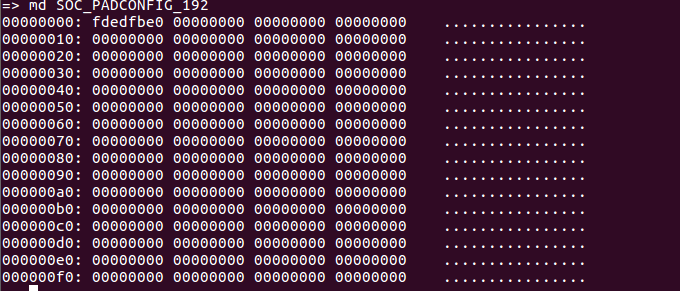
    Could you please provide what value you have in SOC_PADCONFIG_192 register at u-boot stage, before and after the code update?

    Regards,
    Pavel

  • Hi Pavel,

    I tried md command in u-boot prompt please find screenshot.

    fig 1: Before Modification

    fig 2: After modification

    fig 3 : I gave the register address using md command

    Based on above observation please help me out.

    Regards,

    Shadab

  • Hi Shadab,

    Do you use AM65x PSDK Linux? Which version? latest is 6.01 and is available at below link:

    http://software-dl.ti.com/processor-sdk-linux/esd/AM65X/latest/index_FDS.html

    The correct u-boot command is:

    => md 0x0011C300 1
    0011c300: 08210007

    The default u-boot code base is giving the reset value: 0x08210007

    When you update u-boot DTS files, make sure you are building new u-boot images successful. Follow below user guide:

    http://software-dl.ti.com/processor-sdk-linux/esd/docs/latest/linux/Foundational_Components_U-Boot.html#u-boot-for-am65x-family-of-socs

    Regards,
    Pavel


  • Thanks for the reply Pavel,

    I am using PROCESSOR-SDK-LINUX-AM65X  06_00_00_07.

    Yes, I make sure that for every update into U-boot DTS files  i am building new image and copying new generated image into SD card boot partition.

    After copying U-boot images i run the  md command on U-boot prompt as below but still i didn't observe any changes.

    =>  md 0x0011C300 1
    0011c300: 08210007  

    Regards,

    Shadab

  • Shadab,

    Quick fix can be to update this register directly:

    => md 0x0011C300 1
    0011c300: 08210007
    => mw 0x0011C300 08220007 1
    => md 0x0011C300 1
    0011c300: 08220007


    Check if this quick fix is working for you.


    Regards,
    Pavel

  • Thank you so much Pavel, I am able to observe 3.3V on the GPIO1_88 pin.

    Now, can you suggest me how to make it default , that means when we reboot the EVM board  , As soon as  boot process reached in u-boot stage this GPIO1_88 pin should get high(3.3V).

    Regards,

    Shadab

  • Shadab,

    There is some problem with main_pinmux0/1 in k3-am654-base-board.dts, which currently I can not identify.

    What I can suggest you at this stage, is to write the value of  0x08220007 in SOC_PADCONFIG_192/0x0011C300 register directly, with writel() command. You can use this command in below file:

    u-boot/arch/arm/mach-k3/am6_init.c

    You can take for example how NAVSS0_NBSS registers or CTRLMMR_LOCK_KICK registers are written.

    Regards,
    Pavel

  • Thank you so much Pavel.

    It is working now as soon as it reaches u-boot stage i am able to observe GPIO1_88 getting high(3.3V).

    Regards,

    Shadab

  • Shadab,

    the reason that simply adding the pinmux to the DTS file won't work is that U-Boot will only initialize GPIO it needs associated with a peripheral it probes – all in a “lazy” spirit to minimize boot time/effort spent.

    But for completeness sake, here is a list of different methods one can use to set a GPIO in U-Boot:

    1) Use the “gpio-hog” feature. This isn’t available in ti-u-boot-2019.01 yet as it was just added this year to mainline U-Boot but one should be able to backport / cherry-pick the respective changes as shown below from mainline U-Boot without too much trouble:

    5fc7cf8c8e gpio: add gpio-hog support
    49b10cb492 gpio: fixes for gpio-hog support

    2) Request/configure the GPIO pin in questions by directly using gpio_request(), gpio_direction_output(), and gpio_set_value() APIs


    3) If the GPIO is associated with a peripheral that is not probed you can still just configure just its pinmux by using uclass_find_device_by_seq() followed by pinctrl_select_state() API. And then use other GPIO API to manipulate the pin itself.


    4) Use direct pinmux and GPIO module access via writel(), as it was suggested earlier in this thread.

    Regards, Andreas

  • Thank you Andreas, for the reasonable answer.

    Now , can you help me how to use those APIs that you have mentioned  in your reply in 2nd method and from which file need to call those APIs.

    Regards,

    Shadab 

  • Shadab,

    Md Shadab said:
    Now , can you help me how to use those APIs that you have mentioned  in your reply in 2nd method and from which file need to call those APIs.

    I would suggest you to open new e2e thread for you new question, as this thread is already marked as resolved.

    Regards,
    Pavel