This thread has been locked.

If you have a related question, please click the "Ask a related question" button in the top right corner. The newly created question will be automatically linked to this question.

AM5728: VIP debug

Part Number: AM5728

Hi Experts,

I am using am5728 IDK and Linux rt 4.19.38, I am trying to capture images from the ov7670 camera module, I have successfully added related device driver and device tree. from dmesg I can see that the camera module is being recognized and a new node is added in /dev/video1. bellow is the device tree I am using for this purpose:

 ov7670: ov7670@21 {
                compatible = "ovti,ov7670";
                reg = <0x21>;
                clocks = <&src_clk_x1>;
                clock-names = "xclk";   
                powerdown-gpios = <&gpio6 14 GPIO_ACTIVE_HIGH>;
                port {
                        ov7670_0: endpoint {
                                hsync-active = <1>;
                                vsync-active = <1>;
                                pclk-sample = <1>;
                        };
                };
        };

&ov7670_0 {
        remote-endpoint = <&vin4b_ep>;
};

&vin4b {
        vin4b_ep: endpoint@3 {
                slave-mode;
                remote-endpoint = <&ov7670_0>;
        };
};

&vip2 {
        status = "okay";
};

this is the dmesg:

root@am57xx-evm:~# dmesg | grep ov7
[   11.636659] ov7670 0-0021: GPIO lookup for consumer powerdown
[   11.636671] ov7670 0-0021: using device tree for GPIO lookup
[   11.636710] of_get_named_gpiod_flags: parsed 'powerdown-gpios' property of node '/ocp/i2c@48070000/ov7670@21[0]' - status (0)
[   11.636749] ov7670 0-0021: GPIO lookup for consumer reset
[   11.636758] ov7670 0-0021: using device tree for GPIO lookup
[   11.636780] of_get_named_gpiod_flags: can't parse 'reset-gpios' property of node '/ocp/i2c@48070000/ov7670@21[0]'
[   11.636798] of_get_named_gpiod_flags: can't parse 'reset-gpio' property of node '/ocp/i2c@48070000/ov7670@21[0]'
[   11.636808] ov7670 0-0021: using lookup tables for GPIO lookup
[   11.636817] ov7670 0-0021: No GPIO consumer reset found
[   11.685916] ov7670 0-0021: chip found @ 0x42 (OMAP I2C adapter)
[   14.272079] vin4b: Port B: Using subdev ov7670 0-0021 for capture
root@am57xx-evm:~#

I also double-checked the driver code to make sure registers are written correctly. it seems like the camera is configured correctly and it is sending data, bellow is a screenshot I provided using logic analyzer when the IDK starts up:
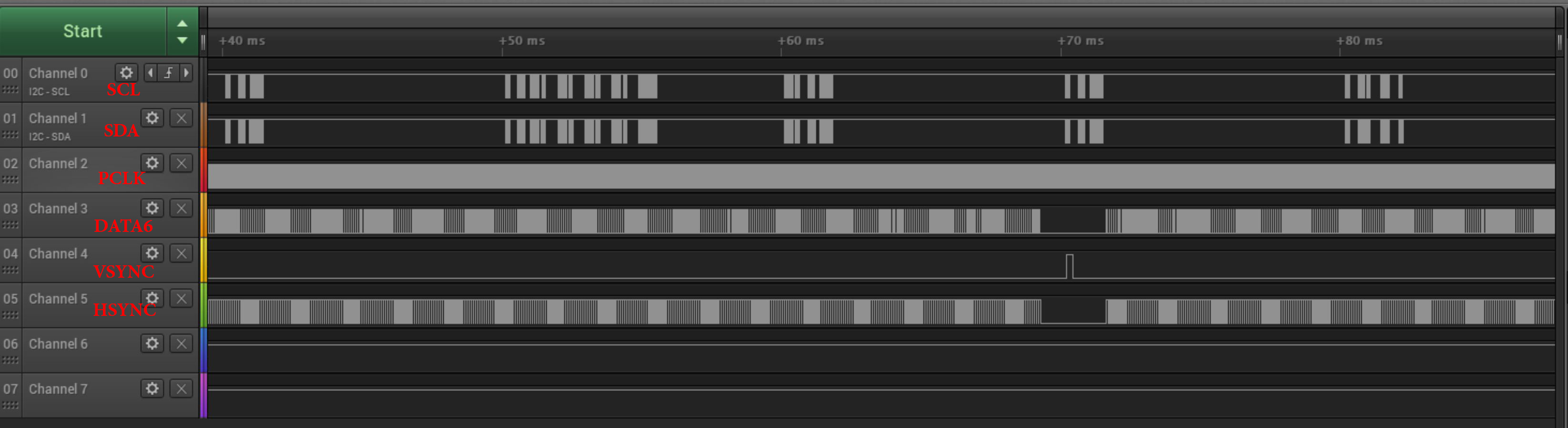
due to sampling rate limitations, I can not capture and analyze some of the above signals, but it seems like everything is working correctly on the camera side. But on the IDK side, I am not able to capture images, I have tried different solutions including GStreamer and some user-space applications, none of them were successful. when I read parser size register for vin4b, it's 0:

root@am57xx-evm:~# devmem2  0x48995A70
/dev/mem opened.
Memory mapped at address 0xb6fd9000.
Read at address  0x48995A70 (0xb6fd9a70): 0x00000000
root@am57xx-evm:~# devmem2  0x48995A0C
/dev/mem opened.
Memory mapped at address 0xb6faf000.
Read at address  0x48995A0C (0xb6fafa0c): 0x000000C0
root@am57xx-evm:~#  

I know that ov7670 supports raw Bayer 8 bit (SRGGB8_1X8) which is supported in VIP. I also have another camera module (ov2640) and that's not functioning too.

I have been trying to fix this issue for a couple of weeks. I was wondering if someone could propose a solution or a debugging method.

Best Regards,

Alex.

  • Hi Alex,

    You have posted another query on this topic in different e2e post where I suggested some response. 

    Please let me know if the suggestion on other thread worked or are you still have having issues? I am closing this thread for now. In case, if you are still having issue, please feel free to discuss on this same thread.

  • Hi Manisha,

    Thanks to you, now my ov2640 camera works fine, I can see the output stream on the LCD:

    root@am57xx-evm:~# gst-launch-1.0 v4l2src device=/dev/video1  ! kmssink

    now I have one question and one new problem. 

    a) I estimated image latency by capturing a timer and comparing results, output stream has a latency of 200ms, is there any way that I can reduce this latency? I never had the chance to use the original camera of my IDK, I don't know whether this latency is normal or not, But my colleague says it's not normal and is not efficient. 

    b) I can not encode incoming stream:

    root@am57xx-evm:~# gst-launch-1.0 v4l2src device=/dev/video1   !  ducatih264enc ! fakesink -v
    Setting pipeline to PAUSED ...
    Pipeline is live and does not need PREROLL ...
    Setting pipeline to PLAYING ...
    /GstPipeline:pipeline0/GstV4l2Src:v4l2src0.GstPad:src: caps = video/x-raw, format=(string)NV12, width=(int)128, height=(int)128, framerate=(fraction)30000/1001, pixel-aspect-ratio=(fraction)1/1, colorimetry=(string)bt601, interlace-mode=(string)progressive
    New clock: GstSystemClock
    /GstPipeline:pipeline0/GstDucatiH264Enc:ducatih264enc0.GstPad:src: caps = video/x-h264, alignment=(string)au, stream-format=(string)byte-stream, width=(int)128, height=(int)128, pixel-aspect-ratio=(fraction)1/1, framerate=(fraction)30000/1001, interlace-mode=(string)progressive, colorimetry=(string)bt601
    /GstPipeline:pipeline0/GstFakeSink:fakesink0.GstPad:sink: caps = video/x-h264, alignment=(string)au, stream-format=(string)byte-stream, width=(int)128, height=(int)128, pixel-aspect-ratio=(fraction)1/1, framerate=(fraction)30000/1001, interlace-mode=(string)progressive, colorimetry=(string)bt601
    /GstPipeline:pipeline0/GstDucatiH264Enc:ducatih264enc0.GstPad:sink: caps = video/x-raw, format=(string)NV12, width=(int)128, height=(int)128, framerate=(fraction)30000/1001, pixel-aspect-ratio=(fraction)1/1, colorimetry=(string)bt601, interlace-mode=(string)progressive
    /GstPipeline:pipeline0/GstDucatiH264Enc:ducatih264enc0.GstPad:src: caps = video/x-h264, width=(int)128, height=(int)128, framerate=(fraction)30000/1001, pixel-aspect-ratio=(fraction)1/1, stream-format=(string)byte-stream, align=(string)au, num-reorder-frames=(int)3, profile=(string)high, level=(string)4
    /GstPipeline:pipeline0/GstFakeSink:fakesink0.GstPad:sink: caps = video/x-h264, width=(int)128, height=(int)128, framerate=(fraction)30000/1001, pixel-aspect-ratio=(fraction)1/1, stream-format=(string)byte-stream, align=(string)au, num-reorder-frames=(int)3, profile=(string)high, level=(string)4
    MmRpc_call: Error: write failed
    ERROR: from element /GstPipeline:pipeline0/GstV4l2Src:v4l2src0: Internal data stream error.
    Additional debug info:
    ../../../../gstreamer-1.14.4/libs/gst/base/gstbasesrc.c(3055): gst_base_src_loop (): /GstPipeline:pipeline0/GstV4l2Src:v4l2src0:
    streaming stopped, reason error (-5)
    ../git/libdce.c:965:    process ERROR: Failed eError == DCE_EOK error val -5Execution ended after 0:00:00.442024218
    Setting pipeline to PAUSED ...
    Setting pipeline to READY ...
    Setting pipeline to NULL ...
    Freeing pipeline ...
    root@am57xx-evm:~#

    I tried some other pipelines too, none of them were successful. after inserting ov2640.ko module and  running the pipeline, I can see these lines on serial port:

     [   33.739898] NET: Registered protocol family 15
    [   34.040221] Initializing XFRM netlink socket
    [  747.724853] ov2640 0-0030: ov2640 Product ID 26:42 Manufacturer ID 7f:a2
    [  747.731616] vin4b: Port B: Using subdev ov2640 0-0030 for capture
    [  747.738033] vin4b-0: device registered as video1
    [  747.742682] i2c i2c-0: OV2640 Probed
    [  747.749781] palmas-usb 48070000.i2c:tps659038@58:tps659038_usb: failed to get id gpio
    [  794.071244] omap-iommu 55082000.mmu: 55082000.mmu: version 2.1
    [  794.394337] rpmsg_rpc rpmsg-dce: error from rproc_pa_to_da, rproc = f9019ef9, pa = 0x00000000fe478000 ret = -22
    [  794.404485] rpmsg_rpc rpmsg-dce: unwinding UVA to RDA translations! translation = 0
    [  794.414847] rpmsg_rpc rpmsg-dce: failed to translate all pointers for remote core!

    and this is the full dmesg:

    2476.dmesg.txt

    Any help would be appreciated.

    Regards,

    Alex.

  • Hi Alex,

    I do not know if this gstreamer pipeline is doing lot of frame buffering or copies. I would suggest using dual-camera-demo out of box application to check the capture-display latency. 

    Regarding the pipeline for encode, please check out the example pipelines documented here -