This thread has been locked.

If you have a related question, please click the "Ask a related question" button in the top right corner. The newly created question will be automatically linked to this question.

TMDX654IDKEVM: OSPI flash programming issue

Part Number: TMDX654IDKEVM
Other Parts Discussed in Thread: UNIFLASH

Hi,

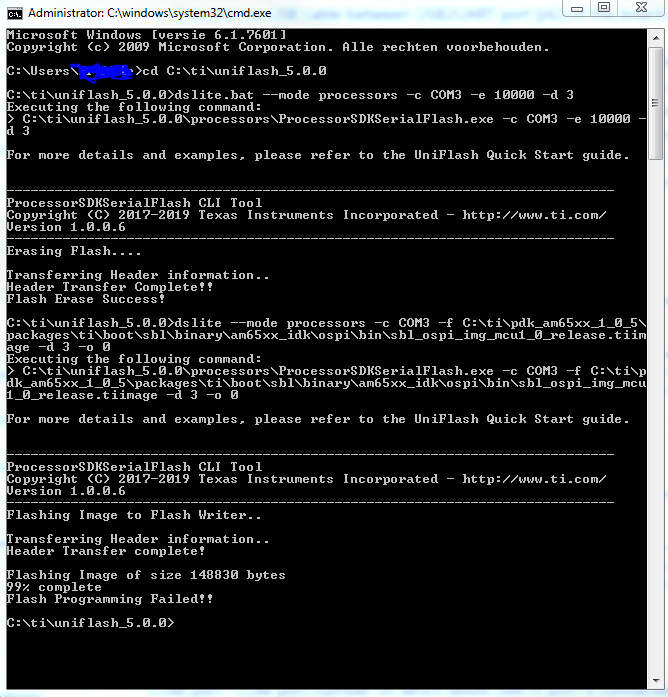
I am having some trouble trying to program the OSPI flash writer binaries. I follow the steps clearly illustrated in http://software-dl.ti.com/processor-sdk-rtos/esd/docs/latest/rtos/index_board.html#programming-flashwriter-on-am65xx-platform, however I have an error during the upload stage. See below steps I follow, and the error I obtain:

  1. I boot the board in no-boot mode
  2. I launch the target config file in CCS and upload the DMSC firmware as usual using the launch.js file.
  3. I connect to the A53 core and upload the FlashWriter to it located at C:\ti\uniflash_5.0.0\processors\FlashWriter\am65xx_idk\uart_am65xx_idk_flash_programmer.out
  4. I execute it and succesfully observer the C character on my main uart0 port. I then close the terminal program, und replug the UART USB
  5. I then attempt erase the flash successfully:
  6. No, when I want to upload the .tiimage file, sysfw.bin file and .appimage file of the example illustrated in  http://software-dl.ti.com/processor-sdk-rtos/esd/docs/latest/rtos/index_board.html#programming-flashwriter-on-am65xx-platform below, The flash fails!:

Is there any steps I am missing or am I doing something wrong? This is quite frustating that even though I follow the steps clearly, I still fail to flash. Also, where can I obtain information on the bytes sizes to flash and erase, and the offset of it? What I mean by that is how do I know what values to enter after the -o and -e commands when calling the dslite.bat script?

I look forward to a reply!

Regards,

Johnny

  • Apologies, the image at number 6 should be this:

    Thanks,

    Regards,

    Johnny

  • I have also looked at the video at this thread: https://e2e.ti.com/support/processors/f/791/t/758374?tisearch=e2e-sitesearch&keymatch=%20user:389703#pi320966=1

    Still no success.

    I have now tried upgrading to the latest Uniflash version, v5.2.0, however there the uart_am65xx_idk_flash_programmer.out file is not even present after installation? What am I missing here? What versions should be used?

    I am also using the following versions:

    - processor_sdk_rtos_am65xx_6_00_00_07

    - pdk_am65xx_1_0_5

    -ccs910

  • Hi Johnny,

    I'll try to reproduce this issue and get back with you.

    Regards,
    Frank

  • Hi Frank,

    Thanks for your reply. I appear to be having the exact same issues as here: https://e2e.ti.com/support/processors/f/791/t/848529?tisearch=e2e-sitesearch&keymatch=%20user%3A74227

    Unfortunately the solution by the person who had the problem is not provided, althought there was a suggestion made to upload the firmware through UART rather than through CCS.

    My understanding however is that when uploading the firmware through UART (booting in UART bootmode) the C character gets printed to the MCU_UART and the firmware should be loaded via this COM port. When uploading the firmware via CCS and JTAG the C character gets printed to MAIN UART0, and this COM port should be used when flashing image files. I currently have a hardware issue with my EVM (I still have to return it) with my MCU uart so I cannot use the UART flash method, the CCS method has to be used.

    So if you could please provide some assistance as to where I am going wrong, it would be greatly appreciated.

    Kind regards,

    Johnny

  • Johnny,

    Thanks for the additional information. I"ll follow up with Andreas.

    Regards,
    Frank.

  • Johnny,

    I'm also able to erase the OSPI flash, but unable to flash the SBL image when loading uart_am65xx_evm_flash_programmer.out via JTAG:

    # .\dslite.bat --mode processors -c COM5 -f R:\pdk_am65xx_1_0_6\packages\ti\boot\sbl\binary\am65xx_evm\ospi\bin\sbl_ospi_img_mcu1_0_release.tiimage -d 3 -o 0
    Executing the following command:
    > c:\ti\uniflash_5.0.0\processors\ProcessorSDKSerialFlash.exe -c COM5 -f R:\pdk_am65xx_1_0_6\packages\ti\boot\sbl\binary\am65xx_evm\ospi\bin\sbl_ospi_img_mcu1_0_release.tiimage -d 3 -o 0

    For more details and examples, please refer to the UniFlash Quick Start guide.


    ----------------------------------------------------------------------------
    ProcessorSDKSerialFlash CLI Tool
    Copyright (C) 2017-2019 Texas Instruments Incorporated - http://www.ti.com/
    Version 1.0.0.6
    ----------------------------------------------------------------------------
    Flashing Image to Flash Writer..

    Transferring Header information..
    Header Transfer complete!

    Flashing Image of size 157078 bytes
    99% complete
    Flash Programming Failed!!

    I'm using Uniflash 5.0.0 & AM65xx PRSDK 6.1.0.8.

    As you mention, I see the CCS/JTAG method wasn't validated in the other E2E thread: https://e2e.ti.com/support/processors/f/791/p/848529/3139947#3139947.

    I don't see any known issue related to this in the release notes for either PRSDK 6.0.0.7 or 6.1.0.8. I need to follow up internally to see whether this is a new bug. I'll keep you posted.

    Regards,
    Frank

  • Johnny,

    I understand this doesn't help you right now since your MCU UART isn't working, but I verified OSPI erase & programming using Uniflash 5.1.0 & PRSDK 6.1.0.8.

    1. Set board to UART boot mode: SW2 all off, SW3.4=on, SW3.3=off, SW3.2=on, SW3.1=off.
    2. Power board.
    3. Connect to MCU_UART using TeraTerm (115200, 8,None,1,None).
    4. Unplug & re-plug USB UART cable from Host.
    5. Execute commands below.

    > cd c:\ti\uniflash_5.1.0\

    > dslite.bat --mode processors -c COM6 -f C:\ti\uniflash_5.1.0\processors\FlashWriter\am65xx_evm\uart_am65xx_evm_flash_programmer.tiimage

    > dslite.bat --mode processors -c COM6 -f R:\pdk_am65xx_1_0_6\packages\ti\boot\sbl\binary\am65xx_evm\ospi\bin\sbl_ospi_img_mcu1_0_release.tiimage -d 3 -o 0
    > dslite.bat --mode processors -c COM6 -f R:\pdk_am65xx_1_0_6\packages\ti\drv\sciclient\soc\V0\sysfw.bin -d 3 -o 40000
    > dslite.bat --mode processors -c COM6 -f R:\pdk_am65xx_1_0_6\packages\ti\boot\sbl\example\k3MulticoreApp\binary\am65xx\sbl_baremetal_boot_test_am65xx_evm_all_coresTestApp_release.appimage -d 3 -o A0000

    Regards,
    Frank

  • Johnny,

    From what I can determine, the A53 flasher executable (which uses MAIN_UART) is only available in Uniflash 5.0.0 under C:\ti\uniflash_5.0.0\processors\FlashWriter\am65xx_evm.

    Uniflash 5.1.0 includes an R5F flasher executable which uses MCU_UART.

    PRSDK 6.0.0.7 & 6.1.0.8 both include R5F flasher executables which use MCU_UART. These are available under <PDK>\pdk_am65xx_1_0_6\packages\ti\board\utils\uniflash\target\bin\am65xx_evm. 

    Regards,
    Frank

  • Hi Frank,

    Thanks for your feedback! I did notice the flasher within the PDK board directory, however when I tried uploading that to the A53 core, the C character was not printed to the UART. I guess that is because it is meant for the R5F core, which I didn't know.

    So what options do I have here?

    I guess Uniflash 5.0.0 should be the version I use since that is the only version supporting the A53 core, so please keep me updated on whether this is a bug and whether it can be sorted out. Also maybe just a suggestion to update that part of the Processor SDK getting started guide, so that customers don't waist hours on this when the MCU UART method is the preferred way to go.

    Also, when OSPI erasing, which sections/offsets should be erased and what byte sizes in order to make sure that everything is erased completely?

    Thanks again for your always detailed and prompt replies!

    Kind regards,

    Johnny

  • Hi Frank,

    Good to see that this method is working and will probably be the way to go as soon as my EVM is returned, as this method does not require the lengthy CCS startup and execution of launch.js.

    However one simple question regarding this, in the above steps you are booted in UART bootmode. After successful programming of the ospi, sysfw.bin and appimage, you will perform the following steps to ensure that the sbl_baremetal_boot_test application executes:

    • Power down the EVM
    • Switch to OSPI boot mode (SW2=all OFF SW3.1=ON SW3.2=OFF SW3.3=OFF SW3.4=OFF)
    • Power on the EVM
    • The application should now execute successfully if flashing was done as mentioned above

    Thanks,

    Kind regards,

    Johhny

  • Hi Johnny,

    >> so please keep me updated on whether this is a bug and whether it can be sorted out

    Certainly, I'll keep you updated.

    >> maybe just a suggestion to update that part of the Processor SDK getting started guide, so that customers don't waist hours on this when the MCU UART method is the preferred way to go

    Agreed, I'm following up on this.

    >> when OSPI erasing, which sections/offsets should be erased and what byte sizes in order to make sure that everything is erased completely?

    You could record the offset & file transfer size reported by Uniflash during programming, and the use these for erasure. I think a simpler method is to erase the entire flash like so:

    dslite.bat --mode processors -c COM6 -e 3ffffff -d 3 -o 0

    It seems to me like Uniflash should take "-e 4000000" for 64 MB (512 Mbit) for the entire flash, but it fails when I provide this parameter setting, i.e. 3ffffff was the maximum value that worked for me.

    >> So what options do I have here?

    It may take some time to figure out the situation with the A53/MCU_UART method, so I'd recommend obtaining a new EVM.

    >> After successful programming of the ospi, sysfw.bin and appimage, you will perform the following steps to ensure that the sbl_baremetal_boot_test application executes

    Your understanding is correct.

    Regards,
    Frank

  • Thanks Frank,

    Your assistance is greatly appreciated. 

    Issue resolved, however I think I will still keep the thread open for updates on the A53/CCS method.

    Regards,

    Johnny

  • Johnny,

    Understood, I'm following up on this internally.

    Regards,
    Frank

  • Johnny,

    Do you need to have the JTAG load method (for some core & Uniflash version) working for your development?

    Thanks,
    Frank

  • Hi Frank,

    We have received our replacement EVM today, and the MCU_UART is working as it should.

    I was now able to test the method to upload the FlashWriter via the MCU_UART, and all is successful. Using this method is acceptable and it is thus not necesary to use the JTAG.

    Thanks for all your troubles, once again, Frank!

    Kind regards,

    Johnny