Tool/software: TI C/C++ Compiler
Hi:
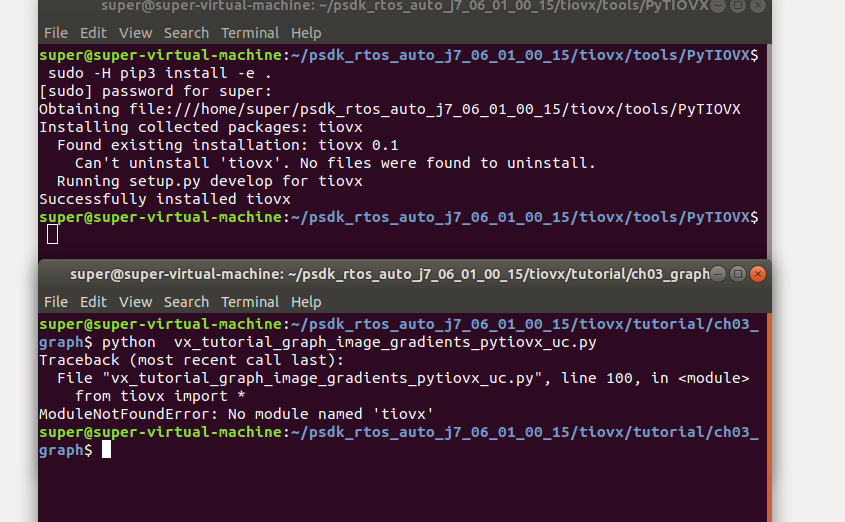
i have install tiovx but still have erro of ModuleNotFoundError: No module named 'tiovx' ,i donot know how to slove it !
thanks
shuai
This thread has been locked.
If you have a related question, please click the "Ask a related question" button in the top right corner. The newly created question will be automatically linked to this question.
Tool/software: TI C/C++ Compiler
Hi:
i have install tiovx but still have erro of ModuleNotFoundError: No module named 'tiovx' ,i donot know how to slove it !
thanks
shuai
Hi Shuai,
can you try to run the "sudo" command with "-H" option, like this:
sudo -H pip3 install -e .
Regards,
Yordan
Hi Shuai,
PyTIOVX module requires Python 3.5.2 or later. Can you run the command like:
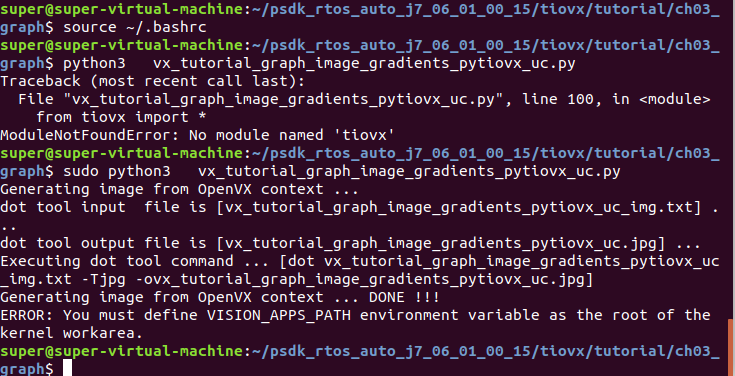
python3 vx_tutorial_graph_image_gradients_pytiovx_uc.py
Regards,
Yordan
Hi : Yordan
super@super-virtual-machine:~/psdk_rtos_auto_j7_06_01_00_15/tiovx/tutorial/ch03_graph$ sudo python3 vx_tutorial_graph_image_gradients_pytiovx_uc.py
Generating image from OpenVX context ...
dot tool input file is [vx_tutorial_graph_image_gradients_pytiovx_uc_img.txt] ...
dot tool output file is [vx_tutorial_graph_image_gradients_pytiovx_uc.jpg] ...
Executing dot tool command ... [dot vx_tutorial_graph_image_gradients_pytiovx_uc_img.txt -Tjpg -ovx_tutorial_graph_image_gradients_pytiovx_uc.jpg]
Generating image from OpenVX context ... DONE !!!
ERROR: You must define VISION_APPS_PATH environment variable as the root of the kernel workarea.
then i add (export VISION_APPS_PATH="/home/super/psdk_rtos_auto_j7_06_01_00_15/vision_apps:$VISION_APPS_PATH")
in ~/.bashrc and source ~/.bashrc but not done.
can you tell me how to slove it ?
thanks
Shuai
Hi Shuai,
can you try just this:
export VISION_APPS_PATH="/home/super/psdk_rtos_auto_j7_06_01_00_15/vision_apps
in the console before running the script and see if it works?
Regards,
Yordan
Hi Shuai,
VISION_APPS_PATH variable is not visible by the script, because you run it with 'sudo'. If you run it like this:
sudo -E python3 vx_tutorial_graph_image_gradients_pytiovx_uc.py
it will probably work ('-E' tells sudo to preserve the environment), but you should be able to run the script without "sudo" anyway and it is quite strange that it fails.
Can you try the following commands (this will uninstall the 'tiovx' module and install it again):
sudo -H pip3 uninstall tiovx cd ~/psdk_rtos_auto_j7_06_01_00_15/tiovx/tools/PyTIOVX sudo -H python3 -m pip install -e . cd ~/psdk_rtos_auto_j7_06_01_00_15/tiovx/tutorial/ch03_graph export VISION_APPS_PATH=~/psdk_rtos_auto_j7_06_01_00_15/vision_apps/ python3 vx_tutorial_graph_image_gradients_pytiovx_uc.py
and see if it works?
Regards,
Yordan
Hi :Yordan
is this Successful? vx_tutorial_graph_image_gradients_pytiovx_uc and vx_tutorial_graph_image_gradients_pytiovx_uc_img.txt are created. other files in psdk_rtos_auto_j7_06_01_00_15\tiovx\tutorial\ch03_graph Is iwritten by hand?(vx_tutorial_graph_image_gradients_pytiovx_uc vx_tutorial_graph_image_gradients_pytiovx_uc.h vx_tutorial_graph_image_gradients_pytiovx_uc.c vx_tutorial_graph_image_gradients_pytiovx.c vx_tutorial_graph_image_gradients.c )
thanks
Shuai
Hi Shuai,
it looks successful! Check psdk_rtos_auto_j7_06_01_00_15/vision_apps/apps/vx_tutorial_graph_image_gradients_pytiovx_uc folder for the generated files.
Regards,
Yordan
Hi :Yordan
python3 vx_tutorial_graph_image_gradients_pytiovx_uc.py how many files will created?
only vx_tutorial_graph_image_gradients_pytiovx_uc and vx_tutorial_graph_image_gradients_pytiovx_uc_img.txt ?
thanks
shuai
Hi Shuai,
it creates the following files:
$ tree $VISION_APPS_PATH/apps/vx_tutorial_graph_image_gradients_pytiovx_uc/ /mnt/x/j7/psdk_rtos_auto_j7_06_01_00_15/vision_apps//apps/vx_tutorial_graph_image_gradients_pytiovx_uc/ ├── app_vx_tutorial_graph_image_gradients_pytiovx_uc │ ├── concerto.mak │ ├── vx_tutorial_graph_image_gradients_pytiovx_uc.c │ └── vx_tutorial_graph_image_gradients_pytiovx_uc.h ├── concerto_inc.mak └── DEVELOPER_TODO.txt
Regards,
Yordan