This thread has been locked.

If you have a related question, please click the "Ask a related question" button in the top right corner. The newly created question will be automatically linked to this question.

AM3358: UART read callback

Part Number: AM3358


I've configured UART in callback mode and it appears to be working correctly when I call UART_read from my task function. I'd like to know more about the buffer used in UART_read() and the buffer used by the callback function, typedef void(* UART_Callback) (UART_Handle handle, void *buf, size_t count). From my testing, it appears that the UART_read(buffer) is receiving the message correctly, but the callback buffer is pointing to a different memory address. 

I would like to be able to post to a Mailbox from within the read callback function, and then use a mailbox pend from the task function. 

static int wait_for_msg_thread(void)
{

FOREVER

{

//READ
UART_read(s_uart_id, s_msg, S_MESSAGE_LENGTH);

/* Get the next message from the queue */
Mailbox_pend(isr_queue, s_msg, BIOS_WAIT_FOREVER)

}

}

void receive_msg_callback(UART_Handle handle, void *msg_in_DPRAM,
size_t msg_length)
{

if (msg_length != S_MESSAGE_LENGTH)
{
return;
}

/* Put the message in a message queue */
Mailbox_post(isr_queue, (char *) msg_in_DPRAM, BIOS_NO_WAIT);

}

The msg_in_DPRAM is not correct and is putting bad messages into the Mailbox. However, UART_read() buffer is getting the correct messages.

  • Hi Connor,

    I'm looking into this..

    Regards,
    Frank

  • Additionally, msg_length in the callback is not matching the size I am using in UART_Read. I am using message size of 36 bytes in UART_Read. THe first three messages are read correctly, then on the fourth call the msg_length in the callback gets changed and I read a partial message which ruins every message after that.

    Any thoughts on how this msg_length parameter could be getting changed?

    void receive_msg_callback(UART_Handle handle, void *msg_in_DPRAM,
    size_t msg_length)

  • Hi Connor,

    I suggest you inspect the UART test program "UART_TestApplication" which is described here: http://software-dl.ti.com/processor-sdk-rtos/esd/docs/06_01_00_08/rtos/index_device_drv.html#examples

    In particular, study the test function UART_test_callback(). This function performs write & read transfers in CPU callback mode.

    Please see information here regarding PDK test/example build: http://software-dl.ti.com/processor-sdk-rtos/esd/docs/06_01_00_08/rtos/index_overview.html#pdk-example-and-test-project-creation.

    Execute this on a Windows command line (similar for Linux) to create all CCS projects for UART test:

     pdkProjectCreate.bat AM335x bbbAM335x little uart test arm

    The source code is located under:

    • <PDK>\packages\ti\drv\uart\test\am335x
    • <PDK>\packages\ti\drv\uart\test\src

    >> The msg_in_DPRAM is not correct and is putting bad messages into the Mailbox. However, UART_read() buffer is getting the correct messages.
    The buffer points in the callback function should contain the Rx UART data. The buffer should match the buffer supplied as to UART_read() as the 2nd parameter. I would declare the array as a global.

     >> Any thoughts on how this msg_length parameter could be getting changed

    The count value should always match the value supplied to UART_read() as the 3rd parameter.

    Regards,
    Frank

  • Frank,

    Thanks for getting back! I've gone through the UART_TestApplication example and it appears I am setting up the UART correctly. I added UART_RETURN_FULL thinking that this may have been the reason for msg_length param in callback being smaller than expected. I have not seen this issue again.

    UART_HwAttrs uart_cfg;
    UART_socGetInitCfg(S_UART, &uart_cfg);
    uart_cfg.edmaHandle = NULL;
    uart_cfg.dmaMode = FALSE;
    uart_cfg.loopback = FALSE;
    
    UART_socSetInitCfg(S_UART, &uart_cfg);
    
    //Open the serial port in callback mode
    UART_Params_init(&uartParams);
    uartParams.readCallback = receive_msg_callback;
    uartParams.readMode = UART_MODE_CALLBACK;
    uartParams.readReturnMode = UART_RETURN_FULL;
    uartParams.readTimeout = UART_WAIT_FOREVER;
    uartParams.readDataMode = UART_DATA_BINARY;
    uartParams.baudRate = 115200;
    
    s_uart_id = UART_open(S_UART, &uartParams);

    I am trying to start simple and am now just doing a UART_Read() and Semaphore_pend() in a loop to see if I can receive good messages before I start working with the Mailbox. The callback function simply does Semaphore_post(). 

    Running the debugger, I always receive the first 36byte expected message correctly (sometimes the first 3 correctly), and then after that the messages appear to be garbage. However, I have noticed that my expected headers are sometimes in the middle of the received message. I am unsure if this is a timing problem or what could be causing this. Any thoughts why I always get the first few messages every time and sporadic success after that? 

    Thanks,

    Connor 

  • Hi Connor,

    >> I am trying to start simple and am now just doing a UART_Read() and Semaphore_pend() in a loop to see if I can receive good messages before I start working with the Mailbox. The callback function simply does Semaphore_post(). 

    That's a good idea.

    >>  Any thoughts why I always get the first few messages every time and sporadic success after that?

    I suggest starting with a low baud rate with a small %error.

    I also suggest inspecting the UART signals using a logic analyzer to see if everything looks proper, especially around the time where you lose synchronization.

    You might need to step into the UART LLD driver code to debug this problem. You can build the UART driver in debug mode like this:

    > gmake uart_lib LIMIT_SOCS="am335x" LIMIT_BOARDS="bbbAM335x" LIMIT_CORES="a8host" BUILD_PROFILE="debug" 

    Then change the .cfg file to use the debug library:

    UartPackage.Settings.libProfile = "debug;

    The key action in the driver will be in these functions:

    <PDK>\packages\ti\drv\uart\src\v1\UART_v1.c:

    • UART_read_v1()
    • UART_v1_hwiIntFxn()
    • UART_v1_callback()

    If you think there's a bug in the UART LLD, I'd ask that you share a simple example demonstrating the problem.

    Regards,
    Frank

  • Frank,

    The board that I am trying to communicate with only supports 1M and 115k baud rates. I am using the 115k now but I was seeing the same characteristics when running at 1M.

    I have already attached a logic analyzer and the packets coming in look correct. 1 36byte packet at 100hz and 3 36 byte packets coming at 4hz. Is this too much for the FIFO to handle? 

    I have built in debug and will continue to investigate the LLD.

    Thanks,

    Connor

  • Connor,

    >> 1 36byte packet at 100hz and 3 36 byte packets coming at 4hz.

    I don't understand this statement. Can you please elaborate?

    >> Is this too much for the FIFO to handle? 

    I doubt it since 115 kbaud is a relatively low. As I recall the FIFO has a maximum depth of 64 characters, but you can check the configured FIFO depth by inspecting UART FIFO control registers. See the TRM, Section 19.3.6.2 FIFO Interrupt Mode.

    You could try time stamping the HWI, or adding GPIO toggle to better understand the timing.

    Is any other code executing on the CPU which could delay the UART LLD (HWI) from reading the FIFO?

    Regards,
    Frank

  • The messages that I am trying to read from the other board are coming at 100hz with additional messages mixed in at 4hz.

  • While debugging and after I received my first message.

  • The way I am testing this first, it is the only thing running on CPU.

  • Sorry to keep throwing a lot of information...

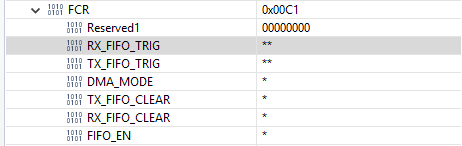
    I was monitoring the IIR_UART register to see if the interrupt is occurring and to watch for any overflow/framing errors. I was not able to see it change from 0x00C1, no interrupts. This also does not seem right but again, maybe I am misinterpreting what the registers are telling me.

  • Connor,

    It might be worth adding code to the HWI to store the value read from the IIR_UART to a buffer in memory.

    Regards,
    Frank

  • Hi Connor,

    Were you able to resolve this issue?

    Regards,
    Frank

  • Frank,

    Thanks for checking in! I have not found a solution yet. I've collected more information that may be worth noting. The RX FIFO is getting overrun after the second message that I receive. All messages coming in are 36 bytes and it appears that I am not reading quick enough to leave room in the buffer for the next message. I am not sure how to speed things up, I am already using UART_RXTRIGLVL_8. Any suggestions?

  • Hi Connor,

    It might be worth profiling UART read by adding timestamps and GPIO toggle to the UART HWI ISR where data is read from the FIFO.

    What is the CPU clock frequency? Can it be increased?

    Regards,
    Frank

  • Frank,

    So I switched things over to polling to avoid the HWI and I am seeing the same results. Letting it run for a bit, 7% of the messages coming in are correct. The others are getting corrupted by overrun errors. Do you have any examples for profiling the UART read time?

    It is running at 48MHz. 

  • Hi Connor,

    >> Do you have any examples for profiling the UART read time

    Unfortunately I don't have any examples. Here's a basic outline of how this can be accomplished:

    • Use the timestamp provider in <BIOS>/docs/cdoc/xdc/runtime/Timestamp.html & add timestamps at strategic locations in the application & UART LLD driver code.
    • If UART LLD in blocking mode, start by adding timestamps before/after the UART read function.
    • If UART LLD in callback mode, start by adding a timestamp before the UART read function, and another timestamp inside the callback function.
    • Add timestamps to UART HWI ISR to more granunularity.

    >> It is running at 48MHz

    Can you increase the CPU frequency? I recall the default GEL files provided with BBB set the MPU PLL to 600 MHz.

    Regards,
    Frank

  • Frank,

    My mistake,48MHz is the input frequency for the UART. The CPU is running 800MHz.

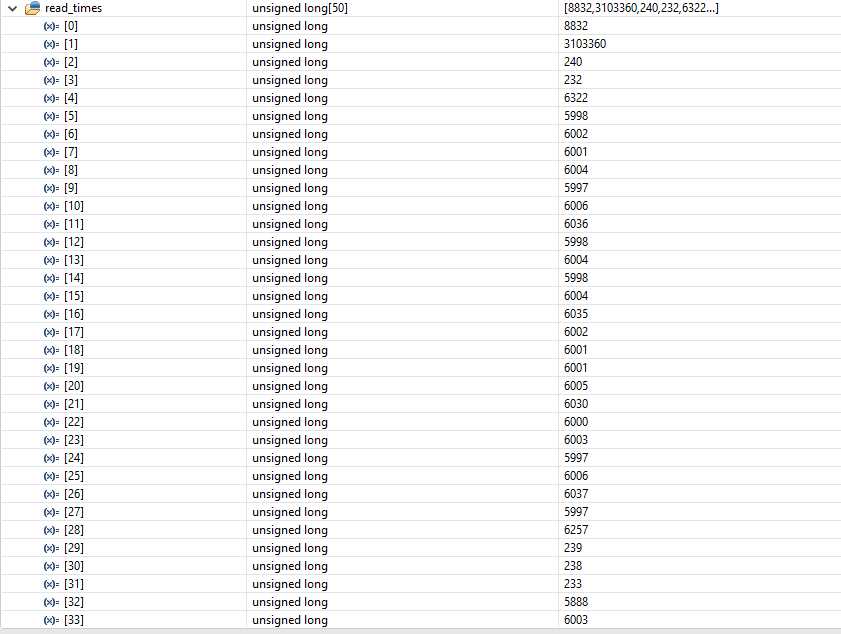
    I had a hard time adding the timestamp.h to the UART LLD. I have been using the gmake (Windows) procedure to build the PDK and drivers and it requires additional include directories to use the timestamps. I was able to add the timestamps to my project code and found some interesting results. Read_times[0] is high due to the startup to first read time. But the time between the 1st and 2nd read is alarming. These times are in microseconds, so this is a 3.1 second delay. While stepping through the code, I am witnessing a delay of approximately 3 seconds so I believe this is an accurate measurement. 

    Any suggestions for how I can add the timestamps to the UART drivers and be able to compile them? Any other suggestions for how I can dig in and find what is causing this delay?

    Thanks,

    Connor

  • Hi Connor,

    It might be worthwhile to instrument your code with GPIO signaling to confirm the time stamps are correct.

    You should be able to add the same time stamps to the UART driver. To recompile theUART driver, open DOS prompt and issue these commands:

    > cd <PDK>\packages
    > pdksetupenv.bat
    > gmake uart_lib LIMIT_SOCS="am335x" BUILD_PROFILE="release" 

    You might consider compiling the driver in debug mode and stepping through the code to get a better understanding of the driver flow. In this case use:

    • use "debug" instead of "release" for the above build command
    • add "UartPackage.Settings.libProfile = libProfile;" to .cfg file 

    The UART_read() function will call UART_read_v1() in <PDK>\packages\ti\drv\uart\src\v1\UART_v1.c. The next read function called depends on whether the read is configured for interrupt or polling mode. Assuming you're using interrupt mode, the next function called is UART_read2_v1(). This function reads characters from the Rx FIFO until the read is complete or the FIFO is empty. If the Rx FIFO is empty but there are more characters to read before the transfer is complete, the remaining reads will occur in UART_v1_hwiIntFxn().

    You can add timestamps as need to difference portions of these functions to determine where all the time is being spent.

    Regards,
    Frank