This thread has been locked.

If you have a related question, please click the "Ask a related question" button in the top right corner. The newly created question will be automatically linked to this question.

Audio capture on Starter Kit

Part Number: PROCESSOR-SDK-AM335X


Tool/software: Code Composer Studio

Hello,

I am trying to design a project(like Audio Capture Application) on Sitara AM335X Starter Kit. The board has an audio output. But no audio input interface.

For that

I'm trying to design a product that'll use the sitara proc and i'm trying to base a prototype simply on the starter kit. Its got everything except audio in.

For that, i have patched a board by removing capacitor C150 and C146,

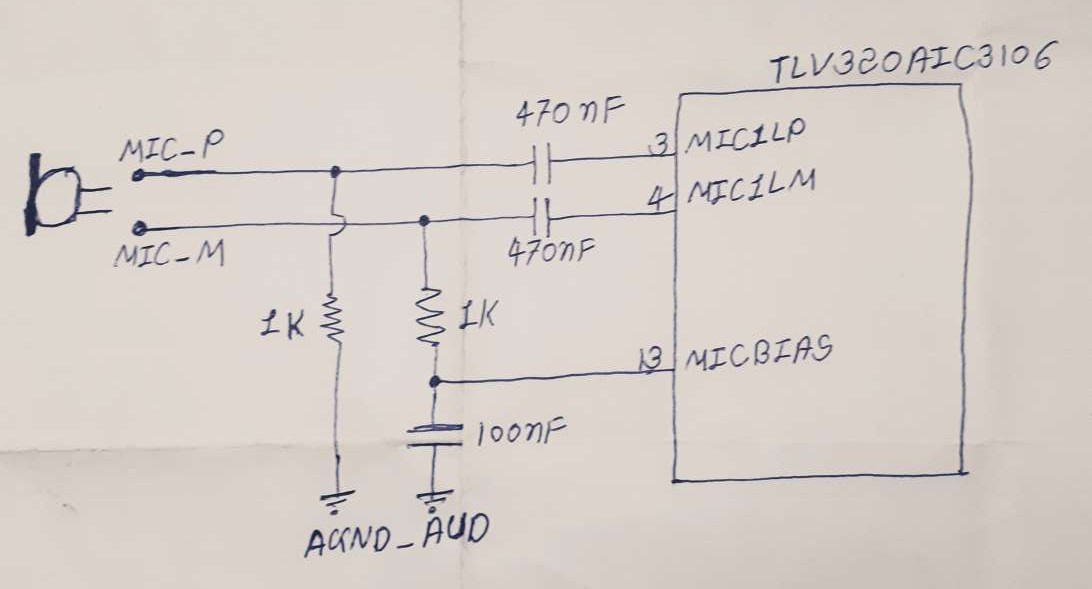
Connect MIC1LP of U31(TLV320AIC3106) to positive line of Condenser MIC using 0.47uF capacitor ,also positive line of MIC is pull down by 1K resistor

Connect MIC1LM of U31(TLV320AIC3106) to negative line of Condenser MIC using 0.47uF capacitor, and connect MICBIAS pin to Condenser MIC using 1K resistor, with 100nF capacitor

Run Audio Capture app in matrix launcher ,But still MIC is not taking input

do i have to make changes in sdk, or not?? Also did not get bias voltage at MICBIAS of U31, how to enable voltage, and how to set it??

Please guide me to capture audio

  • Hi Harshad,

    I can't tell how the ground is connected based on your description.  Can you provide a diagram of the connection to your microphone?

    Regards, Bill

  • Thank You,

    Here is my schematic


    I didn't get Voltage at MICBIAS Pin. how to enable it. For that, how to write command in a file of SDK. 

  • Hi Harshad, 

    Your circuit looks correct.  Did you enable the micbias in register 25?

    Regards, Bill

  • Hi Harshad, 

    With regards to the software changes, please be aware of the following settings:

    1. In the am335x-evmsk.dts file, we do not add the MIC IN support since the EVM does not support it. Since you have modified the board, please refer to the following dtsi file to enable the support. The Linux simple audio card description is available here.

    2. In order to enable the mic bias, please refer to the option "ai3x-micbias-vg" in the following file.

    Regards,
    Krunal

  • Hii,

    I have changed .dts file according to your suggestions. But still i'm not getting MICBIAS voltage at pin13.

    So, what could be wrong? here is my .dts file 0702.am335x-evmsk.dts.zip

  • Hello,

    As an experiment, set the value of "ai3x-micbias-vg" to "<2>". Also, please confirm that the MIC_BIAS voltage at pin 13 rises above 0V while executing the arecord command, and drops back to 0V after the execution of arecord.

    Regards,
    Krunal

  • Hello,

    Still not getting MIC_BIAS voltage, after set the value of  "ai3x-micbias-vg" to "<2>"

    here, all read register

    root@am335x-evm:~# i2cdump -f -y 0 0x1b
    No size specified (using byte-data access)
         0  1  2  3  4  5  6  7  8  9  a  b  c  d  e  f    0123456789abcdef
    00: 00 00 00 10 04 00 00 00 00 00 00 01 00 00 00 80    ...??......?...?
    10: 80 ff ff 78 78 78 78 78 78 06 00 fe 00 00 fe 00    ?..xxxxxx?.?..?.
    20: 00 00 00 00 02 00 00 00 00 00 00 80 80 00 00 00    ....?......??...
    30: 00 00 00 04 00 00 00 00 00 00 04 00 00 00 00 00    ...?......?.....
    40: 00 04 00 00 00 00 00 00 04 00 00 00 00 00 00 00    .?......?.......
    50: 00 00 00 00 00 00 00 00 00 00 00 00 00 00 00 00    ................
    60: 00 01 00 00 00 c0 02 00 00 00 00 00 00 00 00 00    .?...??.........
    70: 00 00 00 00 00 00 00 00 00 00 00 00 00 00 00 00    ................
    80: 00 00 00 10 04 00 00 00 00 00 00 01 00 00 00 80    ...??......?...?
    90: 80 ff ff 78 78 78 78 78 78 06 00 fe 00 00 fe 00    ?..xxxxxx?.?..?.
    a0: 00 00 00 00 02 00 00 00 00 00 00 80 80 00 00 00    ....?......??...
    b0: 00 00 00 04 00 00 00 00 00 00 04 00 00 00 00 00    ...?......?.....
    c0: 00 04 00 00 00 00 00 00 04 00 00 00 00 00 00 00    .?......?.......
    d0: 00 00 00 00 00 00 00 00 00 00 00 00 00 00 00 00    ................
    e0: 00 01 00 00 00 c0 02 00 00 00 00 00 00 00 00 00    .?...??.........
    f0: 00 00 00 00 00 00 00 00 00 00 00 00 00 00 00 00    ................

    Also i show there LINE1L is not configured in fully differential mode at register 0x13,  The value of register 0x13 is 0x78

    So, how to enable it. For that, how to write command in a file of SDK.

  • Hello,

    The changes will only be reflected when you execute the aplay/arecord command. Please try reading the registers while executing the Linux commands.

    Regards,
    Krunal