Part Number: TDA2PXEVM
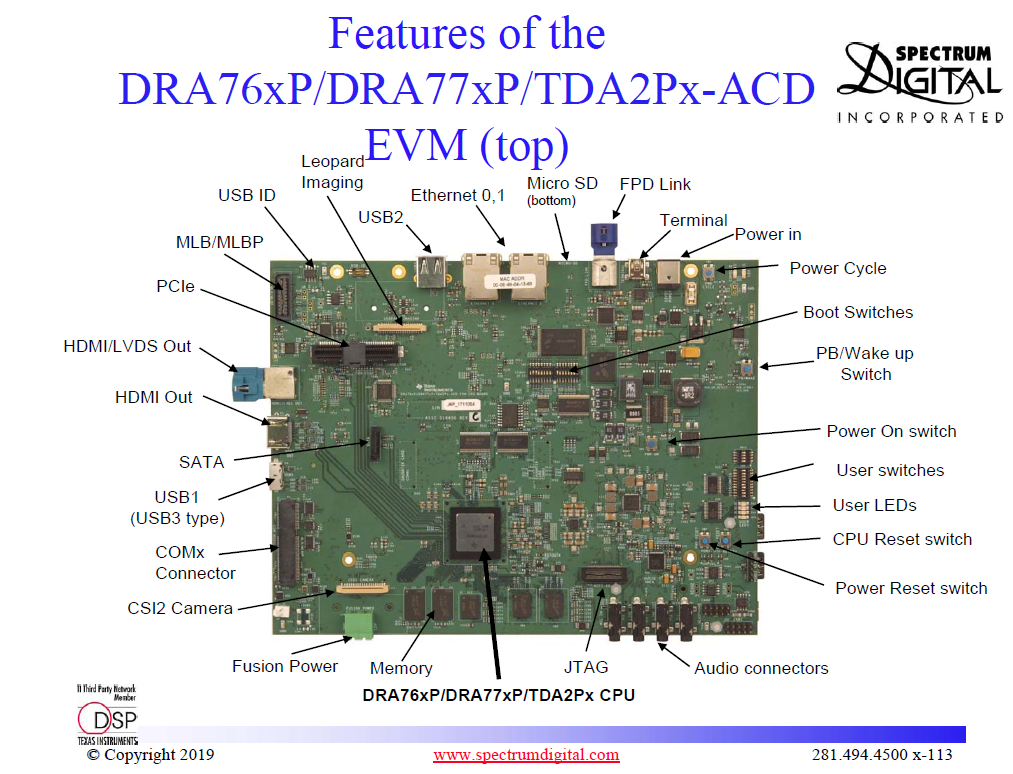
Please explain the functionalities of the following buttons in TDA2P board, Attached image of what I am refring to. ,
1. Power Cycle
2. CPU Reset switch
3. Power Reset switch
Thanks,
Sandeep
This thread has been locked.
If you have a related question, please click the "Ask a related question" button in the top right corner. The newly created question will be automatically linked to this question.
Part Number: TDA2PXEVM
Please explain the functionalities of the following buttons in TDA2P board, Attached image of what I am refring to. ,
1. Power Cycle
2. CPU Reset switch
3. Power Reset switch
Thanks,
Sandeep
Hi Sandeep,
Please refer to section 3.3 Reset Structure in https://www.ti.com/lit/ug/spruii4a/spruii4a.pdf .
1. Power Cycle - Power ON or Power OFF command to PMIC
2. CPU Reset switch - Warm reset to SoC
3. Power Reset switch - SoC cold (Power-On) (aka POR) Reset
Regards,
Stan