This thread has been locked.

If you have a related question, please click the "Ask a related question" button in the top right corner. The newly created question will be automatically linked to this question.

TDA2P-ACD: 3D Surround View - ISP Drop Frames after Cold Start

Part Number: TDA2P-ACD

Hello,

We noticed a strange behavior in 3D SRV usecase. When we use the default V2W files and run calibration usecase (manual calibration option), the obtained LUTs are correct and everything works as expected. However, when we generate our custom views with 3dvis.exe, we experience a significant frame dropping on ISP link (about 10fps) caused by DeWarp (whose average latency goes up to 50ms). The odd thing is that when we run SRV usecase immediately after calibration (without powering the board down), everything is perfect: no frame drops, DeWarp average latency is below 20ms, and the SRV overlay runs smoothly. The problem arises when we cold start the board with the custom generated files: ISP drop frames, average latency of DeWarp suddenly jumps up, and the SRV overlay jerks.

We use our in-house designed board with TDA2Px SoC and VSDK 3.6. We found in the Release Notes of VSDK 3.7 that there were some issue with blend table generation (ADASVISION-2120) when custom view points are generated (it was reported that blend seam is incorrect). However, we compared the relevant changes of two versions (3.6 and 3.7) and could not identify the differences related to SRV. Also, please note that we are using cameras with 1080p resolution and frames are not scaled.

Can someone point us to what could be a possible cause of such behavior?

Regards,

Nevena

  • Hi Nevena,

    That's quite strange, couple of questions. When calibration completes

    1. Is the view-point static or is it changing

    1.1. If the view-point is static, can you re-start with same view (don't traverse viewpoint, start with the one, which is working fine

    1.2. if not static. Let's try with 1 view point,

    2.1. Dump the view-point data for all the cameras (along with other meta-data like number of slices, slice size, etc...) after calibration (not saved to memory, but dumped via ccs)

    2.2. Re Start SRV but before 1 view-point is processed, copy the view-point that you had save.

    My primary suspects are 1. While LUT's are saved, is it being corrupted? check the number of slices, slice size etc... also compare the LUT's for all 4 cameras

    Regards, Sujith

  • Hello,

    We have resolved the issue by reading V2W_IDX.BIN and V2W.LZ4 files at the beginning of the SRV usecase. Currently, these files are read only in calibration usecase before LUT generation, but obviously some information is missing if we don't read this files before the SRV usecase start. This is not case with default views (delivered with VSDK) and is only required for custom generated views. Do you have more info where could be real problem for this issue? We suspect there is some issue with the 3dvis tool? Do you know if 3dvis tool changed and in which VSDK version? How default V2W_IDX.BIN and V2W.LZ4 files are generated?

    Regards,

    Nevena

  • Hi Nevena,

    I went over the code again and did not find anything obvious. For the custom views, can you please ensure LUT_IDX.BIN is written back by calibration and updated LUT_IDX.BIN is read by the SRV when started?

    Regards, Sujith

  • Hi Sujith,

    I work with Nevena on this matter.

    Yes, we confirmed that the LUT_IDX.BIN file contains the correct content. We additionally compared it against the one generated with default V2W files and have not found anything suspicious. What is really confusing part here is that everything works fine with default V2W files delivered as part of VSDK (4 views with 90 views in total). We run LUT generation with these files and everything is correct. The problem arises only when we use custom generated V2W files with 3dvis tool.

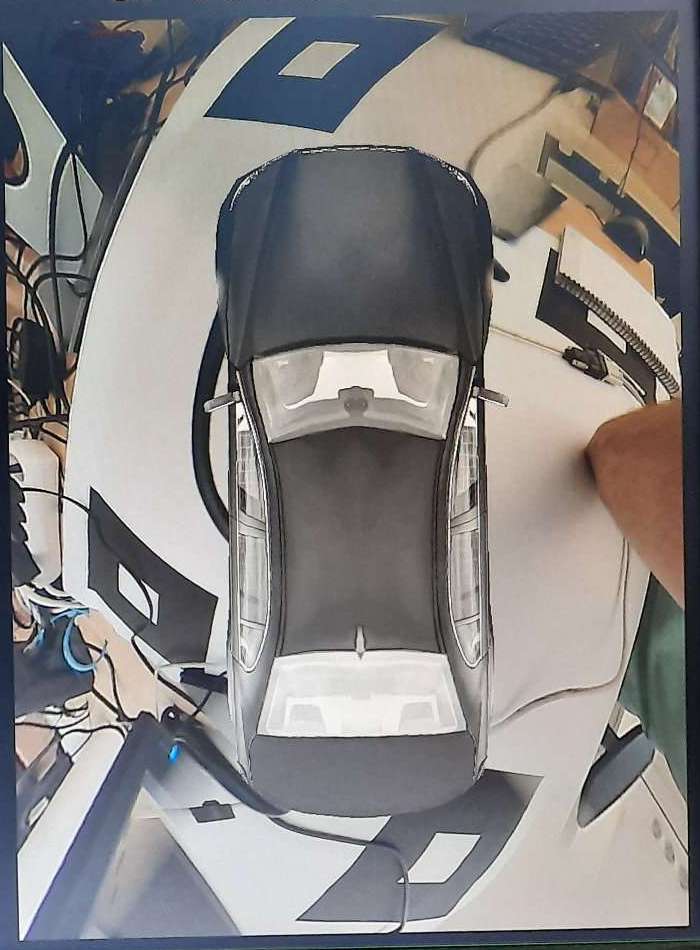
    Additionally, we noticed that 0 viewpoint LUT is not correctly generated when we change the number of points from default 30 to 25 (see attached image). Do you know if there is some limitations imposed by the 3dvis tool when number of points is changes?

    Regards,

    Mladen

  • Hi all,

    One additional observation. After some experimenting, we noticed that above behavior is not actually related to the number of points but rather to the total number of views. If we exceed the total number of 170, the top view is not correct, however, when the total number of views less than 170 (e.g., when we set 6 virtual views with 25 points) the top view is rendered correctly.

    Regards,

    Mladen

  • Hi Mladen,

    Can you confirm when the number of view point is <= 90, the ISP dropping frames is resolved?

    The second problem is viewpoint 0 is corrupted, it seems like the blend seam is not generated correctly. Can you completely cover one the camera and share the pic?

    As an experiment, can the viewpoint 0 start from different view point?

    Regards, Sujith

  • Hi Sujith,

    Sujith said:

    Can you confirm when the number of view point is <= 90, the ISP dropping frames is resolved?

    Yes, I can confirm this. I even tried with 100 view points (4 views with 25 points) and it works without drop. However, when I increase the number of views to 5 (125 view points) it starts to stagger.

    Sujith said:

    The second problem is viewpoint 0 is corrupted, it seems like the blend seam is not generated correctly. Can you completely cover one the camera and share the pic?

    Please find requested pics attached.

    Sujith said:

    As an experiment, can the viewpoint 0 start from different view point?

    Yes, everything looks correct when the SRV starts from the viewpoint 0 starts from different virtual camera view. Only top view seems to be corrupted.

  • Mladen Knezic said:

    Yes, everything looks correct when the SRV starts from the viewpoint 0 starts from different virtual camera view. Only top view seems to be corrupted.

    One correction, the view point 0 is affected regardless of the virtual camera position when total number of points is 200.

    Regards,

    Mladen

  • Posting on behalf my colleague Sujith.

    On view point 0 being corrupted : Based on the pictures, the seam angle seems fine. As you suspect that no of view points > 170 causes view point 0 to be corrupted. Can I request you to do the following?

    Suspecting logic to split and write the LUT’s could be the source

    1. Right after the calibration – LUT.BIN & LUT_IDX.BIN are written back
      1. Rather than writing back the LUT, can you dump them to mmc/sd?
      2. When the SRV re-starts and LUT.BIN & LUT_IDX.BIN are parsed

                                                                   i.      Replace the contents that was stored in mmc/sd

    Please let us know if you can provide this and if this needs to be debugged further.

    Regards

    Karthik

  • Hi Karthik,

    What do you mean by "written back". As far as I can see in the current code that is used in calibration usecase, i.e. function mediaReadv2wWriteLdcLutViewPointParams(), the LUT.BIN and LUT_IDX.BIN are already written to the mmc/sd card. I do not see how can I dump them to the mmc/sd card in a different way, if you suspect they get corrupted during the file write process.

    Regards,

    Mladen

  • Any news regarding this issue?

    Regards,

    Mladen

  • Hi Karthik,

    I'm involved in this issue with Mladen. In this thread we started discussion about two different problems - first one is related to dropping ISP frames with custom generated views, and second one is related to problem that 0 viewpoint LUT is not correctly generated. Let's focus only to first problem - this is more critical for us, so we can close this thread. Is there any limitations related to number of custom generated views? Sujith mentioned number 90 as some possible limit value. Any comments about this?

    Best Regards,

    Stefan.

  • Stefan,

    I will check and get back to you.

    Regards

    Karthik

  • Hi Karthik,

    One additional information which can be useful for you - it seems that the problem with dropping frames only happens when 2D Surround View and 3D Surround View are running in parallel. Are there some common resources between this two usecases than can cause frame drop on 3D usecase?

    Best Regards,

    Stefan.

  • Hi everyone,

    I'm also involved in this issue with Mladen and Stefan. I want to add that ISP frame drop problem happened when we tried to avoid problem with 2D Surround View calibration which is discussed in another thread on following link : .

    ISP Frame drop started after we scaled 2D Surround View synthesis algorithm input to 1MP. We did that because we can calibrate 2D Surround View for 1MP resolution. So, 2D Surround View and 3D Surround View are running in parallel but 2D SRV with 1MP and 3D SRV with 2MP.

    Best regards,

    Aleksandar Kecman.