This thread has been locked.

If you have a related question, please click the "Ask a related question" button in the top right corner. The newly created question will be automatically linked to this question.

AM3352: USB babble with SSC enabled

Part Number: AM3352

On customer's product, enabled SSC for reducing  EMI, recently find when insert a particular U-Disk result in  report continually “ti81xx_interrupt 1093: CAUTION: musb0: Babble Interrupt Occured”。then result watchdog reset.

if remove SSC, then doesn't report babble interrupt and no issue anymore on the same U-Disk.

From TRM, SSC only supports LCD and MPU PLL, why it impacts USB?

  • Hi Tony,

    Which kernel version does the customer use? Please share the patch which enables SSC, and the kernel log shows babble and watchdog reset as well.

  • Hi Tony,

    SSC is not supported for USB2.0, or the PER clock domain in general. In the case of USB, the receiving device recovers the clock from the data stream itself, so if the data stream is off (as in the case of SSC), the recovered clock will be off as well, confusing the device. Some devices may be more tolerant of this effect than others.

  • Bin,

    Customer provides below information according to your request, if need more information, please let us know.

    kernel:3.2.0
    DPLL_DISP: clk=60MHz
    DPLL_Display SSC register:
    devmem2 0x44E0044C w 0x000A0000 > /dev/null
    devmem2 0x44E00450 w 0x00000001 > /dev/null
    devmem2 0x44e00498 w 0x00001007 > /dev/null

    LCD clk= DPLL_DISP_clk/2

    log: “ti81xx_interrupt 1093: CAUTION: musb0: Babble Interrupt Occured”

  • -DK- said:
    so if the data stream is off (as in the case of SSC), the recovered clock will be off as well, confusing the device.

    A bit vague to me. How it relate to the issue.

    #1. Customer only enabled SSC on Display PLL, but USB resides in PER_PLL,

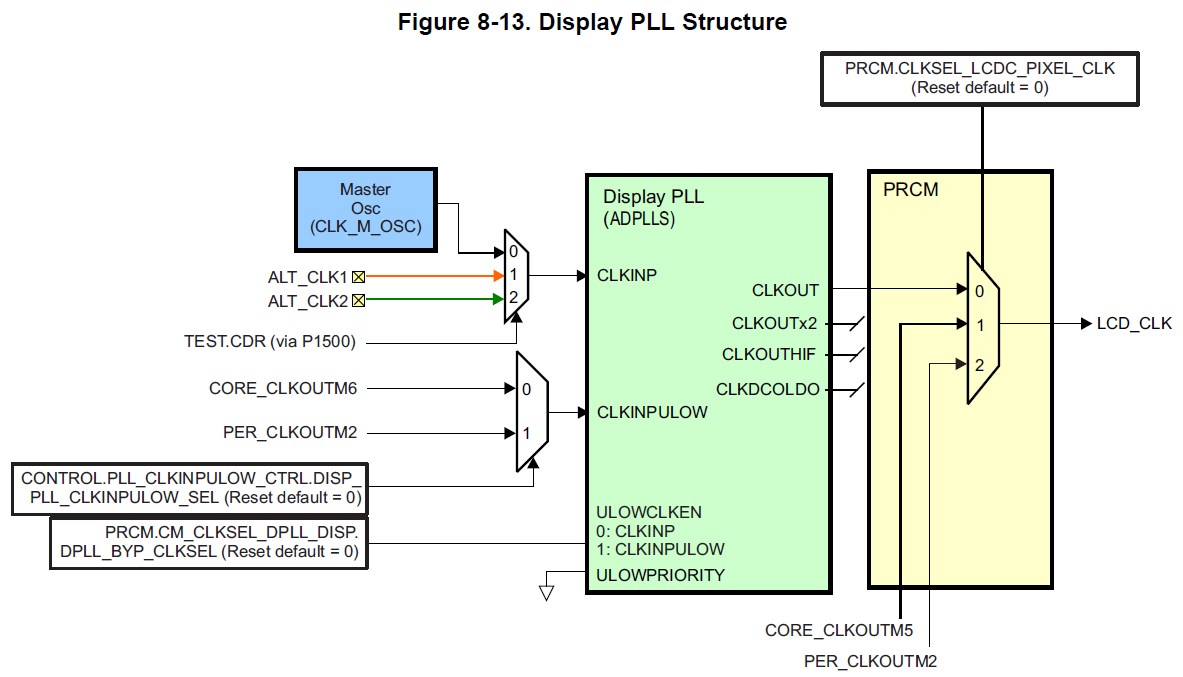
    #2. I have a additional question about the NOTE from AM335x TRM, there is not a dedicated LCD PLL on AM335x, LCD clock is derived from display PLL, so the description of SSC supported for LCD, not supported for DISP sounds conflict.

  • Tony,

    Thanks for the information. As DK explained above, enabling SSC could cause USB failure, it shouldn't be enabled if USB module is used.

  • Bin,

    We can't get such information/conclusion from TRM, that is why we ask here, customer still need more deeper information.

  • HI Tony,

    The TRM clearly states that SSC is not supported for anything beyond the MPU and LCD PLL modules. In the case of USB2.0 specifically, a review of the specification will show that SSC is (also) not supported.

  • DK,

    I think we have different understanding to the Notes. I tried to understand what is your idea:

    #1. If follow you explanation, if enabled SSC on LCD or/and MPU PLL, nothing can be used anymore. if so, what is the mean of having SSC feature on this device.

    #2. Customer only enabled LCD PLL, USB is in PER PLL, they are different clock domain. I did not find the information of when enable LCD or MPU PLL, can't use USB anymore.

    #3. In TRM table 8-89, each DPLL has its own SSC register. according to the NOTE, my understanding is even each DPLL has SSC registers can be configured, but due to peripherals characters, DDR, PER, DISP and CORE PLLs doesn't support SSC, so DO NOT enable the SSC feature on these DPLLs.

    BUT I did not see if enable SSC on LCD will impact USB on the SOC.


    NOTE: Spread spectrum clock is only supported for the LCD and MPU PLLs on this device. Spread

    spectrum clocking is not supported for DDR, PER, DISP, and CORE PLLs. When enabling
    SSC on MPU PLL, ensure the maximum MPU frequency remains below the maximum rated
    frequency for the chosen OPP (see the device-specific Data Manual for more details).