Part Number: TDA4VMXEVM
Hello,
I’d like to disable kernel and filesystem logs during system booting, to do so I’ve done following steps:
Set-up: TDA4VMXEVM, ti-processor-sdk-linux-automotive-j7-evm-06_01_00_05, booting from SD Card
Approach 1
Changing u-boot env during start-up.
Result:
Logs are sitll available after reboot.
Details:
From u-boot console:
=> setenv console /dev/null
=> saveenv
=> reset
Starting kernel ...
I get some kernel logs in normal „readable” form, but after some time logs are being displayed in binary-like format.
Approach 2 :
Recompiling u-boot with CONFIG_SILENT_CONSOLE define.
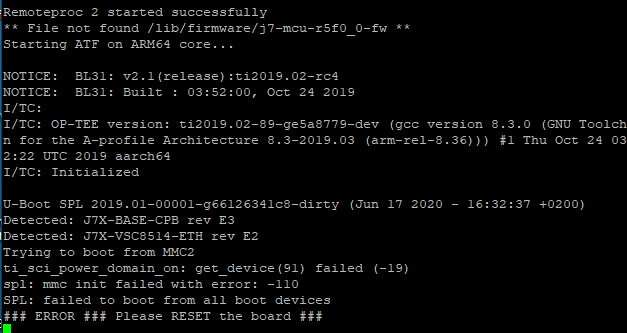
Result:
The system does not boot-up, it finishes with errors.
Details:
$ cd ti-processor-sdk-linux-automotive-j7-evm-06_01_00_05
$ make u-boot_clean
$ make u-boot
$ cd board-support/u-boot-2019.01+gitAUTOINC+66126341c8-g66126341c8/configs/
edit j721e_evm_a72_defconfig (add CONFIG_SILENT_CONSOLE=y)
$ cd ../../../
$ make u-boot_clean
$ make u-boot
copy u-boot.img, tispl.bin from board-support/u-boot_build/a53/ to sd-card/boot
copy tiboot3.bin from board-support/u-boot_build/r5/ to sd-card/boot
(I’ve also tried to copy different combination of these files)
Is there any other, working way to disable kernel and filesystem logs during system booting? Do I do any mistake in one of the described above approaches?
Best regards,
Lukasz