This thread has been locked.

If you have a related question, please click the "Ask a related question" button in the top right corner. The newly created question will be automatically linked to this question.

PROCESSOR-SDK-DRA8X-TDA4X: FFmpeg use

Part Number: PROCESSOR-SDK-DRA8X-TDA4X


Dear experts,

I want to use J721E evm to generate video patterns to do some tests and I'm thinking about ffmpeg libraries.

Do you know how I can install ffmpeg ? PSDK RTOS Automotive is installed in SD Card, I'm booting from SD Card.

Please feel free to suggest other options that can help to generate video patterns (or just an image).

Thanks,

Brahim

  • Hi Brahim,

    It should be possible to build and install ffmpeg from Yocto.

    However, I want to understand if this operation can be done on the PC and then be transferred to the target?

    What is your usecase after you generate the test pattern with ffmpeg?

    Regards

    Karthik

  • Hi Karthik,

    I have some TI products to be tested (Serializer/Deserializer), I want to generate video patterns from the EVM and send it to product, they will be connected to each other via EVM interfaces.

    I'm booting the evm from SD Card, can ffmpeg be installed in Linux in SD card or it should be installed in Ubuntu in laptop ?

    Thanks,

    Brahim

  • Hi Brahim,

    On what EVM interfaces do you want to send out this test data - ethernet, PCIe, CSI or some other? Please elaborate further, if you need to use a block diagram to describe your request clearly kindly use visual aids to represent your final intention.

    Regards

    Karthik

  • Hi Karthik,

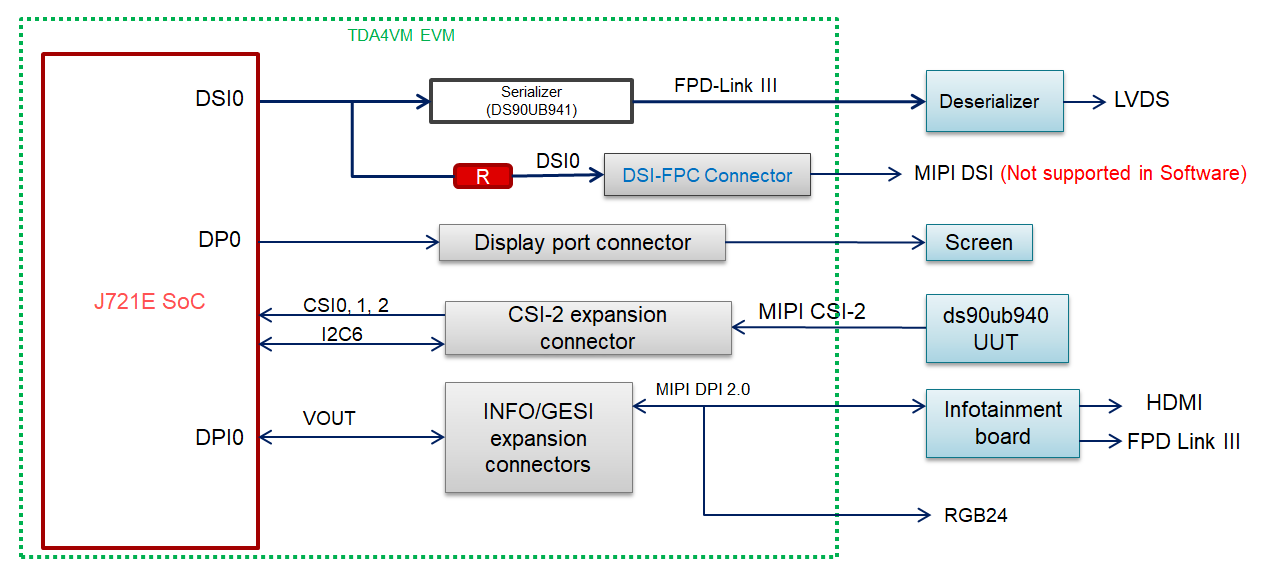
    The interface depends on the product input, it can be MIPI-CSI, DSI, HDMI (via Infotainment board) or Expansion Connectors on the bottom of the evm (it supports RGB24 format).

    Here is a block diagram of the interfaces I want to use:

    Thank you,

    Brahim

  • Hi Brahim,

    As discussed, you can use the gst-launch-1.0 with the videtestsrc to generate the test pattern.

    Please update the ticket with the command that worked for you so on your end.

    Regards

    Karthik

  • Hi,

    To generate the pattern test, the following command is working successfully, you have to run it in SD Card Linux terminal:

    gst-launch-1.0 videotestsrc pattern=4 num-buffers=1000 ! 'video/x-raw, format=(string)BGRA, width=640, height=480' ! waylandsink

    a display screen must be connected to eDP or HDMI via infotainment board.


    To get more details about gst-launch-1.0 and its parameters, run this command in Ubuntu terminal: gst-inspect-1.0 videotestsrc

    Thank you,

    Brahim