Part Number: TDA4VMXEVM
Hi,
I am able load tiboot3.bin -> sysfw.itb -> tispl.bin -> u-boot.img using dfu-util.
could you please tell me how to load rootfs, kernel using dfu-util.
Thanks in advance
Thanks
Gangadhar
This thread has been locked.
If you have a related question, please click the "Ask a related question" button in the top right corner. The newly created question will be automatically linked to this question.
Part Number: TDA4VMXEVM
Hi,
I am able load tiboot3.bin -> sysfw.itb -> tispl.bin -> u-boot.img using dfu-util.
could you please tell me how to load rootfs, kernel using dfu-util.
Thanks in advance
Thanks
Gangadhar
Hi Gangadhar,
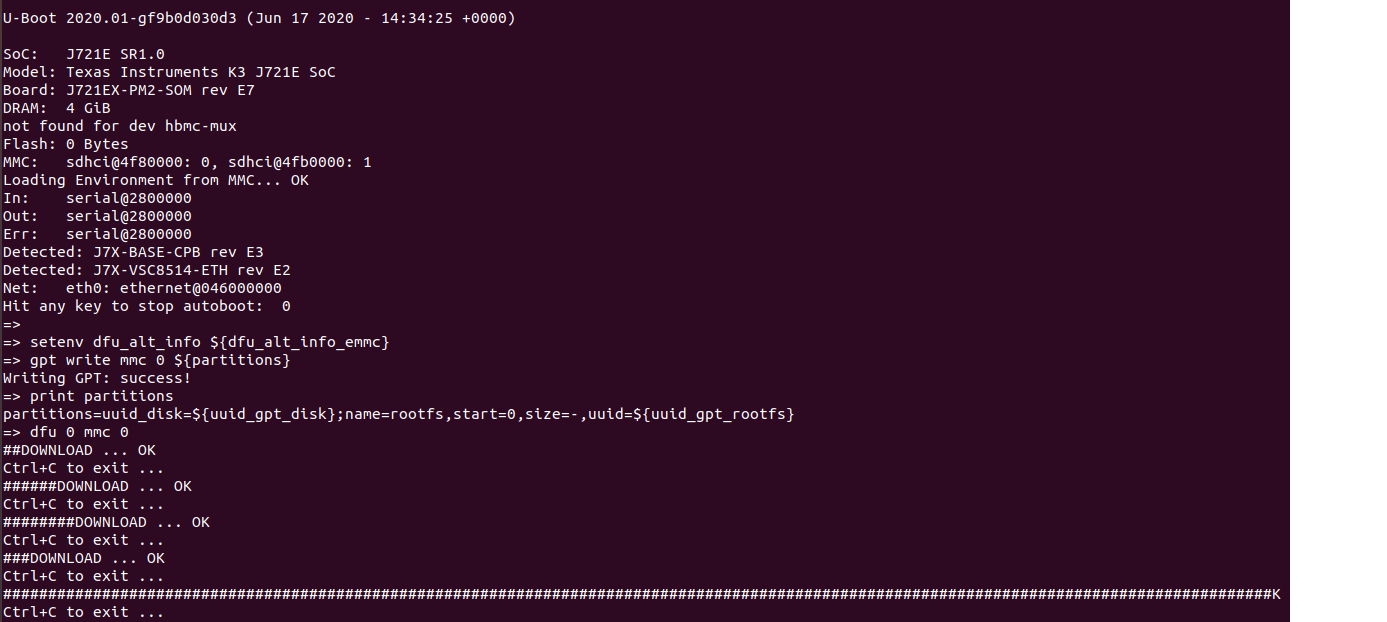
Which dfu_alt_info setting are you using?
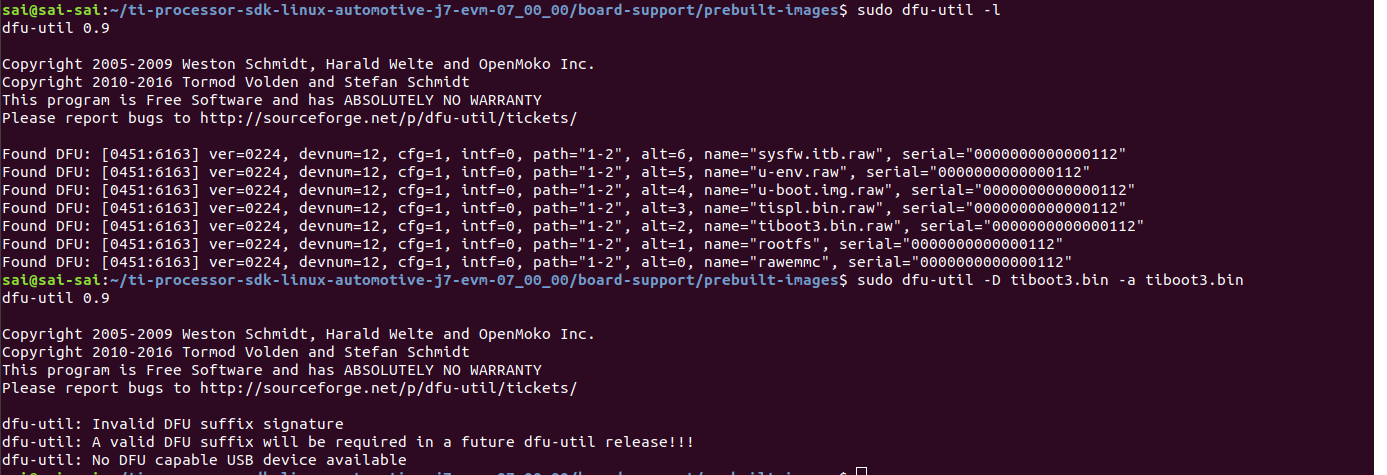
Could you also list the output of dfu-util -l from Linux PC?
Regards,
Vishal
Hi,
Please find the attachments.
U-Boot SPL 2020.01-gf9b0d030d3 (Jun 17 2020 - 15:08:08 +0000)
SYSFW ABI: 3.0 (firmware rev 0x0014 '20.04.1-v2020.04a (Terrific Lla')
Trying to boot from DFU
######DOWNLOAD ... OK
Ctrl+C to exit ...
Loading Environment from MMC... *** Warning - No MMC card found, using default environment
init_env from device 18 not supported!
Loading rproc fw image from device 18 not supported!
Starting ATF on ARM64 core...
NOTICE: BL31: v2.3():07.00.00.005-dirty
NOTICE: BL31: Built : 14:33:55, Jun 17 2020
U-Boot SPL 2020.01-gf9b0d030d3 (Jun 17 2020 - 14:34:25 +0000)
SYSFW ABI: 3.0 (firmware rev 0x0014 '20.04.1-v2020.04a (Terrific Lla')
Detected: J7X-BASE-CPB rev E3
Detected: J7X-VSC8514-ETH rev E2
Trying to boot from DFU
########DOWNLOAD ... OK
Ctrl+C to exit ...
U-Boot 2019.01-g333c3e72d3-dirty (Jun 24 2020 - 09:40:51 +0530)
SoC: J721E PG 1.0
Model: Texas Instruments K3 J721E SoC
Board: J721EX-PM2-SOM rev E7
DRAM: 4 GiB
Flash: 0 Bytes
MMC: sdhci@4f80000: 0, sdhci@4fb0000: 1
Loading Environment from MMC... OK
In: serial@2800000
Out: serial@2800000
Err: serial@2800000
Detected: J7X-BASE-CPB rev E3
Detected: J7X-VSC8514-ETH rev E2
Net: eth0: ethernet@046000000
Hit any key to stop autoboot: 0
=> mmc part
Partition Map for MMC device 0 -- Partition Type: EFI
Part Start LBA End LBA Name
Attributes
Type GUID
Partition GUID
1 0x00000022 0x01da3fde "rootfs"
attrs: 0x0000000000000000
type: ebd0a0a2-b9e5-4433-87c0-68b6b72699c7
guid: d117f98e-6f2c-d04b-a5b2-331a19f91cb2
=> printenv dfu_alt_info_mmc
dfu_alt_info_mmc=boot part 1 1;rootfs part 1 2;tiboot3.bin fat 1 1;tispl.bin fat 1 1;u-boot.img fat 1 1;uEnv.txt fat 1 1;sysfw.itb fat 1 1
=> setenv dfu_alt_info ${dfu_alt_info_mmc}
=> dfu 0 mmc 0
Couldn't find part #2 on mmc device #1
DFU entities configuration failed!
(partition table does not match dfu_alt_info?)
dfu - Device Firmware Upgrade
Usage:
dfu <USB_controller> <interface> <dev> [list]
- device firmware upgrade via <USB_controller>
on device <dev>, attached to interface
<interface>
[list] - list available alt settings
=>

Thanks
Gangadhar
Hi Gangadhar,
Could you try below from Linux PC to transfer binaries to eMMC via DFU?
sudo dfu-util -c 1 -i 0 -a 2 -D tiboot3.bin
sudo dfu-util -c 1 -i 0 -a 3 -D tispl.bin
sudo dfu-util -c 1 -i 0 -a 4 -D u-boot.img
sudo dfu-util -c 1 -i 0 -a 6 -D sysfw.itb
sudo dfu-util -c 1 -i 0 -a 1 -D <rootfs>
Regards,
Vishal
Hi Vishal,
Thank you for your reply,
We are able to copy bootloader(tiboot3.bin -> sysfw.itb -> tispl.bin -> u-boot.img) images into eMMC via DFU using your commands.
Now we want to copy rootfs into eMMC via DFU.
As per our knowledge we have to create rootfs*.jffs2 image from tisdk-default-image-j7-evm.tar.xz for flashing using DFU command(sudo dfu-util -c 1 -i 0 -a 1 -D <rootfs>).
Could you please tell us how to create *.jffs2 image.
Regards,
Gangadhar
Hi Vishal,
1. We are able to copy bootloader(tiboot3.bin -> sysfw.itb -> tispl.bin -> u-boot.img) images into eMMC via DFU using following below commands images was downloaded.
a) sudo dfu-util -c 1 -i 0 -a 2 -D tiboot3.bin
b) sudo dfu-util -c 1 -i 0 -a 3 -D tispl.bin
c) sudo dfu-util -c 1 -i 0 -a 4 -D u-boot.img
d)sudo dfu-util -c 1 -i 0 -a 6 -D sysfw.itb
Now we get back to eMMC dip switch settings, in u-boot prompt nothing is coming.( u-boot is not booting)
2. Now u-boot is booting from SDCARD
Using this command " sudo mkfs.jffs2 -r ./tisdk-default-image-j7-evm -e 512 -o rootfs.jffs2" I have created rootfs.jffs2 image,
Using this command "sudo dfu-util -c 1 -i 0 -a 1 -D rootfs.jffs2" Image was downloaded.
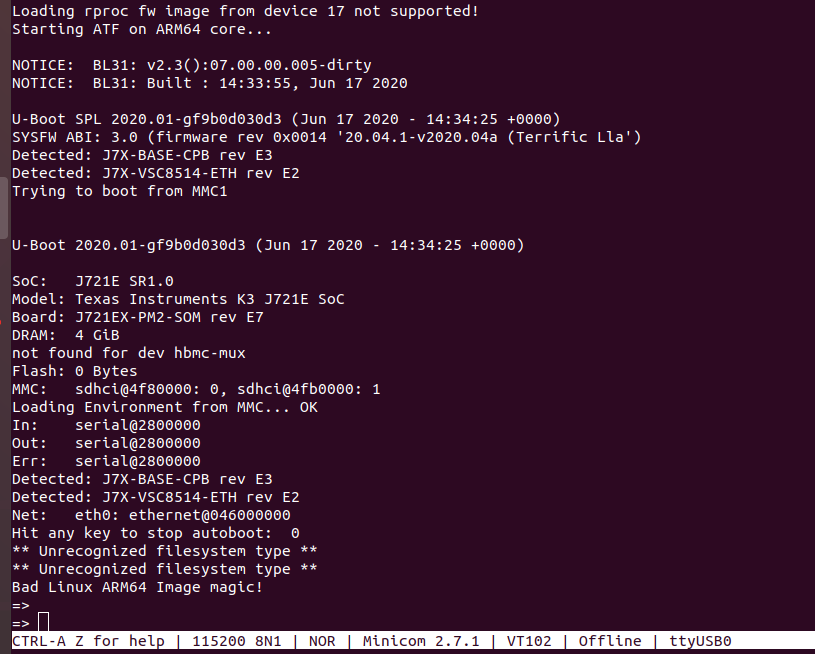
Now I am getting error is " Unrecognized file system"
Could you please help me.
Thanks
Gangadhar
Hi Gangadhar,
For #1, are you setting DIP switch for eMMC boot partition?
For #2, I need to check and get back.
Regards,
Vishal
Hi Gangadhar,
I just tried same steps except rootfs and I see it boot successfully.
Regards,
Vishal
Hi Vishal,
For Question 1:-
Yes your correct, Now u-boot is booting ( After changing proper dip switch settings for eMMC)
For Question 2: - Now u-boot is booting from eMMC
But we are getting below error
We are creating jffs2 image and flashing using dfu-util -- > is this correct way?
Thanks
Gangadhar
Hi Gangadhar,
Can you also update below environment variables to reflect file system on eMMC
=> setenv mmcdev 0
=> setenv bootpart 0:1
=> setenv bootcmd 'run findfdt; setenv mmcdev 0;...........'
Can you try creating ext4 image? I am not sure jffs2 image is correct.
Regards,
Vishal
Hi vishal,
Thanks for your reply.
1. We have created ext4 image using below commands
dd if=/dev/zero of=~/rootfs.ext4 bs=1M count=3072
mkfs.ext4 ~/rootfs.ext4
mount -t ext4 rootfs.ext4 mountpoint/
sudo cp -r tidefautrootfs/* mountpoint/
sudo umount mountpoint/
2. copied roots.ext4 using dfu (sudo dfu-util -c 1 -i 0 -a 1 -D rootfs.ext4)
Now it is giving this error on the host side:dfu-util: File size is too big: Success
On target side it is not copying.
Could you please help us to solve it.
Thanks
Gangadhar
Gangadhar
Hi Gangadhar,
Could you try arago-tiny-image?
Pouyan from your team was able to build arago-tiny-image.
Regards,
Vishal
Closing this e2e entry.
A new one is created specifically for rootfs -- https://e2e.ti.com/support/processors/f/791/t/922228