This thread has been locked.

If you have a related question, please click the "Ask a related question" button in the top right corner. The newly created question will be automatically linked to this question.

AM3352: UART module issue

Part Number: AM3352


Hi

We have following issue with UART module in AM3352BZCZD60 processor on a custom board.

System MPU              AM3352BZCZD60

UARTS in use:           5 ports (/dev/ttyO1 ÷ /dev/ttyO5) as Modbus RTU master

RS-485 transceivers: SN65HVD3082EDR

Linux kernel               4.19.94 from TI SDK am335x-evm-linux-sdk-src-06.03.00.106

toolchain                    gcc-arm-8.3-2019.03-x86_64-arm-linux-gnueabihf


Issue found:               Failure on single UART module after days of continuous communication with slaves at different baud rates (19200 … 115200). Port is found locked, no specific info in /var/log/messages or dmesg


Verified:                       RX/TX pins on RS-485 transceiver and on GPIO processor pins. Both are idle when trying to write to the serial port from Linux

RX, TX pins on transceiver before reboot - no communication
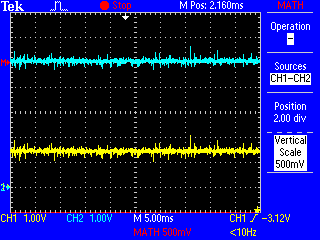
 

RX, TX GPIO pins on processor before reboot - no communication


RX, TX GPIO pins on processor after reboot - communication is back

Thank you in advance for any support in this topic. If some more information will be needed from the Linux kernel, we can read them from the board in a failure state.

Best Regards

Pawel

  • Hi Pawel,

    I have been collecting the information which you have exchanged with the local support regarding this issue, and learned that omap-serial driver is used in your project. The Linux kernel has switched to 8250-omap driver for the UART in TI processors a few years ago, and the omap-serial driver hasn't been used and tested in Processor SDK Linux releases since then. If you check the defconfig tisdk_am335x-evm_defconfig in the Processor SDK Linux kernel, you would see CONFIG_SERIAL_8250_OMAP is set, but CONFIG_SERIAL_OMAP is not set.

    So is it possible for you to switch to 8250-omap driver in your project to see if the lockup still happens?

    There is also a concern about the Errata Advisory 1.0.41, I can confirm the sw workaround has been implemented in the 8250-omap driver, but not in the omap-serial driver.

  • Hi Bin

    Thanks for your swift reply. I've recompiled Linux kernel with disabled SERIAL_OMAP driver and enabled SERIAL_8250_OMAP, but when I'm running read/write test on /dev/ttyS2-3 ports characters are only transmitted, nothing is received:

    root@test:~# cat /proc/tty/driver/serial

    serinfo:1.0 driver revision:

    0: uart:8250 mmio:0x44E09000 irq:30 tx:2499 rx:0 RTS|CTS|DTR|DSR

    1: uart:8250 mmio:0x48022000 irq:31 tx:0 rx:0 CTS|DSR|CD|RI

    2: uart:8250 mmio:0x48024000 irq:32 tx:15187 rx:0 CTS|DSR

    3: uart:8250 mmio:0x481A6000 irq:33 tx:15329 rx:0 CTS|DSR

    4: uart:8250 mmio:0x481A8000 irq:34 tx:0 rx:0 CTS|DSR

    5: uart:8250 mmio:0x481AA000 irq:35 tx:0 rx:0 CTS|DSR


    The same test works fine for the SERIAL_OMAP driver and /dev/ttyO2-3 ports:

    root@test:~# cat /proc/tty/driver/OMAP-SERIAL

    serinfo:1.0 driver revision:

    0: uart:OMAP UART0 mmio:0x44E09000 irq:30 tx:2489 rx:0 RTS|CTS|DTR|DSR

    1: uart:OMAP UART1 mmio:0x48022000 irq:31 tx:0 rx:0 CTS|DSR|CD|RI

    2: uart:OMAP UART2 mmio:0x48024000 irq:32 tx:8953 rx:9114 fe:46 pe:97 brk:3 CTS|DSR

    3: uart:OMAP UART3 mmio:0x481A6000 irq:33 tx:8931 rx:9136 fe:44 pe:98 brk:2 CTS|DSR

    4: uart:OMAP UART4 mmio:0x481A8000 irq:34 tx:1256 rx:107 fe:6 pe:9 brk:49 CTS|DSR

    5: uart:OMAP UART5 mmio:0x481AA000 irq:35 tx:0 rx:0 CTS|DSR


    Does SERIAL_8250_OMAP driver support RS-485?

  • Hi Pawel,

    We don't test RS485 specifically because the EVM doesn't have a RS485 transceiver, but the 8250-omap driver should support RS485 as we have many customers using it.

    How did you test the uart ports? using your python test script? You have to configure the uart port to RS485 mode in your application. I am not sure how to do so in python, but the following is an example in C program, please check its setup_serial_port() function.

    https://github.com/cbrake/linux-serial-test/blob/master/linux-serial-test.c

  • Hi Bin,

    I've tested with previously used Python test scripts, which works fine with SERIAL_OMAP driver. Then I tested with simplified code with defined rs485_ mode. The code is split into two scripts port_read.py and port_write.py, running on two terminals. RS-485 ports on the device are connected each other.

    port_write.py

    #!/usr/bin/env python3

    import sys
    import serial
    import serial.rs485

    port = serial.Serial('/dev/ttyO/S3')
    port.rs485_mode = serial.rs485.RS485Settings()
    port.stopbits = serial.STOPBITS_ONE
    port.bytesize = serial.EIGHTBITS
    port.parity = serial.PARITY_EVEN
    port.timeout = 5
    port.baudrate = 19200

    while True:
      port.write('x'.encode('utf-8'))
      port.flush()


    port_read.py

    #!/usr/bin/env python3

    import sys
    import serial
    import serial.rs485

    port = serial.Serial('/dev/ttyO/S2')
    port.rs485_mode = serial.rs485.RS485Settings()
    port.stopbits = serial.STOPBITS_ONE
    port.bytesize = serial.EIGHTBITS
    port.parity = serial.PARITY_EVEN
    port.timeout = 5
    port.baudrate = 19200

    while True:
      message = port.read(128)
      if len(message) > 0:
        print('Read from port message:', message.decode('utf-8'))
      else:
        print('Error, cannot read from port')

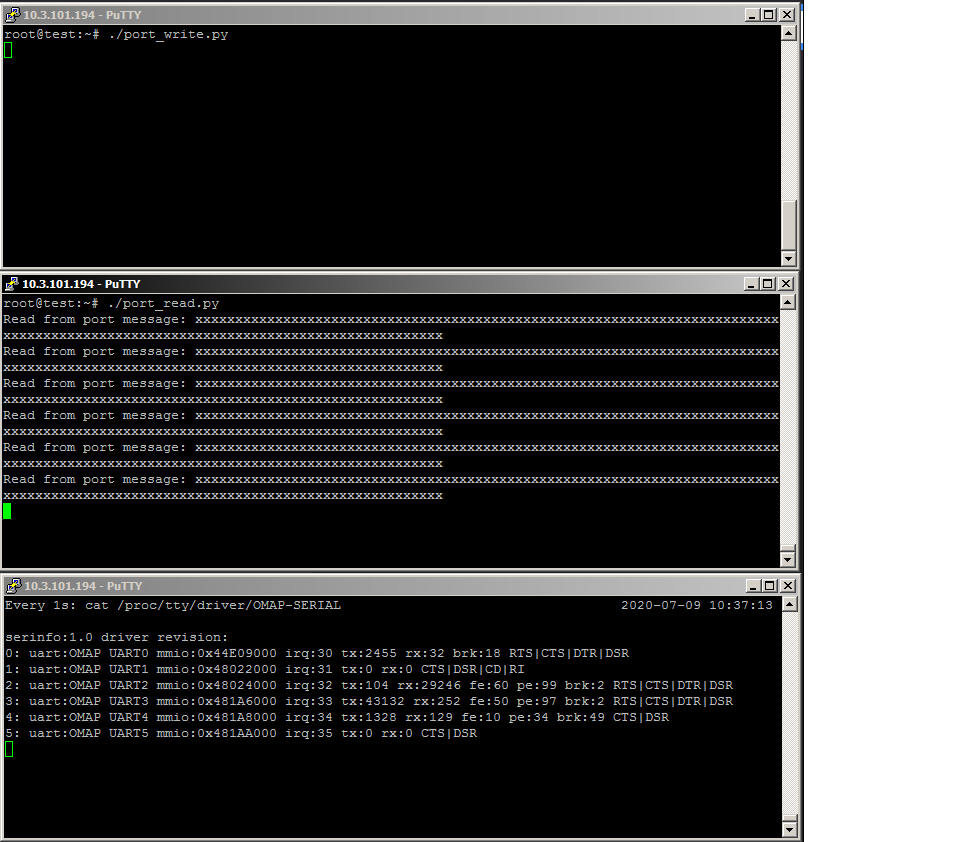
    Results for SERIAL_OMAP driver, characters are send to port 3 and received on port 2:

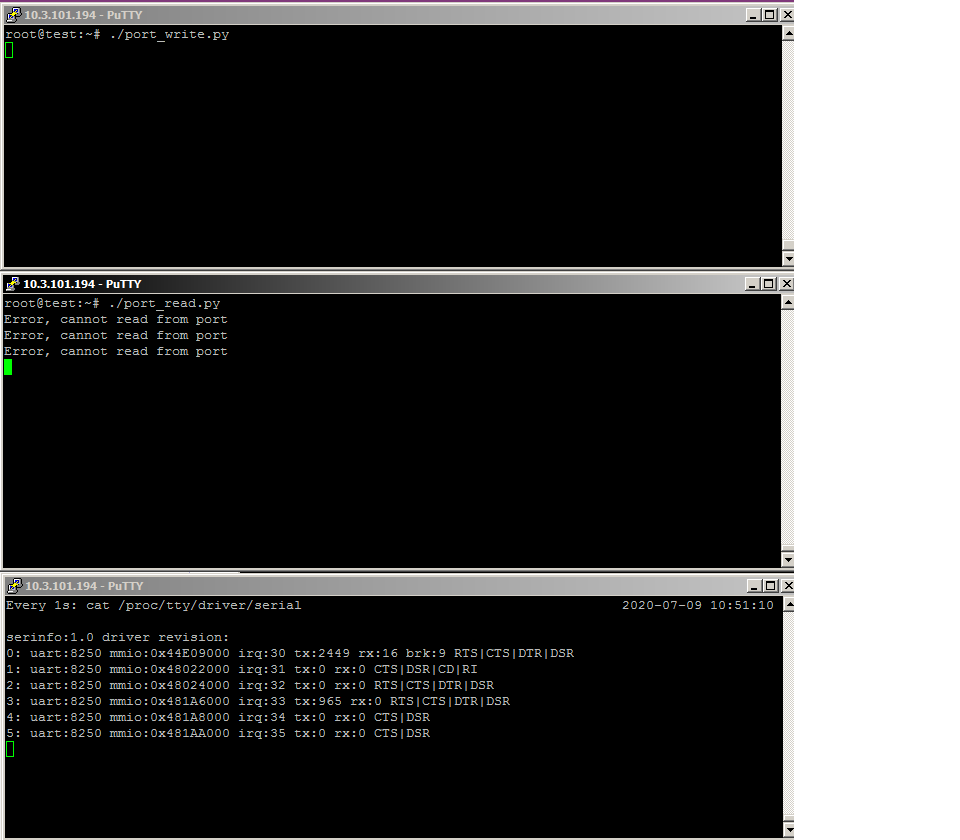
    Results for SERIAL_8250_OMAP driver, characters are send to port 3, but not received on port 2:

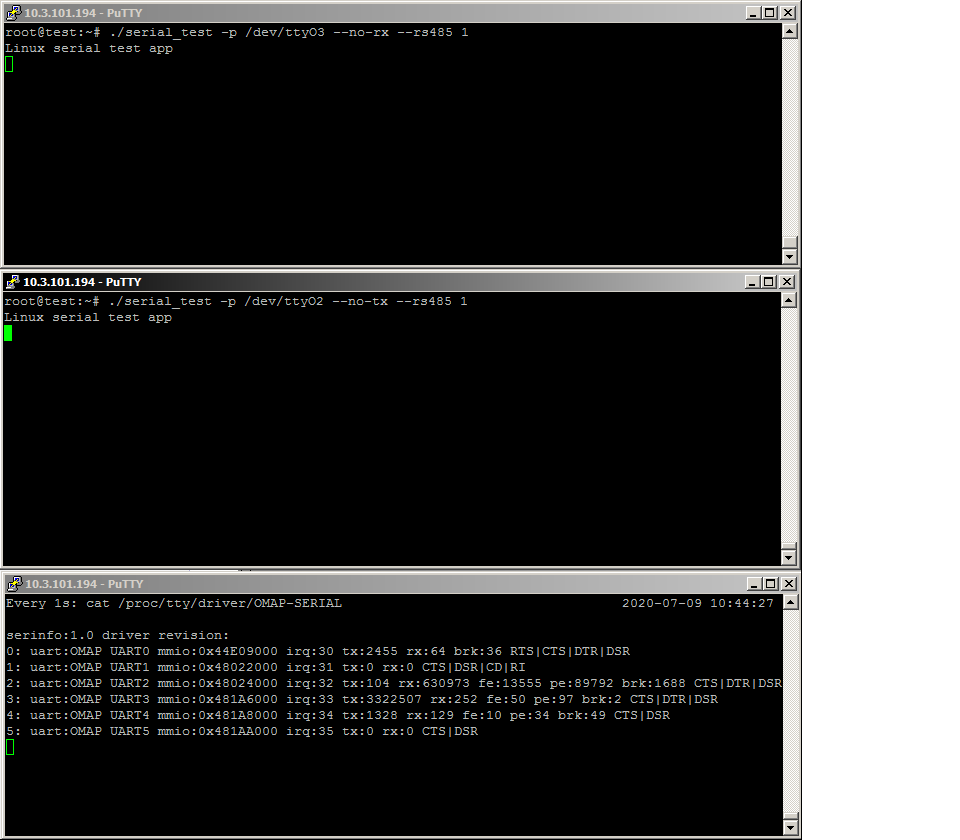
    I've also tested communication on ports using compiled .c code from the link.

    Results for SERIAL_OMAP driver, bytes are send to port 3 and received on port 2:

    Results for SERIAL_8250_OMAP driver, characters are send to port 3, but not received on port 2:

  • What I also found is this thread:

    https://e2e.ti.com/support/processors/f/791/t/728878?Linux-AM4377-RS-485-communication

    and sentence in it:

    There has been upstream activity to allow use of the UART RTS pin for RS-485 in 8250 driver, but I am not sure what the current status is. You can try with 8250 driver coming with PSDK 5.00 (kernel 4.14.40) and check if there will be any improvement.

    It was in 2018, but do you know what is the current status?

  • Hi Pawel,

    I am not sure what that sentence means, the RTS pin for RS-485 direction control is in the driver. But I reviewed the 8250-omap and omap-serial drivers and your board DTS file, I think the receiving failure you saw with 8250-omap driver is not about RS-485 config in your python test script, but just that the 8250-omap driver doesn't support GPIO based RS-485 direction control (rts-gpio property in the device tree uart node). The driver should work if use the UART RTSn pin to control the RS-485 direciton.

    It seems not trivial to implement GPIO-RTS support in 8250-omap driver, so I guess we have to focus on debugging your issue with omap-serial driver. Regarding the scope captures in your first post above, are they probed at the AM335x UART pins before the RS-485 transceiver? I'd like to understand if the captures proved the UART TX pin doesn't transmit data and the issue is not about the RS485 transceiver.

  • Hi Bin,

    Yes, it seems that both Python and C codes work fine as verification tests.

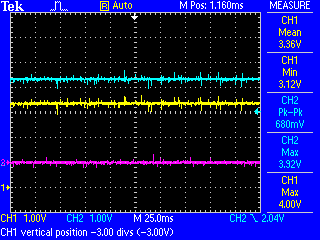
    Regarding scope captures, first one is probed on transceiver pins, next two are probed at the AM3352 UART pins before RS-485 transceiver, during failure and normal communication.

    Our next important observation is that issue is reproducing more frequent when baudrate on the bus is changed more frequent e.g. 115200 -> 19200 -> 115200 etc. We need to change baudrate, to query other types of devices connected to the same bus.

  • Hi Pawel,

    On the locked uart port (for example, uart3), if you run the following command, do you see the tx number in /proc/tty/driver/omap-serial increases? and do you see the uart tx line toggles on the scope?

    # stty -F /dev/ttyS3 115200; echo 'x' > /dev/ttyS3
    # stty -F /dev/ttyS3 19200; echo 'x' > /dev/ttyS3

  • Hi Bin,

    Writing to locked port /dev/ttyO5 is hanging. I had to stop it by Ctrl-C. Counter for tx doesn't increase. Status of pins on the scope is not changing.

    root@test# cat /proc/tty/driver/OMAP-SERIAL;stty -F /dev/ttyO5 115200; echo 'x' > /dev/ttyO5; stty -F /dev/ttyO5 19200; echo 'x' > /dev/ttyO5;cat /proc/tty/driver/OMAP-SERIAL
    serinfo:1.0 driver revision:
    0: uart:OMAP UART0 mmio:0x44E09000 irq:30 tx:3099 rx:0 RTS|CTS|DTR|DSR
    1: uart:OMAP UART1 mmio:0x48022000 irq:31 tx:6 rx:0 CTS|DSR|CD|RI
    2: uart:OMAP UART2 mmio:0x48024000 irq:32 tx:412052 rx:0 CTS|DSR
    3: uart:OMAP UART3 mmio:0x481A6000 irq:33 tx:16870622 rx:22150436 CTS|DSR
    4: uart:OMAP UART4 mmio:0x481A8000 irq:34 tx:20972021 rx:24128615 fe:6 pe:52 brk:2 CTS|DSR
    5: uart:OMAP UART5 mmio:0x481AA000 irq:35 tx:3072561 rx:10271909 fe:39 pe:119 brk:76 CTS|DTR|DSR
    ^C

    yellow - RTS, blue - TxD, magenta - RxD

    When writing to working /dev/ttyO3 port, tx counter increases by 4:

    root@test:~#  cat /proc/tty/driver/OMAP-SERIAL;stty -F /dev/ttyO3 115200; echo 'x' > /dev/ttyO3; stty -F /dev/ttyO3 19200; echo 'x' > /dev/ttyO3;cat /proc/tty/driver/OMAP-SERIAL
    serinfo:1.0 driver revision:
    0: uart:OMAP UART0 mmio:0x44E09000 irq:30 tx:3099 rx:0 RTS|CTS|DTR|DSR
    1: uart:OMAP UART1 mmio:0x48022000 irq:31 tx:6 rx:0 CTS|DSR|CD|RI
    2: uart:OMAP UART2 mmio:0x48024000 irq:32 tx:412052 rx:0 CTS|DSR
    3: uart:OMAP UART3 mmio:0x481A6000 irq:33 tx:16870618 rx:22150436 CTS|DSR
    4: uart:OMAP UART4 mmio:0x481A8000 irq:34 tx:20972021 rx:24128615 fe:6 pe:52 brk:2 CTS|DSR
    5: uart:OMAP UART5 mmio:0x481AA000 irq:35 tx:3072561 rx:10271909 fe:39 pe:119 brk:76 CTS|DTR|DSR
    serinfo:1.0 driver revision:
    0: uart:OMAP UART0 mmio:0x44E09000 irq:30 tx:3099 rx:0 RTS|CTS|DTR|DSR
    1: uart:OMAP UART1 mmio:0x48022000 irq:31 tx:6 rx:0 CTS|DSR|CD|RI
    2: uart:OMAP UART2 mmio:0x48024000 irq:32 tx:412052 rx:0 CTS|DSR
    3: uart:OMAP UART3 mmio:0x481A6000 irq:33 tx:16870622 rx:22150436 CTS|DSR
    4: uart:OMAP UART4 mmio:0x481A8000 irq:34 tx:20972021 rx:24128615 fe:6 pe:52 brk:2 CTS|DSR
    5: uart:OMAP UART5 mmio:0x481AA000 irq:35 tx:3072561 rx:10271909 fe:39 pe:119 brk:76 CTS|DTR|DSR

    On the scope proper communication is visible:

    yellow - RTS, blue - TxD, magenta - RxD

  • Hi Pawel,

    Thanks for the testing. I got your python test script. I understand it writes to one port and reads from other 3 ports in baud rate 19200 or 115200. Can you please test with read/write between just 2 ports to see how long it takes to lock up? I am going to test it on BeagleBone Black with omap-serial driver in RS485 mode but without RS485 transceiver, but I cannot do so in 4 ports.

  • Hi Bin,

    Yes you're correct, script is writing characters to one port and try to read them on other ports with baudrate 19200 and then 115200. I've run it in the loop on two ports and let you know when issue will be reproduced.

  • Hi Pawel,

    How long does it take to lock up typically? a couple days? My test has been running for 17 hours now on Beaglebone Black with your python script which is modified to read/write between UART 1 and 4. I use your DTS settings for UART1 and 4 except different txd/rxd and GPIO pins.

  • Hi Bin, 

    Usually it was couple of days, but reproduction was with external devices connected to the port. Until now, test script was used only to verify port communication when issue occurred. My test is also still running for about 1 day.

    We've made also another verification test with Python and scope.


    Correctly working /dev/ttyO2 port:

    Test script is sending one character to a port, when finished it is properly exiting 

    #!/usr/bin/env python3
    
    import serial
    import serial.rs485
    
    port = serial.Serial('/dev/ttyO2')
    port.rs485_mode = serial.rs485.RS485Settings()
    port.stopbits = serial.STOPBITS_ONE
    port.bytesize = serial.EIGHTBITS
    port.parity = serial.PARITY_EVEN
    port.timeout = 5
    port.baudrate = 19200
    port.write('x'.encode('utf-8'))
    port.flush()

    On the scope it is visible that RTS is going high (yellow) when there are data on TxD (blue). RxD is unchanged (magenta)


    Failed /dev/ttyO5 port:

    In the initial state RTS is high. The state is from the previous attempt to send data.

    RTS - yellow, TxD - blue, RxD - magenta

    Then with the below script it was possible to change RTS to low:

    #!/usr/bin/env python3
    
    import time
    import serial
    import serial.rs485
    
    port = serial.Serial('/dev/ttyO5')
    port.rs485_mode = serial.rs485.RS485Settings()
    port.stopbits = serial.STOPBITS_ONE
    port.bytesize = serial.EIGHTBITS
    port.parity = serial.PARITY_EVEN
    port.timeout = 5
    port.baudrate = 19200
    port.rts = False
    time.sleep(1)
    port.write('x'.encode('utf-8'))
    port.flush()
    port.rts = False
    

    After 1 second script is trying to send data. RTS is going high, but script hangs and next instruction to change RTS again to low was not executed. It should be set to low even without it after finishing data transmission. It was needed to stop script with Ctrl-C. After stopping script, states of pins remain unchanged:

    RTS - yellow, TxD - blue, RxD - magenta

    So in a failure state RTS can work, but TxD not.

  • Hi Pawel,

    Thanks for the testing. It is helpful.

    Pawel Ludowski said:

    Test script is sending one character to a port, when finished it is properly exiting 

    #!/usr/bin/env python3

    Let's call this script as python-one-char for easy reference.

    Pawel Ludowski said:
    In the initial state RTS is high. The state is from the previous attempt to send data.

    Is the failure state observed on your already-locked setup? Or a new setup but ran into the failure state by the script python-one-char? In the "previous attempt to send data", does the write call return peacefully or hang there or returned with error code -110 (timeout)?

    Pawel Ludowski said:
    After 1 second script is trying to send data. RTS is going high, but script hangs and next instruction to change RTS again to low was not executed.

    It sounds to me that with the new python scripts, the uart lockup happens within about 1 second, is it correct? If it is such easy to reproduce the lockup, it would very helpful for debugging.

  • Bin Liu said:
    Is the failure state observed on your already-locked setup? Or a new setup but ran into the failure state by the script python-one-char? In the "previous attempt to send data", does the write call return peacefully or hang there or returned with error code -110 (timeout)?

    Tests were carried out on already locked setup with python-one-char srcipt. First one on a working port /dev/ttyO2, second one on locked port /dev/ttyO5. We'd like to check whether it is possible to change RTS state on already locked port. In the previous attempt to send data, script running on the locked port hangs when trying port.write() and RTS was not going down because write was not finalized. It is the state after failure, but can be changed manually to low.

    Bin Liu said:
    It sounds to me that with the new python scripts, the uart lockup happens within about 1 second, is it correct? If it is such easy to reproduce the lockup, it would very helpful for debugging.

    Unfortunately not, python-one-char script was running on already locked port. It seems that TxD pin is locked but RTS not.

  • Hi Pawel,

    Thanks for the explanation.

    When changing baud rate, the UART FIFO has to be empty. The ideal sequence would be:

    1. close uart port so that all data is flushed;
    2. re-open the port;
    3. change to different baud;
    4. start data transfer.

    I know your python script does this sequence, but I have two questions:

    1. Does your real application close and re-open the uart port when switching baud rate?

    2. Does your python script which writes to one port and reads from other 3 ports reproduce the lockup issue after running for a few days?

  • Hi Bin,

    Bin Liu said:
    1. Does your real application close and re-open the uart port when switching baud rate?

    No, port is opened only once due to expected performance decrease in a case of opening/closing for each reading. But port is flushed at the beginning and end of each data transmission before switching to other baudrate. The sequence is:

    Start application and open port

    1. Read first device
      1. Set port parameters (baudrate, parity, byte size, stop bits)
      2. Flush port
      3. Write/read from port
      4. Flush port
    2. Read second device
      1. Set port parameters (baudrate, parity, byte size, stop bits)
      2. Flush port
      3. Write/read from port
      4. Flush port
    3. Read n device
      1. Set port parameters (baudrate, parity, byte size, stop bits)
      2. Flush port
      3. Write/read from port
      4. Flush port

    Port is closed when application is closed.

    We can run a test with port opening/closing for each reading. 

    Bin Liu said:
    2. Does your python script which writes to one port and reads from other 3 ports reproduce the lockup issue after running for a few days?

    Not yet, it is still running, now second day.

  • Hi Pawel,

    Pawel Ludowski said:
    But port is flushed at the beginning and end of each data transmission before switching to other baudrate.

    Can you please provide the code segment showing what API is used and how flush is done?

    Pawel Ludowski said:
    We can run a test with port opening/closing for each reading. 

    That will be helpful. Thanks.

    Pawel Ludowski said:
    Not yet, it is still running, now second day.

    I guess you meant the two-port testing "write to one port and read from another port" which I asked for a couple days ago? No, I meant did you reproduce the lockup in your 4-port testing with your script ***busselfttest.py?

  • Bin Liu said:
    Can you please provide the code segment showing what API is used and how flush is done?

    The modbus_flush function from https://github.com/stephane/libmodbus/blob/master/src/modbus.c is used in object constructor and destructor.

    Bin Liu said:
    I guess you meant the two-port testing "write to one port and read from another port" which I asked for a couple days ago? No, I meant did you reproduce the lockup in your 4-port testing with your script ***busselfttest.py?

    Yes, but this is the same script busselftest.py which can be run on defined range of ports. For two ports it can be e.g.:

    first_port = 2
    last_port = 3

    The test is running on two ports now. It was not running before on 4 ports to try to reproduce the issue.

  • Pawel Ludowski said:
    It was not running before on 4 ports to try to reproduce the issue.

    So the script busselftest.py was only used to check a locked port? If so, you only saw the port lockup issue in your real application which doesn't close port between different baud?

  • Yes, originally this script is used only for board verification. So we used it after the failure, to exclude that issue is in an application. Locking of port was observed only with application as until now script was not used for long term tests. 

    But we can try to reproduce issue with the script as well as try to run application with opening/closing port between baudrate change. I will let you know when I will have some new results.

  • Hi Pawel,

    Thanks for the clarification.

    Pawel Ludowski said:
    But we can try to reproduce issue with the script as well as try to run application with opening/closing port between baudrate change.

    Yes, this test will conclude if the issue is caused by application changing baud rate without properly flushing the FIFO. Waiting for the test result.

  • Hi Pawel,

    Do you have the test result yet?

  • Hi Bin,

    Both tests:

    • script running on one board
    • application with port closing running on two boards

    are ongoing without failure until now. Looks promising, but still too early to say that issue is solved. Sometimes failure was after couple of weeks. I would say that our criterion will be one month of continuous operation as until now all failures were in that time period.

  • Pawel,

    Thanks for the update.

    Let's wait for a few more weeks to see the results. If this thread is locked (due to lack of activity) you can send the update to the local TI FAE, I will receive it. Thanks.

  • Hi Bin

    The issue was reproduced in the test with application closing the port before baudrate change and with SERIAL_OMAP driver. The failure was after 10 days of continuous operation. We are keeping the board in a failure state. The test with a script is still ongoing without failures.

    In the meantime we were able to run SERIAL_8250_OMAP driver on our board. We figure out that required pins for RTS are already used, only comments in the dts file were misleading. It was also needed to change MUX_MODE for them and reverse the RTS polarity on application level. In default it was low when data sending. The UART port configuration in the dts file is as follows:

    &uart5 {
      pinctrl-names = "default";
      pinctrl-0 = <&uart5_pins>;
      rs485-rts-delay = <0 0>;
      rts-gpio = <&gpio3 2 GPIO_ACTIVE_HIGH>;
      rs485-rts-active-high;
      linux,rs485-enabled-at-boot-time;
      status = "okay";
    };

    Do you know what could be the reason for the reversed polarity?

    Finally we started the test with application closing the port before baudrate change and SERIAL_8250_OMAP driver on the third board and issue was reproduced also here. Failure was after 9 days of continuous operation.

  • Hi Pawel,

    Good to know that the tests with both SERIAL_OMAP and SERIAL_8250_OMAP drivers show the issue with the application closing the port before changing baudrate. I will discuss it with our dev team how to investigate it.

    Pawel said:

    The UART port configuration in the dts file is as follows:

    &uart5 {
      pinctrl-names = "default";
      pinctrl-0 = <&uart5_pins>;
      rs485-rts-delay = <0 0>;
      rts-gpio = <&gpio3 2 GPIO_ACTIVE_HIGH>;
      rs485-rts-active-high;
      linux,rs485-enabled-at-boot-time;
      status = "okay";
    };

    Do you know what could be the reason for the reversed polarity?

    It seems this uart configuration is the same as that for SERIAL_OMAP driver, is this not what you used initially when testing with SERIAL_8250_OMAP driver a few weeks ago but TX didn't transmit data?

    Can you please explain the device tree difference between the previous SERIAL_8250_OMAP test which didn't work and the test now which works?

  • Hi Bin

    The difference is in the MUX_MODE for RTS pin. For SERIAL_OMAP driver it was MUX_MODE7 for all ports and the same configuration was used in previous SERIAL_8250_OMAP tests. E.g. for UART5 it was:

    uart5_pins: pinmux_uart5_pins {
      pinctrl-single,pins = <
        0x108 ( PIN_INPUT_PULLUP | MUX_MODE3 )
        0x144 ( PIN_OUTPUT_PULLDOWN | MUX_MODE3 )
        0x110 ( PIN_OUTPUT_PULLUP | MUX_MODE7 )
      >;
    };

    For SERIAL_8250_OMAP driver, modes for RTS pin have to be as follows:

    • MUX_MODE0 for UART1
    • MUX_MODE2 for UART2
    • MUX_MODE6 for UART3
    • MUX_MODE6 for UART4
    • MUX_MODE5 for UART5

    Additionally in the application, the polarity of the RTS was reversed with using https://libmodbus.org/docs/v3.1.1/modbus_rtu_set_rts.html function:

    modbus_rtu_set_rts(modbusContext, MODBUS_RTU_RTS_DOWN);


  • Hi Pawel,

    Here is the reason why your application has to reverse the RTS polarity with SERIAL_8250_OMAP driver:

    The UART5 pin 0x110 mux mode 5 is uart5_rtsn, and its mode 7 is gpio3_2. So you used the pin as a GPIO in SERIAL_OMAP driver while as native RTSn in SERIAL_8250_OMAP driver. The drivers handle the native RTSn pin and rts_gpio pin differently.

    With GPIO in SERIAL_OMAP driver, the DT property "rs485-rts-active-high;" takes care of reversing the RTS polarity; while this dts property is only used in SERIAL_OMAP driver, it is not applicable in SERIAL_8250_OMAP driver, so the user space application has to take care of the reversing when using SERIAL_8250_OMAP driver.

    By the way, I don't think you need DT property "rts-gpio = <&gpio3 2 GPIO_ACTIVE_HIGH>;" when using pin 0x110 in mode 5. Because the pin is not in GPIO mode.

    Our dev team ask the following debug information on the locked board.

    1. the output of command "serialstats", the link below has the information of this tool.

    https://software-dl.ti.com/processor-sdk-linux/esd/docs/06_03_00_106/AM335X/linux/Foundational_Components/Kernel/Kernel_Drivers/UART.html#basic-external-loopback-testing

    2. get the register dump of the locked port. you can use devmem2 command to read the registers.

    3. get all the tasks in the system by command "echo t > /proc/sysrq-trigger". You can send this log offline if you are not comfortable to post it here.

    4. what is the state of RTS line (high or low) after the port is locked up?

    Once above states and logs are collected, please check if the UART IP is in sane state:

    - write a char directly to the TX FIFO to see if there is any activity on the TX line, for example on UART5, "devmem2 0x481aa000 b 0x55", where 0xa81aa000 is the base address of UART5.

    - send some data from the other side and see if AM3352 UART FIFO occupancy increases in offset 0x64 (UART_RXFIFO_LVL register).

    Also do you understand when exactly the lockup happens? Is it just after switching baud rate or in the middle of transfer or at the start or random? When the AM3352 UART lockup happens, it is a rs485 master, not slave, right?

  • Hi Bin

    Thank you for clarifying the RTS polarity topic.

    Unfortunately our test rack has been accidentally restarted, so we have to reproduce the issue again. In the meantime I've collected all the tools to read required information. If the issue will be reproduced this week then I will put here the output and send sensitive data to local support team. If the issue will be not reproduced this week then I will be able to put debug info beginning of September.