Part Number: AM5728
Other Parts Discussed in Thread: BEAGLEBOARD-X15, , DRA752, AM5729, TMP102, TPD2E001, PMP
I have a AM5728 custom board.
I use ti-processor-sdk-linux-rt-am57xx-evm-06.03.00.106-Linux-x86-Install.bin.
I split the sd card's partition into two partitions via create-sdcard.sh provided by sdk (16GB capacity).
Available Drives to write images to:
..................................................................................................................................................................
# major minor size name
1: 8 0 351641304 sda
2: 8 32 15286272 sdc
Enter Device Number or n to exit: 2
sdc was selected
/dev/sdc is an sdx device
Unmounting the sdc drives
unmounted /dev/sdc1
unmounted /dev/sdc2
Current size of sdc1 71680 bytes
Current size of sdc2 15197184 bytes
################################################################################
Select 2 partitions if only need boot and rootfs (most users).
Select 3 partitions if need SDK & other content on SD card. This is
usually used by device manufacturers with access to partition tarballs.
****WARNING**** continuing will erase all data on sdc
################################################################################
Number of partitions needed [2/3] : 2
Now partitioning sdc with 2 partitions...
################################################################################
Now making 2 partitions
################################################################################
1024+0 records in
1024+0 records out
1048576 bytes (1.0 MB, 1.0 MiB) copied, 0.261054 s, 4.0 MB/s
DISK SIZE - 15653142528 bytes
################################################################################
Partitioning Boot
################################################################################
mkfs.fat 4.1 (2017-01-24)
mkfs.fat: warning - lowercase labels might not work properly with DOS or Windows
mkfs.vfat: unable to open /dev/sdc1: No such file or directory
################################################################################
Partitioning rootfs
################################################################################
mke2fs 1.44.1 (24-Mar-2018)
/dev/sdc2 contains a ext3 file system labelled 'rootfs'
last mounted on /media/skyliqf/rootfs on Wed Jul 8 11:17:21 2020
Proceed anyway? (y,N) y
Creating filesystem with 3799296 4k blocks and 950272 inodes
Filesystem UUID: 30ceebdb-9acb-4dae-aeef-33f268435240
Superblock backups stored on blocks:
32768, 98304, 163840, 229376, 294912, 819200, 884736, 1605632, 2654208
Allocating group tables: done
Writing inode tables: done
Creating journal (16384 blocks): done
Writing superblocks and filesystem accounting information: done
################################################################################
Partitioning is now done
Continue to install filesystem or select 'n' to safe exit
**Warning** Continuing will erase files any files in the partitions
################################################################################
Would you like to continue? [y/n] : y
Mount the partitions
Emptying partitions
Syncing....
################################################################################
Choose file path to install from
1 ) Install pre-built images from SDK
2 ) Enter in custom boot and rootfs file paths
################################################################################
Choose now [1/2] : 1
Will now install from SDK pre-built images
now installing: AM57X_RT
################################################################################
Multiple rootfs Tarballs found
################################################################################
1:tisdk-rootfs-image-am57xx-evm.tar.xz
2:tisdk-docker-rootfs-image-am57xx-evm.tar.xz
Enter Number of rootfs Tarball: 1
################################################################################
Copying files now... will take minutes
################################################################################
Copying boot partition
MLO copied
u-boot.img copied
uEnv.txt copied
Copying rootfs System partition
Syncing...
Un-mount the partitions
Remove created temp directories
Operation Finished
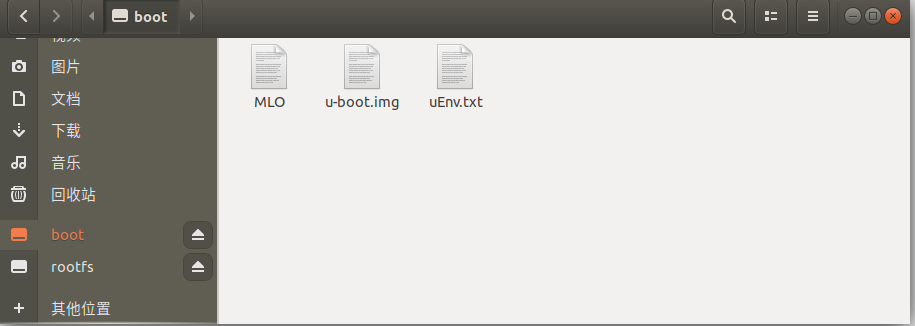
but board doesn't recognize the SD card in U-Boot, the kernel and device tree loading is failing.
Could you tell me why?
...............................................................................................................................................
U-Boot SPL 2019.01-g333c3e72d3 (Apr 20 2020 - 05:48:48 +0000)
DRA752-GP ES2.0
Trying to boot from MMC1
Loading Environment from FAT... *** Warning - bad CRC, using default environment
Loading Environment from MMC... *** Warning - bad CRC, using default environment
U-Boot 2019.01-g333c3e72d3 (Apr 20 2020 - 05:48:48 +0000)
CPU : DRA752-GP ES2.0
Model: TI AM5728 BeagleBoard-X15
Board: UNKNOWN(BeagleBoard X15?) REV UNKNOWN
DRAM: 2 GiB
MMC: OMAP SD/MMC: 0, OMAP SD/MMC: 1
Loading Environment from FAT... MMC: no card present
Loading Environment from MMC... *** Warning - bad CRC, using default environment
Warning: fastboot.board_rev: unknown board revision
am57x_idk_lcd_detect: Failed to get I2C device 0/56 (ret 1)
Net:
Warning: ethernet@48484000 using MAC address from ROM
eth0: ethernet@48484000
Hit any key to stop autoboot: 0
MMC: no card present
MMC: no card present
MMC: no card present
MMC: no card present
Trying to boot Linux from eMMC ...
switch to partitions #0, OK
mmc1(part 0) is current device
SD/MMC found on device 1
** No partition table - mmc 1 **
** No partition table - mmc 1 **
Trying to boot Android from eMMC ...
switch to partitions #0, OK
mmc1(part 0) is current device
mmc - MMC sub system
Usage:
mmc info - display info of the current MMC device
mmc read addr blk# cnt
mmc write addr blk# cnt
mmc erase blk# cnt
mmc rescan
mmc part - lists available partition on current mmc device
mmc dev [dev] [part] - show or set current mmc device [partition]
mmc list - lists available devices
mmc hwpartition [args...] - does hardware partitioning
arguments (sizes in 512-byte blocks):
[user [enh start cnt] [wrrel {on|off}]] - sets user data area attributes
[gp1|gp2|gp3|gp4 cnt [enh] [wrrel {on|off}]] - general purpose partition
[check|set|complete] - mode, complete set partitioning completed
WARNING: Partitioning is a write-once setting once it is set to complete.
Power cycling is required to initialize partitions after set to complete.
mmc bootbus dev boot_bus_width reset_boot_bus_width boot_mode
- Set the BOOT_BUS_WIDTH field of the specified device
mmc bootpart-resize <dev> <boot part size MB> <RPMB part size MB>
- Change sizes of boot and RPMB partitions of specified device
mmc partconf dev [boot_ack boot_partition partition_access]
- Show or change the bits of the PARTITION_CONFIG field of the specified device
mmc rst-function dev value
- Change the RST_n_FUNCTION field of the specified device
WARNING: This is a write-once field and 0 / 1 / 2 are the only valid values.
mmc setdsr <value> - set DSR register value
Wrong Image Format for bootm command
ERROR: can't get kernel image!
=>
=> printenv
arch=arm
args_mmc=run finduuid;setenv bootargs console=${console} ${optargs} root=PARTUU}
baudrate=115200
board=am57xx
board_name=beagle_x15
boot_fdt=try
boot_fit=0
bootargs=androidboot.serialno=0f0070146e600002 console=ttyS2,115200 androidbootd
bootcmd=if test ${dofastboot} -eq 1; then echo Boot fastboot requested, resetti;
bootdelay=2
bootdir=/boot
bootenvfile=uEnv.txt
bootfile=fitImage
bootm_size=0x10000000
bootpart=1:2
bootscript=echo Running bootscript from mmc${mmcdev} ...; source ${loadaddr}
console=ttyS0,115200
cpu=armv7
devnum=1
devtype=mmc
dfu_alt_info_emmc=rawemmc raw 0 3751936;boot part 1 1;rootfs part 1 2;MLO fat 11
dfu_alt_info_mmc=boot part 0 1;rootfs part 0 2;MLO fat 0 1;MLO.raw raw 0x100 0x1
dfu_alt_info_qspi=MLO raw 0x0 0x040000;u-boot.img raw 0x040000 0x0100000;u-boot0
dfu_alt_info_ram=kernel ram 0x80200000 0x4000000;fdt ram 0x80f80000 0x80000;ram0
dfu_bufsiz=0x10000
dofastboot=0
emmc_android_boot=echo Trying to boot Android from eMMC ...; run update_to_fit;;
emmc_linux_boot=echo Trying to boot Linux from eMMC ...; setenv mmcdev 1; seten;
envboot=mmc dev ${mmcdev}; if mmc rescan; then echo SD/MMC found on device ${mm;
ethaddr=e8:eb:11:6b:61:0e
eval_bootargs=setenv bootargs androidboot.serialno=${serial#} console=ttyS2,115d
fastboot.cpu=DRA752
fastboot.secure=GP
fdt_addr_r=0x88000000
fdtaddr=0x88000000
fdtcontroladdr=fdf220a8
fdtfile=am57xx-beagle-x15.dtb
findfdt=if test $board_name = omap5_uevm; then setenv fdtfile omap5-uevm.dtb; f
finduuid=part uuid mmc ${bootpart} uuid
fit_bootfile=fitImage
fit_loadaddr=0x90000000
get_overlaystring=for overlay in $overlay_files;do;setenv overlaystring ${overl;
idk_lcd=no
importbootenv=echo Importing environment from mmc${mmcdev} ...; env import -t $}
kernel_addr_r=0x82000000
loadaddr=0x90000000
loadbootenv=fatload mmc ${mmcdev} ${loadaddr} ${bootenvfile}
loadbootscript=load mmc ${mmcdev} ${loadaddr} boot.scr
loadfdt=load ${devtype} ${bootpart} ${fdtaddr} ${bootdir}/${fdtfile}
loadfit=run args_mmc; run run_fit;
loadimage=load ${devtype} ${bootpart} ${loadaddr} ${bootdir}/${bootfile}
machid=fe6
mmcboot=mmc dev ${mmcdev}; setenv devnum ${mmcdev}; setenv devtype mmc; if mmc ;
mmcdev=1
mmcloados=run args_mmc; if test ${boot_fdt} = yes || test ${boot_fdt} = try; th;
mmcroot=/dev/mmcblk0p2 rw
mmcrootfstype=ext4 rootwait
netargs=setenv bootargs console=${console} ${optargs} root=/dev/nfs nfsroot=${sp
netboot=echo Booting from network ...; setenv autoload no; dhcp; run netloadima}
netloadfdt=tftp ${fdtaddr} ${fdtfile}
netloadimage=tftp ${loadaddr} ${bootfile}
nfsopts=nolock
partitions=uuid_disk=${uuid_gpt_disk};name=bootloader,start=384K,size=1792K,uui}
partitions_android=uuid_disk=${uuid_gpt_disk};name=xloader,start=128K,size=256K}
pxefile_addr_r=0x80100000
ramdisk_addr_r=0x88080000
rdaddr=0x88080000
rootpath=/export/rootfs
run_fit=bootm ${fit_loadaddr}#${fdtfile}${overlaystring}
scriptaddr=0x80000000
serial#=0f0070146e600002
setconsole=if $board_name=am5729_beaglebonai;then setenv console ttyS0,115200; d
soc=omap5
static_ip=${ipaddr}:${serverip}:${gatewayip}:${netmask}:${hostname}::off
stderr=serial@48020000
stdin=serial@48020000
stdout=serial@48020000
update_to_fit=setenv loadaddr ${fit_loadaddr}; setenv bootfile ${fit_bootfile}
usbtty=cdc_acm
vendor=ti
ver=U-Boot 2019.01-g333c3e72d3 (Apr 20 2020 - 05:48:48 +0000)
vram=16M
Environment size: 7815/131067 bytes
=>
=> mmc list
OMAP SD/MMC: 0
OMAP SD/MMC: 1 (eMMC)
=> mmc dev 0
MMC: no card present
=> mmc part
## Unknown partition table type 0
=> mmc info
Device: OMAP SD/MMC
Manufacturer ID: 15
OEM: 100
Name: AJTD4
Bus Speed: 48000000
Mode : MMC DDR52 (52MHz)
Rd Block Len: 512
MMC version 5.1
High Capacity: Yes
Capacity: 14.6 GiB
Bus Width: 8-bit DDR
Erase Group Size: 512 KiB
HC WP Group Size: 8 MiB
User Capacity: 14.6 GiB WRREL
Boot Capacity: 4 MiB ENH
RPMB Capacity: 4 MiB ENH
=> mmc dev 1
switch to partitions #0, OK
mmc1(part 0) is current device
=> mmc part
## Unknown partition table type 0
=> mmc info
Device: OMAP SD/MMC
Manufacturer ID: 15
OEM: 100
Name: AJTD4
Bus Speed: 48000000
Mode : MMC DDR52 (52MHz)
Rd Block Len: 512
MMC version 5.1
High Capacity: Yes
Capacity: 14.6 GiB
Bus Width: 8-bit DDR
Erase Group Size: 512 KiB
HC WP Group Size: 8 MiB
User Capacity: 14.6 GiB WRREL
Boot Capacity: 4 MiB ENH
RPMB Capacity: 4 MiB ENH
=> mmc rescan
=> mmc list
OMAP SD/MMC: 0
OMAP SD/MMC: 1 (eMMC)
=> mmc dev 0
MMC: no card present
=> mmc dev 1
switch to partitions #0, OK
mmc1(part 0) is current device
=>
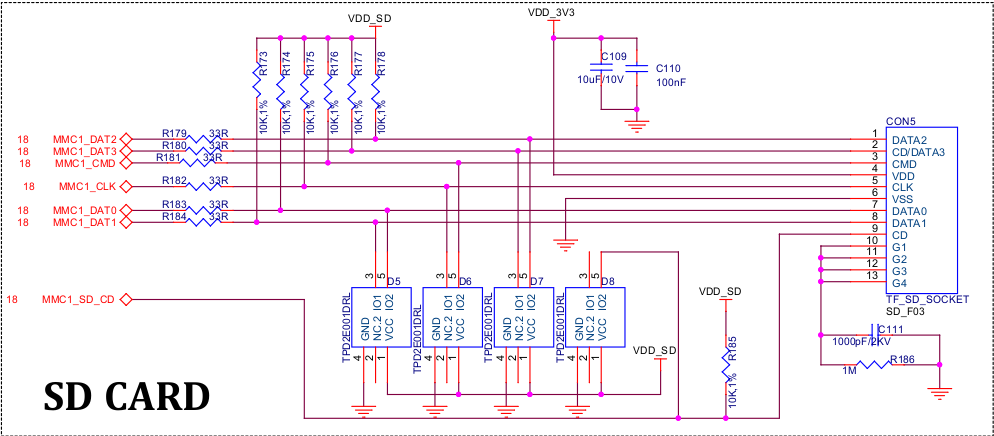
SD Card part of schematic: