This thread has been locked.

If you have a related question, please click the "Ask a related question" button in the top right corner. The newly created question will be automatically linked to this question.

AM3358: SPL debugging

Part Number: AM3358


Hi,

I followed this link http://software-dl.ti.com/processor-sdk-linux/esd/docs/latest/linux/Foundational_Components_U-Boot.html#uboot-spl-debugging-tips about SPL debugging. 

1. load memory->  u-boot-spl.bin

2. load symbol-> u-boot-spl

I can see the PC start from 0x402f0400 correctly in disassembly view. But why i cannot see the source code. I want to debug source code.
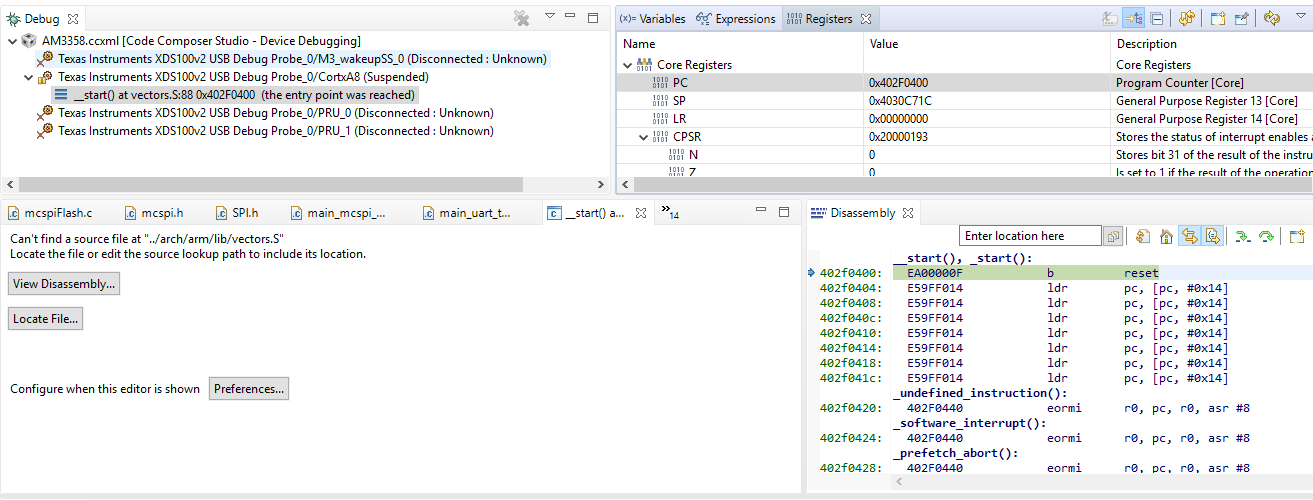
  • Can you press the "Locale File..." button in the source window shown in your screenshot, and navigate to vectors.S in the U-Boot tree (that you built from)?

    Usually once you give the debugger one valid path, it'll be able to infer all other paths related to that debug session correctly. You can also set those source search paths in the options for a given debug session.

    Regards, Andreas