This thread has been locked.

If you have a related question, please click the "Ask a related question" button in the top right corner. The newly created question will be automatically linked to this question.

TDA4VM: TDA4VM: getting object detection tensor and csv outputs

Part Number: TDA4VM


Hello,

I executed the sample object detection model (PeleeNet) on the EVM and received only a .bmp image, which included the detected bounding-boxes in the frame.

1. I would like to know if there is a way to receive not only the image with the detections but also a CSV/TXT file with the bounding-boxes coordinates? (like provided in the emulation)

2. In my own model which I would like to import, I'm doing the post-processing bounding-box retrieval offline. That is, it is made in a python script over tensors which are outputted from the network forward pass. Is there a way to get those tensor after execution?

3. Is there a way to perform inference on target from a CLI and not from the CCS?

Thanks,

Adam

  • Hi Adam,

    Can you please let us know if you tried one of the OpenVx application or CCS based TIDL test bench?

    Regards,
    Shyam

  • Hi,

    Thanks for answering.

    Meanwhile, I progressed in the process. Right now I'm using only TIDL- from model import to emulation and target execution.

    1. Regarding Q2 from the original message - I have found that setting writeTraceLevel to 2/3 (in the config file) should provide tracing all the model layers. However, it happens only during import (for feature map comparison and quantization debugging). Why isn't it happening also on simulation or target inference?

    2. And one more question - I have read in this thread that to enable single-channel models, I can only use raw binary inputs by setting inFileFormat=1 in the import confile file. In that format, is it possible to provide a batch of images and not only a single image each time?

    Thanks,

    Adam

  • 1. TIDL standalone mode generates text file with Box information along with visualization. Please check in the output folder where the visualization is available.

    2.writeTraceLevel = 3 works in inference mode also.

    3. Use vsion_apps DL demos to run TIDL from A72- Linux

    4. Batch mode processing is not supported.

  • Thanks a lot for your answer.

    I have currently only one issue left- how to create a raw binary file from a single-channel png image, so the TIDL model will read it properly. As mentioned in the "Steps to Debug" chapter in the TIDL user guide, I'm setting foldPreBnConv2D = 0 in the import config file, and comparing the output of the first batchnorm layer to the original input binary.

    First, I have created the input binary in several ways, mostly with the imagemagick's convert command. When I'm reading this file with np.fromfile(<file>, dtype=np.uint8), it looks exactly like the original png file.

    Later, I import my model with this config file:

    modelType = 2
    numParamBits = 16
    numFeatureBits = 16
    inputNetFile = "../../test/testvecs/models/public/onnx/yolov3ours/model_sim.onnx"
    outputNetFile = "../../test/testvecs/config/tidl_models/onnx/tidl_net_yolo3ours.bin"
    outputParamsFile = "../../test/testvecs/config/tidl_models/onnx/tidl_io_yolo3ours_"
    inFileFormat = 1
    inDataNorm = 1
    inMean = 0
    inScale = 0.00392156862745098
    inWidth = 416
    inHeight = 416
    inNumChannels = 1
    inData = "../../test/testvecs/input/image2_magick9.y"
    perfSimConfig = ../../test/testvecs/config/import/device_config.cfg
    inElementType = 0
    outDataNamesList = "output0,output1,output2"
    postProcType = 0
    debugTraceLevel = 2
    writeTraceLevel = 3
    foldPreBnConv2D = 0


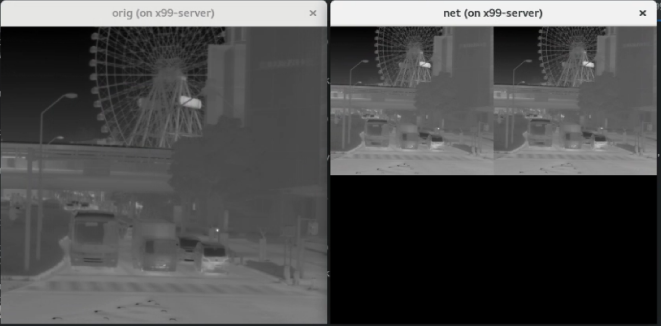
    Lastly, I extract the output of the batchnorm output, read it with np.fromfile(<file>, dtype=np.float32) and reshaping it to the original image size, I get a different result (left- original image, right- processed image).

    Can you help me figure this out?

    Thanks,

    Adam

  • Looks like the resolution of the trace file that you are using is not the same as what you are expecting.

    Can you share the trace file name used in the below command

    read it with np.fromfile(<file>, dtype=np.float32

  • You are probably right, but only 32bit tracing resolution gives me the array size which I accept to receive (length of 416*416).

    I just found out that by importing the model with numParamBits and numFeatureBits equal to 8 (and not 16 like before), I do receive the input I expected.

    Attached the trace file. Thanks!

    4152.input.tar

  • Do we have any open questions in this thread?

    If not can I close this thread?

  • Yes, I am still waiting for a solution to how to parse correctly a raw binary for a 16-bit quantized model. I also attached before the output of the first batchnorm layer.

    I am also attaching now the input binary which was used. It was saved in uint8 format:

    input_uint8.tar

    Thanks!

  • gentle reminder

  • Another gentle reminder

  • Hi Adam,

        If you are using 16 bit quantization then input raw data should be 16 bit. Is this the information you are looking for?


    Regards,

    Anshu

  • Hi,

    Thanks for the information. I assumed that the input can only be 8 bit since inElementType parameter in the config file can receive (according to the manual) only "8bit Unsigned" and "8bit signed" options. How should I set this parameter with 16 bit input?