This thread has been locked.

If you have a related question, please click the "Ask a related question" button in the top right corner. The newly created question will be automatically linked to this question.

AM5728: New user creation not working

Part Number: AM5728

Hello,

I am trying to create a new user ( say abcd ) on AM5728.

Setup :  AM5728, SDK 6.03, Linux Operating System.  Below mentioned are the steps i followed

1. Login though root user

2. Run command  ==>> useradd abcd

3. passwd abcd

4. a new directory with name abcd is created at path /home and corresponding entries /etc/passwd and /etc/shadow file are created

5. Logged out and logged in through abcd and it works. A shell with abcd user is opened.

Now, my requirement is: I do not want to give this user the shell access but instead wants to run a script.

1. Created a script with abcd user and has ownership of abcd.

2. Logged in with root user, changed the /etc/passwd file

3. Inside the shell as root user, ran command < su abcd >. Script ran successfully.

4. Now, Logged out and logged in again with the abcd user. ssh abcd@IP

4. Entered the passwd,

Permission Denied prompt came, and without giving any passwd, just pressed entered and the script ran successfully. Why this error
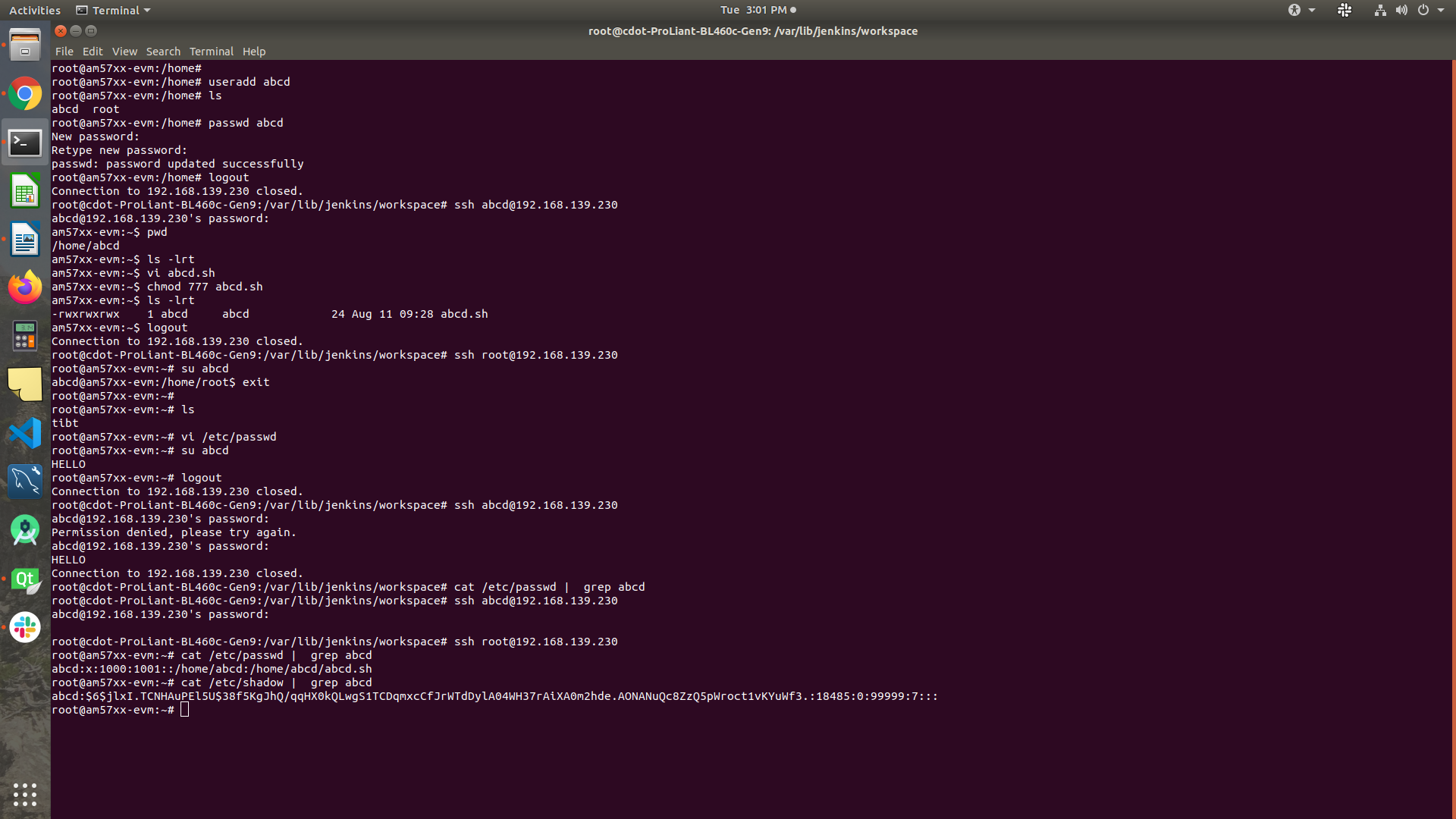
  • Sahil,

    12 lines from the bottom, I see the HELLO getting executed when you login with ssh?

    May be I'm not understanding the problem and you may want to provide annotations in the screenshot.

    Regards

    Karthik

  • Hello Karthik,

    Yes, Let me try to explain here a little bit.

    1. I  logged in with the abcd user.    < ssh abcd@IP

    2. Entered the passwd prompt          < abcd123 >

    3. Permission Denied prompt came, asking for password again

    4. This just pressed Entered without giving any password and script executed. 

    Query is why it is giving permission denied when I entered the password for the first time.

    and why without providing any password second time , it executes the script.

    and without giving any passwd, just pressed entered and the script ran successfully. Why this error

  • Hi Sahil,

    It is a little strange. Are you able to repeat the behavior? I can try to check if you can confirm the detailed steps that you took.

    Regards

    Karthik

  • Yes, 

    It is 100% repeatable on all the three AM5728 chipset I have.

    And, also I created a fresh SD Card with TI prebuilt image of SDK 6.03 and tried again.

    Also, tried the same thing with fresh pre-built images of SDK6.02.

  • Hi Sahil,

    2. Logged in with root user, changed the /etc/passwd file

    Can you share the exact change you did?
    What is the script that you are running?

    Best Regards,
    Keerthy

  • Hi Keerthy,

    This is the entry i added in /etc/passwd

    abcd:x:0:0::/home/abcd:/home/root/scripts/run_abcd.sh

    Content of run_abcd.sh

    #!/bin/bash

    echo "HELLO WORLD"

  • Hi Sahil,

    ssh abcd@xxx.xxx.xxx.xxx
    abcd@xxx.xxx.xxx.xxx's password:
    Permission denied, please try again.
    abcd@xxx.xxx.xxx.xxx's password:
    Connection to xxx.xxx.xxx.xxx closed.

    I am on ti-processor-sdk-linux-am57xx-evm-06.03.00.106 and above is the behavior.

    I did not see that executing with just a press of enter after first time permission denied message.

    - Keerthy

  • Hi,

    Can you explain, why you are getting the Permission denied error?

    Are you purposely entering the wrong password or is it a bug?

    Also, it is also surprising, when I am trying script is getting executed on just pressing enter second time after entering the correct password for the first time. But, this case is not happening when you are trying.

  • Hi Sahil,

    One suggestion to try the same on an ubuntu host. Can you see that the behavior is as expected
    by you. I found some post similar to your requirement:

    Can you try something like above?

    Best Regards,
    Keerthy

  • Hey Keerthy,

    Yes I have tried the same on three other hosts, 

    Ubuntu 

    Fedora

    mipsel based chipset.

    On all the three is working fine.

    But it is not working on TI-AM5728. 

    I followed the same procedure in all of them.

  • Sahil,

    We are checking with our file system experts. I will revert back to you once i have information from them.

    Best Regards,
    Keerthy

  • Hey Keerthy,

    Thanks !! 

    I will wait. But, please keep looking into it. As it is a very critical feature for me. 

    Regards 

    Sahil Kalra

  • Hello Keerthy,

    Any update on my query ?

    Regards

    Sahil Kalra

  • Hi Sahil,

    Apologies for the dealy. Our team is working on this. I will get back to you
    once i have an answer from them.

    Best Regards,
    Keerthy

  • Thanks for the quick reply.

    I will wait. Thanks

    Regards,

    Sahil Kalra

  • Hi Sahil,

    I haven't been able to find a solution yet. We have reached out to other internal teams to get some additional help. But this process could take longer and therefore I suggest you to look for alternate solutions and update this thread if you have been able to make progress. I will also keep you posted as soon as we have additional information.

    Best Regards,
    Keerthy

  • Hey Keerthy,

    Thanks for the update.

    Sorry, I am also not able to find any solution for this problem yet.

    No problem, I will wait.

    As I said earlier, this is an important feature for my product. So, its an humble request to keep trying to find a solution for it.

    Regards,

    Sahil

  • Has anyone tried checking the logs?

    # journalctl
    

    On bad password:

    dropbear[1684]: Bad PAM password attempt for 'abcd' from ::ffff:X.X.X.X:XXX
    

    On good password:

    dropbear[1684]: User 'abcd' has invalid shell, rejected
    

    Check valid login shells:

    # cat /etc/shells
    # /etc/shells: valid login shells
    /bin/sh
    /bin/bash
    

    Add the script:

    # echo /home/abcd/abcd.sh >> /etc/shells
    

    Login via ssh, the log says:

    dropbear[1691]: PAM password auth succeeded for 'abcd' from ::ffff:X.X.X.X:XXX
    

    The client side:

    $ ssh abcd@Y.Y.Y.Y
    abcd@Y.Y.Y.Y's password: 
    HELLO
    Connection to Y.Y.Y.Y closed.
    

  • Thanks a lot Denys! The missing steps was:

    echo /home/abcd/abcd.sh >> /etc/shells

    I am able to execute the script via abcd login.

    Sahil,

    Please check if that is working for you and resolve this thread.

    Best Regards,
    Keerthy

  • Hello Keerthy and Denys Dmytriyenko 

    Sorry for the late reply !!

    It is still not working . I have add the entry in my /etc/shell.

    It ask for the password on logging from abcd

    1. If I enter the wrong password, it says Permission denied - which is the correct behaviour

    2. If I enter the correct password, it says Permission denied and I just press the blank enter, my script gets executed and i am able to do my intended work.

    Why it says Permission denied in first attempt and allows it in second attempt when I just press a  enter.

    PS: Behaviour is same whether i add entry in my /etc/shell or not.

    Regards Sahil

  • I replied with the following last week, but then I deleted the post because I did not see there was a 2nd page to the thread, and on that page you stated your problem was already resolved. :P  

    ------------------------------

    I realize this is a month old, but in case you haven't resolved this, here are my two cents.

    sahil kalra

    abcd:x:0:0::/home/abcd:/home/root/scripts/run_abcd.sh

    This seems wrong to me.  The last token of a passwd entry line is the shell to execute for that user.  Here, you are indirectly telling the system to run a script from the root user's directory.  When you are prompted for a password, the system is asking for the root user's password (since user abcd does not have rights to the root user's home directory), NOT abcd's password.  This is why when you enter abcd's password, it's rejected, but when you just hit enter, it's excepted (presuming you did not update the root user's default <empty> password.)

    Now, I see you said you gave abcd access rights to the run_abcd.sh script, but abcd still does not have permission to access /home/root itself (and /home/root/scripts as well for that matter probably), so could that be the problem?

    Ideally, the shell in the passwd file should be set to '/bin/sh' (or /bin/bash if you prefer [like I do] assuming you have bash installed).  Then in your .profile file under abdc's home directory (or .bash_login if you use bash), run your script from there.  Then permission issues are not an issue.

    If I am completely off the mark with what you are trying to accomplish, my apologies for wasting your time. :-)

  • Hello Keerthy,

    One more thing i observed,

    If I connect the Soc through minicom cable, then on ssh through abcd login my script is running,

    but when I do ssh through network ssh abcd@IP, then the Permission denied error comes and one blank enter it works

    Regards

    Sahil

  • Sahil,

    As soon as i added the /etc/shell entry. It is working absolutely as expected at my end on 6.03 SDK.

    Best Regards,
    Keerthy