This thread has been locked.

If you have a related question, please click the "Ask a related question" button in the top right corner. The newly created question will be automatically linked to this question.

DM365 MPEG4 Encoder Bitrate in VBR Mode

Hi
I want to operate DM365 MPEG4 Encoder (dm365_mpeg4enc_01_10_00_03_production.bin) in VBR  mode. In order  to get  a linear  variation  in bitrate  I set the parameters  as  follows.
rateControlPreset=IMP4VENC_CVBR_LBR1;

and  to control the  quality  , I  set  the  parameters  as  follows.
rcQMax=31;
rcQMin is  varied  between  4 to 31 (In 20 steps)
initQ=0;
intraFrameQP=0;
interFrameQP=0;

I  get  a variation in bitrate  , but is  not  linear with  the  degaradation in qualitIy.
I have  no problems  with CBR  mode.
(I  have  tried  other modes  also,IVIDEO_STORAGE  & IMP4VENC_CVBR_LBR1), but  was  not  successful.
Is  this  a  bug? I have tried  with earlier  version   of the  Encoder (which  also  runs  in MJCP).
Pls help

Regards
JK


  • Hi JK,

    It is not implied that the VBR algorithm will deliver such linearity. When you refer to 'quality', what metric are you using?

    The design will try to adjust the Q in such a way as to stick to your set value of bitrate. The rcQMax and rcQMin are upper and lower clamps between which the value of Q is allowed to vary. Neither of these methods will deliver a linear relationship. 

    Regards,

    Akshay

  • Hi Akshay,

    Thank  you for the  reply.

    My requirement is  simple. In VBR  mode,   I have  a  quality metric  which varies  from 1  to 20. "1" means "Best quality" and "20" means  "Worst  quality".

    When I  say linear relationship, I  expect  bitrate(1) > bitrate(2) > bitrate(3) > ..................>bitrate(20) , where 1  and  20  corresponds  to best  and  worst  quality respectively.

    Is this  not  a fair expectation?

    Now, coming  to what  I did, I set  rcQMax =31  and  rcQMin is  allowed  to vary from 4-31 in 20  steps ( 4 is Best   quality).

    I did experiment  with 4  modes. Fixed Qp,IVIDEO_STORAGE, IMP4VENC_CVBR_LBR1,IMP4VENC_CVBR_LBR2

    In FixedQp, I set  initQ=0,rcQMax=0,rcQMin=0 .  intraFrameQP and  interFrameQP  are allowed  to  vary in steps( 4  to  31).

    In other modes, I set initQ=0,intraFrameQP=0,interFrameQP=0, rcQMax=31,rcQMin is  allowed  to vary in steps( 4  to  31).

    My question is,  Is  there  anything wrong  in the  above  settings?  ( I followed MPEG4 user guide)

    I am using dvsdk_2_10_01_18.

    Pls  reply

    Regards

    JK


  • Akshay, Just to add to the  above,   in the fixedQp mode,   bitrate is  varying expectedly  when intraFrameInterval=1.(GOP Size=1)  But  when it is > 1 , the  bitrate variation is not  as  expected. There  are  no  B  frames.

    --JK

  • Is  there  any  update   on this?  The  issue  is  critical  for  us  and   we are waiting  for your response.


    Thanks

    JK


  • Hi JK,


    Is your quality metric in any way related to your setting of rcQMin, since both are 20 step?  

    What you should expect from the algorithm is:

    a. actual bitrate staying close to targetBitRate setting.

    b. If at all you want to tie it to a Q related metric, then you could expect a linear relationship between achieved bitrate and average Q for the whole frame - i.e.

    (Avg Q)512kbps > (Avg Q)1Mbps > (Avg Q)2Mbps.

    However, this is also a very simplified view of things. Frame complexity, etc also have  an effect on this. For example, if your scene has very low motion, then the encoder can choose to skip over macroblocks. This will cause the average Q of the coded blocks to drop, since now the encoder has more bits available in which to accommodate them.

    In fixedQp mode, you are seeing results because you are explicitly choosing the Q value for the whole frame. This is expected behaviour. But then, you will not get a consistent bitrate.

    Ultimately, the only goal of the rate control algorithm is to stay faithful to the targetBitRate. For two equal inputs, a higher targetBitRate setting in one case should deliver a lower average Q and hence higher quality than the other. That is the understanding. 

    If you can share details of the quality metric you are using and also a couple of sample encoded streams, maybe we can give those a closer look.


    Regards,

    Akshay

  • Hi  Akshay,

    Yes. My   quality metric is related  to rcQMin. and it is  given  below.

    [4, 5, 6, 7, 8, 9, 10, 11, 12, 14,16, 18, 20, 22, 24, 26, 28, 29, 30, 31]

     If I tie rcQMin  to  the  above quaility metric , I don't know   what  value  to choose    for targetBitrate. Pls tell me.

    Below  is  the chart  which shows  my requirement. Pls tell  me the suitable  mode  and  its parameter  settings  to  make  it linear.

    My test  scenario  is  such that  the video  has  no motion.(or a single still   frame is the input  source. You  can get this  by giving a  DVD output to the  Encoder and pausing it)


  • Hi JK,

    I see. So in all these tests which you have run, what has been your set value of targetBitRate?

    For example, for a VGA stream, you can try keeping the targetBitRate at 1Mbps [1000000] and rcQMax = 31 and rcQMin = 2 and check what your achieved bit rate is.  For a mostly still scene, this should result in good (visual) quality. In a way, this targetBitRate is the maximum bitrate you want. The codec will try not to exceed it. If you specify a high enough bitrate (say 10Mbps), the codec will fall short since it'll use the lowest Q factor i.e. rcQMin - and that's all it can do. 

    Qcalc = fVBR (targetBitRate, neighbour Q, encoded bits, etc )

    if Qcalc < rcQMin then Qcalc = rcQMin

    if Qcalc > rcQMax then Qcalc = rcQMax

    So basically, if you specify a very high & unrealistic targetBitRate, and then vary rcQMin along your 20 steps, you will see the resultant bitrate vary in a similar fashion.

    On the other hand, if you set a unrealistically low bitrate (say 64kbps), then most of the blocks will hit a Q of 31. If you then vary the value of rcQMax, you'll see a variation in resultant bitrate.

    But then, by this method, you are not really making use of the RC algorithm. You might as well use it in fix Q mode.


    Regards,

    Akshay


  • Hi Akshay,

    I have set an  arbitrary targetBitrate of 4Mbps in my first  set of  experiments. So  as  you  said I was  getting variation in bitrate with changing rcQMin, but  NOT as  expected.

    Today ,I  set  10 Mbps  as targetBitrate  and  varied rcQMin in 20 steps. I also  tried the  otherway round,i.e, setting  a very low targetBitrate(64Kbps)  and  varying rcQMax.

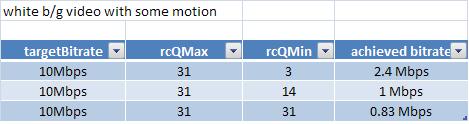
    Unfortunately, the  results are  not  satisfactory. Pls  see the  table  below. Am I  missing  something?

    In fixedQp  mode  also there  seems  to be  no change. Why is  it  so?

    But  when  I  set  rcQMax=31  , rcQMin=1,  and  targetBitrate is varied  between 500 kbps  to 2.4 Mbps  in steps  of 100 kbps, I obtained a constent result.

    But this  seems like more of  a CBR  mode. Pls  could  you  explain this?

    By the  way, is  there  a way to check the internal Q  used  by the  Encoder?


  • Hi JK,

    Do you have a MPEG analysis tool, like Elecard Stream Eye? or Interra Analyzer? You can then check what Q is being used for each MB.

    Between case 1 and 2 there is a slight drop in bitrate, which is expected because you are using essentially a steady input, which will cause majority of MBs to skip. Between 2 and 3, there is a rise, which is surprising. I'll check this with a still scene and get back to you.

    Meanwhile, can you try this test with a stream with a fair bit of motion?

    This is not a true VBR algorithm but a TI developed variant.

    What parameter settings are you using for fixed Qp mode?


    Regards,

    Akshay


  • Hi  Akshay,

    For  FixedQp  mode  I am changing  intraFrameQP & interFrameQP  identically.

    I  will check Q value with Elecard. I will  try testing with some  amount  of  motion.

    Thank  you

    JK

  • Akshay,

    pls  check the  below  table. This  is  for a  scene  with mostly white background and also some  fair  amount  of  motion in it.

  • JK,

    Can you please share the streams also.

    regards

    Yashwant

  • Hi JK,

    With a stream like football, I get results like this.

    The result is not linear, obviously, but I guess this is what you had in mind?


    Regards,

    Akshay


  • Hi Yashwant, Akshay,

    Apologies  for late  response. I have attached  streams (640x480,With no motion in it) and  the  corresponding  bitrate info. Recorded  streams  are   for  rcQMin=3,12,14,and 31  respectively. I have analysed  these streams  in Elecard. The Q values  are  varying  as  expected.

    Akshay,

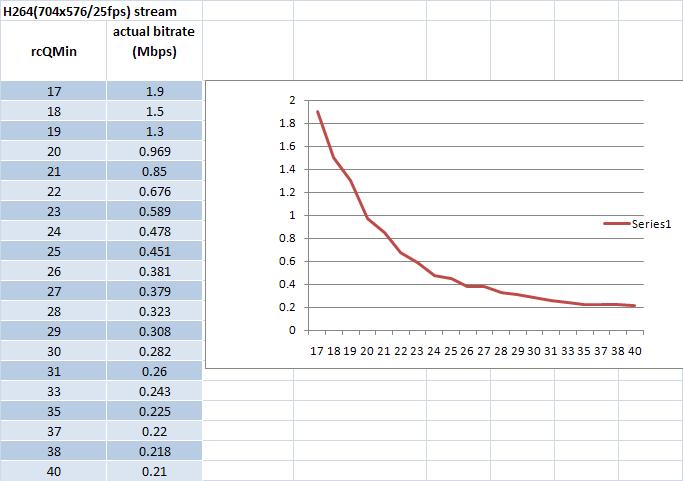
    I wanted  to get a graph  similar  to  the  one  for  football stream. But  as  you  can  see from the graph posted  earlier ( for a DVD movie stream in pause condition)  and  the graph  shown below are  definitely not  consistent. (Does not look  like  a  proper rate-distortion curve). This  is  more prominent in the  first  graph(DVD). Can you pls check this?

    Regards

    JK

  • I don't  know  how  to  attache  multiple  files. I am  attaching  one by one.

  • Hi Akshay,

    Today I have experimented  with an H264 Encoder(dm365_h264enc_02_10_00_06_production) and   got the  following  results.

    (same visual   scene as in the  earlier case)

    rateControlPreset=IVIDEO_STORAGE (VBR)

    rcQMax=44, targetBitrate=5Mbps


  • Hi,

    For a still scene, a perfect curve is harder to achieve because of the introduction of skip MBs, intra MBs and the like. I do not know the specifics of the h264 rate control algorithm, but it might not operate in the same way as the MPEG4 one here.

    Hence, I would still suggest you to tie your quality metric to the targetBitRate parameter and empirically determine at what setting it gives acceptable visual quality for different scene types. This way, you would not be constraining the encoder to operate at a specific Q value. Allowing the encoder the flexibility to operate over a wider range of Q, will give better results as far as visual quality is concerned.


    Regards,

    Akshay 


  • Hi Akshay,

     The maximum variation in bitrate for  a  still  scene, whatever  targetBitrate you  choose is  only around  100-150 kbps , that too  not  consistent.

    But I am facing a different  problem for a normal scene  with fair amount of motion. The variation in bitrate is  considerable  and  consistent. But after  about 15 minutes,

    the  internal Q value  drops   suddenly  and the  video output  becomes too  worse in visual quality. It  regains  its quality after sometime  and looses  it again.


    Regards

    JK


  • Hi Akshay/Yashwant,

    Is  there  any update on this?

    Regards

    JK

  • Hi,

    Sorry for the late reply.

    For still scenes, the performance will be largely as we have observed.

    As for the drop in quality after a long run - can you try doing a XDM_RESET periodically?

    Regards,

    Akshay