This thread has been locked.

If you have a related question, please click the "Ask a related question" button in the top right corner. The newly created question will be automatically linked to this question.

66AK2G12: Hard Reset by software

Part Number: 66AK2G12

Hi All,

I am trying to perform hard reset with software on microprocessor 66AK2G12. I managed to implement soft reset by software but not hard reset. Can anyone advice please? what is the problem with my code and why I couldn't have successful hard reset?

Thank you

The code:

#define PLLC_CFG_REGS     0x02310000U

#define RSCTRL_OFFSET     0x000000E8UL

#define RSCFG_OFFSET      0x000000ECUL

#define RSCTRL            (PLLC_CFG_REGS + RSCTRL_OFFSET)

#define RSCFG             (PLLC_CFG_REGS + RSCFG_OFFSET)

.

typedef unsigned long DWORD;

void Reboot()

{

    volatile DWORD* rsctrl = (DWORD*)RSCTRL;

    volatile DWORD* rscfg = (DWORD*)RSCFG;

    DWORD key = 0x00005A69;


    DWORD temp = *rsctrl;


    temp &= ~(0x0000FFFF);

    temp |= key;

    *rsctrl = temp;


    temp = *rscfg;

    temp |= 0x0002000;           //soft reset, by PLL controller: successful

//    temp &= ~(0x0002000);    //hard reset, by PLL controller: failed 

    *rscfg = temp;


    temp = *rsctrl;

    temp &= ~(0x0000FFFF);

    temp |= key;

    *rsctrl = temp;


    temp = *rsctrl;

    temp &= ~(0x00010000);

    *rsctrl &= temp;

}

  • Hi,

    I understood you code up to: 

      temp |= 0x0002000;           //soft reset, by PLL controller: successful

    //    temp &= ~(0x0002000);    //hard reset, by PLL controller: failed 

        *rscfg = temp;

    ==========>This should trigger a soft reset. The rest code:

      temp = *rsctrl;

        temp &= ~(0x0000FFFF);

        temp |= key;

        *rsctrl = temp;


        temp = *rsctrl;

        temp &= ~(0x00010000);

        *rsctrl &= temp;

    This write the key to bit 15-0 then clear bit 16 to rsctl. Then, I think you need do a write rscfg bit 13 with 0? like //    temp &= ~(0x0002000);    //hard reset, by PLL controller: failed 

    Regards, Eric


  • Hi Eric,

    many thanks for reply.

    I changed the code to be as follows:

    void Reboot()

    {

        volatile DWORD* rsctrl = (DWORD*)RSCTRL;

        volatile DWORD* rscfg = (DWORD*)RSCFG;

        DWORD key = 0x00005A69;


        DWORD temp = *rsctrl;


    temp &= 0xFFFF0000;
    temp |= key;
    *rsctrl = temp;

    temp = *rsctrl;
    temp &= ~(0x00010000);
    *rsctrl &= temp;

    temp &= 0xFFFF0000;
    temp |= key;
    *rsctrl = temp;

    temp = *rscfg;
    temp &= ~(0x0002000); //hard reset,
    *rscfg = temp;

    }

    this did not work, is that what you mean or something else?

    I want the system to behave after the software reset as if a power-on reset is performed, I suppose the hard reset is the type I need to implement to replace the power-on or the reset implemented by switching off-on the power by the hardware.

    Thank you for help

  • Hi,

    Below is what I tried on the C66x core of K2G device. After the power on, the register look this:

    0x023100E0 00000000 00000001 00010003 00000000

    offset 0xE4 is RSTYPE: it means the power on reset is the last reset occurred

    offset 0xE8 is RSTCTRL: 0x3 is locked

    offset 0xEC is RSTCFG: it is hard reset already by default

    Then,

    I modified 0xE8 to 0x15A69, 

    0x023100E0 00000000 00000001 0001000C 00000000  =======> 

    This register contains a key that enables writes to the MSB of this register and the RSTCFG register. The key value
    is 0x5A69. A valid key will be stored as 0x000C, any other key value is invalid. When the RSTCTRL or the RSTCFG
    is written, the key is invalidated. Every write must be set up with a valid key.

    So I have a valid key at this moment.

    Then, I cleared bit 16 of offset 0xE8 by write 0x0 (I thought what you write to bit 15-0 doesn't matter). It become:

    0x023100E0 00000000 00000004 00010003 00000000

    RSTYPE: 0x4: Reset initiated by PLLCTL was last occurred.

    Yes, hard reset is the closest to power on reset, when compared to soft reset and local reset. For details, please refer to TRM of K2G 5.3 Reset Management.

    Regards, Eric

  • Hi Eric,

    I did the same, the initial status was as follows:

    0x023100E0        00000000            00000001            00010003            20000000            00000001

    then wrote the key:

     *rsctrl = 0x00015A69;

    the new status became:

    0x023100E0        00000000            00000001            0001000C            20000000            00000001

    finally tried to write 0 to the bit 16:

    *rsctrl = 0x00005A69;

    Couldn't write zero to the bit 16, it crashed and the registers status stays the same:

    0x023100E0        00000000            00000001            0001000C            20000000            00000001 (Crashed)

    the messages displayed at crashing were like the following:

    CortexA15: Error: (Error -1170 @ 0x0) Unable to access the DAP. Reset the device, and retry the operation. If error persists, confirm configuration, power-cycle the board, and/or try more reliable JTAG settings (e.g. lower TCLK). (Emulation package 8.0.903.2)

    CortexA15: Trouble Halting Target CPU: (Error -2064 @ 0x0) Unable to read device status. Reset the device, and retry the operation. If error persists, confirm configuration, power-cycle the board, and/or try more reliable JTAG settings (e.g. lower TCLK). (Emulation package 8.0.903.2)

    ..

    ..

    CortexA15: Unable to determine target status after 20 attempts

    CortexA15: Failed to remove the debug state from the target before disconnecting. There may still be breakpoint op-codes embedded in program memory. It is recommended that you reset the emulator before you connect and reload your program before you continue debugging

    Thank you

    S.S

  • Hi,

    I did on C66x yesterday and you did it on A15. Below is my trial of A15 today:

    After power on: 

    0x023100E0 00000000 00000001 00010003 00000000 00000000

    After wrote the key:

    0x023100E0 00000000 00000001 0001000C 00000000 00000000

    I wrote 0 or 0x5a69 to offset 0xE8 (tried both), the JTAG lost:

    CortexA15: Trouble Reading Register REG_SYSTEM_MMU_STATUS: (Error -2131 @ 0x73000003) Unable to access device register. Reset the device, and retry the operation. If error persists, confirm configuration, power-cycle the board, and/or try more reliable JTAG settings (e.g. power TCLK). (Emulation package 8.4.0.00006)

    CortexA15: Trouble Reading Register REG_SYSTEM_MMU_STATUS: (Error -2131 @ 0x73000003) Unable to access device register. Reset the device, and retry the operation. If error persists, confirm configuration, power-cycle the board, and/or try more reliable JTAG settings (e.g. lower TCLK). (Emulation package 8.4.0.00006)
    CortexA15: Trouble Reading Register CP15_Registers.REG_CTXA15_CP15_C2_TTBCR: (Error -2131 @ 0x270F0202) Unable to access device register. Reset the device, and retry the operation. If error persists, confirm configuration, power-cycle the board, and/or try more reliable JTAG settings (e.g. lower TCLK). (Emulation package 8.4.0.00006)
    CortexA15: Trouble Reading Register CP15_Registers.REG_CTXA15_CP15_C2_TTBR0_64B: (Error -2131 @ 0x278F0020) Unable to access device register. Reset the device, and retry the operation. If error persists, confirm configuration, power-cycle the board, and/or try more reliable JTAG settings (e.g. lower TCLK). (Emulation package 8.4.0.00006)
    CortexA15: Trouble Reading Register REG_SYSTEM_TARGET_CONFIG: (Error -2131 @ 0x73000000) Unable to access device register. Reset the device, and retry the operation. If error persists, confirm configuration, power-cycle the board, and/or try more reliable JTAG settings (e.g. lower TCLK). (Emulation package 8.4.0.00006)
    CortexA15: Trouble Reading Register CP15_Registers.REG_CTXA15_CP15_C2_TTBR1_64B: (Error -2131 @ 0x278F1020) Unable to access device register. Reset the device, and retry the operation. If error persists, confirm configuration, power-cycle the board, and/or try more reliable JTAG settings (e.g. lower TCLK). (Emulation package 8.4.0.00006)
    CortexA15: Trouble Reading Register CP15_Registers.REG_CTXA15_CP15_C3_DACR: (Error -2131 @ 0x270F0300) Unable to access device register. Reset the device, and retry the operation. If error persists, confirm configuration, power-cycle the board, and/or try more reliable JTAG settings (e.g. lower TCLK). (Emulation package 8.4.0.00006)
    CortexA15: Trouble Reading Register REG_SYSTEM_MMU_CONFIG: (Error -2131 @ 0x73000002) Unable to access device register. Reset the device, and retry the operation. If error persists, confirm configuration, power-cycle the board, and/or try more reliable JTAG settings (e.g. lower TCLK). (Emulation package 8.4.0.00006)
    CortexA15: Trouble Reading Memory Block at 0x23100e0 on Page 0 of Length 0xc9: (Error -1205 @ 0x23100E0) Device memory bus has an error and may be hung. Verify that the memory address is in valid memory. If error persists, confirm configuration, power-cycle board, and/or try more reliable JTAG settings (e.g. lower TCLK). (Emulation package 8.4.0.00006)
    CortexA15: Error: (Error -1170 @ 0x0) Unable to access the DAP. Reset the device, and retry the operation. If error persists, confirm configuration, power-cycle the board, and/or try more reliable JTAG settings (e.g. lower TCLK). (Emulation package 8.4.0.00006)
    CortexA15: Unable to determine target status after 20 attempts
    CortexA15: Failed to remove the debug state from the target before disconnecting. There may still be breakpoint op-codes embedded in program memory. It is recommended that you reset the emulator before you connect and reload your program before you continue debugging

    To this step, the outcome is the same as yours. Then I connect the C66x core to check the registers: 

    0x023100E0 00000000 00000004 00010003 00000000 00000000 ===========>how do you know the "..... and the registers status stays the same" in your case?

    To me, the hard reset happened as I can judge from the DSP side. The ARM lost the JTAG is different from the C66x which doesn't lose the JTAG. As emulation logical is not supposed to be affected by hard reset, I don't expect the loss of JTAG connectivity, there may be some other reasons. If this is your question, I can follow up.

    But to me, the hard reset did occur. Also you lost the JTAG is a sign of reset occurred.

    Regards, Eric

  • Hello Eric,

    Many thanks for the prompt response.

    I did this process step by step after a break point, I lost the JTAG and did not restart again. I expect the system to reboot and start again in the same way it does when I perform a power-on reset (switch off and then on the power) but it doesn't.

    The aim is to reset the system and reboot it using the software. Using the software I can do hard and soft reset by the software, the soft reset worked but did not restart the system, so I supposed I need hard reset to do the reset and then reboot to behave as if it is reset with the power-on (i.e.hardware) reset. 

    Best regards

    Shafik

  • Hello,

    The actual situation: when I switch off the power and switch it on again, or when I push the hardware reset button, a message on the serial port is displayed and prompting the user to enter the name of the application to run it. the available applications are already uploaded to the flash memory of the board, when the user selects the application, the image is loaded from flash memory and ran. 

    I need to implement the reboot from software with a command sent on the serial port, the instruction will call a function that should do the same process explained above (reboots and displays the prompt message to select the application image), this should be done with a function in the software that is called when the command is sent. 

    I tried to do hard or soft reset within the mentioned function to simulate what is happening when I switch off -on the power or when I perform a hardware reset. but neither the hard nor the soft reset did the task, when the soft reset is implemented, the debugger shows that there is reset but afterwards, the system doesn't response at all, and the required reboot described above doesn't happen. when a hard reset is implemented by the software, the system crashes and as Eric mentioned, the reset could be occurred but the system doesn't response after that and the reboot with the loader prompt doesn't happen.

    The required situation: I need to write the hard or soft reset code within the function so that when it is called the system is rebooted and the loader probpt message is displayed allowing me to select the application image to load and run.

    Many thanks for help

  • Hi,

    Do you use TI K2G EVM? And if yes, which is the hardware reset button? I saw Power on reset, bmc reset, and warm reset buttons there. You may look at the K2G EVM schematic what is connected to that button.

    If you originally be able to see something printed to UART, the program would be on the QSPI or MMCSD flash and what is the boot mode? You can check the BOOTCFG_DEVSTAT (0x262_0020) for this. Where is the program counter when the UART is active and be able to accept input? in DDR3?

    Then, when you do a hard reset through the software but nothing printed to console, are you able to use JTAG to connect the A15 core again? What is the  BOOTCFG_DEVSTAT and Program Counter? Are you still in ARM bootrom?

    Regards, Eric

  • Hello,

    Thanks for reply

    I am using 66AK2G12_BlackHawk, the reset button is a part of the board itself. The emulator that is connected over BlackHawk shows that there is a reset applied when I do soft reset by software but it doesn't show the same when I do hard reset by software.

    the BOOTCFG_DEVSTAT register value is: 

    0x02620020        0x00060395

    the boot mode is XIP 

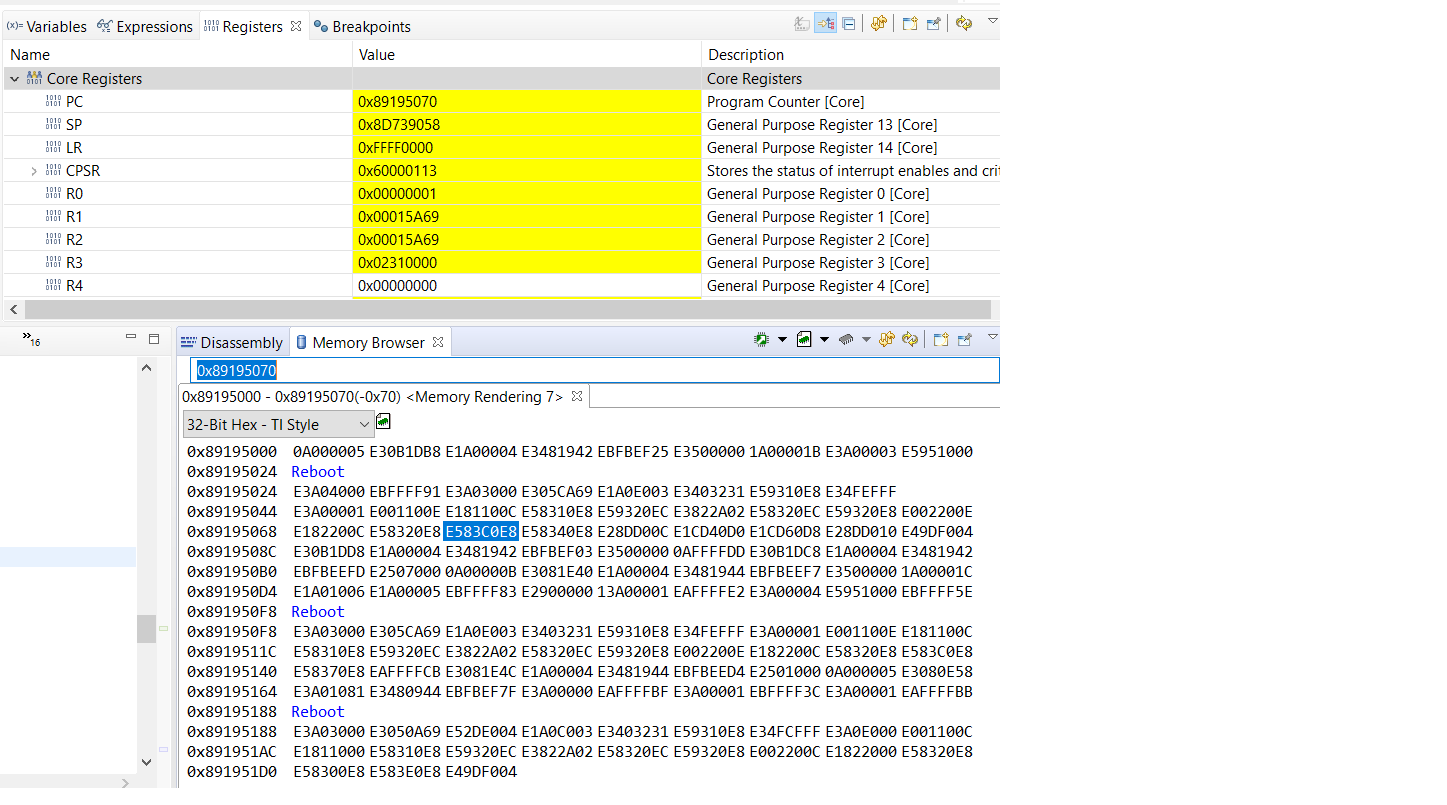
    The PC = 0x89195070  when the serial port is responsive and just before the system crashes. JTAG is disconnected and no way to communicate with the board unless I reset (switch off and on the power). 

    the ARM code start address and length are respectively : DDR0_ARM_CODE    :  o = 0x89000000, l = 0x04000000, the last readable PC value 0x89195070   is within this area..

    implementing Hard reset by software: A snapshot of the memory browser around the PC value at the time just before the system crashes is attached:

    when implementing Soft reset by software: the PC takes values such as 0x89195070   then  0x0000083C, then 0x00014858 before it stops responding.

    I tried to isolate some of the clocks from reset by assigning values to the register RSISO but the register did not change and did not accept writing to it.

    Best regards

    S.S

  • Hi,

    I did a test by copying two files processor_sdk_rtos_k2g_6_03_00_106\prebuilt-sdcards\evmK2G\sd_card_files into a MMCSD card, one file is the bootloader (MLO), the second file is a LED blinking application (APP). The boot sequence is ROM bootloader------>MLO----->App.

    I set the boot mode to MMCSD boot mode by dip switch: 0x2620020 = 0x000E009D

    I was able to see some boot info printed on the UART and LED is blinking after power on.

    Then I halt the ARM core, I knew the PC is inside DDR3 (LED stopped blinking as ARM core halts). Then I did the hard reset from software (I didn't run any code, just use CCS memory browser to write the registers to do reset), I immediately lost the JTAG. But the UART prints out the same boot info and LED starts to blink again.

    So, it looks the hard reset can work at least in MMCSD boot mode. For XIP boot mode, we don't have any work example for this. The K2G EVM supports QSPI 48 boot mode, not XIP. Are you able to try MMCSD boot + hard reset on your blackhawk EVM?

    Regards, Eric

  • Hi Eric,

    Many thanks for help

    I am still having a problem with that, I tried all the different boot modes but after reset the PC jumps to the ROM area and get stuck there at address 0x130 for some reason.

    I will update with the results if anything has changed.

    Best regards

    S.S. 

  • Hi Eric,

    Many thanks for help

    I am still having a problem with that, I tried all the different boot modes but after reset the PC jumps to the ROM area and get stuck there at address 0x130 for some reason.

    I will update with the results if anything has changed.

    Best regards

    S.S. 

  • Shafik,

    Have you tried running the code without JTAG using an SD card and monitor if the device is rebooting. Are you seeing the RESETSTAT pn behavior change and clock behavior change. The address 0x130 is vector table where reset vector  table is located.

    Regards,

    Rahul