This thread has been locked.

If you have a related question, please click the "Ask a related question" button in the top right corner. The newly created question will be automatically linked to this question.

AM4378: Sqlite based libraries.

Part Number: AM4378


Here I created a database file with.db3extension and I want to link that to qt application. I did that application compiled I builder sqlite packages and loaded them to Target side as well as devkit side.

But now after compiling when loaded to SD card for am437x it is showing as unable to load qquery.

So any package do I have to build or sqlite3and sqliteus enough?

If so how to link my .db3 file to qt application .

It will be helpful for me if someone let me know about this.

Thank you.

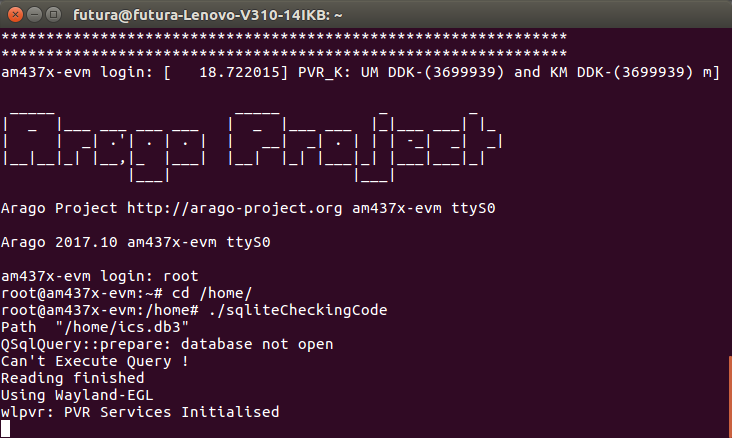
  • here i build sqlite package by bitbake target method and copy pasted all related files on to target side. but still my qt application is showing an error as shown below image. the database is not even opening on target side any libraries do have to link?

    please  some one help me in this matter.

    r.

  • Hello,

    I recommend you to please check with the Qt community on the requirements for running sqlite application. As mentioned in the following document, we do not own/maintain Qt. The Qt community will provide insights on how to link the db3 file with your application.

    Regards,
    Krunal

  • Yes qt application wise sqlite packages are available for desktop but I want to compile the application for am437x processor based custom board. I used SDK 04.02. but when I used qdebug command to find what is error it is showing on Target side as not linked libraries. So my issue here is what libraries I need to put in rootfs to make my qt application  work on target.

  • Hello,

    The Qt community should be able to provide guidance on the libraries needed for running your application. I noticed the following wiki page on their website and it should give you information on how to check for missing libraries.

    Regards,
    Krunal

  • HI Krunal,

    Thanks for your immediate response.

    But i think i missing out some clarity  it seems to be.  i will lay it down more clearly to make my doubt more understandable to you.

    1)I am using SDK 04.02. for am437x processor . now in the rootfs already there is sqlite3 package under usr/.. sub folders present. but those libraries already present are not been sufficient for me so i builded sqlite package using bitbake method as mentioned in ti forum only.

    e2e.ti.com/.../692710

    using this link i have done building for sqlite (just replaced serial port to sq lite

    2)later i copied the files in sqlite builded folder to devkit as well as  target

    cp -r <tisdk>/build/arago-tmp-external-linaro-toolchain/work/armv7ahf-neon-linux-gnueabi/qtserialport/<version>/image/usr/ <Processor SDK>/linux-devkit/sysroots/armv7ahf-neon-linux-gnueabi/usr/


    3) Next step i made is compiled qt application with sqlite in that got errors . so i used this command to locate error.

    qDebug() <<db.lastError().text();

    this also i got from tiforum only.

    https://e2e.ti.com/support/legacy_forums/embedded/linux/f/354/t/597768?tisearch=e2e-sitesearch&keymatch=sqlite

    using above link i did so .

    4)  but after following all these also my issue is not sorted as above link my issue also showing libraries not loaded.

    5) now i also copy pasted ipk files to target roofs and run those to install using opkg install [packagename].ipk

    but still no use.

    6) later i followed this way also

    https://e2e.ti.com/support/processors/f/791/t/603906?tisearch=e2e-sitesearch&keymatch=sqlite 

    but not worked.

    7)so here what my doubt finally is how qt libraries are missing as they working fine on desktop. some qt libraries for sqlite are missing or present but not linking from target side only. but i am missing out something in making it work.

    so please help me in understanding this concept of building and linking libraries for am437x custom board.

    Thanks & Regards

    Lavanya

  • Hello Lavanya,

    Is there an out of box Qt example that you used for sqlite? I would like to run the above configuration on my AM4378 setup. 

    Regards,
    Krunal  

  • Hi Kunal,

    yes i have a sample application which is compiling but not properly functioning on am437x custom board. here is the sample code i am attaching to you.

    samplesqlitecode.zip

    here in code i also added debug line to check the libraries present in os. there is came as  empty bracket(). but i already loaded the sqlite  libraries sqlite3 are alreday present some files missed from builded sqlie3 thta i copied.

    please have a look at this.

    Thanks

  • HI Kunal,

    can you please look at this and give me a reply in this belt.

    Thanks

  • Hello Lavanya,

    I apologize for the delayed response but I got your application to work on my setup. I am using a AM437x EVM and I am running our latest PSDK6.3. After running your application, I saw the following prompt on my terminal:

    root@am437x-evm:~# ./sqliteCheckingCode --platform eglfs
    Path  "/home/root/ics.db3"
    Path inside isDriverAvailable function  "/home/root/ics.db3"
    TERMINAL_ID :  "32"
    TERMINAL_NAME :  "WLAN-2"
    Priority :  "High"
    Default_Group_Number :  "1"
    Group_Numbers :  "1 ,2 ,3 ,4 ,5"
    Main_BroadCast :  "0"
    Conference_Dial :  "8888"
    Reading finished

    Here are the steps that I used:
    1. git clone git://arago-project.org/git/projects/oe-layersetup.git tisdk
    2. cd tisdk
    3. ./oe-layertool-setup.sh -f configs/processor-sdk/processor-sdk-06.03.00.106-config.txt
    4. cd build
    5. . conf/setenv
    6. export TOOLCHAIN_PATH_ARMV7=$HOME/gcc-arm-8.3-2019.03-x86_64-arm-linux-gnueabihf
    7. Navigate to the following directory "/tisdk/sources/meta-arago/meta-arago-distro/recipes-qt/qt5" and add the following line: PACKAGECONFIG_append = " sql-sqlite" in the file "qtbase_%.bbappend"
    8. Navigate back to the build folder and run the command "MACHINE=am437x-evm bitbake qtbase"
    9. Upon successfully build, navigate to the directory "tisdk/build/arago-tmp-external-arm-toolchain/work/armv7at2hf-neon-linux-gnueabi/qtbase/5.11.3+gitAUTOINC+08de243eaa-r0.arago17.tisdk5.7/temp" and open the file "log.do_configure". Please make sure that "SQLite" is set to yes.
    10. Navigate to the directory "/tisdk/build/arago-tmp-external-arm-toolchain/work/armv7at2hf-neon-linux-gnueabi/qtbase/5.11.3+gitAUTOINC+08de243eaa-r0.arago17.tisdk5.7/deploy-ipks/armv7at2hf-neon" and copy all the ipks to the filesystem
    11. Boot your EVM and run the command "opkg install *.ipk" (will take some time to install)

    The issue was that the SQLite application is expecting the driver to be present in the "/usr/lib/plugins/sqldrivers" directory. After installing the ipk, I noticed that the driver was installed and I was able to run the application.

    Regards,
    Krunal

  • Also Krunal  a small request, if any source is there please let me know that SDK Versions and supported targets to built Qt classes(e.g QCanBus). and also which qt vesrion  a sdk version can handle?

    where i get this information so that before  start build only i will decide what sdk version,what qt version and wether we can builld qt classes using bitbake for that version of sdk.

    This i am asking since i am facing issue with QCanBus which is available from QT5.6.

    I am using QT5.7,SDK 04.02.

    when i given MACHINE=am437x-evm bitbake QCanBus i got like this , so please provide me what all can i build for a sdk version

    Thanking You

  • Hello,

    Please refer to the software manifest and it has details about the Qt version. Alternatively, you could also refer to our release notes guide. With regards to Qt classes, I would recommend you to ask the Qt community. They would have more details on the supported classes for a given Qt versions. Based on a google search, here is some information about QCanBus (introduced in Qt5.8).  

    Regards,
    Krunal

  • Thank you krunal for this reply.

    I will do the same.

    1)above to this question I asked one more question please will you give clarification on this.

    2)qcan bus is available in qt5.6onwards right.

    Here in above link I saw that

  • HI Krunal,

    I think the reply to this post have been missed it seems to be. so i am writing again. sorry if i am making this loop again means.

    The issue is now i am using SDK Version 04.02 please let me know by anyway can i do the same procedure for sdk04.02 version so that it helpful for me. since when i tried withsdk06.03 and builded os but with that i am not getting display

    in this link i already have posted that,please clarify me 2 things.

    e2e.ti.com/.../939438

    1)can i do the above same procedure with04.02 version sdk image.

    2)if not after building image with sdk06.03 i had display issue how to overcome that display of red screen even booting is displaying in terminal


  • Krunal,

    here i have 2 major doubts related to this post.

    1. building sdk06.03 issues:

    Do i have to change anything according to my custom board as i am facing no display issue on my board with sdk 06.03.

    2. qt issue:

    you tried above qt application know you didn't get any error like this

    Can't Execute Query !

    "No query Unable to fetch row".

     this error i got when i run application for desktop.

  • Hello,

    1. With regards to LCD issues, please refer to the following thread

    2. I only tested your code until the driver got initialized and I shared my output in the previous thread. The above errors seems to be Qt related and I would advise you to check with the Qt community.

    Regards,
    Krunal

  • Hi Krunal,

    As you explained in the last but one message i applied the same in sdk 04.02 vesrion(since i had some boot issues in sdk 06.03.00.103) but the issue have solved little bit. like earlier on gui sqlite libraries not installed properly so foe qdebug statement it is shown blank of no libraries present.

    but after installing 11 ipk files which present in builded qtbase folder the issue solved . but still had some issues.

    1.opkg install to some ipk files is showing cannot downgrade so did force reinstall to downgrade version with the following command

    opkg install --force-reinstall --force-depends --force-downgrade .ipk

    then all ipks installed but showing some warnings as shown in the pic attched.

    so is those errors really matter?

    and due to sdk 04.02 downgrade version of ipks the qt application is not reading .db3 file?

    2.can i know what is the qt environment do you have in your system as you are not getting qt query error which i am getting still.

    Pease pass the information regarding this. it will be very helpful for me in proceeding. 

    Tankiing you

  • Hello,

    Are you asking about the Qt libraries installed on my rootfs? If yes, I used the default images that come with the PSDK6.3.

    Regards,
    Krunal

  • Hi Krunal,

    Actually I did the same procedure for sdk04.02 yes it actually worked for SDK 04.02 also fine. It came successfully after installing 11ipk files from qtbase simply and copy pasting all use subfolders build during "sqlite" which I builded separately. It's coming now.

    So issue solved at customer place and more over while copying along with bin file .db3 file, compiled UI files also placed in home directory. But don't know is this solved the issue or what. So how you copied and what files you copied can you please let me know.

    Coming to booting issue on 06.03sdk i am writing on this on another chain please have a look at this also since moving to higher version will helpful for me to use more qt classes.

    Thanks & Regards

    A.N.V.Lavanya

  • Sorry here is the link which I didn't attached previously of SDK06.03

    issues.

  • Hello,

    After building the qtbase recipe, I just copied all the ipk to the "/home/root" folder and ran the command "opkg install *.ipk". With regards to your test, I copied the binary and the database file to the "/home/root" directory. I did not modify any other files and the test ran without any issues. I tried building the qt sqlite package but it was not building the driver "libqsqlite.so". Based on the online recommendations, the solution was to add the following command to qtbase recipe:  PACKAGECONFIG_append = " sql-sqlite". Also, with Yocto builds, I recommend you to do a clean build otherwise it will have information stored from your previous builds. 

    Regards,
    Krunal