This thread has been locked.

If you have a related question, please click the "Ask a related question" button in the top right corner. The newly created question will be automatically linked to this question.

TDA2P-ACD: HDMI issue - Problem with 1920x720 resolution display.

Part Number: TDA2P-ACD
Other Parts Discussed in Thread: TFP401, TFP401A, TFP410, DS90C385A

Hi everyone,

i have some difficulties when trying to stream video over HDMI on display with 1920x720 resolution. I have changed display parameters for 1920x720 resolution and set timing parameters on HDMI interface. However, the display does not work as expected.  I can see the image, it does not move but there is a horizontal line on display which split the image. It is shown on picture below.
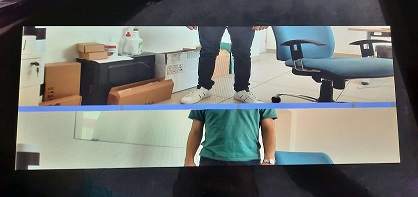
I also notice that the position of this line depends of a moment when streaming video is started (or HDMI is plugged in), precisely when i unplugge the HDMI connector while video is streaming, and plug it in again the position of this line changed every time. I'am confused about that. I note that display works just fine when connected to a PC (both Windows and Linux). I also note that HDMI signals are converted to LVDS using TFP401APZP and transmitted using DS90C385AMT. 

I suspect this to be an issue with synchronization and that this line is blanking time. Does somebody have this or a similar problem? What has caused this line? I am not sure do i need some aditional configurations.

Regards,

Aleksandar.

  • Hi,

    Can I know what display parameter changes have you done?

    The issue is specific to this resolution? is it working for other resolution?

    Are you trying to do in the vision SDK?

    If you are using the vision SDK then what is the vision SDK version & which use-case are you running?

    Thanks

    Gaviraju

  • Hi Gaviraju,

    I work with Aleksandar on this issue.

    We changed the display timing parameters by adding the new display in chains_common.c with the following parameters:

        else if (displayType == CHAINS_DISPLAY_TYPE_HDMI_IMI_LCD)
        {
            pVInfo->mInfo.standard                  =   SYSTEM_STD_CUSTOM;
            pVInfo->mInfo.width                     =   displayWidth;
            pVInfo->mInfo.height                    =   displayHeight;
            pVInfo->mInfo.scanFormat                =   SYSTEM_SF_PROGRESSIVE;
            pVInfo->mInfo.pixelClock                =   91600;
            pVInfo->mInfo.fps                       =   60U;
            pVInfo->mInfo.hFrontPorch               =   24U;
            pVInfo->mInfo.hBackPorch                =   24U;
            pVInfo->mInfo.hSyncLen                  =   32U;
            pVInfo->mInfo.vFrontPorch               =   3U;
            pVInfo->mInfo.vBackPorch                =   20U;
            pVInfo->mInfo.vSyncLen                  =   5U;
        }

    We tried other resolutions reportedly supported by the display (e.g. 1280x720), however, it did not work either (we used the default timing parameters from the VSDK). We also experimented with other timing parameters for resolution 1920x720, however, we got worse results (e.g. vertical line sliding from left to right).

    Yes, we are using Vision SDK version 3.6. The usecase is a single camera usecase that we developed specifically for testing.

    Regards,

    Mladen

  • Hi,

    The issue may come due to incorrect vertical timing. Maybe vsync position is not at the correct place or the height is not matching. So please check the vertical timing parameter.

    Thanks

    Gaviraju

  • Hi Gaviraju,

    We tried to further characterize synchronization signals (HSYNC, VSYNC and DE) delivered by TFP401 to the LCD panel. As it turns out, the polarity was wrong, so we changed it. However, it does not help either because DE signal seems to have a lot of jitter.

    Oddly, when we apply timing parameters from the specification (which fully match those read from EDID), the display shows restless image and oscilloscope shows no activity on HSYNC/VSYNC outputs while DE is generated with high jitter. Conversely, when we attach the display to the PC with Windows OS (using HDMI cable), we get still image perfectly aligned and when we measure signals, they correspond to the ones obtained from the datasheet. For completeness, I provide the timing parameters from the datasheet:

        else if (displayType == CHAINS_DISPLAY_TYPE_HDMI_IMI_LCD)
        {
            pVInfo->vencOutputInfo.vsPolarity = SYSTEM_DCTRL_POLARITY_ACT_LOW;
            pVInfo->vencOutputInfo.hsPolarity = SYSTEM_DCTRL_POLARITY_ACT_LOW;
    
            pVInfo->mInfo.standard                  =   SYSTEM_STD_CUSTOM;
            pVInfo->mInfo.width                     =   displayWidth;
            pVInfo->mInfo.height                    =   displayHeight;
            pVInfo->mInfo.scanFormat                =   SYSTEM_SF_PROGRESSIVE;
            pVInfo->mInfo.pixelClock                =   115620U;
            pVInfo->mInfo.fps                       =   60U;
            pVInfo->mInfo.hFrontPorch               =   120U;
            pVInfo->mInfo.hBackPorch                =   504U;
            pVInfo->mInfo.hSyncLen                  =   32U;
            pVInfo->mInfo.vFrontPorch               =   3U;
            pVInfo->mInfo.vBackPorch                =   20U;
            pVInfo->mInfo.vSyncLen                  =   5U;

    Do you think there could be some problems with the parameters on VPS driver level of the HDMI? I suspect PLL is not configured correctly or there are some HW limitations we are not aware of. Also, where can I find the register description for HDMI of TDA2Px (I can find only basic set of register in TRM)?

    Regards,

    Mladen

  • After additional experimenting with the HDMI settings in the VPS driver, I noticed this piece of code in halHdmiCoreVideoConfig() function (file vpshal_dssHdmi.c):

        /* It is always 1 */
        HW_SET_FIELD32(regVal, HDMI_DWC_TX_FC_INVIDCONF_DE_IN_POLARITY, 1U);
        /* Always 0 need to confirm */
        HW_SET_FIELD32(regVal, HDMI_DWC_TX_FC_INVIDCONF_R_V_BLANK_IN_OSC, 0U);

    Interestingly, when I change HDMI_DWC_TX_FC_INVIDCONF_DE_IN_POLARITY to 0 (even though it is stated in the comment that it should always be 1), I get perfect timing for VSYNC/HSYNC/DE, however, no data is shown on display (so I assume that data is not correctly delivered). Maybe this could serve as a possible clue for tracing the cause of the problem. Again, I cannot find any additional information related to this (and other) flags for HDMI device. Would that be possible to share some doc that describes all registers relevant to HDMI?

    Regards,

    Mladen

  • Any news regarding this issue?

    Regards,

    Aleksandar

  • Mladen,

    This is input polarity of DE signal, when you say perfect timing for VS/HS/DE, where are you seeing this? is there anything coming display? Do you still see split screen?

    Rgds,

    Brijesh

  • Hi Brijesh,

    When I say perfect timing, I mean the one I see on oscilloscope (signals output from TFP401A to LCD panel). The signals match the one from PC (when display works correctly).

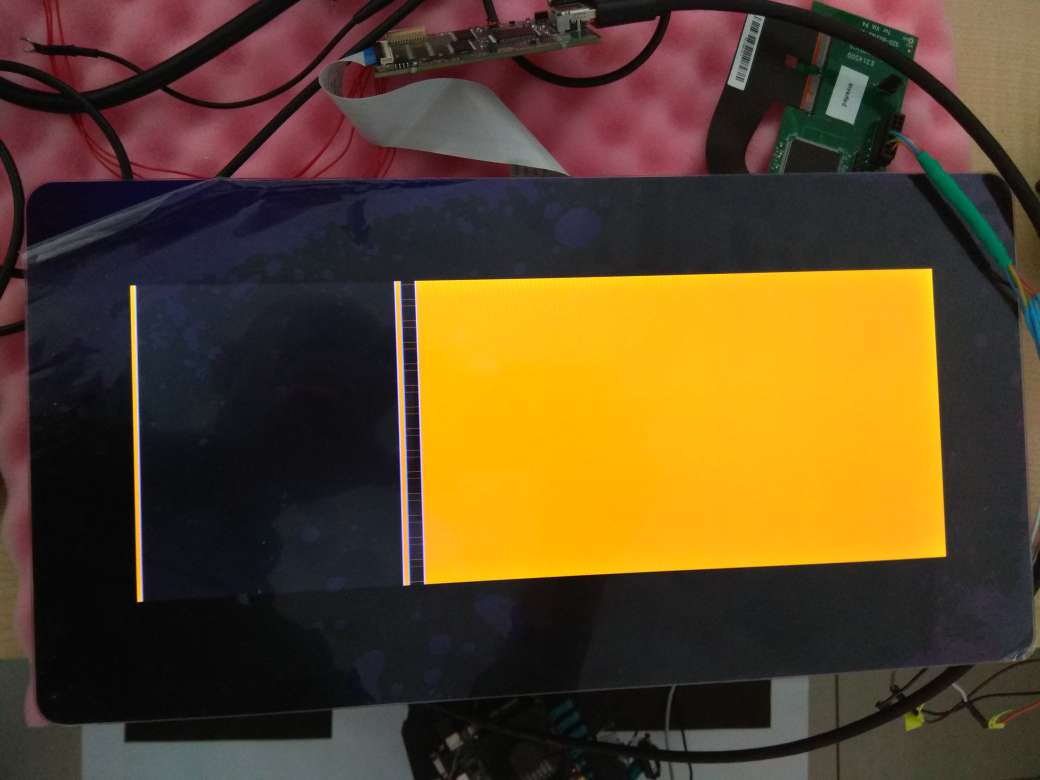
    The display shows some artificial image (half orange, half black) and it is not split screen (at least not horizontally). There is a vertical boundary between black and orange area, however. I do not think it is related to synchronization but rather incorrect data streamed via HDMI.

    Regards,

    Mladen

  • Hi Mladen,

    But are you using internal HDMI or external TFP410 to get HDMI output? 

    The above settings are for internal HDMI module.

    Regards,

    Brijesh

  • Hi Brijesh,

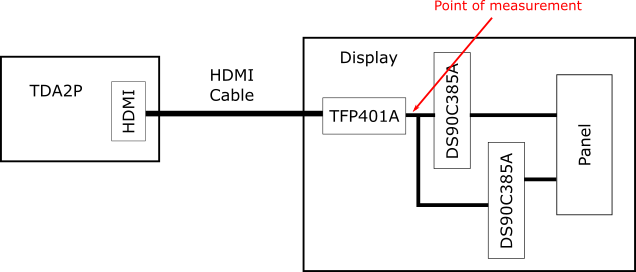
    We are using internal HDMI on TDA2Px based board. The board is connected to the display via HDMI cable. On the display there is TFP401A, which converts HDMI to LVDS and pass it to two DS90C385A as the display panel uses dual pixel LVDS interface. I attach the block diagram of our system.

    Also, I am providing you with the image on the display when we change DE polarity (parameters of internal HDMI on TDA2Px), which I discussed before.

  • Hi Mladen,

    ok understood, the output is expected, because if you change polarity of DE, it might display even blanking data. So i would suggest keeping DE inverted. 

    If DE is inverted, what do you see in output? Please note that DE will toggle only during active video duration. If this is not expected, then output will not be correct. 

    Regards,

    Brijesh

  • Hi Brijesh,

    Thank you for prompt answer.

    When we keep DE inverted (I assume inverted means default, HDMI_DWC_TX_FC_INVIDCONF_DE_IN_POLARITY set to 1), we get flickering image behaving like both horizontal and vertical synchronization is incorrect. When I observe HS/VS/DE signals on an oscilloscope, I get no activity on HS output, VS is correct, while DE experience a lot of jitter and it certainly toggles not only during active video.

    It seems like DE is not correctly recovered from the data. As per my understanding, TFP401A should rely only on video data and should be able to recover all other signals. Is there any specific parameter/flag in HDMI driver that we need to set for the case of this non-standard resolution? Also, would it be required to change any of the default HDMI settings for the case of dual pixel LCD panels?

    Regards,

    Mladen

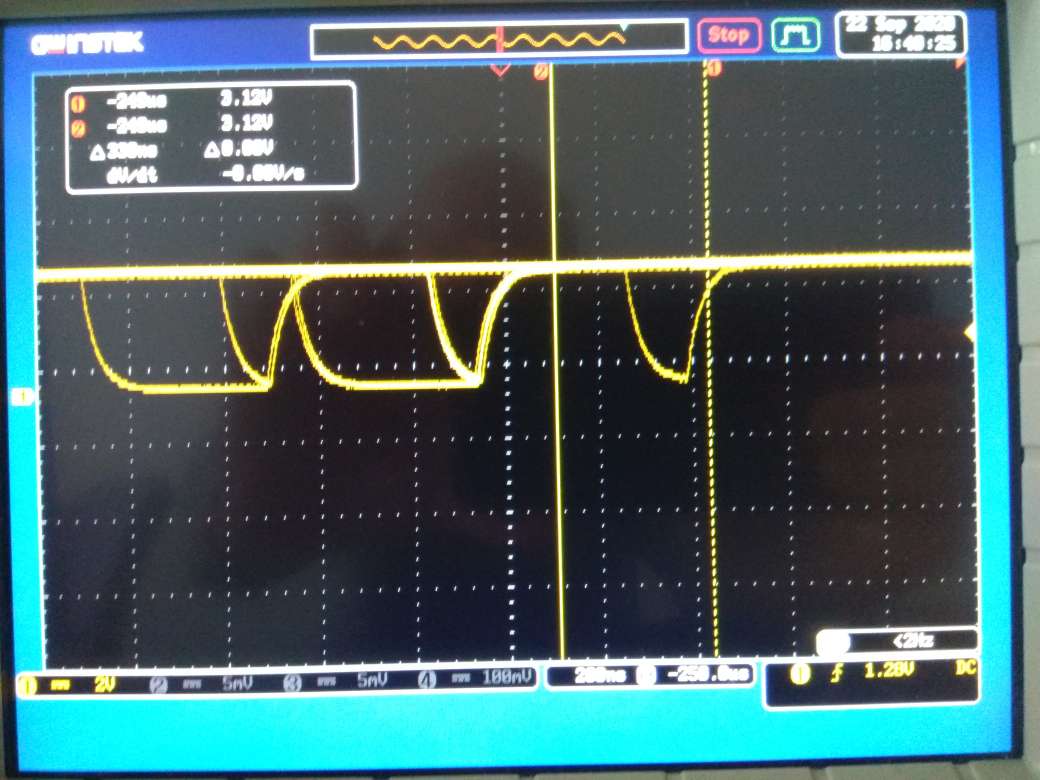
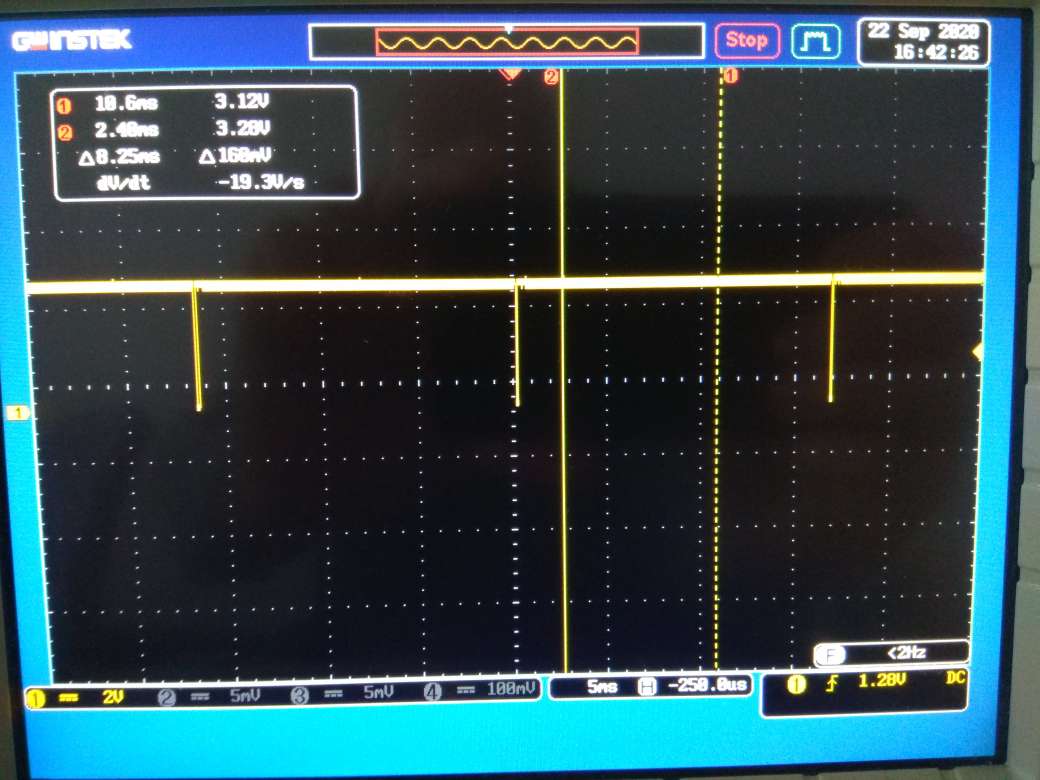
  • I also attach the previously discussed observations captured by oscilloscope (when default DE polarity is used).

    DE signal (with zoomed toggle region):

    VSYNC signal:

    As I mentioned, HSYNC shows no action, i.e. it is always high.

    Regards,

    Mladen

  • Finally, here are some waveforms when aliased traces are removed.

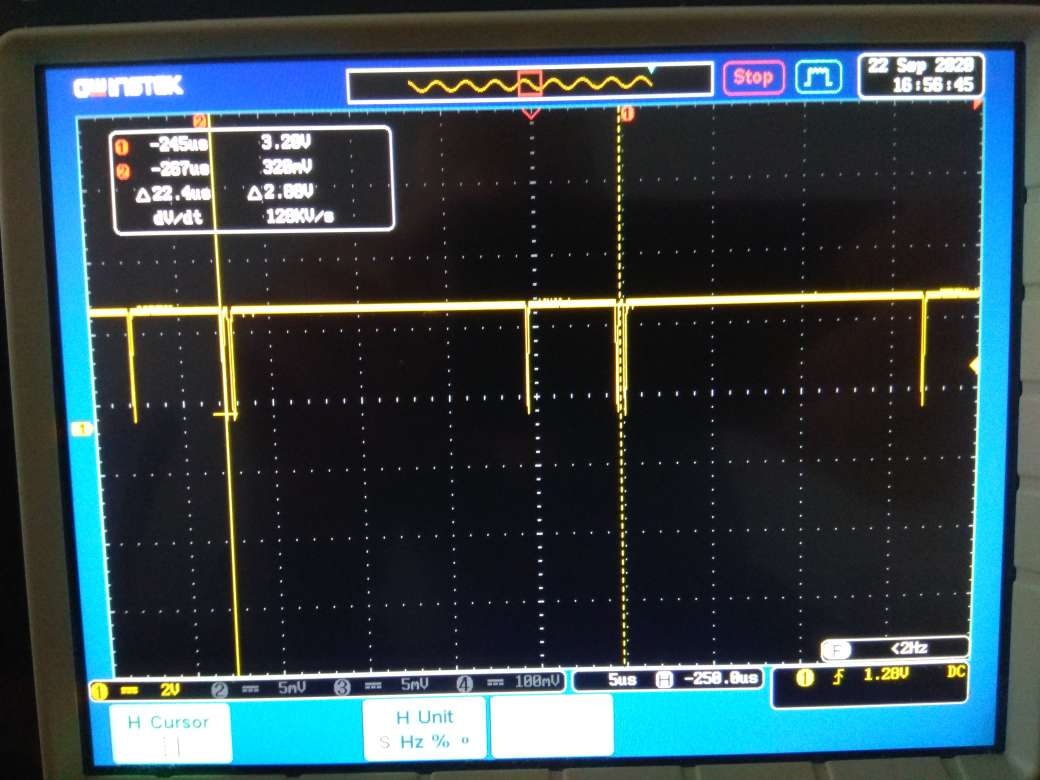
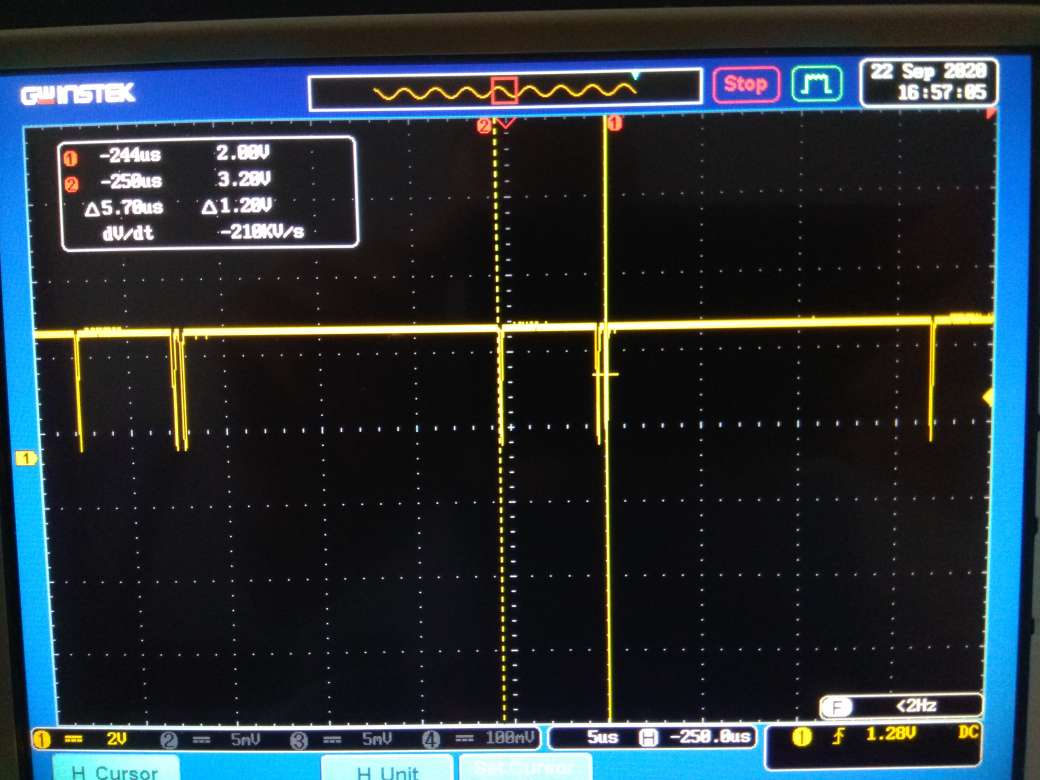
    First image shows the total duration of DE signal (as can be seen it takes about 22-23us). The second image is (almost) the same and it corresponds to the duration of blanking interval (about 5-6us). The timing seems to be in line with what we expect, however, the integrity of the signal is compromised. It looks like something force DE to go high even during the blanking interval. It is like there is some mix-up between the signals.

    Regards,

    Mladen

  • Hi Brijesh,

    Just to let you know that we have resolved the issue with the display. It turns out that HDMI hdmiConf.mode was fixed to 1 in vpscore_dctrl.c. When we changed it to 0, everything is correct. Could you just let me know what is this flag for? My assumption is to choose between  HDMI and DVI mode.

    Regards,

    Mladen

  • Hi Mladen,

    It seems your display supports DVI mode, because when we set mode to 0, it mean output is in DVI format, not in HDMI.

    Glad to know issue is resolved. Please close the thread.

    Regards,

    Brijesh