This thread has been locked.

If you have a related question, please click the "Ask a related question" button in the top right corner. The newly created question will be automatically linked to this question.

CCS/TMDSIDK572: Code Composer Studo on linux

Genius 5840 points
Part Number: TMDSIDK572


Tool/software: Code Composer Studio

Hello,

I'm reading and doing procedure in following URL.

1.In new connection window, after I specified ssh.shells, "Next" button is not active and  I can't proceed to next step.

   Are there any possible reasons why?

   Could you tell me advice where to check configurations?

2.Is it possible to debug the behavior of DSP, IPU, other peripheral etc. in this way?

Regards,

U-SK

  • Hello,

    U-SK said:

    1.In new connection window, after I specified ssh.shells, "Next" button is not active and  I can't proceed to next step.

       Are there any possible reasons why?

    I assume you are using a later version of CCS than the one in the document (6.1). You are likely running into the below issue:

    https://bugs.eclipse.org/bugs/show_bug.cgi?id=472774

    RSE is not developed from the CCS team but by the Eclipse community. 

    U-SK said:
    2.Is it possible to debug the behavior of DSP, IPU, other peripheral etc. in this way?

    RSE is for communication a remote system (in this case, embedded Linux) to browse the file system, transfer files, etc. Check the Eclipse documentation for more information on RSE:

    https://help.eclipse.org/2020-09/index.jsp?topic=%2Forg.eclipse.rse.doc.user%2Fgettingstarted%2Fg_start.html

    Thanks

    ki

  • Hi ki,

    Thank you for your reply.

    I will try using CCSv6.1.1.

    Regarding debug, I understand debug of application running on A15 is possible according to following.

    I would like to know whether debug is possible with the application running on DSP/IPU or the application using some peripheral driver.

    In code composer studio on linux, can we compile following project?

     -application running on DSP/IPU

       -application using some peripherals(USB, timer, SPI, etc)

    Regards,

    U-SK

  • U-SK said:
    I would like to know whether debug is possible with the application running on DSP/IPU or the application using some peripheral driver.

    GDB debug would get linux application level debug visibility. For the above, you'd want CCS low-level JTAG debug. See the below presentation for more details:

    https://dev.ti.com/tirex/explore/node?node=AFh9r0YTTAqSBoDhP3BjRQ__FUz-xrs__LATEST

    U-SK said:

    In code composer studio on linux, can we compile following project?

     -application running on DSP/IPU

       -application using some peripherals(USB, timer, SPI, etc)

    I would assume so. However any details is beyond my area of expertise.

    Thanks

    ki

  • Hi ki,

    Thank you for your reply.

    I understand.

    Regards,

    U-SK

  • Ki said:

    I assume you are using a later version of CCS than the one in the document (6.1). You are likely running into the below issue:

    https://bugs.eclipse.org/bugs/show_bug.cgi?id=472774

    I was able to experiment with the workaround (last comment in the link) and it appears to have worked for me with CCS 10.1.1. I installed the TM Terminal and TM Terminal RSE add-in packages like below (under 'Help -> Install New Software'):

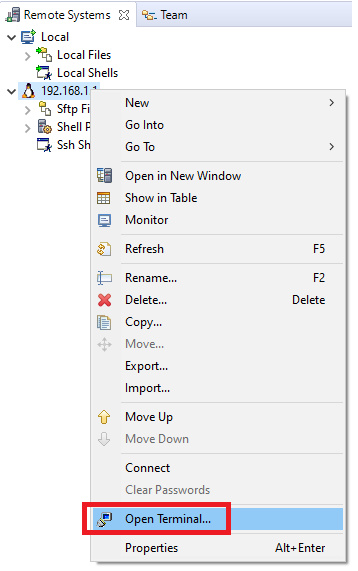
    Once installed, I then was able to open a terminal with the context menu on the RSE connection:

    This is the functionality that was missing.

    Hope this helps

    ki

  • Hi ki,

    Thank you for your reply.

    I tried your procedure, but following error occurred.

    (I accidentally checked the entire TM Terminal 4.1 Main Features and proceeded with the installation.)

    An error occurred while collecting items to be installed
    session context was:(profile=epp.package.cpp, phase=org.eclipse.equinox.internal.p2.engine.phases.Collect, operand=, action=).
    No repository found containing: osgi.bundle,org.eclipse.tm.terminal.connector.local,4.1.0.201602101502
    No repository found containing: org.eclipse.update.feature,org.eclipse.tm.terminal.connector.local.feature,4.1.0.201603090932
    No repository found containing: org.eclipse.update.feature,org.eclipse.tm.terminal.connector.local.sdk.feature,4.1.0.201603090932

    After that, I tried to execute it again, but even if I changed the Workwith column, TM Terminal and TM Terminal View Remote System Explorer add-in disappeared in the Name column.

    Could you tell me how to fix it?

    Regards,

    U-SK

  • U-SK said:
    After that, I tried to execute it again, but even if I changed the Workwith column, TM Terminal and TM Terminal View Remote System Explorer add-in disappeared in the Name column.

    If it disappeared, it could be that those two plugins were installed correctly before the install failure occured. Are you able to open a Terminal via RSE connection (as shown in my last screenshot)?

  • Hi ki,

    Thank you for your reply.

    Sorry, I wasn't fully informed about the situation.

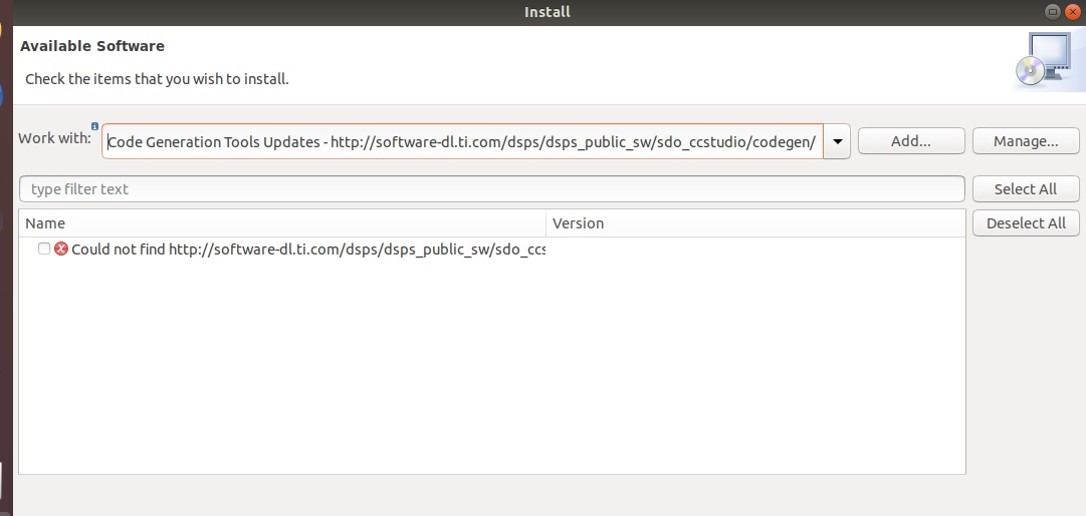
    Not only is the item not displayed in the Name field, but the display is as shown below.

    Is it network problem?

    I have done my proxy setting at Window-Preferences-General-Network Connections.

    Regards,

    U-SK

  • Can you repost the screeenshot? Please see the below FAQ if you are having issues posting it:

    https://e2e.ti.com/support/tools/ccs/f/81/t/821597

    Thanks

    ki

  • Hi ki,

    Sorry for uploading invalid data.

    The capture is following.

    Could you please confirm it?

    Regards,

    U-SK

  • I see. Thank you.

    That update site works for me. Other than proxy issue, is there any other security software like antivirus running on the PC? If so, it may be helpful to disable it temporarily.

    I see the screenshot is for the compiler site. Does the customer also need to get a compiler update?

  • Hi ki,

    Thank you for your reply.

    >Other than proxy issue, is there any other security software like antivirus running on the PC? If so, it may be helpful to disable it temporarily.

    My customer disabled antivirus software temporarily, but the problem remains.

    >Does the customer also need to get a compiler update?

    No, the customer just would like to install TM Terminal and TM Terminal RSE add-in packages.

    When the customer specified "download.eclipse.org/.../marketplace", but the same error occur.

    My customer install CCS again and execute your procedure correctly, but same problem remains...

    My customer has already done proxy setting of CCS as well as that of Ubuntu18.04, is there anything he should be careful when setting proxy in CCS?

    Is there any possible cause?

    My customer's environment is as below.

    Regards,

    U-SK

  • Assuming that the Eclipse proxy settings are set, I'm not sure what the issue could be.

    I may have a different workaround. Please start a private E2E conversation with me for more details.

    Thanks

    ki

  • Hi ki,

    Thank you for your reply.

    I understand.

    I'll contact you via private message.

    Thank you for your cooperation!

    Regards,

    U-SK

  • Thank you. I have replied to your message