This thread has been locked.

If you have a related question, please click the "Ask a related question" button in the top right corner. The newly created question will be automatically linked to this question.

RTSC configuration example "Hello" won't build

Other Parts Discussed in Thread: OMAPL138, SYSBIOS, CCSTUDIO

I'm trying to create a sample project for the DSP on my OMAPL138 using RTSC so I can have BIOS on it. However, when I go through the new project wizard and creat a new project and RTSC configuration project based on the "Hello" Example, I get the following configuration build errors:

----------------------------------------------------------------------------------------------------------------------------------------------------------------------------------


**** Build of configuration Default for project algproc_configuration ****


C:\Program Files\Texas Instruments\ccsv4\utils\gmake\gmake -k all

'Building target: configPkg/linker.cmd'

'Invoking: XDCtools'

"C:/Program Files/Texas Instruments/xdctools_3_20_00_41/xs" --xdcpath="C:/Program Files/Texas Instruments/pspdrivers_02_10_01/packages;C:/Program Files/Texas Instruments/bios_6_21_00_13/packages;C:/Program Files/Texas Instruments/ipc_1_00_05_60/packages;C:/Program Files/Texas Instruments/xdais_6_25_01_08/packages;C:/Program Files/Texas Instruments/xdais_6_25_01_08/examples;" xdc.tools.configuro -o configPkg -t ti.targets.C674 -p ti.platforms.evmOMAPL138 -r whole_program -c "C:/Program Files/Texas Instruments/C6000 Code Generation Tools 7.0.1" "../common.cfg"

making package.mak (because of package.bld) ...

generating interfaces for package configPkg (because package/package.xdc.inc is older than package.xdc) ...

configuring common.p674 from package/cfg/common_p674.cfg ...

js: "C:/Program Files/Texas Instruments/xdctools_3_20_00_41/packages/xdc/cfg/Main.xs", line 123: Error: incompatible use of package 'xdc.runtime' [in C:/Program Files/Texas Instruments/xdctools_3_20_00_41/packages/xdc/runtime/]: version of the loaded package 'xdc.runtime' is [2, 1, 0], while 'ti.targets.rts6000' [in C:/Program Files/Texas Instruments/bios_6_21_00_13/packages/ti/targets/rts6000/] was built with 'xdc.runtime' [2, 0, 0, 0, 1254957688197], while 'ti.sysbios.interfaces' [in C:/Program Files/Texas Instruments/bios_6_21_00_13/packages/ti/sysbios/interfaces/] was built with 'xdc.runtime' [2, 0, 0, 0, 1254957688197], while 'ti.sysbios.family.c64p' [in C:/Program Files/Texas Instruments/bios_6_21_00_13/packages/ti/sysbios/family/c64p/] was built with 'xdc.runtime' [2, 0, 0, 0, 1254957688197], while 'ti.sysbios.family' [in C:/Program Files/Texas Instruments/bios_6_21_00_13/packages/ti/sysbios/family/] was built with 'xdc.runtime' [2, 0, 0, 0, 1254957688197], while 'ti.sysbios.misc' [in C:/Program Files/Texas Instruments/bios_6_21_00_13/packages/ti/sysbios/misc/] was built with 'xdc.runtime' [2, 0, 0, 0, 1254957688197], while 'ti.sysbios.hal' [in C:/Program Files/Texas Instruments/bios_6_21_00_13/packages/ti/sysbios/hal/] was built with 'xdc.runtime' [2, 0, 0, 0, 1254957688197], while 'ti.sysbios.knl' [in C:/Program Files/Texas Instruments/bios_6_21_00_13/packages/ti/sysbios/knl/] was built with 'xdc.runtime' [2, 0, 0, 0, 1254957688197], while 'ti.sysbios.heaps' [in C:/Program Files/Texas Instruments/bios_6_21_00_13/packages/ti/sysbios/heaps/] was built with 'xdc.runtime' [2, 0, 0, 0, 1254957688197], while 'ti.sysbios.ipc' [in C:/Program Files/Texas Instruments/bios_6_21_00_13/packages/ti/sysbios/ipc/] was built with 'xdc.runtime' [2, 0, 0, 0, 1254957688197], while 'ti.sysbios.gates' [in C:/Program Files/Texas Instruments/bios_6_21_00_13/packages/ti/sysbios/gates/] was built with 'xdc.runtime' [2, 0, 0, 0, 1254957688197], while 'ti.sysbios.xdcruntime' [in C:/Program Files/Texas Instruments/bios_6_21_00_13/packages/ti/sysbios/xdcruntime/] was built with 'xdc.runtime' [2, 0, 0, 0, 1254957688197], while 'ti.sysbios' [in C:/Program Files/Texas Instruments/bios_6_21_00_13/packages/ti/sysbios/] was built with 'xdc.runtime' [2, 0, 0, 0, 1254957688197], while 'ti.sysbios.family.c62' [in C:/Program Files/Texas Instruments/bios_6_21_00_13/packages/ti/sysbios/family/c62/] was built with 'xdc.runtime' [2, 0, 0, 0, 1254957688197], while 'ti.sysbios.timers.timer64' [in C:/Program Files/Texas Instruments/bios_6_21_00_13/packages/ti/sysbios/timers/timer64/] was built with 'xdc.runtime' [2, 0, 0, 0, 1254957688197], while 'ti.sysbios.family.c64p.primus' [in C:/Program Files/Texas Instruments/bios_6_21_00_13/packages/ti/sysbios/family/c64p/primus/] was built with 'xdc.runtime' [2, 0, 0, 0, 1254957688197]

Adding the following line to your program configuration script:

      environment['xdc.cfg.check.fatal'] = 'false';

converts this incompatibility error into a warning. Please, check the documentation for the package xdc.cfg for more information.

gmake.exe: *** [package/cfg/common_p674.xdl] Error 1

js: "C:/Program Files/Texas Instruments/xdctools_3_20_00_41/packages/xdc/tools/Cmdr.xs", line 51: Error: xdc.tools.configuro: configuration failed due to earlier errors (status = 2); 'linker.cmd' deleted.

C:\Program Files\Texas Instruments\ccsv4\utils\gmake\gmake: *** [configPkg/linker.cmd] Error 1

C:\Program Files\Texas Instruments\ccsv4\utils\gmake\gmake: Target `all' not remade because of errors.

Build complete for project algproc_configuration

 --------------------------------------------------------------------------------------------------------------------------------------------------------------------------------------------------------------------------------

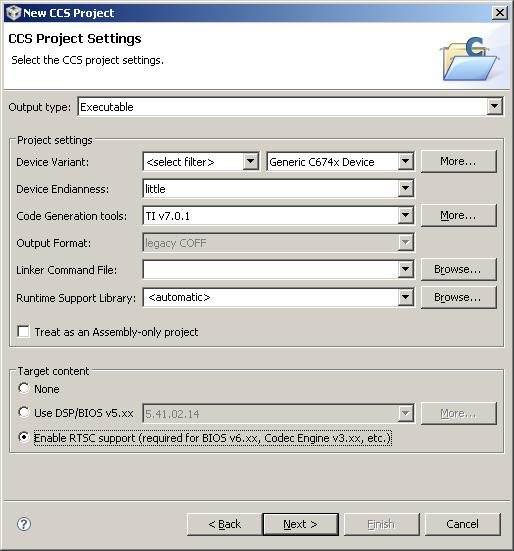
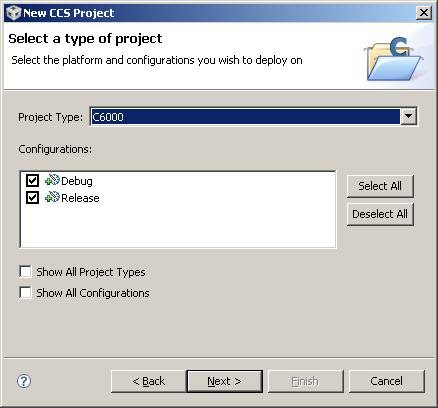
My settings in the wizard look like this:


CCStudio version is

Version: 4.1.3.00038

RTSC version is 3.20.0.41

BIOS version is 6.21.0.13

Thanks in advance


  • Hi,

    It seems to be a version mismatch, although the error message is not entirely clear.

    By reading the BIOS 6.21.00.13 release notes, it says there that you need to use XDC version 3.15 (from the screenshot you are using 3.20.xx.xx), therefore this may be the issue.

    If you have another version of the XDC tools installed (3.16 comes by default in the CCSv4.1.3 installation and it works for me), then you can select it in the XDC Tools Version drop down menu.

    Please give this a try and see if it works. In the meantime I will move this thread to the BIOS forum so they may have additional insights to what may be happening in your case.

    Cheers,

    Rafael

  • Hi Rafael, thanks for the response.

    I tried again with XDC version 3.16 (default) that worked for you and while it still didn't work for me, I did get a different error:

    ---------------------------------------------------------------------------------------------------------------------------------------------------------------------------

    **** Build of configuration Default for project algProc_configuration ****


    C:\Program Files\Texas Instruments\ccsv4\utils\gmake\gmake -k all

    'Building target: configPkg/linker.cmd'

    'Invoking: XDCtools'

    "C:/Program Files/Texas Instruments/xdctools_3_16_02_32/xs" --xdcpath="C:/Program Files/Texas Instruments/bios_6_21_00_13/packages;C:/Program Files/Texas Instruments/ipc_1_00_05_60/packages;C:/Program Files/Texas Instruments/xdais_6_25_01_08/packages;C:/Program Files/Texas Instruments/xdais_6_25_01_08/examples;" xdc.tools.configuro -o configPkg -t ti.targets.C674 -p ti.platforms.evmOMAPL138 -r whole_program -c "C:/Program Files/Texas Instruments/C6000 Code Generation Tools 7.0.1" "../common.cfg"

    making package.mak (because of package.bld) ...

    generating interfaces for package configPkg (because package/package.xdc.inc is older than package.xdc) ...

    configuring common.p674 from package/cfg/common_p674.cfg ...

    cl674 package/cfg/common_p674.c ...

    lnk674 common.p674 ...


    >> Compilation failure


    >> Compilation failure

    >> Invalid intermediate file: C:\Program Files\Texas Instruments\bios_6_21_00_13\packages\ti\sysbios\timers\timer64\lib\whole_program_debug\ti.sysbios.timers.timer64.a674, abortingerror: failed to recompile

    gmake.exe: *** [common.p674] Error 1

    js: "C:/Program Files/Texas Instruments/xdctools_3_16_02_32/packages/xdc/tools/Cmdr.xs", line 51: Error: xdc.tools.configuro: configuration failed due to earlier errors (status = 2); 'linker.cmd' deleted.

    C:\Program Files\Texas Instruments\ccsv4\utils\gmake\gmake: *** [configPkg/linker.cmd] Error 1

    C:\Program Files\Texas Instruments\ccsv4\utils\gmake\gmake: Target `all' not remade because of errors.

    Build complete for project algProc_configuration

    -------------------------------------------------------------------------------------------------------------------------------------------------------------------------------

    I even uninstalled and re-installed ccstudio 4.1.38 with all components and still get this error.

  • Nick,
    that error is caused by incompatibility of some internal intermediate files between the compiler used for SYS/BIOS 6.21.00.13 and the compiler you are using, 7.0.1. I think SYS/BIOS 6.21.00.13 was built with 6.1.9, so any 6.1 compiler newer than that should work.

  • Thanks for the quick response!

    I have a couple of questions. First, wouldn't a version 7 compiler be considered newer than version 6.1.9? Second, below is a snapshot of my ccstudio configuration. I don't see version 7.0.1 even listed here, so how exactly would I reconfigure ccstudio to use 6.1.15? Thanks in advance...

  • The incompatibility is related to the format of certain non-public intermediary files that are used only when you select 'whole_program' profile for your configuration. But, if you select any other profile you will lose some optimizations. So, although 7.0.1 compiler is newer and in most aspects compatible with older compilers, to get the optimized code out of the configuration, you need to use a 6.1.x compiler.

    I have a CCSv4.2 installation, but I think the compiler selection is done the same way as in CCSv4.1. You can select a compiler by going to Build Properties for a project, and then in CCS Build->General there is a drop-down list with the compiler versions. There is also a button "More ..." in case you have a compiler installation that CCS does not know about, so you can add such an installation to the list.

  • This appears to have rectified the issue as the configuration and sample project build now. However, when building the configuration project, I still get the following warning in the "Problems" window:

    Product 'PSP Drivers' v02.10.01 defines no repositories. Uninstall and reinstall the product, or contact the product provider.

    I just installed v2.10.01 of the psp drivers, so I don't think uninstalling and reinstalling the product will work...I don't believe this warning is necessarily a show-stopping issue, but I'd like some insight into this if possible.

    Thanks again

  • When you open Project->Properties->CCS Build->RTSC, you can see the list of installed products that declare RTSC repositories (collections of packages). That means when you run a configuration step, these products' repositories are added to the RTSC package path, and their packages are then located along that package path. There is more about it on RTSCpedia: http://rtsc.eclipse.org/docs-tip/Glossary#PackagePath.

    It seems that the product PSP Drivers does not declare any repositories. If your configuration worked without adding any PSP Drivers repositories, you are then probably not using any of its packages in your configuration. I am not that familiar with that product, so I can't tell if you can somehow use it when building target code without configuring it first.