This thread has been locked.

If you have a related question, please click the "Ask a related question" button in the top right corner. The newly created question will be automatically linked to this question.

TDA4VM: environment variables can't be saved

Part Number: TDA4VM
Other Parts Discussed in Thread: UNIFLASH

Hi,

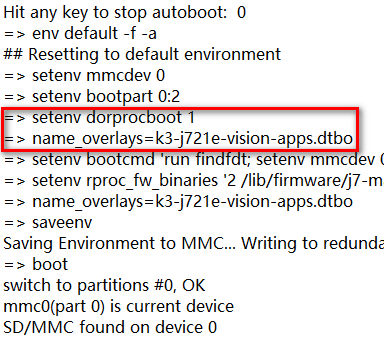
The applications run well after I configure environment variables at uboot prompt,while the applications run incorrectly after rebooting.It's really strange because I do save the environment variables,but it doesn't work when I reboot it.It seems that the environment variables have not been saved.Can you help me solve it?

Regards!

HJ

boot_error.txt

  • Hi Jian,

    I don't see any error reported when 'savenv' command was executed.
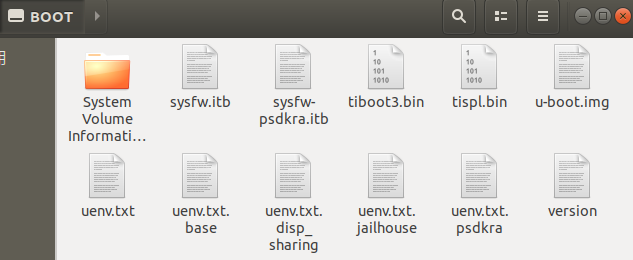
    Do you have any uenv.txt file on SD card? this will override any env settings you have stored.

    Could you do a simpler test?
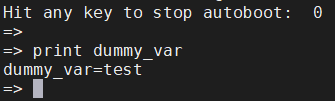
    Set a dummy variable, save it, reboot and check if it's stored.

    => setenv dummy_var test
    => saveenv

    reboot

    => print dummy_var


  • Hi,

    The test shows that the environment variables can be saved.

    It boots from eMMC,and I flash eMMC using uniflash like this:

    1. sudo ./dslite.sh --mode processors -c /dev/ttyUSB1 -f /home/vmuser/psdk_rtos_auto_j7_07_00_00_11/bootfs/tiboot3.bin -d 4 -o 0
    2. sudo ./dslite.sh --mode processors -c /dev/ttyUSB1 -f /home/vmuser/psdk_rtos_auto_j7_07_00_00_11/bootfs/tispl.bin -d 4 -o 80000
    3. sudo ./dslite.sh --mode processors -c /dev/ttyUSB1 -f /home/vmuser/psdk_rtos_auto_j7_07_00_00_11/bootfs/u-boot.img -d 4 -o 280000
    4. sudo ./dslite.sh --mode processors -c /dev/ttyUSB1 -f /home/vmuser/psdk_rtos_auto_j7_07_00_00_11/bootfs/sysfw.itb -d 4 -o 6C0000

    Compared with the files in boot partition in SD card,it seems that more files should be haved flashed.Is it  the reason why the applications run incorrectly?

    Regards!

    HJ

  • Hi HJ,

    You can ignore the uenv*.txt files, they are example environment settings for different use cases.

    The four important files are tiboot3.bin, sysfw.itb, tispl.bin and u-boot.img.

    If you are relying on any uenv.txt file settings, save them by default.

    Regards,
    Vishal

  • Hi Vishal ,

    As for the filesystem,it's copied from the SD card rootfs filesystem and it may rely on the uenv.txt file settings .To run the vision apps ,is there some steps to copy the uenv.txt files from SD boot partition?The uEnv.txt in boot partition is to select the .dtbo's which is required to run vision apps demos.

    Regards!

    HJ

  • One way to workaround this is to set the settings from uenv.txt manaully once and do saveenv.

  • Hi Vishal ,

    I have saved it at uboot prompt.It doesn't work unless I configure environment variables at uboot prompt .Is there something wrong in environment variables?

    Regards!

    HJ

  • The commands have some typo.. You are missing setenv command.

    => setenv <variable> <value>

    Ex:

    => setenv dorprocboot 1
    => setenv name_overlays k3-j721e-vision-apps.dtbo
    etc..

    Could you paste the contents of the uenv.txt you are using?

  • Hi Vishal ,

    Thanks for your reply! I use this uenv.txt.

    dorprocboot=1
    name_overlays=k3-j721e-vision-apps.dtbo


  • The uenv.txt you shared has only 2 settings. SO below two commands are doing the same thing.

    => setenv dorprocboot 1
    => setenv name_overlays k3-j721e-vision-apps.dtbo
    => saveenv