


Part Number: TDA4VM
Other Parts Discussed in Thread: UNIFLASH
Tool/software: Code Composer Studio
Hi, Experts :
Follow title description, we try to load uboot through CCS (+JTAG XDS110) & let it runs on RAM, but it's doesn't work for TDA4 EVB.
I think it's could be just some CCS parameter setting problems, and we need to know correct steps(settings) for TDA4.
we follow these instructions as below . (section 3.1.1.17. Loading Uboot through Code Composer Studio )
software-dl.ti.com/.../Foundational_Components_U-Boot.html
here is our steps.
(1) adjust boot switch, let board go to uart boot mode
(2) remove sdcard, and connect MCU uart. The char 'C' appears in terminal (Windows, COM10 in host), leave this console RUNNING in the background
(3) launch CCS and make sure successful connection . we connect core "MCU_Cortex_R5_0)".
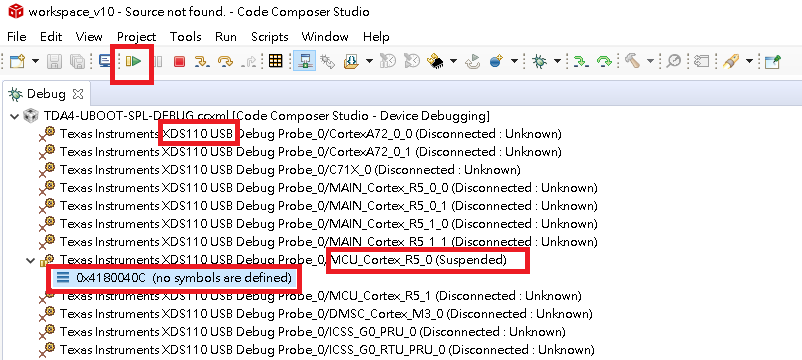
(4) set Core Registers CPSR, make sure T register is 0 (original display is 0, no changed)

(5) check u-boot SPL start address, LSDK path\board_support\u-boot_build\r5\spl\u-boot-spl.map, the address is 0x41c00000

(6) load u-boot-spl.bin to board memory, this binary locate in LSDK path\board_support\u-boot_build\r5\spl\ , and set start address is 0x41c00000


(7) load the symbols for the binary "u-boot-spl " , which allows source level debugging
(8) set PC = 0x41c00000, and disassembly view PC value correctly


(9) let program go(F8)! but no SPL boot message appears in MCU uart (com10) or main uart, is any thing wrong ?
BTW, next step, if I want to load u-boot image, which one I should load?
LSDK path\board_support\u-boot_build\r5\u-boot.img or LSDK path\board_support\u-boot_build\a72\u-boot.img ?
Please give us some hints, many Thanks!
Gibbs

