


Part Number: OMAP-L138
Other Parts Discussed in Thread: DA8XX
Hello,
I am working with the OMAP-L138-DG-325-RI SoM and I am trying to update code that uses DSP/LINK to use SYS/BIOS & IPC instead.
So far, I have tried to install and setup IPC by following the "IPC_Install_Guide_Linux.pdf" (I have attached the pdf), but I am stuck at "Installing Tests".
According to the install guide, firmware for the remote processor should be loaded via the remoteproc kernel module and placed in /lib/firmware. However, my Linux does not have this folder.
Kernel Configuration
When rebuilding the kernel, I have added these config parameters to my defconfig file as described in the guide.
CONFIG_REMOTEPROC=m
CONFIG_DA8XX_REMOTEPROC=m
CONFIG_RPMSG=m
CONFIG_VIRTIO=m
Enable Remoteproc
I have enabled the remoteproc module in Linux with "modprobe remoteproc" and can see it listed with "lsmod".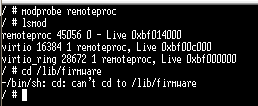
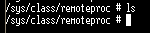
The sys/class/remoteproc folder is also empty
Is there any documentation with regards to how remoteproc is enabled and configured in order for it to work with IPC in Linux?
Tools
- ipc_3_40_01_08
- bios_6_42_02_29
- c6000_7_4_24
- xdctools_3_31_02_38_core
- arm-926ejs-linux-gnueabi-gcc: (crosstool-NG 1.13.2) 4.5.3
- Linux kernel: 4.19.141
Thanks,
Kim

