This thread has been locked.

If you have a related question, please click the "Ask a related question" button in the top right corner. The newly created question will be automatically linked to this question.

PROCESSOR-SDK-AM437X: [AM437x] Ping fails on eth0 and eth1 on custom hardware

Part Number: PROCESSOR-SDK-AM437X
Other Parts Discussed in Thread: AM4372, TPS65218

We are in process of bringing up the ethernet peripheral on our custom board. Both the interfaces work properly and link (both eth0 & eth1) comes up/down appropriately and ping doesn’t work from PC->device or device->PC. Please find below log snippets and ethtool output. Could you please help us with pointers?

Board: Custom board based on AM437X.
TISDK: ti-processor-sdk-linux-am437x-evm-06.03.00.106
Linux: linux-4.19.94

PHY : Microchip LAN8740AI-EN-TR & LAN8740AI 

PC to device connection:
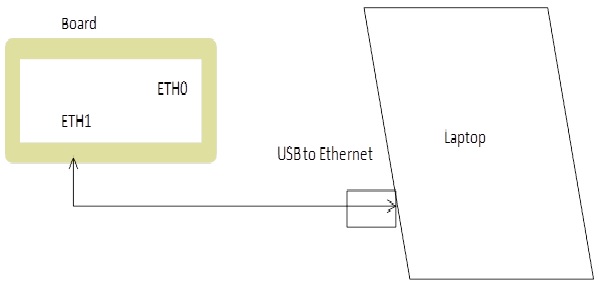
We manually connect to Eth0 and Eth1 of the board one at a time. Board’s ethernet interfaces (Eth0 and Eth1) detects the link when we connect the ethernet cable to them. We have configured usb-ethernet adapter on PC with 169.254.1.60 (while testing ETH0) & 192.168.100.55 (while testing ETH1). Target Ip address  are statically assigned via “/etc/networks/interface” file on the board. Below are the actual IP & subnet details being used on the board.

ETH0 is configure to “IP - 169.254.1.1; Subnet – 255.255.0.0”

ETH1 is configure to “IP - 192.168.100.100; Subnet – 255.255.255.0”

We have tested that the usb-to-ethernet convertor and ethernet cable and its working fine. We validated it by connecting to working board.


Log snippet:

[ 1.234284] mdio_bus fixed-0: GPIO lookup for consumer reset
[ 1.234297] mdio_bus fixed-0: using lookup tables for GPIO lookup
[ 1.234306] mdio_bus fixed-0: No GPIO consumer reset found
[ 1.255561] mdio_bus 4a101000.mdio: GPIO lookup for consumer reset
[ 1.255573] mdio_bus 4a101000.mdio: using device tree for GPIO lookup
[ 1.255602] of_get_named_gpiod_flags: can't parse 'reset-gpios' property of node '/ocp@44000000/ethernet@4a100000/mdio@4a101000[0]'
[ 1.255623] of_get_named_gpiod_flags: can't parse 'reset-gpio' property of node '/ocp@44000000/ethernet@4a100000/mdio@4a101000[0]'
[ 1.255635] mdio_bus 4a101000.mdio: using lookup tables for GPIO lookup
[ 1.255645] mdio_bus 4a101000.mdio: No GPIO consumer reset found
[ 1.311668] davinci_mdio 4a101000.mdio: davinci mdio revision 1.6, bus freq 1000000
[ 1.319377] davinci_mdio 4a101000.mdio: detected phy mask fffffffc
[ 1.327738] libphy: 4a101000.mdio: probed
[ 1.331896] davinci_mdio 4a101000.mdio: phy[0]: device 4a101000.mdio:00, driver SMSC LAN8740
[ 1.340381] davinci_mdio 4a101000.mdio: phy[1]: device 4a101000.mdio:01, driver SMSC LAN8740
[ 1.350163] cpsw 4a100000.ethernet: Detected MACID = 14:42:fc:94:c1:a6
[ 1.357003] cpsw 4a100000.ethernet: initialized cpsw ale version 1.4
[ 1.363470] cpsw 4a100000.ethernet: ALE Table size 1024
[ 1.368766] cpsw 4a100000.ethernet: cpts: overflow check period 500 (jiffies)
[ 1.377012] cpsw 4a100000.ethernet: cpsw: Detected MACID = 14:42:fc:94:c1:a8
[ 1.711255] cpuidle: enable-method property 'ti,am4372' found operations
[ 7.012316] net eth0: initializing cpsw version 1.15 (0)
[ 7.183015] SMSC LAN8740 4a101000.mdio:00: attached PHY driver [SMSC LAN8740] (mii_bus:phy_addr=4a101000.mdio:00, irq=POLL)
[ 7.330352] IPv6: ADDRCONF(NETDEV_UP): eth0: link is not ready
[ 7.412438] net eth1: initializing cpsw version 1.15 (0)
[ 7.593078] SMSC LAN8740 4a101000.mdio:01: attached PHY driver [SMSC LAN8740] (mii_bus:phy_addr=4a101000.mdio:01, irq=POLL)
[ 7.704019] IPv6: ADDRCONF(NETDEV_UP): eth1: link is not ready
[ 9.362642] cpsw 4a100000.ethernet eth0: Link is Up - 100Mbps/Full - flow control off
[ 9.381710] IPv6: ADDRCONF(NETDEV_CHANGE): eth0: link becomes ready
[ 11.358940] device eth0 entered promiscuous mode

Link status:
root@Node1442fc94c1a6:~# [ 2342.962518] cpsw 4a100000.ethernet eth0: Link is Down
[ 2346.962505] cpsw 4a100000.ethernet eth0: Link is Up - 100Mbps/Full - flow control off
root@Node1442fc94c1a6:~#
root@Node1442fc94c1a6:~# [ 2355.122283] cpsw 4a100000.ethernet eth0: Link is Down
[ 2356.802511] cpsw 4a100000.ethernet eth1: Link is Up - 100Mbps/Full - flow control off
[ 2356.810465] IPv6: ADDRCONF(NETDEV_CHANGE): eth1: link becomes ready
[ 2363.922284] cpsw 4a100000.ethernet eth1: Link is Down
[ 2365.042502] cpsw 4a100000.ethernet eth0: Link is Up - 100Mbps/Full - flow control off


ETHTool output:

root@Node1442fc94c1a6:~# ./ethtool eth0
Settings for eth0:
Supported ports: [ TP MII ]
Supported link modes: 10baseT/Half 10baseT/Full
100baseT/Half 100baseT/Full
Supported pause frame use: Symmetric Receive-only
Supports auto-negotiation: Yes
Supported FEC modes: Not reported
Advertised link modes: 10baseT/Half 10baseT/Full
100baseT/Half 100baseT/Full
Advertised pause frame use: No
Advertised auto-negotiation: Yes
Advertised FEC modes: Not reported
Link partner advertised link modes: 10baseT/Half 10baseT/Full
100baseT/Half 100baseT/Full
Link partner advertised pause frame use: Symmetric
Link partner advertised auto-negotiation: Yes
Link partner advertised FEC modes: Not reported
Speed: 100Mb/s
Duplex: Full
Port: MII
PHYAD: 0
Transceiver: internal
Auto-negotiation: on
Supports Wake-on: d
Wake-on: d
Current message level: 0x00000000 (0)

Link detected: yes
root@Node1442fc94c1a6:~#
root@Node1442fc94c1a6:~# ./ethtool -S eth0
NIC statistics:
Good Rx Frames: 0
Broadcast Rx Frames: 0
Multicast Rx Frames: 0
Pause Rx Frames: 0
Rx CRC Errors: 0
Rx Align/Code Errors: 0
Oversize Rx Frames: 0
Rx Jabbers: 0
Undersize (Short) Rx Frames: 0
Rx Fragments: 0
Rx Octets: 0
Good Tx Frames: 13
Broadcast Tx Frames: 0
Multicast Tx Frames: 13
Pause Tx Frames: 0
Deferred Tx Frames: 0
Collisions: 0
Single Collision Tx Frames: 0
Multiple Collision Tx Frames: 0
Excessive Collisions: 0
Late Collisions: 0
Tx Underrun: 0
Carrier Sense Errors: 0
Tx Octets: 1514
Rx + Tx 64 Octet Frames: 0
Rx + Tx 65-127 Octet Frames: 8
Rx + Tx 128-255 Octet Frames: 5
Rx + Tx 256-511 Octet Frames: 0
Rx + Tx 512-1023 Octet Frames: 0
Rx + Tx 1024-Up Octet Frames: 0
Net Octets: 1514
Rx Start of Frame Overruns: 0
Rx Middle of Frame Overruns: 0
Rx DMA Overruns: 0
Rx DMA chan 0: head_enqueue: 1
Rx DMA chan 0: tail_enqueue: 127
Rx DMA chan 0: pad_enqueue: 0
Rx DMA chan 0: misqueued: 0
Rx DMA chan 0: desc_alloc_fail: 0
Rx DMA chan 0: pad_alloc_fail: 0
Rx DMA chan 0: runt_receive_buf: 0
Rx DMA chan 0: runt_transmit_bu: 0
Rx DMA chan 0: empty_dequeue: 0
Rx DMA chan 0: busy_dequeue: 0
Rx DMA chan 0: good_dequeue: 0
Rx DMA chan 0: requeue: 0
Rx DMA chan 0: teardown_dequeue: 0
Tx DMA chan 0: head_enqueue: 13
Tx DMA chan 0: tail_enqueue: 0
Tx DMA chan 0: pad_enqueue: 0
Tx DMA chan 0: misqueued: 0
Tx DMA chan 0: desc_alloc_fail: 0
Tx DMA chan 0: pad_alloc_fail: 0
Tx DMA chan 0: runt_receive_buf: 0
Tx DMA chan 0: runt_transmit_bu: 0
Tx DMA chan 0: empty_dequeue: 13
Tx DMA chan 0: busy_dequeue: 0
Tx DMA chan 0: good_dequeue: 13
Tx DMA chan 0: requeue: 0
Tx DMA chan 0: teardown_dequeue: 0

DTS nodes:
&mac {
pinctrl-names = "default", "sleep";
pinctrl-0 = <&cpsw_default0>, <&cpsw_default1>;
pinctrl-1 = <&cpsw_sleep0>, <&cpsw_sleep1>;
dual_emac;

status = "okay";
};

&cpsw_emac0 {
phy_id = <&davinci_mdio>, <0>;
phy-mode = "rmii";
dual_emac_res_vlan = <1>;
};


&cpsw_emac1 {
phy_id = <&davinci_mdio>, <1>;
phy-mode = "rmii";
dual_emac_res_vlan = <2>;
};


&davinci_mdio {
pinctrl-names = "default", "sleep";
pinctrl-0 = <&davinci_mdio_default>;
pinctrl-1 = <&davinci_mdio_sleep>;

};

  • Mahidar,

    I just received a good suggestion from . He pointed out that you're missing this:

    &phy_sel {
            rmii-clock-ext = <1>;
    };

    Please try that out to see if it resolves your issue.

    Best regards,
    Brad

  • Hi Brad,

     With the suggested change also we donot see PING working for us.


    Regards,

    Mahidhar.

  • That was definitely an important change, so that should be kept permanently regardless.

    Can you verify that a 50 MHz clock is present?  Is it being generated by the PHY or do you have a separate crystal oscillator providing the 50 MHz clock to both the processor and the PHY?

  • Yes the 50Mhz clock is present. The clock is being provided by separate 50MHz crystal oscillator for the PHY’s.

    Also everything looks good from hardware perspective, voltage levels are @3.3V, signal integrity looks good. 

  • Hi,

    - The boot log is showing the PHY driver is identified and PHYs are at the correct address. 

    - The ethtool is showing a link established, but the ethtool statistics is showing no received packets. It is also showing no received errors either.

    I would like to suggest the following debug steps:

    - The tx packets from device to device need to be followed and proved that that they are showing up at the link partner. While the statistics are showing packets leaving (TX count increasing) we need to see that they showed up on the connected PC. Using Wireshark here on the laptop here would be ideal because you can see the types of packets being sent from the board. You can also test this without using Wireshark too. For this test direct connect the board using eth0 to the laptop and please leave eth1 disconnected. 

    - Before issuing the ping command please perform the following commands you were doing earlier in the post ifconfig -a, ethtool eth0, ethtool -S eth0, please perform these same commands on the laptop too. If the laptop is not running linux you will need to use wireshark.

    - Run the ping command and after a few seconds stop the command and repeat the previous steps for ifconfig -a ethtool etc. for both sides of the link partner. 

    With the results we want to see if the RX packet count on the laptop is showing an increase. If the RX count on the laptop is increasing that indicates the packets from the board are being received.  Please attach (not cut and paste) the results of the commands to this thread. If you use wireshark please attach the capture file as well.

    You can also repeat the test with eth1 but leave eth0 disconnected.

    Best Regards,

    Schuyler

  • Hi Schuyler,

    We are able to see arp broadcast packets while performing ping from device to PC on wireshark but still PING isnt successful and seems there is no RX activity. 

    Device to PC <Wireshark capture>:

    2 0.204155 TexasIns_94:c1:a6 Broadcast ARP 64 Who has 169.254.1.60? Tell 169.254.1.1

    3 0.204321 GoodWayI_16:56:67 TexasIns_94:c1:a6 ARP 42 169.254.1.60 is at 00:50:b6:16:56:67

    4 1.264935 TexasIns_94:c1:a6 Broadcast ARP 64 Who has 169.254.1.60? Tell 169.254.1.1

    5 1.265165 GoodWayI_16:56:67 TexasIns_94:c1:a6 ARP 42 169.254.1.60 is at 00:50:b6:16:56:67


    While performing PC to device ping operation we didnt see anything on tcpdump. 

    PC to device <Wireshark capture>:

    296 2147.321328 GoodWayI_16:56:67 Broadcast ARP 42 Who has 169.254.1.1? Tell 169.254.1.60
    301 2208.321803 GoodWayI_16:56:67 Broadcast ARP 42 Who has 169.254.1.1? Tell 169.254.1.60

    Regards,

    Mahidhar

  • Nikhilesh,

    Thanks for your patience.  The severe winter storms in Texas are impacting our ability to answer questions.

    I'm going to do some further digging to try and come up with suggestions.  Hopefully will be back online soon.

    Best regards,
    Brad

  • At run-time can you please read the CTRL_GMII_SEL register at address 0x44e10650?

    devmem2 0x44e10650

    There are a few critical values in that register I'd like to double check.

    Thanks,
    Brad

  • Hi Brad

    Brad Griffis said:

    At run-time can you please read the CTRL_GMII_SEL register at address 0x44e10650?

    devmem2 0x44e10650

    There are a few critical values in that register I'd like to double check.

    root@Node1442fc94c1a6:~# ./devmem2 0x44e10650
    /dev/mem opened.
    Memory mapped at address 0xb6f01000.
    Read at address 0x44E10650 (0xb6f01650): 0x000000C5

    GMII sel is  set to RMII mode.

    RMII1_IO_CLK_EN is set to Enable RMII clock to be sourced from chip pin

    Regards,

    Mahidhar.

  • EDIT : Deleting this reply!  My mistake...

  • Hello Brad, 

    In CTRL_GMII_SEL register the possible values for RMIIx_IO_CLK_EN are:

    1 : Enable RMII clock to be sourced from chip pin
    0 : Enable RMII clock to be sourced from PLL

    Our understanding is:

    1 : Enable RMII clock to be sourced from chip pin - This means clock is sourced externally - which is currently set - please let us know if our undersetting is wrong 
    0 : Enable RMII clock to be sourced from PLL - This means clock is sourced from PLL

    I looked in to the dts/dtb file and can see we have added

     &phy_sel {
            rmii-clock-ext = <1>;
    };

  • Nikhilesh,

    Oh geez.  Sorry, I totally reversed that.  You're right.  I was interpreting "sourced from chip pin" to mean "originating from chip pin" or "generated at chip pin".

    Sorry for any confusion.  I'll edit my previous post!  (And get another cup of coffee!)

    Best regards,
    Brad

  • To add to the observations: 

    • The refclk looks stable
    • We probed the Rx and Tx lines between PHY and MAC. We see the RX data between PHY and MAC. 
    • We see Rx data between PHY and Mac we do not see Rx interrupt counters increment at all on micro side 
    • As indicated before if we ping from Device -> PC, on wireshark we are able to see ARP packets, we see Rx signal between PHY and MAC but "tcpdump" on device does not show anything  
    • We also looked at clock signal going to PHY and MAC, the clocks look good, we did not see any clock skewing.  

  • Hi,

    You have traced that the ARP process is transmitted correctly and the response is coming back to your board. Since the MAC hw statistics Good Rx Frames is showing 0 this could indicate something on the RX pin mux needs to be verified. 

    Good Rx Frames: 0

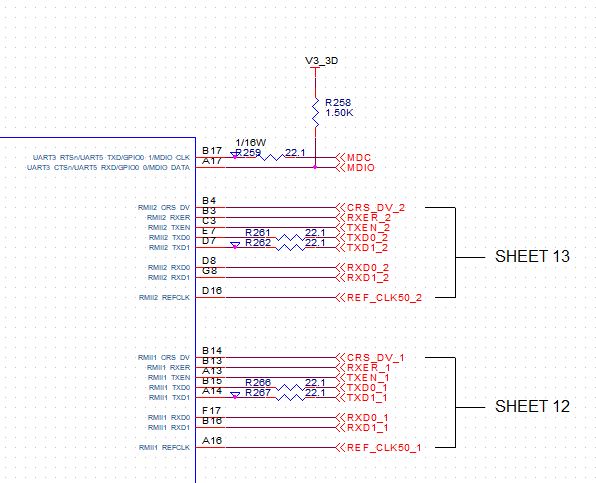
    Please attach a snippet of the schematic and the DTS snippet for the CPSW interface.

    Best Regards,

    Schuyler

  • Hi Schuyler,

    DTS  snippet of CPSW interface.

    cpsw1_default: cpsw1_default {
    pinctrl-single,pins = <
    /* Slave 1 */
    AM4372_IOPAD(0x90c, PIN_INPUT | MUX_MODE1) /* (B14) mii1_crs.rmii1_crs_dv */
    AM4372_IOPAD(0x910, PIN_INPUT | MUX_MODE1) /* (B13) mii1_rx_er.rmii1_rxer */
    AM4372_IOPAD(0x914, PIN_OUTPUT | MUX_MODE1) /* (A13) mii1_tx_en.rmii1_txen */
    AM4372_IOPAD(0x928, PIN_OUTPUT | MUX_MODE1) /* (B15) mii1_txd0.rmii1_txd0 */
    AM4372_IOPAD(0x924, PIN_OUTPUT | MUX_MODE1) /* (A14) mii1_txd1.rmii1_txd1 */
    AM4372_IOPAD(0x940, PIN_INPUT | MUX_MODE1) /* (F17) mii1_rxd0.rmii1_rxd0 */
    AM4372_IOPAD(0x93c, PIN_INPUT | MUX_MODE1) /* (B16) mii1_rxd1.rmii1_rxd1 */
    AM4372_IOPAD(0x944, PIN_INPUT | MUX_MODE0) /* (A16) rmii1_ref_clk.rmii1_refclk */
    >;
    };

    cpsw2_default: cpsw2_default {
    pinctrl-single,pins = <
    /* Slave 2*/
    AM4372_IOPAD(0x864, PIN_INPUT | MUX_MODE8) /* (B4) gpmc_a9.rmii2_crs_dv */
    AM4372_IOPAD(0x874, PIN_INPUT | MUX_MODE3) /* (B3) gpmc_wpn.rmii2_rxer */
    AM4372_IOPAD(0x840, PIN_OUTPUT | MUX_MODE3) /* (C3) gpmc_a0.rmii2_txen */
    AM4372_IOPAD(0x854, PIN_OUTPUT | MUX_MODE3) /* (E7) gpmc_a5.rmii2_txd0 */
    AM4372_IOPAD(0x850, PIN_OUTPUT | MUX_MODE3) /* (D7) gpmc_a4.rmii2_txd1 */
    AM4372_IOPAD(0x86c, PIN_INPUT | MUX_MODE3) /* (D8) gpmc_a11.rmii2_rxd0 */
    AM4372_IOPAD(0x868, PIN_INPUT | MUX_MODE3) /* (G8) gpmc_a10.rmii2_rxd1 */
    AM4372_IOPAD(0x908, PIN_INPUT | MUX_MODE1) /* (D16) mii1_col.rmii2_refclk */

    >;
    };

    Schematic snippet we will share it offline separately.

    Regards,

    Maheedhar.

  • Additional info
    We are seeing interrupt count increase while performing device to PC but not while PC to device.
    root@Node1442fc94c1a6:~# cat /proc/interrupts
    CPU0
    16: 3282 WUGEN 68 Level gp_timer
    18: 12558 GIC-0 29 Edge twd
    20: 0 WUGEN 9 Level l3-dbg-irq
    21: 0 WUGEN 10 Level l3-app-irq
    25: 660 WUGEN 12 Level 49000000.edma_ccint
    27: 16 WUGEN 14 Level 49000000.edma_ccerrint
    35: 610 WUGEN 45 Level 481a8000.serial
    38: 0 WUGEN 98 Level 4804c000.gpio 
    39: 0 WUGEN 32 Level 481ac000.gpio
    40: 0 WUGEN 62 Level 481ae000.gpio
    41: 0 WUGEN 106 Level 48320000.gpio
    42: 0 WUGEN 148 Level 48322000.gpio
    43: 130 WUGEN 70 Level 44e0b000.i2c
    44: 4 WUGEN 71 Level 4802a000.i2c
    45: 2113 WUGEN 64 Level mmc0
    47: 0 WUGEN 41 Level 4a100000.ethernet
    48: 49 WUGEN 42 Level 4a100000.ethernet
    50: 0 WUGEN 16 Level TI-am335x-adc.0.auto
    54: 1 WUGEN 111 Level 48310000.rng
    55: 0 WUGEN 4 Level 48080000.elm
    56: 3 WUGEN 172 Level dwc3-omap
    57: 3 WUGEN 178 Level dwc3-omap
    68: 0 PRCM Edge pinctrl
    91: 0 WUGEN 127 Level OMAP DISPC
    92: 30 WUGEN 168 Level xhci-hcd:usb1
    93: 2758 WUGEN 174 Level xhci-hcd:usb3
    94: 0 WUGEN 7 Level tps65218
    Err: 0
    root@Node1442fc94c1a6:~# --> At this point we did PC to device
    root@Node1442fc94c1a6:~# cat /proc/interrupts
    CPU0
    16: 3365 WUGEN 68 Level gp_timer
    18: 12846 GIC-0 29 Edge twd
    20: 0 WUGEN 9 Level l3-dbg-irq
    21: 0 WUGEN 10 Level l3-app-irq
    25: 660 WUGEN 12 Level 49000000.edma_ccint
    27: 16 WUGEN 14 Level 49000000.edma_ccerrint
    35: 654 WUGEN 45 Level 481a8000.serial
    38: 0 WUGEN 98 Level 4804c000.gpio
    39: 0 WUGEN 32 Level 481ac000.gpio
    40: 0 WUGEN 62 Level 481ae000.gpio
    41: 0 WUGEN 106 Level 48320000.gpio
    42: 0 WUGEN 148 Level 48322000.gpio
    43: 130 WUGEN 70 Level 44e0b000.i2c
    44: 4 WUGEN 71 Level 4802a000.i2c
    45: 2113 WUGEN 64 Level mmc0
    47: 0 WUGEN 41 Level 4a100000.ethernet
    48: 49 WUGEN 42 Level 4a100000.ethernet
    50: 0 WUGEN 16 Level TI-am335x-adc.0.auto
    54: 1 WUGEN 111 Level 48310000.rng
    55: 0 WUGEN 4 Level 48080000.elm
    56: 3 WUGEN 172 Level dwc3-omap
    57: 3 WUGEN 178 Level dwc3-omap
    68: 0 PRCM Edge pinctrl
    91: 0 WUGEN 127 Level OMAP DISPC
    92: 30 WUGEN 168 Level xhci-hcd:usb1
    93: 2758 WUGEN 174 Level xhci-hcd:usb3
    94: 0 WUGEN 7 Level tps65218
    Err: 0
    root@Node1442fc94c1a6:~#
    root@Node1442fc94c1a6:~# ping 169.254.1.60 <-- Device to PC
    PING 169.254.1.60 (169.254.1.60): 56 data bytes

    ^C
    --- 169.254.1.60 ping statistics ---
    5 packets transmitted, 0 packets received, 100% packet loss
    root@Node1442fc94c1a6:~#
    root@Node1442fc94c1a6:~# cat /proc/interrupts
    CPU0
    16: 3908 WUGEN 68 Level gp_timer
    18: 14631 GIC-0 29 Edge twd
    20: 0 WUGEN 9 Level l3-dbg-irq
    21: 0 WUGEN 10 Level l3-app-irq
    25: 660 WUGEN 12 Level 49000000.edma_ccint
    27: 16 WUGEN 14 Level 49000000.edma_ccerrint
    35: 792 WUGEN 45 Level 481a8000.serial
    38: 0 WUGEN 98 Level 4804c000.gpio
    39: 0 WUGEN 32 Level 481ac000.gpio
    40: 0 WUGEN 62 Level 481ae000.gpio
    41: 0 WUGEN 106 Level 48320000.gpio
    42: 0 WUGEN 148 Level 48322000.gpio
    43: 130 WUGEN 70 Level 44e0b000.i2c
    44: 4 WUGEN 71 Level 4802a000.i2c
    45: 2113 WUGEN 64 Level mmc0
    47: 0 WUGEN 41 Level 4a100000.ethernet
    48: 55 WUGEN 42 Level 4a100000.ethernet
    50: 0 WUGEN 16 Level TI-am335x-adc.0.auto
    54: 1 WUGEN 111 Level 48310000.rng
    55: 0 WUGEN 4 Level 48080000.elm
    56: 3 WUGEN 172 Level dwc3-omap
    57: 3 WUGEN 178 Level dwc3-omap
    68: 0 PRCM Edge pinctrl
    91: 0 WUGEN 127 Level OMAP DISPC
    92: 30 WUGEN 168 Level xhci-hcd:usb1
    93: 2767 WUGEN 174 Level xhci-hcd:usb3
    94: 0 WUGEN 7 Level tps65218
    Err: 0
    PC to device:
    C:\>ping 169.254.1.1
    Pinging 169.254.1.1 with 32 bytes of data:
    Reply from 169.254.1.60: Destination host unreachable.
    Reply from 169.254.15.182: Destination host unreachable.
    Reply from 169.254.15.182: Destination host unreachable.
    Reply from 169.254.15.182: Destination host unreachable.
    Ping statistics for 169.254.1.1:
    Packets: Sent = 4, Received = 4, Lost = 0 (0% loss),
    Regards,
    Mahidhar.
  • Hi,

    Thank you for dts and additional data. Pin mux wise this looks correct. I need to discuss with additional team members. I will respond on Monday.

    I apologize for repeating this but until this statistic is non-zero the ethtool -S eth0 output then are no packets are being received.

    Best Regards,

    Schuyler

  • Hello, 

    I was looking in to some references board device tree files, where RMII is used. I came across AM43x EPOS EVM (am43x-epos-evm.dts), for this EVM I see the RXDV pin configured in dts for RMII pin configuration, But when we looked at the board schematic the RXDV pin is not connected any where (not used). 
    I also checked RMII vs MII signals, as per PHY data sheet RMII doesn't use RXDV signal. 

    am43x-epos-evm.dts RMII pin config:

    cpsw_default: cpsw_default {
    pinctrl-single,pins = <
    /* Slave 1 */
    AM4372_IOPAD(0x90c, PIN_INPUT_PULLDOWN | MUX_MODE1) /* mii1_crs.rmii1_crs */
    AM4372_IOPAD(0x910, PIN_INPUT_PULLDOWN | MUX_MODE1) /* mii1_rxerr.rmii1_rxerr */
    AM4372_IOPAD(0x914, PIN_OUTPUT_PULLDOWN | MUX_MODE1) /* mii1_txen.rmii1_txen */
    AM4372_IOPAD(0x918, PIN_INPUT_PULLDOWN | MUX_MODE1) /* mii1_rxdv.rmii1_rxdv */
    AM4372_IOPAD(0x924, PIN_OUTPUT_PULLDOWN | MUX_MODE1) /* mii1_txd1.rmii1_txd1 */
    AM4372_IOPAD(0x928, PIN_OUTPUT_PULLDOWN | MUX_MODE1) /* mii1_txd0.rmii1_txd0 */
    AM4372_IOPAD(0x93c, PIN_INPUT_PULLDOWN | MUX_MODE1) /* mii1_rxd1.rmii1_rxd1 */
    AM4372_IOPAD(0x940, PIN_INPUT_PULLDOWN | MUX_MODE1) /* mii1_rxd0.rmii1_rxd0 */
    AM4372_IOPAD(0x944, PIN_INPUT_PULLDOWN | MUX_MODE0) /* rmii1_refclk.rmii1_refclk */
    >;
    };

    I am not sure if there is a clue here, Is the driver somehow looking for this pin to be configured? 

  • NIKHILESH CHAVAN said:
    AM4372_IOPAD(0x918, PIN_INPUT_PULLDOWN | MUX_MODE1) /* mii1_rxdv.rmii1_rxdv */

    That particular signal / mode of operation is non-existent as far as I can tell.  I'm checking with some others for verification.  I don't think it has any relationship to RMII.

    I noticed that all of the pins in the EVM have the internal pulldown activated.  I'm not aware of any such requirement, but it would be an easy test for you to try in the interim.  Will you please try that out?  I don't think it should make a difference, but given that we still haven't resolved the issue, it's a good test.

  • Hello Brad, 

    We have already tried configuring the pins with internal pulldown activated, It does not make any difference. 

    We have also tried configuring only cpsw_emac0 just to see if we are facing any problems due to dual_emac, but that also did not make nay difference. 

  • The PHY has CRS (MII) and CRS_DV(RMII) that goes back to the MAC.  We had incorrectly connected the CRS instead of the CRS_DV which was causing the Rx not working.

    In RMII mode MAC was looking for CRS_DV for Rx data valid but the pin goin back to mac was CSR(MII mode) this is why the MAC never recognizing any RX data. 

    After connecting CSR_DV to MAC we are able to see Tx as well as Rx working as expected. Ping works.

    Thanks Brad and Schuyler for all the support you guys provided. 

  • Thanks for the update.  I'm glad to hear it's working now!