


Part Number: PROCESSOR-SDK-AM57X
Other Parts Discussed in Thread: BEAGLEBOARD-X15
Hi
I using the Linux SDK 06.03.00(PROCESSOR-SDK-LINUX-RT-AM57X) for Beagleboard-x15. When i try to boot the SD card with custom image the u-boot fails to boot.
Steps
-> Inserted the SD card to PC
Compiling the kernel
-> $make ARCH=arm CROSS_COMPILE=arm-linux-gnueabihf- distclean
-> $make ARCH=arm CROSS_COMPILE=arm-linux-gnueabihf- tisdk_am57xx-evm_defconfig
->
$ ti_config_fragments/defconfig_builder.sh -t ti_sdk_omap2_release
$ export ARCH=arm
$ make ti_sdk_omap2_release_defconfig
$ mv .config arch/arm/configs/tisdk_am57xx-evm_defconfig

Compiling the Device tree
make ARCH=arm CROSS_COMPILE=arm-linux-gnueabihf- am57xx-evm.dts

Compiling the U-boot
$ make CROSS_COMPILE=arm-linux-gnueabihf- O=am57xx_evm am57xx_evm_defconfig
$ make CROSS_COMPILE=arm-linux-gnueabihf- O=am57xx_evm
Copying the image to SD-card

Then i zipped the images as
kernel_image.zimage, dts ,u-boot.img,MLO->boot_partition.tar.gz
root files into-> rootfs_partition.tar.gz

Then i used the create-sdcard.sh to prepare the SD-card using the custom-image mode,
once i inserted the SD card to board it was not booting, it shows the below error message
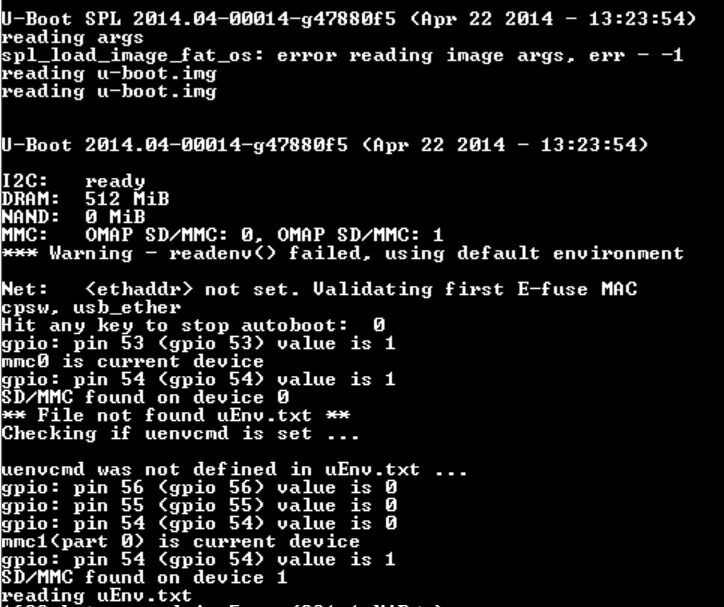
Then it boot from eMMC , can anyone suggest what went wrong..

Regards,
Vairamani.V
