This thread has been locked.

If you have a related question, please click the "Ask a related question" button in the top right corner. The newly created question will be automatically linked to this question.

TDA4VM: Execute external binary using SBL

Part Number: TDA4VM
Other Parts Discussed in Thread: SYSBIOS

SDK version : 7.1

Board : TDA4VM J721E EVM

Similar to the related post, we are trying to run our program built outside of the example in tiboot3.bin(SBL).

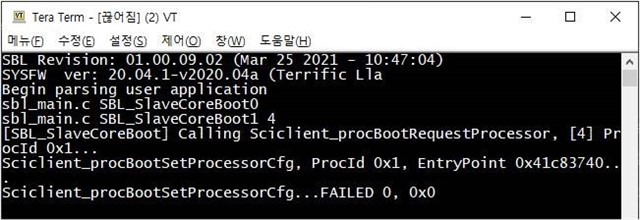
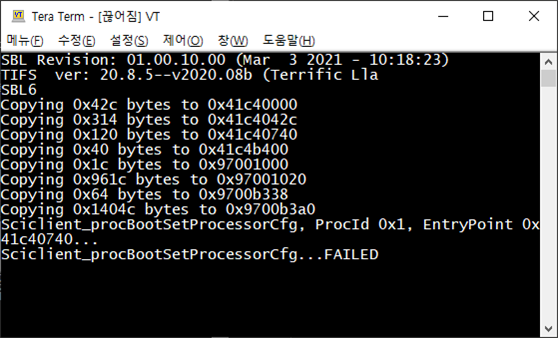
I ran it through the entry point of the binary generated externally via "ti cgt". It has entered SBL_SlaveCoreBoot function from SBL, but fails because Sciclient_procBootSetProcessorCfg does not receive ack from Sciclient.

I hope for some help on what part to check.
Best Regards,

- Pauleta

  • Hi Pauleta,

    There might be something wrong with the memory map I suppose. Is the application which you are trying to load from SBL is an SDK example or is it your custom code? Another thing would be, did you take reference from an SDK example for the memory map?

    Regards,

    Karan

  • Hi Karan

    Thanks for your kind reply. I could not track this these days.

    They're trying to integrate Vector' Flash loader solution. 

    The issue happens when changed the entry point to reset vector table (i.e. 0x41c4 b400).

    The problem is shown as MCU1_0 boots succesfully however MCU1_1 fails upon Sciclient_procBootRequestProcessor.

    FYI, Vector FBL BootManager's Entry point is at 0x41c4 0740. Hence they redirected entry point to Reset Vector Table forcibly.

    Could you please give us any helpful guidance to integrate Vector's FlashLoader solution ?

    ps. This requires the prompt action to close issue by end of this month.

    Thanks.

  • Hi Karan

    I found a comments from Memory Map considerations in Jacinto PDK User Guide_07_03_00 as below.

    https://software-dl.ti.com/jacinto7/esd/processor-sdk-rtos-jacinto7/07_03_00_07/exports/docs/pdk_jacinto_07_03_00_29/docs/userguide/jacinto/boot/boot_k3.html#sbl-memory-usage

    Memory Map Considerations

    Applications that the SBL loads must comply generally with the sbl-memory-usage. In the application’s linker command file, care must be taken to not use the first 0x100 bytes of the MCU R5’s ATCM memory, as well as the SBL reserved memory from 0x41C00100 to 0x41C80000, for J7xx devices (0x41C00100 to 0x41C3E00, for AM65xx). If the applications are signed, no loadable sections must be placed in the SBL scratch memory area. The scratch memory can be used at application runtime for stacks, heaps, etc.

    Also, the SCISERVER now needs to be started on MCU1_0, as part of the MCU1_0 application. The board configuration space for SBL to leave behind for the SCISERVER in MCU SRAM should be left as reserved, at least until Sciclient_init() has executed on MCU1_0 - it is from 0x41C80000 to 0x41C82000. Similarly, the common header location from 0x41CFFB00 to 0x41D00000 should also be left untouched until Sciclient_init() has finished execution.

    Their entry point seems be overlapped with SBL reserved memory region. 0x41C0 0100 to 0x41C8 0000.

    Could you please recommend the proper memory region for their app image loading as the binary size is approximately upto 50KB.

    Thanks.

    Regards, Jack

  • Hi Karan

    Please see their app's linker script below figure attached.

    I believe the memory map should not be overlap with SBL's reserved region (0x41C0 0100 ~ 0x41C8 0000).

    If I am correctly understanding, Please give us guideline for their app to run without hang. Should they use DDR' unused area instead of On-Chip memory if there're not sufficient memory remained in On-chip memory for their app' running? i.g. Their app image size is about 50KB. 

    My assumption is as below.

    According to Chap 7.1 How to Guide of PDK document, MPU(Memory Protection Unit) should be setup within 100byte from Reset vector (entry point). then the rest of code should be run from DDR. 

    Hence their app also should be run from DDR instead of On-chip memory if binary size exceeds than free space size in On-chip memory.

    Please give your comment on this. 

    1. Where to load app image which has about 50KB size between On-chip memory and DDR ?

    2. Example Code

        2-1 Example code to run app if on-chip memory is correct.

        2-2. Example code to run app if DDR is correct. 

    Thanks.

  • Hi Jack,

    There is another table in the SDK which can be referenced to see what regions in the MCU OCM RAM can be used by the MCU1_0 apps. See https://software-dl.ti.com/jacinto7/esd/processor-sdk-rtos-jacinto7/latest/exports/docs/psdk_rtos/docs/user_guide/developer_notes_mcu1_0_sysfw.html#memory-map-considerations 

    So essentially you can use ~500KB of space. I think that should be enough for you app as you mentioned it is just 50KB.

    Please modify the linker file of the app to start using OCM RAM from 0x41C8_2000.

    If you plan to use DDR, you need to take care that the startup code where the MPU is set up, that happens from some internal memory (NOT DDR). See https://software-dl.ti.com/jacinto7/esd/processor-sdk-rtos-jacinto7/latest/exports/docs/pdk_jacinto_07_03_00_29/docs/userguide/jacinto/howto/run_apps_from_ddr_on_r5.html 

    You can take reference from SDK's linker files:

    if you only want to use OCM RAM (I would suggest start with this): <SDK>/mcusw/mcuss_demos/profiling/can/overrides/j721e/mcu1_0/linker_r5_sysbios.lds

    if you also want to use DDR:

    <SDK>/pdk*/packages/ti/build/j721e/linker_r5_sysbios.lds

    Regards,

    Karan

  • Hi Karan. Thanks for your kind reply.

    Customer maybe able to follow up your suggestion. Let us give you feedback on this soon. 

    Thanks. 

  • Sure, let me know.

    Regards,

    Karan

  • Hi Karan

    Customer tried to test with the modified memory map. However it still fails on MCU1_1. 

    Here are the scratch of their linker script and memory map.

    - Linker script

    - Memory Map

    Is there any further debugging point? Could you please give some comments helpful?

    Thanks.

  • Hi 

    Also let us know how to build SBL with Symbol for further debugging step. Customer said the debug mode build seems be blocked.

    SDK/PDK document mentioned it. However the link is inactivated.

    Thanks.

  • Hi Jack,

    The debug build is not supported for SBL but to get more logs you can make the SBL_LOG_LEVEL=3.

    Change the file: pdk/packages/ti/boot/sbl/sbl_component.mk

    -DSBL_LOG_LEVEL=3 (it would be 2 by default)

    Regards,

    Karan

  • Hi Jack,

    I just read back and you mention the MCU1_is failing but MCU1_0 is passing. I am not sure if there need to be some settings which are needed to disable lockstep and load MCU1_1 separately.

    Have you loaded any app on MCU1_1 and now trying the customer's app? Or is this the first time you are trying to load MCU1_1?

    Regards,

    Karan

  • Hi Jack,

    - Linker script

    - Memory Map

    I see a delta between the linker sections and the sections in the map file. See OCMRAM_Common is 0x41C3_F000 in Linker and 0x41C8_3000 in map file. Can you confirm what is being used?

    I tried to run an example on MCU1_1 (csl_vim_baremetal_test_app) and it was loaded successfully from SBL. It uses the linker file at pdk/packages/ti/build/j721e/linker_r5.lds. Can you align you memory map to this?

    Also, if there is a possibility to share the app (along with build environment, I can give it a try).

    NOTE: You need to have an image on MCU1_0 along with MCU1_1. Is that taken care of or are you loading the MCU1_1 image alone? That won't work.

    Regards,

    Karan

  • Hi Karan

    There's no specific app on MCU1_1 as I understood by their description given app image. But it does not work for me due to incorrect setup by me.

    They have reported the MCU1_1 boot failure as no response from sciclient api according to offline communication.

    Are you saying that MCU1_1 also need app image for successful booting sequence? 

    Could you please let me know more details regarding some settings which are needed to disable lockstep and load MCU1_1 separately what you said above?

    Thanks.

  • Hi Karan.

    I received their pre-built app img. But I am not sure about MCU1_1 app. 

    Could you please let me know your email address. I will send you via email due to Customer Security Issue. Thx.

  • Hi Jack,

    They have reported the MCU1_1 boot failure as no response from sciclient api according to offline communication.

    Are you saying that MCU1_1 also need app image for successful booting sequence? 

    I am a little confused now, when you say you want to boot MCU1_1 it has to have an application which the SBL loads on to it and boots. If there is no application the SBL won't do anything for that core - it will remain in reset.

    Could you please let me know more details regarding some settings which are needed to disable lockstep and load MCU1_1 separately what you said above?

    I checked this and by default this is disabled.

    Can you please explain the whole system right now by answering the below questions and also adding more information if needed: (you can confirm this with the customer if needed)

    1. You are using the default SBL from SDK 7.1 with no changes to it?

    2. What all cores are you loading from the SBL?

    3. Application(s) getting loaded are running which OS? (TI RTOS, AutoSAR, baremetal or no OS?)

    4. The MCU1_0 application integrates the Sci Server as per - https://software-dl.ti.com/jacinto7/esd/processor-sdk-rtos-jacinto7/07_01_00_11/exports/docs/psdk_rtos/docs/user_guide/developer_notes_mcu1_0_sysfw.html ?

    Regards,

    Karan

  • Hi Karan.

    There're some feedback from customer as below items.

    I also attached patch and app img what I received earlier from Customer.

    1. SBL Debug Build w/Symbol infoThank you for letting me know how to log. I understand that debugging method through Symbol is not available the other day.

    2. MCU1_1 Boot Failure: There is no intention to disable Lockstep, and I understood it as normal to approach MCU1_1 while checking SBL's behavior. We want to run from MCU1_0 to lockstep. I will check this part and reply to you again.

    3. Memory Map : Sorry for the wrong screenshot. The address information is 0x41c3f000 based on the linker. I am attaching a new screenshot.

    4. Modification from Default SBL : Attached

    eint_sblemmc_edited.zip

    5. App Img

    SBL_eintelligence_20210409.zip

     i. The file in Tiboot3.bin is a partial modification of the mmcsd part of the sbl.

    ii. DemoBm.out is an ELF file that we're trying to run created through Vector's program.

    iii. DemoBm.appimage is a file that converts an ELF file to a .appimage file for SBL to run.

    Thanks.

  • Hi Jack,

    I looked at the attached SD card images and I see you are using sysfw.bin. This is not there in SDK7.1 which is the SDK which you mentioned you are on. In SDK7.1 we use tifs.bin.

    SDk7.0 and SDK7.1 are very different as there has been an architectural change in SW which has gone in and all the resources (wrt Memory map, Sciserver) which I have been mentioning on this link are for SDK7.1 or later.

    Can you please clarify this?

    Regards,

    Karan

  • Hi Karan.

    The image what I gave you was build on SDK7.0, But they found it's still reproducible from SDK7.1 as well.

    They have developed their application on top of SDK 7.0 because of contract with their client. 

    Plz give your comments. the followings are feedback from customer toward your queries above. 

    1. They have used SDK 7.0 version. But observed the same failure on SDK 7.1 as well. Do they need to upgrade SDK version to 7.1 or latest?

    2. MCU1_0 only needs to be executed in SBL. Their intention is to activate other cores including MAIN during MCUSW: SBL execution like 'CAN Response and Bootloader Demo App' -> SYSFW execution -> App execution.

    3. The loaded Vector Corp' App is non-OS and operates on its own FSM.

    4. They understood that including Sci Server in MCU1_0 is a concept that applies when SYSFW side changes after 7.1 update. Just like inquiry number 1, we need to check if SDK version up solves the problem.

    5. Do you need the new images built in the latest version of SDK? i.g. SDK 7.1 ~ 7.3?

    Thanks.

  • Hi Jack,

    The image what I gave you was build on SDK7.0, But they found it's still reproducible from SDK7.1 as well.

    SDK7.0 and SDK7.1 are very different from each other as there has been a change in the SW architecture. See https://software-dl.ti.com/jacinto7/esd/processor-sdk-rtos-jacinto7/latest/exports/docs/psdk_rtos/docs/user_guide/developer_notes_mcu1_0_sysfw.html for details here.

    But essentially the same MCU1_0 firmware will not work on both SDK and so will the SBL and sysfw.bin / tifs.bin.

    1. They have used SDK 7.0 version. But observed the same failure on SDK 7.1 as well. Do they need to upgrade SDK version to 7.1 or latest?

    If all your baseline is SDK7.0 then moving to SDK7.1 or latest will need some planned effort base on the developer note I linked before. But all your images should be from the same SDK. Once decided, please convey the version as till now I was giving suggestions based on SDK7.1.

    2. MCU1_0 only needs to be executed in SBL. Their intention is to activate other cores including MAIN during MCUSW: SBL execution like 'CAN Response and Bootloader Demo App' -> SYSFW execution -> App execution.

    What is the final intent of the customer? Which core or cores do they want to load? There might be simpler ways to do that instead of using the CAN Response and Bootloader Demo App. Is there an HLOS (like Linux or QNX) need to be loaded on the A72 core?

    3. The loaded Vector Corp' App is non-OS and operates on its own FSM.

    Is this the only application you need to load? Which core will this run on?

    4. They understood that including Sci Server in MCU1_0 is a concept that applies when SYSFW side changes after 7.1 update. Just like inquiry number 1, we need to check if SDK version up solves the problem.

    If you plan to migrate to SDK7.1 then if you have some custom firmware running on MCU1_0 that needs to change. If you do not have a custom firmware on MCU1_0 you can pic what is there in the SDK and that should work. Based on what custom SW is there, the effort of migration could be high or low.

    5. Do you need the new images built in the latest version of SDK? i.g. SDK 7.1 ~ 7.3?

    Whatever SDK your customer latches on to, just use images from that SDK.

    Regards,

    Karan

  • Hi Karan

    Please see my comment below.

    0. MCU1_0 Firmware Working
    [Karan] ....But essentially the same MCU1_0 firmware will not work on both SDK and so will the SBL and sysfw.bin / tifs.bin.

    [Jack] OK. I understand.

    1. Usage of SDK 7.0 vs 7.1

    [Karan] If all your baseline is SDK7.0 then moving to SDK7.1 or latest will need some planned effort base on the developer note I linked before. But all your images should be from the same SDK. Once decided, please convey the version as till now I was giving suggestions based on SDK7.1.

    [Jack] I reported their SDK incorrectly due to miscommunication. They have used their application on top of SDK7.0 as a baseline. It has to be officially arranged with their client to change SDK version. The contract has to be renewed. 
    If TI recommends customer to use SDK7.1 or latest, Customer will change the baseline SDK to 7.1 or later.

    If SDK7.0 version has issues on Sciserver, Also need to change the baseline to SDK7.1 or later. 

    Please clarify whether SDK7.0 has not problem regarding SciServer, or not. The customer is considering whether to change the SDK version.

    Is it necessary to upgrade SDK version to 7.1 or later? If not needed, They should fix the problem on the SDK7.0.

    2. Scenario

    [Karan] What is the final intent of the customer? Which core or cores do they want to load? There might be simpler ways to do that instead of using the CAN Response and Bootloader Demo App. Is there an HLOS (like Linux or QNX) need to be loaded on the A72 core?

    [Jack] Only MCU1_0 need to be loaded in SBL. Their desired scenario is that SBL starts -> SYS-FW/or TIFS load, Getting Img from eMMC -> App Running   

    During App running, they would like to activate(boot Cores) other core including A72. Linux would run on A72 for their applications.

    3. Vector Corp' App.

    [Karan] Is this the only application you need to load? Which core will this run on?

    [Jack] MCU1_0 runs the Vector's App(i.e. Flash Loader, Details not opened). Currently only Vector's App need to be loaded by MCU1_0.

    4. Migration to SDK7.1 or later

    [Karan] If you plan to migrate to SDK7.1 then if you have some custom firmware running on MCU1_0 that needs to change. If you do not have a custom firmware on MCU1_0 you can pic what is there in the SDK and that should work. Based on what custom SW is there, the effort of migration could be high or low.

    [Jack] My understanding from your comment is that they can pickup a sample FW on MCU1_0 in SDK, then make changes for customization. right? 

    5. Test Image

    [Karan] Whatever SDK your customer latches on to, just use images from that SDK.

    [Jack] After necessary code change, then I will request them to provide, then convey to you. 

    or make changes on exist firmware running on MCU1_0 to support new SDK version completely.

  • Hi Jack,

    If SDK7.0 version has issues on Sciserver, Also need to change the baseline to SDK7.1 or later. 

    Please clarify whether SDK7.0 has not problem regarding SciServer, or not. The customer is considering whether to change the SDK version.

    Is it necessary to upgrade SDK version to 7.1 or later? If not needed, They should fix the problem on the SDK7.0.

    There is no concept of SciServer in SDK7.0 and previous releases. The Device manager runs on DMSC and not on MCU1_0 in the older releases. So if you are using all the components from SDK7.0, you should be okay.

    [Jack] MCU1_0 runs the Vector's App(i.e. Flash Loader, Details not opened). Currently only Vector's App need to be loaded by MCU1_0.

    Is this running from SBL now? Or are you facing issues?

    [Jack] Only MCU1_0 need to be loaded in SBL. Their desired scenario is that SBL starts -> SYS-FW/or TIFS load, Getting Img from eMMC -> App Running   

    During App running, they would like to activate(boot Cores) other core including A72. Linux would run on A72 for their applications.

    So do you want to integrate the loading of other cores in you app itself?

    [Karan] If you plan to migrate to SDK7.1 then if you have some custom firmware running on MCU1_0 that needs to change. If you do not have a custom firmware on MCU1_0 you can pic what is there in the SDK and that should work. Based on what custom SW is there, the effort of migration could be high or low.

    [Jack] My understanding from your comment is that they can pickup a sample FW on MCU1_0 in SDK, then make changes for customization. right? 

    You can pick the SDK firmware and make customizations, that is correct. But if you are not planning to migrate, all this is not needed. To keep things simple, considering that you are not migrating and staying on SDK7.0, is that a correct statement?

    Regards,

    Karan

  • Hi Jack,

    There has been some confusion in this thread. Will it be possible for you to summarize the latest?

    For now we can keep the migration option aside and just focus on what issues you are facing on SDK7.0.

    Thanks and Regards,

    Karan

  • Hi Karan, 
    I put my comment below blue.

    If SDK7.0 version has issues on Sciserver, Also need to change the baseline to SDK7.1 or later. 
    Please clarify whether SDK7.0 has not problem regarding SciServer, or not. The customer is considering whether to change the SDK version.
    Is it necessary to upgrade SDK version to 7.1 or later? If not needed, They should fix the problem on the SDK7.0.

    MCU1_0 runs the Vector's App(i.e. Flash Loader, Details not opened). Currently only Vector's App need to be loaded by MCU1_0.

    Only MCU1_0 need to be loaded in SBL. Their desired scenario is that SBL starts -> SYS-FW/or TIFS load, Getting Img from eMMC -> App Running   

    During App running, they would like to activate(boot Cores) other core including A72. Linux would run on A72 for their applications.

    So do you want to integrate the loading of other cores in you app itself?

    [Jack] Yes, I understood like what you said.

    [Karan] If you plan to migrate to SDK7.1 then if you have some custom firmware running on MCU1_0 that needs to change. If you do not have a custom firmware on MCU1_0 you can pic what is there in the SDK and that should work. Based on what custom SW is there, the effort of migration could be high or low.

    [Jack] My understanding from your comment is that they can pickup a sample FW on MCU1_0 in SDK, then make changes for customization. right? 

    You can pick the SDK firmware and make customizations, that is correct. But if you are not planning to migrate, all this is not needed. To keep things simple, considering that you are not migrating and staying on SDK7.0, is that a correct statement?

    [Jack] According to them, They have tested the same app under SDK7.1 then 7.0 without knowing differences btw SDK 7.0 and 7.1.

    They said the contract with their client is to use SDK 7.0 however the issue was reported on SDK 7.1 from E2E.. They will determine the baseline SDK version according to TI's recommendation and will ask Vector to integrate the App with appropriate version. 

  • Hi Karan, 

    I put my comment below.

    Karan said:

    There has been some confusion in this thread. Will it be possible for you to summarize the latest?

    For now we can keep the migration option aside and just focus on what issues you are facing on SDK7.0.

    Jack said: 

    Yes, your're correct. Let me summarize this issue history.

    1. Customer created this ticket by a engineer. Test was under SDK 7.1 setup.

    2. Another engineer also communicated with me via email and verbal. They said the issue has been found under SDK 7.0 as the contract with their client is based on SDK 7.0.

    This mean their app image has been tested on SDK 7.0 and 7.1 without appropriate integration of required component libraries such as SCISERVER/PM/RM Services.

    3. Earlier on this thread, You found the their memory map was also incorrectly configured. then customer tried to run app with modified memory map. But issue is still reproducible. No further investigation and updates are not shared with us.
    My understanding was the same code(i.e. Sciclient_procBootSetProcessorCfg() ) could not get CSL_PASS on both SDK 7.0 and SDK7.1. 

    4. Since the development of the flash loader app has been down by Vector' team. The details are not share with us. Vector team reported that the issue happens due to TI's SDK restriction. hence the this ticket was created. 

    5. Aside from SDK migration, We need to figure out why this issue happen.

    I supposed the Vector team has developed their App using SDK 7.0 setup. But eIntelligence team has tested the app under both SDK7.1 and 7.0 as well without proper changes.

    6, BTW, I attached their app binary, if the app image seems be built under SDK 7.0 setup by Vector since their contact with customer is based on SDK 7.0, We can focus DMSC side first. right? How can I check whether DMSC could support Sciclient API appropriately  with necessary components. Let's focus this issue within SDK7.0 setup.

    7. If Baseline is SDK7.0, Is it available for customer to use MCU1_1. I saw Main R5F0 Core 1 is only available for user to access on SDK7.1 or later version. It's restricted on SDK 7.0.

    If so, customer should not call the Sciclient API for MCU1_1. right?

    8. This ticket was reported on SDK7.1, But the SCISERVER/PM/RM services components libraries could not be integrated into App image. Hence the (attached above)app will not work properly under SDK7.1. I believe Vector team will compile the app with appropriate component libraries linking such as SCISERVER, PM, RM services. 

    Let's firstly focus on the reason why issue was occurred on SDK 7.0 setup. I am sure they were not aware of differences btw SDK7.0 and 7.1. Hence SCISERVER, and PM, RM component libraries are not properly linked into a app image.  Of course the app wouldn't have worked in SDK 7.1.

    Thanks.

    Best Regards, 

    Jack Cha

  • Hi Jack,

    Unlocking this thread.

    Are there still any open questions on this thread?

    Regards

    Karan

  • Hi Karan.

    Thanks for checking this thread.

    Let me check their status. I heard the MCU1_0 app has been developed by Vector team as We're waiting their update.

    Thanks.

  • Hi Karan.

    It's not easy to get this guy' feedback on this issue although I asked them to give us latest status.

    Let's lock again or close this ticket since no interaction is expected.

    I will ask to raise a new ticket if the issue is reproducible when they tested a new MCU1_0 binary which has been implemented by Vector Team.

    Thanks.

    Regards, 

    Jack

  • Thanks for the feedback Jack. Closing now.

    Regards

    Karan