Other Parts Discussed in Thread: OMAP-L138, TLV320AIC3106, OMAP-L137
Hello,
I would appreciate any simple McASP loopback example code for the C6748.
Regards,
Robert
This thread has been locked.
If you have a related question, please click the "Ask a related question" button in the top right corner. The newly created question will be automatically linked to this question.
Other Parts Discussed in Thread: OMAP-L138, TLV320AIC3106, OMAP-L137
Hello,
I would appreciate any simple McASP loopback example code for the C6748.
Regards,
Robert
Robert,
You will find a McASP Example in the quickStartOMAPL1x-rCSL Project. This is probably very similar to what you would like in terms of a look-back code. Although written on the OMAP-L138 platform, it is extensible to the C6748 DSP as well with some minor tweaks to the header files.
Thanks for the reply Drew. I'm actually working on OMAP-L138 ;) There is a McASP example in that rCSL 2.0, but it's used for interface with the resident TLV320AIC3106 codec, not loopback. In the absence of a simple loopback example, I'll try to modify that for loopback purposes. But if you know of any other possible loopback examples, please let me know.
Robert
Robert,
Robert said:I'm actually working on OMAP-L138 ;
Sorry for the device variant misunderstanding. I need more coffee.
Robert said:There is a McASP example in that rCSL 2.0, but it's used for interface with the resident TLV320AIC3106 codec, not loopback.
Yup - I actually wrote the code for the McASP example - so yes you are correct, it does use the AIC3106 - however in McASPInit (mcasp.c) there should be some comments about 1/2 way through the function which disable digital loopback mode. You can enable these quite easily, and get the Digital Loopback (DLB) mode to work.\
I believe you only have to change two lines of code.
1. Enable Digital Loopback Mode
2. Select the loop back type (Even or Odd)
You should see that whatever is received on the Rx serializer, is copied to the Tx serialzer. (I initially used DLB, but then swiched to using the AIC codec).
Drew,
Using the project as is (not DLM), what is the expected response ... anything input to the codec is turned around and sent out? If so, does that require that something actually be connected to the TLV320AIC3106 input jack, in order to trigger the transfer? Or will the code go through the motions without an input connected?
I'm eventually driving towards interfacing the McASP with a different codec, that will be connected via the J30 connector, which has the McASP pins. I have that setup, and when scoping the clock pins, after building and running the rCSL 2.0 McASP Echo project, I see no clock or other activity on the pins. But I don't physically have a connection on the input jack. I also hope that my pin outs of the McASP pins, via J30, are not inteferring. But I'd think they'd be passive.
Thanks,
Robert
Robert said:Or will the code go through the motions without an input connected?
The AIC is driven as as audio clock slave device, so there should always be an active transfer, however the data pattern that the McASP will receive in dependent on the Codec. You'll have to review the AIC3106 to determine if it outputs a mute condition (all zeros in the data stream) or just real low level audio. I'm not sure what it does. I always used a simple analog line-out from my computer as well as a cheapo pair of headphones. (I try to assume what would be a typical setup for the end user)
Robert said:I'm eventually driving towards interfacing the McASP with a different codec, that will be connected via the J30 connector, which has the McASP pins. I have that setup, and when scoping the clock pins, after building and running the rCSL 2.0 McASP Echo project, I see no clock or other activity on the pins.
There might be some bus contention, but there is also a pretty good amount of muxing that occurs both within the OMAP-L138 and typically on the 3rd party EVMs. You'll have to follow the traces back on the schematic to determine where the issue is. You might be loading the pins to much. Also note - i've got the clock error logic detection enabled in the McASP, so if something goes wrong with the clock, the McASP will output a mute condition to the codec.
If you probe the codec connects to the McASP on the LogicPD board (as is) , you'll see that the clocks are active. If they are not - something when wrong in the project rebuild process. If nothing else - there should at least by a 24.576MHz signal on AHCLKR as this is physically connected to an external crystal.
Drew,
Did you mean AHCLKX (24.576 Mhz signal)? I see it says that in mcasp.c, that MCLK is M_AHCLKX ( connected to 24.576 Mhz XTAL). I'm not seeing any XTAL connection to AHCLKX (or AHCLKR) on the schematic, but then again, find Logic's documentation difficult to follow. Or maybe the connection is internal to the 6748? We have the L138 EVM, which I assume McASP Echo was written for.
I took an unused OMAP-L138, without any of my connections, and don't see anything on AHCLKX or AHCLKR, when McASP Echo is running. I don't have an 1/8" audio jack to connect to it, via my computer, but you had mentioned that AHCLKR (or AHCLKX) should be running anyways.
Robert
Mike,
Robert said:I'm not seeing any XTAL connection to AHCLKX (or AHCLKR) on the schematic
It's on the baseboard schematic.It's not explicitly clear, but there is a net that is tied into the MCLK Net. If you look just to the right of the AIC3106 on the same page (just below the line out), you'll see a 24.576 MHz Oscillator connected to the same net.
Robert said:I took an unused OMAP-L138, without any of my connections, and don't see anything on AHCLKX or AHCLKR, when McASP Echo is running. I don't have an 1/8" audio jack to connect to it, via my computer, but you had mentioned that AHCLKR (or AHCLKX) should be running anyways.
It's hard to say what the issue is without looking at your setup. There are a couple things to look at.
[1] Make sure the Linker Command Script is properly linked into your project so the code gets placed in the appropriate sections.There are three defined sections L1D, L1P, and L2. If these sections are not present in the .map file, the program was not properly linked.
[2] Where are you probing on the board. There is a bank of resistors immediately south of the codec (R25-R34). I probed on those lines to verify that clocks were working.
[3] McASP is a peripheral that doesn't support emulation. If you have breakpoints anywhere after McASPStart(), you'll probably kill the McASP clocks. I'd suggest to set up a break point at the first entry in McASPStart() and verify that you see some registers change in McASP0. You can also look at the codecPage0Regs in the watch window to see that they too have changed. If neither on changed - that is an issue, but let's deal with that at the appropriate time.
Drew Abuan said:It's on the baseboard schematic.It's not explicitly clear, but there is a net that is tied into the MCLK Net. If you look just to the right of the AIC3106 on the same page (just below the line out), you'll see a 24.576 MHz Oscillator connected to the same net.
Ok, I see it on the schematic, and when probing R24/R25. But I'm primarily probing on a breakout board connected to J30 (found at http://createnewstuff.com/), on pin 69, which will be used to connect to our alternative CODEC. From what I see on the schematic, pin 69 of J30 should be AHCLKX/USB_REFCLKIN/UART1_CTS/GP0[10], but yet the 24.576 Mhz doesn't appear there. Something doesn't make sense with probing the signals via this breakout board and J30, although I've successfully confirmed toggling the McASP pins as IO using that probe method.
Drew Abuan said:[3] McASP is a peripheral that doesn't support emulation. If you have breakpoints anywhere after McASPStart(), you'll probably kill the McASP clocks. I'd suggest to set up a break point at the first entry in McASPStart() and verify that you see some registers change in McASP0. You can also look at the codecPage0Regs in the watch window to see that they too have changed. If neither on changed - that is an issue, but let's deal with that at the appropriate time.
I didn't realize breakpoints killed the signal, and will be mindful of it during continued debugging. The assumption was that the McASP signals would re-enage, one re-starting execution.
Robert
Please correct me if wrong, but M_AHCLKX is sourced from the C6748, via J1. And then that is routed to a SN7416212 switch, and the result is that M_AHCLKX either goes to AIC_MCLK or AHCLKX, the latter of which I should see on J30. I thought changing the input on that dip switch, S0/AUDIO_EXP_SEL, from a low to high was going to produce the 24.576 Mhz on pin 69 of J30, by routing M_AHCLKX through to AHCLKX, but no luck so far. On further review, though, the 24.576 Mhz is on the B1-port of the switch, so couldn't make it to the B2/AHCLKX. And I guess with the McASP Echo program running, it's assumed the DSP is a slave to the AIC_MCLK signal (24.576 Mhz).
Robert
Robert,
Robert said:Please correct me if wrong, but M_AHCLKX is sourced from the C6748, via J1.
AHCLKX/R are either sourced internally -or- can additionally be sourced externally. You can reference the OMAP-L138 McASP User's Guide for the clocking details
.Robert said:And I guess with the McASP Echo program running, it's assumed the DSP is a slave to the AIC_MCLK signal (24.576 Mhz).
Kind of.. The 24.576MHz signal is present on the electrical net (PCB Trace) at all times, the OMAP-L138 uses that reference clock to provide the Frame Sync as well as the Serial Bit clock. So - the McASP is really driving the I2S clocks based off the external reference.
You'll have to take a closer look at how the connection is routed to the breakout board. If you have questions in regards to the board design, LogicPD did the design, so they can better answer any design decisions they made.
Note that changing the input on the DIP switch doesn't necessarily change the routing through the SN7416212 device. I believe, (though it's been a while) that that particular device is controlled by some mode pins, which if I recall correctly are set by LogicPD in hardware.
Good to hear that you were able to get the McASP signals toggling.
From what I can see on the schematic, the switch is controlled by S0, S1 and S2. S1 and S2 are tied high, so S0 is the ultimate control between whether the AIC or J30 pins are connect to the DSP McASP signals. And the state of S0 is set by the dipswitch (S7, pin 2).
With McASP Echo as it is, though, the 24.576 Mhz is required as input reference clock to the DSP, so the switch needs to route the AIC signals. However, I might try and change McASP Echo to generate the reference clock internally. That way I don't need the 24.576 Mhz input, and can use the dipswitch to route the McASP signals to J30. And that could also serve as the basis of driving the alternative codec we're trying to prototype (AIC3254). If there's some reason you know of that McASP couldn't be modified to use an internally-generated reference clock, please let me now.
Thanks,
Robert
For any future reference, here's how to use McASP Echo with an internal reference clock, and signals routed to J30 of the OMAP-L138 baseboard:
1) change dipswitch s7, #2 to ON
2) make the following changes in mcasp.c
CSL_FINST( mcaspRegs->PDIR, MCASP_PDIR_AHCLKX, OUTPUT );
and
CSL_FINST( mcaspRegs->AHCLKXCTL, MCASP_AHCLKXCTL_HCLKXM, INTERNAL );
CSL_FINS( mcaspRegs->AHCLKXCTL, MCASP_AHCLKXCTL_HCLKXDIV, 5 );
Hello,
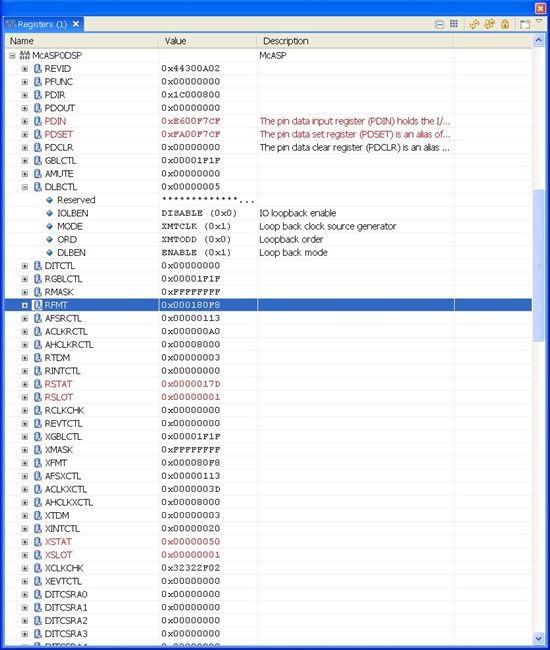
I continue to try unsuccessfully to get loopback mode running. At this point, I can drive all the TX pins for the McASP, including AHCLKX, ACLKX and AFSX, at rates determined by the dividers I program. These signals are confirmed on a scope, via J30 on the OMAP-L138, after setting dip switch 2 of S7 to high, which connects the C6748 McASP pins to J30 (instead of connecting the AIC signals to the C6748 McASP ). However, once enabling loopback, I don't see any signal on the receive side, when scoping those signals. And I don't see the initial word I write being read into the receive buffer.
I modified the McASP_Echo program to do all this, so XBUF11 is used for transmitting, and RBUF12 is used for receiving. At McASP initialization, XRDY is 1, and 0xa5a5a5a5 is written to XBUF11. But XRDY never goes to 1 again, so the transmitter is never ready to accept another word to write. And when I look at RBUF12, after starting all the McASP clocks, etc, it does not contain the 0xa5a5a5a5 that was put in the XBUF11 buffer at initialization (it contains all F's).
In loopback mode, does AHCLKR or ACLKR appear on their McASP pins, so I could look to see if their present? Also, in the DLBCTL register, I see a "IOBLEN" in CCSV4 register readouts, which isn't mentioned in any of the literature, and appears to be some sort of enable. Does this need to be set, in addition to DLBEN?
I've attached my associated registers settings. Any assistance would be appreciated.
Robert

second half of McASP registers (E2E web interface would only allow on picture load at a time)...
these registers are after the McASP has been initialized and started.
.
Robert,
I would suggest using the loopback mode without the expansion board. This eliminates any hardware issues / configuration issues due to the expansion board. the DLB will work without it.
Hello,
I'm having the same problem with the OMAP-L137 evaluation board. I'm testing the AIC3106 codec example using McASP1 (included in the installation).
Before taking the McASP out of reset, a dummy write is done to the Tx serializer to avoid an underrun. After reset, the dummy write is done and the XRDY goes to 0 and back to 1 to indicate that the XBUF is empty (ready). Then the first data is written to XBUF, XRDY goes to 0 and remains 0 thereby staying in the while loop that checks XRDY.
I think I'm using CCS 4.2.3. Could this problem be coming from the fact that I'm debugging using the on-board emulator? Could stepping in the code cause any problems?
Thanks,
SC
Hello Drew,
I redid some tests this morning with the AIC3106 example that comes with the eval board. This time, I just let it run from start to finish and the McASP did not hang. There's a warning in the code saying that the test should not be halted because the McASP will hang and will require a board reset. After some trial and error, I figured out that the emulator should not halt the McASP after the Frame Syncs (XFRST, RFRST in GBLCTL) are taken out of reset (last step in the documented configuration procedure).
Is there a McASP mode that allows halting the process with the emulator? In my application, I will have many continuous (non-bursting) input/output data streams and for debugging, I will surely have to halt the DSP. If I do this, does this mean that the McASP will hang and I will have to reset the whole application to restart my tests? Is there a "freerun" mode like in other peripherals?
Thank you.
SC
If you use the EDMA3 to feed data to/from the McASP, you can then halt the DSP without worrying about the McASP detecting an under run condition. This way the McASP will always run, because you are always feeding it data.