This thread has been locked.

If you have a related question, please click the "Ask a related question" button in the top right corner. The newly created question will be automatically linked to this question.

nand erase problem in u-boot

HI all

My board is am335x-evm, SDK is sdk-02.00.00.11.

I have one problem.


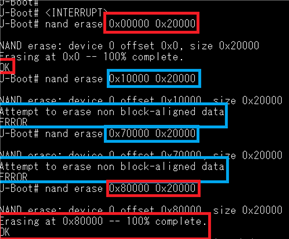
I tried to delete a specific area (0x20000 to 0x7ffff) using the nand command in u boot, but I get an error. However, using nanderas.chip will erase it nicely. Writing to a specific area works well. But, as I said

above, if I say "do not erase 0x20000 0x20000".


I get an error with the message "Trying to erase unblocked data".

There is no problem after 0x80000.

Answer please
  • Hi Gihwan,
    The error message is due to the nand erase offset is not aligned with nand sector block as shown in code snippet below.

    /drivers/mtd/nand/raw/nand_util.c
    int nand_erase_opts(struct mtd_info *mtd,
    		    const nand_erase_options_t *opts)
    {
    ...
    	if ((opts->offset & (mtd->erasesize - 1)) != 0) {
    		printf("Attempt to erase non block-aligned data\n");
    		return -1;
    	}
    ...
    }

    I uploaded the nand erase log captured on AM335x GP EVM with SDK 6.3, where nand sector size is 128KiB (0x20000).
    So nand erase offset needs to be 0x20000 aligned.

    Best,

    -Hong

    => nand info
    
    Device 0: nand0, sector size 128 KiB
      Page size       2048 b
      OOB size          64 b
      Erase size    131072 b
      subpagesize      512 b
      options     0x4000400c
      bbt options 0x00008000
    => mtdparts
    
    device nand0 <nand.0>, # parts = 10
     #: name		size		offset		mask_flags
     0: NAND.SPL            0x00020000	0x00000000	0
     1: NAND.SPL.backup1    0x00020000	0x00020000	0
     2: NAND.SPL.backup2    0x00020000	0x00040000	0
     3: NAND.SPL.backup3    0x00020000	0x00060000	0
     4: NAND.u-boot-spl-os  0x00040000	0x00080000	0
     5: NAND.u-boot         0x00100000	0x000c0000	0
     6: NAND.u-boot-env     0x00020000	0x001c0000	0
     7: NAND.u-boot-env.backup10x00020000	0x001e0000	0
     8: NAND.kernel         0x00800000	0x00200000	0
     9: NAND.file-system    0x0f600000	0x00a00000	0
    
    active partition: nand0,0 - (NAND.SPL) 0x00020000 @ 0x00000000
    
    defaults:
    mtdids  : nand0=nand.0
    mtdparts: mtdparts=nand.0:128k(NAND.SPL),128k(NAND.SPL.backup1),128k(NAND.SPL.backup2),128k(NAND.SPL.backup3),256k(NAND.u-boot-spl-os),1m(NAND.u-boot),128k(NAND.u-boot-env),128k(NAND.u-boot-env.backup1),8m(NAND.kernel),-(NAND.file-system)
    => nand erase 0x0 0x20000
    
    NAND erase: device 0 offset 0x0, size 0x20000
    Erasing at 0x0 -- 100% complete.
    OK
    => nand erase 0x10000 0x20000
    
    NAND erase: device 0 offset 0x10000, size 0x20000
    Attempt to erase non block-aligned data
    ERROR
    =>