This thread has been locked.

If you have a related question, please click the "Ask a related question" button in the top right corner. The newly created question will be automatically linked to this question.

TDA2EG-17: LCD noise

Part Number: TDA2EG-17
Other Parts Discussed in Thread: SN65LVDS93B

Hi,

My custom board have a issue in lcd display.

We use tda2eg-17 and vision SDK 3.07

The image flow:

Camera capture  ->  CSI2  ->  SOC  ->  VOUT2 (RGB888)  ->  SN65LVDS93B  --> LCD

When I run rtos, the image display well.

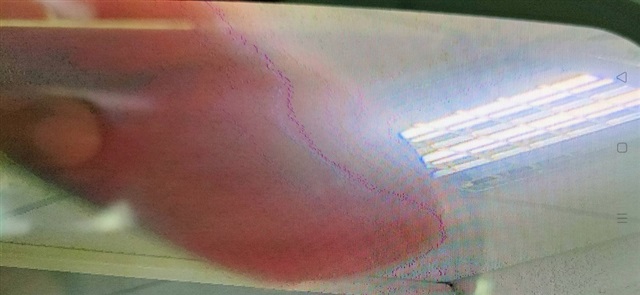
But when I run linux, lcd display occur many noise like purple pixel.

In linux usecase, I save the camera image to file and it shows the capture image is fine.

Can you help me where might be wrong?

The LCD display issue photo below:

Thanks.

  • Hi Terry,

    One possible reason could be pinmux, could you please check and make sure that the pinmux is setup correctly for all data lines, when usecase is running? This is to make sure it is not getting overwritten by some other code. 

    Regards,

    Brijesh

  • Hi Brijesh,

    I check the pinmux  CTRL_CORE_PAD_VIN2A_D0 to CTRL_CORE_PAD_VIN2A_D23

    In rtos, the register value:

    [IPU2 ] 6.900963 s: 0x4A003568: 0x40104, 0x40104, 0x40104, 0x40104
    [IPU2 ] 6.901085 s: 0x4A003578: 0x40104, 0x40104, 0x40104, 0x40104
    [IPU2 ] 6.901177 s: 0x4A003588: 0x40004, 0x40004, 0x40004, 0x40104
    [IPU2 ] 6.901268 s: 0x4A003598: 0x40104, 0x40104, 0x40104, 0x40104
    [IPU2 ] 6.901360 s: 0x4A0035A8: 0x40104, 0x40104, 0x40104, 0x40104
    [IPU2 ] 6.901451 s: 0x4A0035B8: 0x40104, 0x50104, 0x50104, 0x40104

    In linux:

    [HOST] [IPU2 ] 23.917647 s: 0x4A003568: 0x40004, 0x40004, 0x40004, 0x40004
    [HOST] [IPU2 ] 23.917739 s: 0x4A003578: 0x40004, 0x40004, 0x40004, 0x40004
    [HOST] [IPU2 ] 23.917830 s: 0x4A003588: 0x40004, 0x40004, 0x40004, 0x40004
    [HOST] [IPU2 ] 23.917922 s: 0x4A003598: 0x40004, 0x40004, 0x40004, 0x40004
    [HOST] [IPU2 ] 23.918013 s: 0x4A0035A8: 0x40004, 0x40004, 0x40004, 0x40004
    [HOST] [IPU2 ] 23.918135 s: 0x4A0035B8: 0x40004, 0x40004, 0x40004, 0x40004

    I find values are not all the same in rtos but the image display on LCD is good.

    In linux, I set the pinmux in uboot and it still have noise pixels in display.

    Terry

  • Hi Terry,

    ok, as such the pinmux mode looks correct and is same as what is set in rtos driver. 

    Are you enabling any other features in DSS like color keying or alpha blending etc?

    Regards,

    Brijesh

  • Hi Brijesh,

    I check the ChainsCommon_SetDctrlConfig() in 

    vision_sdk\apps\src\hlos\common\chains_common.c and in 

    vision_sdk\apps\src\rtos\usecases\common\chains_common.c

    The related settings is the same.

    Terry

  • Hi Brijesh,

    The issue is not solved yet.

    I change the setting in ChainsCommon_SetDctrlConfig() in vision_sdk\apps\src\hlos\common\chains_common.c

        /* TODO Dont know what to set here */
        pVInfo->mode = 0;
        pVInfo->isInputPipeConnected[0] =
                        TRUE;
        pVInfo->isInputPipeConnected[1] =
                        TRUE;
        pVInfo->isInputPipeConnected[2] =
                        TRUE;
        pVInfo->isInputPipeConnected[3] =
                        TRUE;
        pVInfo->writeBackEnabledFlag = FALSE;
    
    
        /* Setting other overlay parameters common to both Venc */
    
        ovlyPrms->deltaLinesPerPanel   = 0;
        ovlyPrms->alphaBlenderEnable   = 0;
        ovlyPrms->backGroundColor      = 0x0;
        ovlyPrms->colorKeyEnable       = 1;
        ovlyPrms->colorKeySel          = SYSTEM_DSS_DISPC_TRANS_COLOR_KEY_SRC;
        ovlyPrms->ovlyOptimization     = SYSTEM_DSS_DISPC_OVLY_FETCH_ALLDATA;
        ovlyPrms->transColorKey        = DRAW2D_TRANSPARENT_COLOR;
    
        /* Setting overlay pipe parameters */
    
        pipeOvlyPrms[0].pipeLine = SYSTEM_DSS_DISPC_PIPE_VID1;
        pipeOvlyPrms[0].globalAlpha = 0xFF;
        pipeOvlyPrms[0].preMultiplyAlpha = 0;
        pipeOvlyPrms[0].zorderEnable = TRUE;
        pipeOvlyPrms[0].zorder = SYSTEM_DSS_DISPC_ZORDER0;
    
        pipeOvlyPrms[1].pipeLine = SYSTEM_DSS_DISPC_PIPE_VID2;
        pipeOvlyPrms[1].globalAlpha = 0xFF;
        pipeOvlyPrms[1].preMultiplyAlpha = 0;
        pipeOvlyPrms[1].zorderEnable = TRUE;
        pipeOvlyPrms[1].zorder = SYSTEM_DSS_DISPC_ZORDER1;
    
        pipeOvlyPrms[2].pipeLine = SYSTEM_DSS_DISPC_PIPE_VID3;
        pipeOvlyPrms[2].globalAlpha = 0xFF;
        pipeOvlyPrms[2].preMultiplyAlpha = 0;
        pipeOvlyPrms[2].zorderEnable = TRUE;
        pipeOvlyPrms[2].zorder = SYSTEM_DSS_DISPC_ZORDER2;
    
        pipeOvlyPrms[3].pipeLine = SYSTEM_DSS_DISPC_PIPE_GFX1;
        pipeOvlyPrms[3].globalAlpha = 0xFF;
        pipeOvlyPrms[3].preMultiplyAlpha = 0;
        pipeOvlyPrms[3].zorderEnable = TRUE;
        pipeOvlyPrms[3].zorder = SYSTEM_DSS_DISPC_ZORDER3;

    I modify some setting to test but the noise pixel still appear.

    My linux usecase image flow is:

    The camera image 1280x720  and display on 1280x256 LCD.

    I found the image is downscale to 1280x256 on LCD.

    When I disable the setting:

    ovlyPrms->alphaBlenderEnable = 0;
    ovlyPrms->colorKeyEnable = 0;

    It doesn't have any effect.

    Please help this issue.

    Terry

  • Hi Terry,

    If you are not running any usecase, do you see any issue? I mean when it displays just background color, do you see any corruption in the output image? You could try changing background color in the overlay manager. 

    This will tell us if issue is on VP or in video pipeline.

    Regards,

    Brijesh

  • Hi Brijesh,

    If I don't run any usecase, it display nothing,  only black.

    I don't see any issue.

    When I set  ovlyPrms->backGroundColor      = 0xFF0000,

    I see it display red color and then display camera image.

    The camera image still have noise pixel.

    Sometimes, I found the noise pixel often appear on the object edge.

    I take a picture to describe that.

    My finger is front of the camera and there are some clear contour between finger and light.

    I hope the photo would help.

    Thanks,

    Terry

  • Hi Terry,

    Few questions,

    1, please confirm you dont see any issue when red background color is displayed. The issue is seen when camera image is displayed.

    2, are you sure that the input image has not artifacts? Can you please save one image which is fed to display and analyze it? 

    3, What's the display input format? I want to see what all other modules used in the pipe.

    Regards,

    Brijesh

  • Hi Brijesh,

    Sorry for the late response.

    I double confirm my usecases and VSDK.

    The issue is still not solved.

    1, please confirm you dont see any issue when red background color is displayed. The issue is seen when camera image is displayed. 

    From the log. I don't see any error messages.

    When the red background is displayed, no issue was seen.

    2, are you sure that the input image has not artifacts? Can you please save one image which is fed to display and analyze it? 

    I create two new linux usecases.

    First usecase:  IssCapture -> Null (A15)

    Second usecase:  NullSource (A15) -> Display

    I save the camera image to file, the camera output format is SYSTEM_DF_YUV422I_UYVY.

    The file display on my PC is fine.

    Then I use this file to display on my board LCD, the noise pixel occur.

    At this step, I change the file image format from YUV422_UYVY to YUV422_YUYV on PC,

    because NullSource is only support SYSTEM_DF_YUV422I_YUYV

    3, What's the display input format? I want to see what all other modules used in the pipe.

    The display input image is SYSTEM_DF_YUV422I_UYVY. 

    It is the same as camera output format.

    My usecase is:

    IssCapture -> Select -> Display_M4 (IPU1_0)

    GrpxSrc -> Display_Grpx


    Can you describe what is modules in the pipe?

    Thanks,

    Terry


  • Hi Terry,

    I meant, have any enable, scaling, blending or color keying kind of features in the pipeline? If they are enabled, can you disable them and try it out?

    Regards,

    Brijesh

  • Hi Brijesh,

    I disable blending and colorkey features in ChainsCommon_SetDctrlConfig() in 

    vsdk3.7/vision_sdk/apps/src/hlos/common/chains_common.c

    I can't find where is scaling settings.

    The ChainsCommon_SetDctrlConfig()  code:

    static Void ChainsCommon_SetDctrlConfig(
                                    DisplayCtrlLink_ConfigParams *pPrm,
                                    DisplayCtrlLink_OvlyParams *ovlyPrms,
                                    DisplayCtrlLink_OvlyPipeParams *pipeOvlyPrms,
                                    UInt32 displayType,
                                    UInt32 displayWidth,
                                    UInt32 displayHeight)
    {
        DisplayCtrlLink_VencInfo *pVInfo;
    
        pPrm->numVencs = 1;
        pPrm->tiedVencs = 0;
    
        pVInfo = &pPrm->vencInfo[0];
    
        pVInfo->tdmMode = DISPLAYCTRL_LINK_TDM_DISABLE;
        if(displayType == CHAINS_DISPLAY_TYPE_LCD_7_INCH)
        {
            pPrm->deviceId = DISPLAYCTRL_LINK_USE_LCD;
            pVInfo->vencId = SYSTEM_DCTRL_DSS_VENC_LCD1;
            pVInfo->outputPort = SYSTEM_DCTRL_DSS_DPI1_OUTPUT;
            pVInfo->vencOutputInfo.vsPolarity    =   SYSTEM_DCTRL_POLARITY_ACT_LOW;
            pVInfo->vencOutputInfo.hsPolarity    =   SYSTEM_DCTRL_POLARITY_ACT_LOW;
    
            /* Below are of dont care for EVM LCD */
            pVInfo->vencOutputInfo.fidPolarity      =   SYSTEM_DCTRL_POLARITY_ACT_LOW;
            pVInfo->vencOutputInfo.actVidPolarity   =   SYSTEM_DCTRL_POLARITY_ACT_LOW;
    
            pVInfo->mInfo.standard                  =   SYSTEM_STD_CUSTOM;
            pVInfo->mInfo.width                     =   displayWidth;
            pVInfo->mInfo.height                    =   displayHeight;
            pVInfo->mInfo.scanFormat                =   SYSTEM_SF_PROGRESSIVE;
            pVInfo->mInfo.pixelClock                =   29232u;
            pVInfo->mInfo.fps                       =   60U;
            pVInfo->mInfo.hFrontPorch               =   40u;
            pVInfo->mInfo.hBackPorch                =   40u;
            pVInfo->mInfo.hSyncLen                  =   48u;
            pVInfo->mInfo.vFrontPorch               =   13u;
            pVInfo->mInfo.vBackPorch                =   29u;
            pVInfo->mInfo.vSyncLen                  =   3u;
            pVInfo->vencDivisorInfo.divisorLCD      =   1;
            pVInfo->vencDivisorInfo.divisorPCD      =   4;
    
            pVInfo->vencOutputInfo.dataFormat       =   SYSTEM_DF_RGB24_888;
            pVInfo->vencOutputInfo.dvoFormat        =
                                        SYSTEM_DCTRL_DVOFMT_GENERIC_DISCSYNC;
            pVInfo->vencOutputInfo.videoIfWidth     =   SYSTEM_VIFW_24BIT;
    
            pVInfo->vencOutputInfo.pixelClkPolarity =   SYSTEM_DCTRL_POLARITY_ACT_HIGH;
            pVInfo->vencOutputInfo.aFmt             =   SYSTEM_DCTRL_A_OUTPUT_MAX;
    
            /* Configure overlay params */
    
            ovlyPrms->vencId                       = SYSTEM_DCTRL_DSS_VENC_LCD1;
        }
        else if(displayType == CHAINS_DISPLAY_TYPE_LCD_10_INCH)
        {
            pPrm->deviceId = DISPLAYCTRL_LINK_USE_LCD;
            pVInfo->vencId = SYSTEM_DCTRL_DSS_VENC_LCD2;
            pVInfo->outputPort = SYSTEM_DCTRL_DSS_DPI2_OUTPUT;
            pVInfo->vencOutputInfo.vsPolarity    =   SYSTEM_DCTRL_POLARITY_ACT_LOW;
            pVInfo->vencOutputInfo.hsPolarity    =   SYSTEM_DCTRL_POLARITY_ACT_LOW;
    
            pVInfo->vencOutputInfo.fidPolarity      =   SYSTEM_DCTRL_POLARITY_ACT_HIGH;
            pVInfo->vencOutputInfo.actVidPolarity   =   SYSTEM_DCTRL_POLARITY_ACT_HIGH;
    
            pVInfo->mInfo.standard                  =   SYSTEM_STD_CUSTOM;
            pVInfo->mInfo.width                     =   displayWidth;
            pVInfo->mInfo.height                    =   displayHeight;
            pVInfo->mInfo.scanFormat                =   SYSTEM_SF_PROGRESSIVE;
            pVInfo->mInfo.fps                       =   60U;
            pVInfo->vencDivisorInfo.divisorLCD      =   1;
    
            pVInfo->mInfo.pixelClock                =   24000U;
            pVInfo->mInfo.hSyncLen                  =   6U;
            pVInfo->mInfo.hBackPorch                =   9U;
            pVInfo->mInfo.hFrontPorch               =   48U;
            pVInfo->mInfo.vSyncLen                  =   3U;
            pVInfo->mInfo.vBackPorch                =   21U;
            pVInfo->mInfo.vFrontPorch               =   16U;
            pVInfo->vencDivisorInfo.divisorPCD      =   1;
    
            pVInfo->vencOutputInfo.dataFormat       =   SYSTEM_DF_RGB24_888;
            pVInfo->vencOutputInfo.dvoFormat        =
                                        SYSTEM_DCTRL_DVOFMT_GENERIC_DISCSYNC;
            pVInfo->vencOutputInfo.videoIfWidth     =   SYSTEM_VIFW_24BIT;
    
            pVInfo->vencOutputInfo.pixelClkPolarity =   SYSTEM_DCTRL_POLARITY_ACT_LOW;
            pVInfo->vencOutputInfo.aFmt             =   SYSTEM_DCTRL_A_OUTPUT_MAX;
    
            /* Configure overlay params */
            ovlyPrms->vencId                        = SYSTEM_DCTRL_DSS_VENC_LCD2;
        }
        else if (displayType ==
            CHAINS_DISPLAY_TYPE_LDC_10_INCH_LCDCTRL_TC358778_MIPI_DSI_1920_1200)
        {
            pPrm->deviceId = DISPLAYCTRL_LINK_USE_LCD;
            pVInfo->vencId = SYSTEM_DCTRL_DSS_VENC_LCD1;
            pVInfo->outputPort = SYSTEM_DCTRL_DSS_DPI1_OUTPUT;
            pVInfo->vencOutputInfo.vsPolarity    =   SYSTEM_DCTRL_POLARITY_ACT_LOW;
            pVInfo->vencOutputInfo.hsPolarity    =   SYSTEM_DCTRL_POLARITY_ACT_LOW;
    
            /* Below are of dont care for EVM LCD */
            pVInfo->vencOutputInfo.fidPolarity      =   SYSTEM_DCTRL_POLARITY_ACT_HIGH;
            pVInfo->vencOutputInfo.actVidPolarity   =   SYSTEM_DCTRL_POLARITY_ACT_HIGH;
    
            pVInfo->mInfo.standard                  =   SYSTEM_STD_CUSTOM;
            pVInfo->mInfo.width                     =   displayWidth;
            pVInfo->mInfo.height                    =   displayHeight;
            pVInfo->mInfo.scanFormat                =   SYSTEM_SF_PROGRESSIVE;
            pVInfo->mInfo.pixelClock                =   147000U;
            pVInfo->mInfo.fps                       =   60U;
            pVInfo->mInfo.hBackPorch                =   32U;
            pVInfo->mInfo.hSyncLen                  =   16U;
            pVInfo->mInfo.hFrontPorch               =   32U;
            pVInfo->mInfo.vBackPorch                =   16U;
            pVInfo->mInfo.vSyncLen                  =   2U;
            pVInfo->mInfo.vFrontPorch               =   7U;
            pVInfo->vencDivisorInfo.divisorLCD      =   1;
            pVInfo->vencDivisorInfo.divisorPCD      =   1;
    
            pVInfo->vencOutputInfo.dataFormat       =   SYSTEM_DF_RGB24_888;
            pVInfo->vencOutputInfo.dvoFormat        =
                                        SYSTEM_DCTRL_DVOFMT_GENERIC_DISCSYNC;
            pVInfo->vencOutputInfo.videoIfWidth     =   SYSTEM_VIFW_24BIT;
    
            pVInfo->vencOutputInfo.pixelClkPolarity =   SYSTEM_DCTRL_POLARITY_ACT_LOW;
            pVInfo->vencOutputInfo.aFmt             =   SYSTEM_DCTRL_A_OUTPUT_MAX;
    
            /* Configure overlay params */
    
            ovlyPrms->vencId                       = SYSTEM_DCTRL_DSS_VENC_LCD1;
        }
        else if(displayType == CHAINS_DISPLAY_TYPE_HDMI_720P
                || displayType == CHAINS_DISPLAY_TYPE_HDMI_1080P)
        {
            pPrm->deviceId = DISPLAYCTRL_LINK_USE_HDMI;
            pVInfo->vencId = SYSTEM_DCTRL_DSS_VENC_HDMI;
            pVInfo->outputPort = SYSTEM_DCTRL_DSS_HDMI_OUTPUT;
            pVInfo->vencOutputInfo.vsPolarity       =   SYSTEM_DCTRL_POLARITY_ACT_HIGH;
            pVInfo->vencOutputInfo.hsPolarity       =   SYSTEM_DCTRL_POLARITY_ACT_HIGH;
    
            /* Below are of dont care for EVM LCD */
            pVInfo->vencOutputInfo.fidPolarity      =   SYSTEM_DCTRL_POLARITY_ACT_LOW;
            pVInfo->vencOutputInfo.actVidPolarity   =   SYSTEM_DCTRL_POLARITY_ACT_HIGH;
    
            pVInfo->vencOutputInfo.dataFormat       =   SYSTEM_DF_RGB24_888;
            pVInfo->vencOutputInfo.dvoFormat        =
                                        SYSTEM_DCTRL_DVOFMT_GENERIC_DISCSYNC;
            pVInfo->vencOutputInfo.videoIfWidth     =   SYSTEM_VIFW_24BIT;
    
            pVInfo->vencOutputInfo.pixelClkPolarity =   SYSTEM_DCTRL_POLARITY_ACT_HIGH;
            pVInfo->vencOutputInfo.aFmt             =   SYSTEM_DCTRL_A_OUTPUT_MAX;
    
            /* Configure overlay params */
    
            ovlyPrms->vencId                        = pVInfo->vencId;
        }
        else if(displayType == CHAINS_DISPLAY_TYPE_FPD)
        {
            pPrm->deviceId = DISPLAYCTRL_LINK_USE_LCD;
            pVInfo->vencId = SYSTEM_DCTRL_DSS_VENC_LCD3;
            pVInfo->outputPort = SYSTEM_DCTRL_DSS_DPI3_OUTPUT;
            pVInfo->mInfo.width                     =   displayWidth;
            pVInfo->mInfo.height                    =   displayHeight;
            pVInfo->mInfo.pixelClock                =   74250;
            pVInfo->mInfo.fps                       =   60U;
            pVInfo->mInfo.hBackPorch                =   148U;
            pVInfo->mInfo.hSyncLen                  =   44U;
            pVInfo->mInfo.hFrontPorch               =   88U;
            pVInfo->mInfo.vBackPorch                =   15U;
            pVInfo->mInfo.vSyncLen                  =   5U;
            pVInfo->mInfo.vFrontPorch               =   2U;
            pVInfo->vencDivisorInfo.divisorLCD      =   1;
            pVInfo->vencDivisorInfo.divisorPCD      =   1;
            pVInfo->vencOutputInfo.vsPolarity       =   SYSTEM_DCTRL_POLARITY_ACT_HIGH;
            pVInfo->vencOutputInfo.hsPolarity       =   SYSTEM_DCTRL_POLARITY_ACT_HIGH;
    
            /* Below are of dont care for EVM LCD */
            pVInfo->vencOutputInfo.fidPolarity      =   SYSTEM_DCTRL_POLARITY_ACT_LOW;
            pVInfo->vencOutputInfo.actVidPolarity   =   SYSTEM_DCTRL_POLARITY_ACT_HIGH;
    
            pVInfo->vencOutputInfo.dataFormat       =   SYSTEM_DF_RGB24_888;
            pVInfo->vencOutputInfo.dvoFormat        =
                                        SYSTEM_DCTRL_DVOFMT_GENERIC_DISCSYNC;
            pVInfo->vencOutputInfo.videoIfWidth     =   SYSTEM_VIFW_24BIT;
    
            pVInfo->vencOutputInfo.pixelClkPolarity =   SYSTEM_DCTRL_POLARITY_ACT_HIGH;
            pVInfo->vencOutputInfo.aFmt             =   SYSTEM_DCTRL_A_OUTPUT_MAX;
    
            /* Configure overlay params */
    
            ovlyPrms->vencId                        = pVInfo->vencId;
        }
        else
        {
            OSA_assert(0);
        }
    
        if(displayType == CHAINS_DISPLAY_TYPE_HDMI_720P)
        {
            pVInfo->mInfo.standard                  =   SYSTEM_STD_720P_60;
    
        }
        else if (displayType == CHAINS_DISPLAY_TYPE_HDMI_1080P)
        {
            pVInfo->mInfo.standard                  =   SYSTEM_STD_1080P_60;
        }
        else if (displayType == CHAINS_DISPLAY_TYPE_FPD)
        {
            pVInfo->mInfo.standard                  =   SYSTEM_STD_720P_60;
        }
    
        /* TODO Dont know what to set here */
        pVInfo->mode = 0;
        pVInfo->isInputPipeConnected[0] =
                        TRUE;
        pVInfo->isInputPipeConnected[1] =
                        TRUE;
        pVInfo->isInputPipeConnected[2] =
                        TRUE;
        pVInfo->isInputPipeConnected[3] =
                        TRUE;
        pVInfo->writeBackEnabledFlag = FALSE;
    
    
        /* Setting other overlay parameters common to both Venc */
    
        ovlyPrms->deltaLinesPerPanel   = 0;
        ovlyPrms->alphaBlenderEnable   = 0;
        ovlyPrms->backGroundColor      = 0x10;
        ovlyPrms->colorKeyEnable       = 0;
        ovlyPrms->colorKeySel          = SYSTEM_DSS_DISPC_TRANS_COLOR_KEY_SRC;
        ovlyPrms->ovlyOptimization     = SYSTEM_DSS_DISPC_OVLY_FETCH_ALLDATA;
        ovlyPrms->transColorKey        = DRAW2D_TRANSPARENT_COLOR;
    
        /* Setting overlay pipe parameters */
    
        pipeOvlyPrms[0].pipeLine = SYSTEM_DSS_DISPC_PIPE_VID1;
        pipeOvlyPrms[0].globalAlpha = 0xFF;
        pipeOvlyPrms[0].preMultiplyAlpha = 0;
        pipeOvlyPrms[0].zorderEnable = TRUE;
        pipeOvlyPrms[0].zorder = SYSTEM_DSS_DISPC_ZORDER0;
    
        pipeOvlyPrms[1].pipeLine = SYSTEM_DSS_DISPC_PIPE_VID2;
        pipeOvlyPrms[1].globalAlpha = 0xFF;
        pipeOvlyPrms[1].preMultiplyAlpha = 0;
        pipeOvlyPrms[1].zorderEnable = TRUE;
        pipeOvlyPrms[1].zorder = SYSTEM_DSS_DISPC_ZORDER1;
    
        pipeOvlyPrms[2].pipeLine = SYSTEM_DSS_DISPC_PIPE_VID3;
        pipeOvlyPrms[2].globalAlpha = 0xFF;
        pipeOvlyPrms[2].preMultiplyAlpha = 0;
        pipeOvlyPrms[2].zorderEnable = TRUE;
        pipeOvlyPrms[2].zorder = SYSTEM_DSS_DISPC_ZORDER2;
    
        pipeOvlyPrms[3].pipeLine = SYSTEM_DSS_DISPC_PIPE_GFX1;
        pipeOvlyPrms[3].globalAlpha = 0xFF;
        pipeOvlyPrms[3].preMultiplyAlpha = 0;
        pipeOvlyPrms[3].zorderEnable = TRUE;
        pipeOvlyPrms[3].zorder = SYSTEM_DSS_DISPC_ZORDER3;
    
    }
    

    When disable alpha blending and color key, the display still have

    noise pixels.

    Regards,

    Terry

  • Hi Terry,

    ok, can you try changing pixel clock edge polarity? I am thinking if the pixel clock edge polarity is not matching, there could be mismatch in pixel values being sampled by the LCD. Can you try changing it in the DSS?

    Regards,

    Brijesh

  • Hi Brijesh,

    It is no use when I set pixelClkPolarity = SYSTEM_DCTRL_POLARITY_ACT_HIGH

    The display is the same.

    Regards,

    Terry

  • Hi Terry,

    One more question, do you see this issue only when background color is getting displayed, ie no video pipelines are connected? If you have not tried this experiment, can you try out? 

    If you see this issue even when background color is enabled, most likely, the issue is somewhere in the HW, may be, something interfering data lines.. 

    But if you dont see this issue in background color, something coming from video pipeline. can you try disabling graphics input? 

    Regards,

    Brijesh

  • Hi Brijesh,

    Do you mean videos pipelines here:

    pVInfo->isInputPipeConnected[0] =
    TRUE;
    pVInfo->isInputPipeConnected[1] =
    TRUE;
    pVInfo->isInputPipeConnected[2] =
    TRUE;
    pVInfo->isInputPipeConnected[3] =
    TRUE;

    If I set that all FALSE, the code will stop:

    [HOST] [IPU2 ] 35.995607 s: dispcore/src/vpscore_dctrl.c @ Line 2094:
    [HOST] [IPU2 ] 35.995699 s: Unsupported Pipe/Venc
    [HOST] [IPU2 ] 35.995760 s: dispdrv/src/vpsdrv_dctrl.c @ Line 1198:
    [HOST] [IPU2 ] 35.995851 s: Core control: Set pipelineconfig failed!!
    [HOST] [IPU2 ] 35.995912 s: Assertion @ Line: 1235 in displayCtrlLink_drv.c: retVal == SYSTEM_LINK_STATUS_SOK : failed !!!

    -------------------------

    And when I set the background color, it only displays very short time and then video shows.

    I can not see whether the background color had the issue.

    I do an experiment to take red color, green color, blue color, gold color files to display.

    The results are normal, no issue seen.

    Regards,

    Terry


  • Hi Terry,

    No, we cannot set isInputPipeConnected flag for all pipelines.. It must be set to TRUE for atleast one pipeline which is used in the usecase (and also for graphics).

    But if you are not seeing this issue with the background color, then most likely is coming from pipeline.

    Can you try removing graphics pipeline from your usecase? 

    In addition, what is your input frame format? 

    Regards,

    Brijesh

  • Hi Brijesh,

    1.  When I set :

    pVInfo->isInputPipeConnected[0] =
    FALSE;
    pVInfo->isInputPipeConnected[1] =
    TRUE;
    pVInfo->isInputPipeConnected[2] =
    FALSE;
    pVInfo->isInputPipeConnected[3] =
    TRUE;

    It fails the same above:

    [HOST] [IPU2 ] 148.437686 s: dispcore/src/vpscore_dctrl.c @ Line 2094:
    [HOST] [IPU2 ] 148.437778 s: Unsupported Pipe/Venc
    [HOST] [IPU2 ] 148.437869 s: dispdrv/src/vpsdrv_dctrl.c @ Line 1198:
    [HOST] [IPU2 ] 148.437930 s: Core control: Set pipelineconfig failed!!
    [HOST] [IPU2 ] 148.438022 s: Assertion @ Line: 1235 in displayCtrlLink_drv.c: retVal == SYSTEM_LINK_STATUS_SOK : failed !!!

    Now I only use the nullsrc usercase to test the issue:

    NullSource (A15) -> Display

    So in usecase, I don't set graphics pipeline parameter.

    The file format is SYSTEM_DF_YUV422I_YUYV

    Regards,

    Terry

  • Hi Terry,

    Can you check in your usecase text file if there is any line for grpx? If yes, then graphics is enabled..

    Can you remove it and regenerate usecase without graphics input?

    Regards,

    Brijesh

  • Hi Brijesh,

    The usecase text file only have one chain, no use graphics.

    NullSource (A15) -> Display

    Regards,

    Terry

  • Hi Terry,

    Is your input resolution different from output resolution? I just want to see if scalar in the video pipeline getting enabled. Can you try keeping input resolution same as output resolution?

    Regards,

    Brijesh

  • Hi Brijesh,

    In the previous test, my input is 1280x720 and output display is 1280x256.

    Now I change my input 1280x256 and output 1280x256.

    This test also has noise pixels.

    It seems the issue is not caused by scalar.

    Regards,

    Terry

  • Hi Terry,

    when you changed pixel clock polarity, did you also change in the control module? 

    Also are you sure there is no other HW issue? Is the DSS output directly connected to the LCD? 

    Regards,

    Brijesh

  • Hi Brijesh,

    when you changed pixel clock polarity, did you also change in the control module? 

    No, I only changed pixel clock polarity. I don't know how to change control module and where.

    Also are you sure there is no other HW issue? Is the DSS output directly connected to the LCD? 

    The image flow is:

    NullSrc (File)  ->  SOC  ->  VOUT2 (RGB888)  ->  SN65LVDS93B  --> LCD

    The DSS is connected to sn65lvds93b and I don't find any hw issue yet.

    Regards,

    Terry

  • Hi Terry,

    What is the use of SN65LVDS93B? Does it require any configuration? Can you please check?

    Regards,

    Brijesh

  • Hi Brijesh,

    SN65LVDS93B is RGB to LVDS Serdes transmitter. It connects to LCD module by cable.

    https://www.ti.com/lit/ds/symlink/sn65lvds93b.pdf?ts=1622428296577&ref_url=https%253A%252F%252Fwww.google.com%252F

    It does not need software initial.

    The power-up sequence is the same as run in rtos.

    I think SN65LVDS93B should be fine but I will recheck it.

    Thanks,

    Terry

  • Hi Terry,

    DSS seems to be configured correctly, Graphics pipeline is not enabled, no other modules are enabled. Then Data should straight go out of DSS.

    The artifact seems to be coming at the object boundaries, ie when color/frequency changes. That's why i am doubting something on HW.  

    Regards,

    Brijesh

  • Hi Brijesh,

    We found the issue is caused by SN65LVDS93B HW setting.

    The issue is solved.

    Thank you.

    Terry